Zight + Intercom Integration
Request and Share Screen Recordings in Intercom
Set up the native Zight app in your Intercom workspace, then enable the Intercom integration in Zight. Agents can use Zight from Intercom's app tray to send existing videos, screenshots, or GIFs and request customer screen recordings. This native workflow is separate from pasting a standard Zight share link, and the official setup guide notes that an add-on or access approval may be required depending on the plan.
Trusted by 5m+ people who would rather show than tell









Real Customers
How support teams use Zight
General Zight customer evidence — these quotes do not claim Intercom usage. Source: Zight case studies
"Leveraging Zight in our GitHub pull requests and during conversations with our Engineering team saves us about 50 minutes every day!"
"It's better if they can see a video while showing them how to use our software. It just saves so many steps."
"It's always an extra delight when the customer is so impressed that they send you a GIF back or when they call us by name."
"I love Zight Smart Actions! Documenting bug reports that used to take me 5-10 minutes now only take me 30 seconds."
Native Workflow
Request customer evidence with screen recordings
With the native app installed and the integration enabled in Zight, agents can open Zight from the Intercom app tray, send an existing Zight item, or ask a customer to record their screen.
Read the Intercom workflow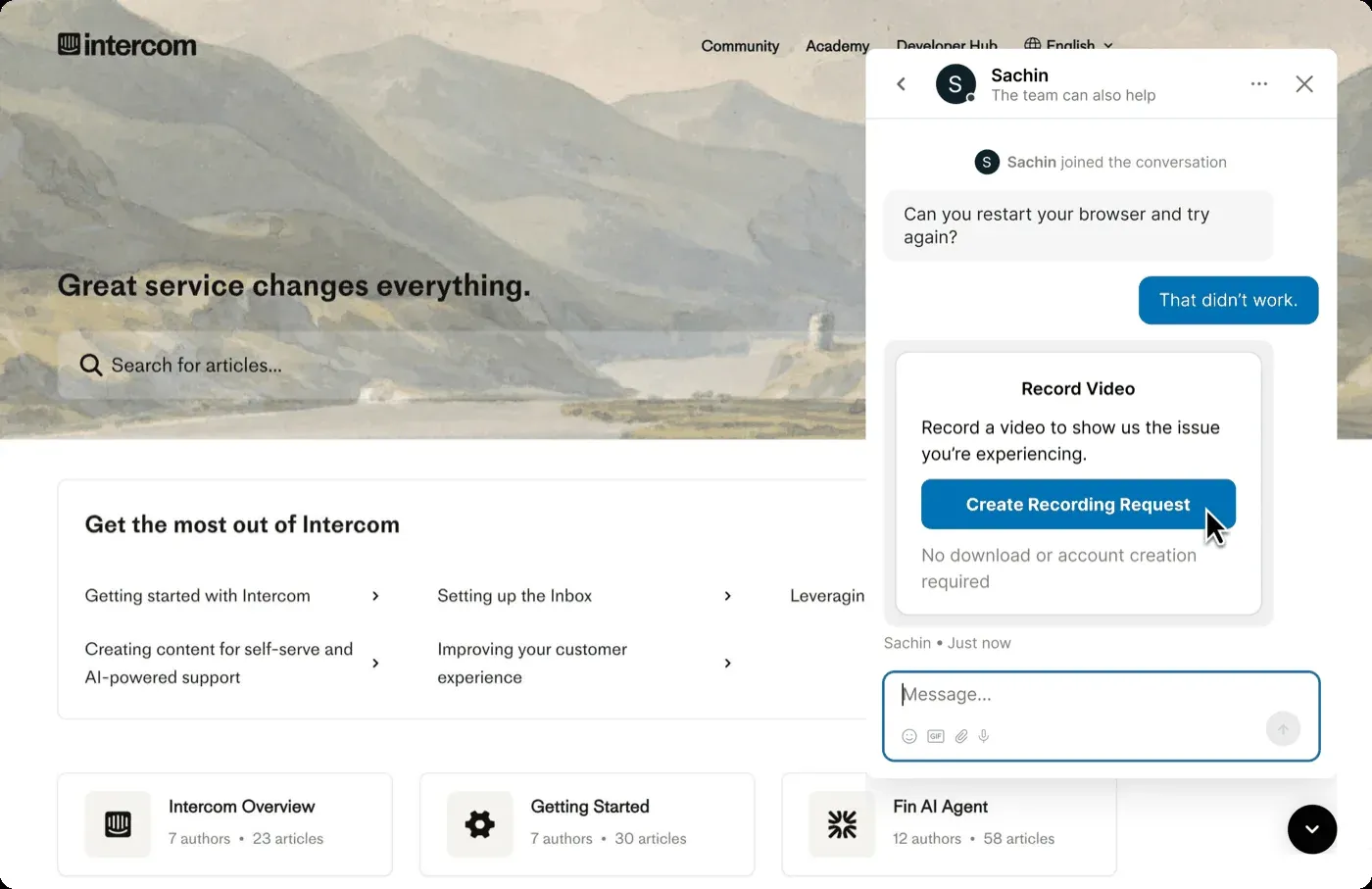
Where it earns its keep
Native visual workflows for customer support
Request a customer recording
Open Zight from the Intercom app tray and send a video request so the customer can record the issue in a browser.
Send existing Zight content
Choose a recent Zight video, screenshot, or GIF from the app tray and add it to the Intercom conversation.
Carry evidence into the next step
Review the customer's recording, optionally collect browser data logs for complex issues, and use the evidence when creating documentation or a bug report.
Where it fits
See it in a workflow: Customer Support · Troubleshooting · Request → Diagnose → Resolve
FAQ
Frequently Asked Questions
Install the Zight app in your Intercom workspace, then enable the Intercom integration from Zight's Integrations page. The official setup guide notes that an add-on is available on some plans and directs users to request access when needed.
No. You can paste an ordinary Zight share link into a conversation, but the native app must be installed and enabled before agents can use Zight from the Intercom app tray to browse existing items or request a customer video.
The customer receives a request, opens it in a new browser tab, records the issue, and sends the recording back for the agent to review. The official guide says customers do not need to install software for this workflow.
Yes. When requesting a video for a complex issue, an agent can choose to collect browser data logs. The resulting recording can support follow-up documentation or a bug report, but it does not guarantee a particular resolution time.
The Intercom screen-recording guide follows installation, a focused customer request, evidence review, a visual reply, and reuse as maintained guidance.




Set up the native app
and check plan access
Follow the official guide to install the Intercom app in the intended workspace and enable the integration in Zight. An add-on or access approval may be required depending on the plan.