Step-by-Step Guide
Set up a project workspace
1
2
3
AI SOP generator
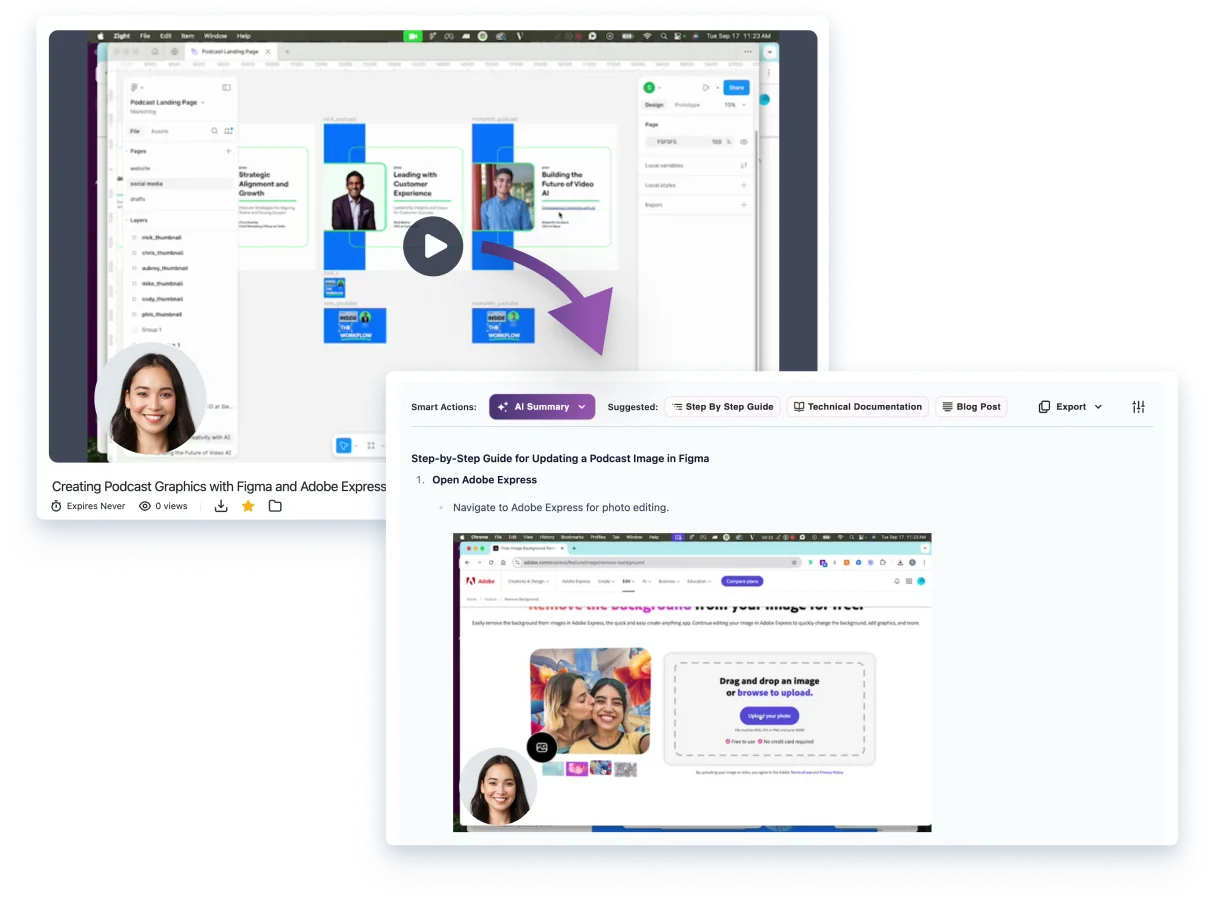
Walk through the real workflow on screen. Zight AI pulls screenshots from the video and drafts numbered instructions your team can edit, approve, and reuse.
Start your SOP
Drafting with AI is plan-based: Create includes 5 AI smart actions a month, Collaborate and up are unlimited. Compare plans.
An AI SOP generator drafts a standard operating procedure for you. Zight works from a screen recording: you walk through the process once, and it pulls a screenshot for each key moment and writes a numbered step beside it. A person still edits and approves the draft before anyone relies on it.
The payoff
The work after a walkthrough is usually the work that never happens: pause the video, take screenshots, write the instructions, and find somewhere to put them. Zight makes the recording useful again without asking someone to rebuild it by hand.
The recording is still source evidence, not an approved procedure. See how to review the video-to-SOP workflow, add prerequisites and exception branches, and test the instructions with a second operator.
How it works
Walk through the real workflow on screen and narrate the decisions that matter.
Zight AI pulls a screenshot for each key moment and writes a numbered instruction beside it.
Fix the wording, reorder steps, add prerequisites and exceptions, and have the process owner sign off.
Send a link, download a PDF, copy it into your docs, or export it to a connected tool.
What you get
Every instruction sits next to the screen it describes, so nobody has to guess which button.
The video stays linked, for the step that is easier to watch than to read.
Reorder, remove or add steps and replace screenshots. The AI writes a draft, not the final word.
A Zight link, a PDF, or formatted copy for Word and Google Docs. Confluence, Notion and Jira in one click on Scale.
What the recording cannot supply
A recording can show the screens, clicks, narration, and visible result. If the person who knows the workflow is not you, request a process demonstration rather than drafting the steps from memory.
The owner still adds prerequisites, permissions, reasons for each branch, stop conditions, and escalation roles. For a support procedure, use the template to complete the support handoff fields.
A recording may show someone selecting Export and seeing a confirmation. The finished SOP must also say what to do when Export is unavailable and who owns that exception. Follow the full method to write and review a complete SOP, or compare capture tools, wikis, and SOP management.
Compared
Most SOP tools differ in one place: how the process gets captured. That decides what you can document and who has to do the capturing.
| Approach | How it captures the process | What you get | Who records it |
|---|---|---|---|
| Zight | A screen recording, with your narration | Numbered steps with screenshots, plus the video | You, or anyone you send a request link |
| Scribe | A browser extension that captures screenshots and text as you click | A step-by-step guide, exported as PDF, HTML or Markdown | You |
| Tango | A browser extension that records your clicks | A how-to guide with screenshots and annotations | You |
| A general AI chat | A prompt you write | Text, from what you describe | Nobody: it never sees the screen |
| Writing it by hand | Your notes and screenshots | Whatever you build in a doc | You |
Scribe and Tango details checked 6 October 2026 on their own pages: Scribe SOP generator; Tango SOP creator.
Built for the repeat question
Show customers where to click, then keep the guide ready for the next ticket. See how support teams request, reply and reuse. If a customer's screen differs, request a recording before updating the instructions.
Give new teammates an SOP they can follow at their pace instead of a meeting they have to remember. See how training and onboarding teams use it.
Turn the setup you do every week into an SOP with the real screens in it. Start from the free SOP template if you want a structure first, or the customer service SOP template for support handoffs.
FAQ
Record a real process, then use Zight AI to draft numbered instructions with screenshots from the recording. Review every step, add prerequisites and exceptions, and have the process owner approve the result before your team uses it as an SOP. AI helps create the draft; it does not replace your approval process.
You can sign up and record on the free plan. Drafting with AI is plan-based: Create includes 5 AI smart actions a month, and Collaborate and up are unlimited. Compare plans on the pricing page.
Yes. Edit the text, reorder or remove steps, and add or replace steps and screenshots before you share the SOP.
Share a Zight link, download a PDF, or copy the content formatted for Word or Google Docs. On the Scale plan, connected workspaces can create a Confluence or Notion page or a Jira ticket in one click.
Scribe and Tango capture your clicks through a browser extension as you work. Zight starts from a screen recording, so your narration and the video stay with the SOP, and a request link lets someone else record the process for you.
Yes. Send a request link to the person who does the work. They record their screen in the browser with no account or install, and the recording comes back to your Zight library.
Yes. Support teams turn a solved issue into a reusable visual answer, then send it the next time a customer asks the same question. The customer service SOP template covers the handoff details.
Zight is SOC 2 Type II certified. Zight is HIPAA compliant on the Scale plan, with a signed BAA available. Keep sensitive data out of a recording unless your approved workflow allows it.
Start with the workflow you explained most recently. Zight can take it from there.