
Instead of rewriting every recorded walkthrough from memory, use a Zight Confluence SOP workflow: record the task, turn the demonstrated actions into reviewed instructions, and publish a Confluence page with the recording link. This 2026 guide uses Zight for visual capture and Confluence for the written procedure, with an explicit handoff rather than an assumed automatic integration.
- The Zight Confluence SOP workflow pairs screen recordings with reviewed Confluence instructions; use a manual handoff before adding automation.
- Record one complete task, document prerequisites and exceptions, and test the SOP with someone who did not write it.
- Keep the recording and Confluence page accessible to the same intended audience; test both permissions separately.
- For healthcare documentation, use synthetic examples and verify contractual, plan, and workflow requirements before handling protected information.
Why this matters
A recording shows what happened. An SOP tells someone what to do, what access they need, and how to recognize success. Publishing only the video leaves readers searching for the relevant moment; publishing only a summary loses the visual detail that explains an unfamiliar screen.
Zight screen recording is best for teams that need to show a process alongside a written SOP. The trade-off is editorial work: someone must turn the demonstration into instructions, check the sequence, and maintain the resulting page.
For your 2026 documentation standard, treat the written procedure as the operational reference and the recording as supporting evidence. Neither replaces a test by another person.
Before you start
- Accounts and access: Have access to the recording software, permission to create or edit pages in the destination Confluence space, and a test account for the application being documented.
- Materials: Prepare a synthetic example, the intended outcome, prerequisite permissions, and an approved location for the recording. As an editorial target, keep the demonstration to one task in about 90 seconds; split longer processes at meaningful handoffs.
- The gotcha: A readable Confluence page does not guarantee a readable recording. Test the recording link using an intended reader's account before publication, and keep sensitive information out of both the capture and the written instructions.
For healthcare teams, start with synthetic records only. Before any workflow handles protected health information, obtain current official confirmation of applicable plan requirements, BAA availability, feature limitations, and your organization's approval for both systems. A recording copied into a documentation workflow is not automatically HIPAA compliant.
Configure the source recording
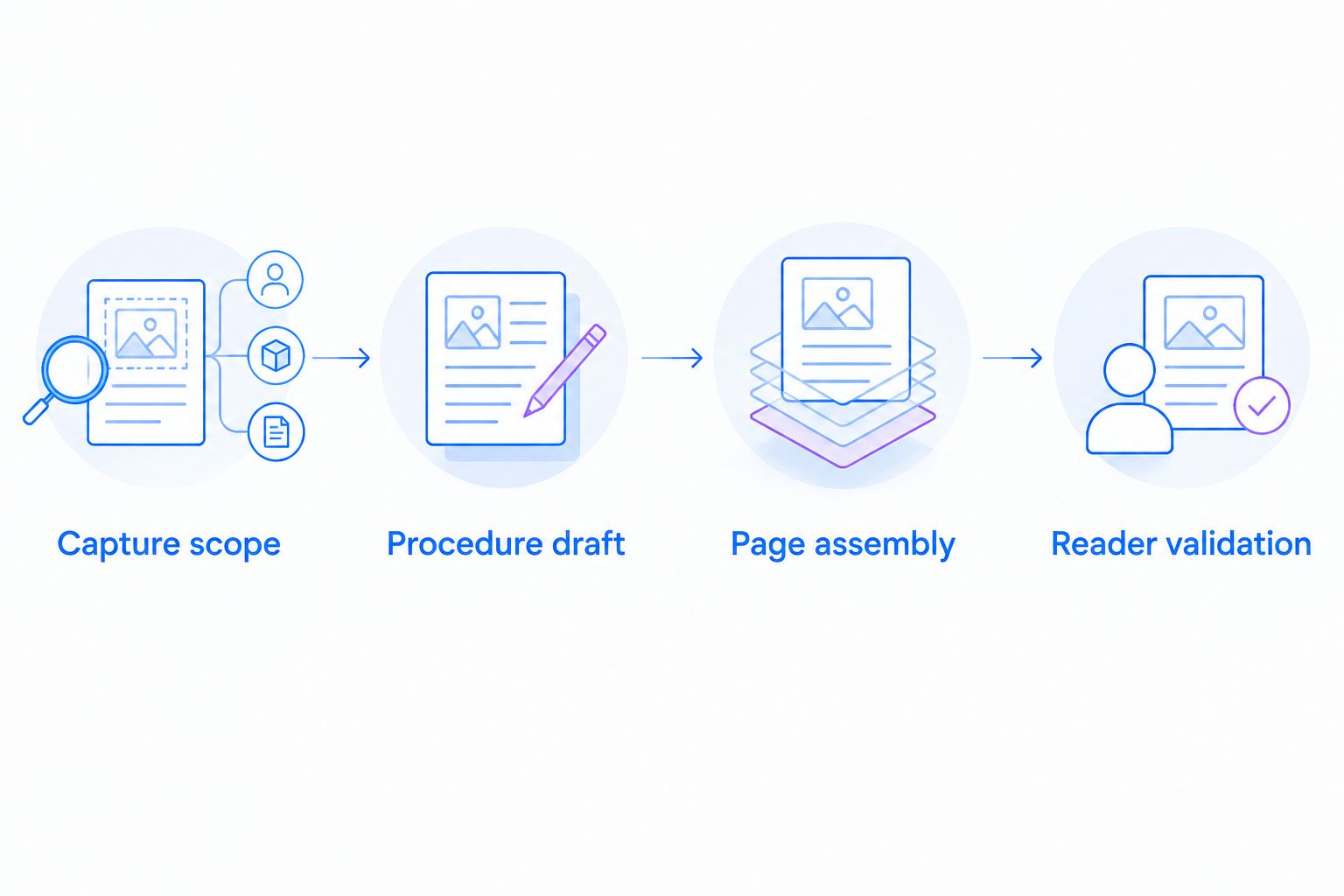
Capture scope
- Define the finish line. Write a sentence describing the completed task, such as: “A support agent has reproduced the error in a test account and attached the reproduction steps to the internal ticket.”
- Prepare the starting state. Open the correct application and remove unrelated tabs, notifications, messages, and customer information. Use a test account with the same permissions the SOP reader will have.
- Record the successful path. Show each action in order. Explain why you choose a setting when the reason is not obvious from the screen.
- State the checkpoints. Describe what the reader should see after a meaningful action. Avoid narrating only mouse movements; explain the resulting state.
- Review before sharing. Watch the capture from beginning to end. Replace a recording that exposes sensitive information or demonstrates the wrong sequence rather than documenting around the mistake.
Expected result: You have a clean recording of one reproducible task, with a visible starting state and a clear completion condition.
Keep error recovery separate from the successful path. If the demonstration wanders through failed attempts, a reader cannot tell which actions are required. Capture exceptions separately or describe them under troubleshooting.
Configure the written procedure
Procedure draft
- Create a working outline. Use these headings: Purpose, Before you start, Steps, Expected result, Troubleshooting, and Ownership. Draft outside the published page if the procedure still needs approval.
- Translate actions into commands. Replace “then I went over here” with an instruction naming the actual destination. Copy application field names and clickable labels exactly as they appear in the environment being documented.
- Separate actions from explanations. Start each numbered step with an imperative verb. Put the reason or warning immediately afterward, not inside a long introductory paragraph.
- Add missing context. Document permissions, required inputs, and decisions the demonstrator already knew. A recording often leaves these prerequisites unstated.
- Check the draft against the capture. Read every step while watching the corresponding action. Remove unsupported details and add any action required to reach the stated result.
Expected result: A reader can follow the written procedure without reconstructing the process from the video.
Use AI-assisted documentation as a draft, not as approval. If your available workflow produces a guide from a recording, compare its instructions with the source before publishing; otherwise, write the steps directly from playback. Do not assume a generated guide has captured permissions, exceptions, or business rules.
Choose the handoff
| Workflow option | Best for | Advantage | Limitation |
|---|---|---|---|
| Manual recording-to-page handoff | Teams establishing their first approved SOP process | Keeps each editorial and publishing decision explicit | Requires someone to transfer and review the instructions |
| Assisted draft with human review | Teams with an approved guide-generation workflow | Gives the reviewer a draft to check against the recording | Still requires verification of actions, prerequisites, and exceptions |
Start with the manual handoff. Add assisted drafting only after the team agrees on the SOP structure and review criteria. Automation cannot resolve an unclear process owner or an undefined completion condition.
Configure the Confluence page
Page assembly
- Choose the destination space. Use the space where the intended team already maintains approved procedures. Confirm that you can create content and that the intended readers have access.
- Select Create. Start a page and give it a task-based title. “Reproduce a login error in a test account” is more useful than “Support recording.”
- Insert the reviewed instructions. Preserve the prerequisite section, numbered actions, expected result, and exception handling. Keep each instruction focused on a reader action.
- Add the recording link near the steps. Give the link a descriptive label explaining what the recording demonstrates. A normal link is sufficient; the procedure should not depend on an embed rendering successfully.
- Add ownership details. Name the responsible role, the reviewer, and the review date. Use an unambiguous date format in your 2026 template and record what changed when you revise the procedure.
Expected result: The draft page contains a complete written procedure, an accessible supporting recording, and an identifiable owner.
Use screenshots where a static state communicates more clearly than playback. For example, a cropped image can identify the setting a help-desk agent must inspect, while the recording shows how to reach it. The screenshot tools for IT help desk teams guide covers that adjacent capture workflow.
The Zight Confluence SOP workflow has a deliberate boundary: this guide transfers reviewed content and a shareable recording link. It does not depend on a native connector, automatic page creation, or synchronized edits.
Configure the review and release
Reader validation
- Assign an unfamiliar tester. Ask someone other than the author to follow the draft using the intended account permissions. Do not explain missing steps verbally during the first attempt.
- Check the written path first. Have the tester attempt the procedure from the text. Use the recording when visual clarification is needed, and note where that clarification belongs in the instructions.
- Test both access boundaries. Confirm that the tester can open the Confluence page and the recording. Author access is not evidence that a reader has either permission.
- Correct the page and retest. Fix missing prerequisites, ambiguous labels, and incorrect expected results. Repeat any step affected by the change.
- Select Publish when approved. Release the page after the responsible reviewer accepts it. Follow your organization's approval process if publication and approval are separate actions.
Expected result: An intended reader can complete the task, access the visual reference, and identify who maintains the procedure.
Reserve 15 minutes for the initial reader test as a planning allowance, not a promised completion time. If the task needs a longer test, allocate it. The point is to put validation on the calendar rather than treating publication as proof of usability.
Update the SOP whenever the process changes
The second workflow starts with a changed application or procedure rather than a new recording. Use it when a button moves, a permission changes, or the required outcome changes.
- Identify the affected steps and their current owner.
- Reproduce the revised process in a test environment.
- Record a replacement demonstration when the existing capture no longer matches.
- Update the written instructions and the recording reference together.
- Retest the changed path and record the review date.
Keep a short change note explaining the operational difference. “Updated in 2026” does not tell a reader whether the permissions, sequence, or expected result changed.
Do not leave contradictory instructions in place. If an old recording shows a different action, replace its reference or clearly remove it from the active procedure. A newer paragraph cannot make an outdated demonstration accurate.
Troubleshooting
Readers can open the page but not the recording
Check the recording's access settings separately from Confluence permissions. Test with the reader's approved account, then adjust access according to policy or move the supporting material into an approved sharing arrangement.
The recording does not display inside the page
Use a descriptive link instead of relying on an embedded player. Confirm that the destination opens for an intended reader; an embed failure and an access failure require different fixes.
The SOP skips a necessary action
Replay the demonstration from the stated starting condition. Add the omitted action and its expected result, then ask the tester to repeat the affected sequence without verbal help.
The tester sees different controls
Compare account permissions, application configuration, and the environment used in the recording. Document the required environment explicitly rather than assuming every reader sees the author's interface.
The capture contains sensitive information
Do not publish or circulate the capture. Follow your organization's incident and deletion procedures, then recreate the demonstration with synthetic information; do not assume removing a link resolves copies already shared.
Customize your workflow
Expand the process by team, not by adding unnecessary steps to every SOP. Keep the same review standard while changing the demonstrated task and the reader's prerequisites.
- Support and IT: Document issue reproduction, account troubleshooting, and escalation handoffs. Include the observable condition that requires escalation.
- Clinical teams: Use synthetic demonstrations for recording or requesting workflow videos. Keep the example administrative and procedural, without patient data or medical advice.
- Healthcare operations: Build training procedures and onboarding SOPs with synthetic examples. Confirm approved capture, storage, access, and review requirements before using production information.
- Product and engineering: Show a reproducible test case, configuration change, or internal handoff. State the environment and expected result so another person can repeat it.
For a paid-team evaluation in 2026, pilot the workflow on a real internal procedure using non-sensitive test data. Assess whether another employee can complete the task, whether access works, and whether the owner can update both references without ambiguity.
FAQ
How do I turn a Zight recording into a Confluence SOP?
Record one task, write and verify its instructions, then publish the procedure in Confluence with the recording link. Test the page and recording using an intended reader's account before release.
Does this workflow require a native Confluence integration?
No. This workflow uses a manual handoff of reviewed instructions and a recording link, so it does not depend on a native connector or automatic page creation.
Can I publish only the recording instead of writing an SOP?
A recording alone does not provide the written prerequisites, decision points, and completion criteria used in this SOP workflow. Pair the visual demonstration with instructions that a reader can follow independently.
What should I do if the video will not embed in Confluence?
Use a descriptive link to the recording instead. Test that the intended reader can open the destination, because a working link still requires appropriate access permissions.
Can healthcare teams use this workflow with patient information?
Use synthetic examples for this guide. Before handling protected health information, verify current plan requirements, BAA availability, feature limitations, and organizational approval for every system involved.
When should I update a recording-based SOP?
Update the SOP when a process change makes its instructions or recording inaccurate. Revise the affected text and visual reference together, then retest the changed path.
What is the best way to check whether an SOP is ready?
Have someone other than the author complete the task using the intended permissions and the draft instructions. Correct any missing context and confirm that both the page and recording are accessible before publication.
One last thing
Test the SOP without playing the recording first. This exposes missing instructions that a familiar author fills in automatically. Then test the recording link separately: a readable procedure and an accessible demonstration are different acceptance checks.