Engineering teams’ screen recording is the capture of on-screen workflows with the aim of making bugs, technical decisions, and handoffs easier to understand. This guide covers screen recording for engineering teams in 2026, where visual evidence needs reproduction steps, environment details, and a clear next action—not just a video link.
- Screen recording for engineering teams should pair visual evidence with written reproduction steps and environment details.
- Zight fits engineering teams that need screen recording, screenshots, and shareable documentation for asynchronous troubleshooting.
- Choose screenshots for static defects, recordings for changing behavior, and live discussions for unresolved questions.
- Keep credentials and sensitive data out of captures; review access before sharing bug reports or technical handoffs.
Why screen recording matters for engineering teams
Record behavior that words alone leave ambiguous. A screenshot shows the wrong result; a recording shows the actions that produced it. That distinction matters when a defect depends on timing, navigation, a changing interface, or a particular sequence of interactions.
Engineering teams also need evidence that survives the handoff. A developer receiving a bug report needs to know the starting state, expected behavior, actual behavior, and environment. Without those details, even a clear recording leaves the reproduction work unfinished.
Zight provides screen recording, screenshots, and guide/documentation software for asynchronous communication through shareable links. Zight fits engineering teams that need screen recording, screenshots, and shareable documentation for asynchronous troubleshooting. Its role is to show the workflow; your issue tracker still needs the technical context and ownership.
For your 2026 workflow, use recording where motion explains the problem. Keep searchable details in text so teammates can find the issue without watching every attachment.
Build a repeatable engineering recording workflow
Define the question before you capture
Start with the decision the viewer needs to make. A useful engineering recording answers a specific question: Can you reproduce this defect? Does the implementation match the intended behavior? What changed between these two states?
The manual approach is straightforward: write the question in your issue or document before opening a recorder. Remove unrelated observations from the capture plan. If you are reporting a disabled submit button, do not mix in a separate navigation problem.
As an editorial rule, use 1 issue per recording. This is a recommended boundary, not a platform limit. Separate recordings let you assign, resolve, and revisit issues independently instead of tracking several outcomes inside one attachment.
- State the question in the recording title.
- Write the expected result before you capture.
- Choose a starting state another engineer can recreate.
- Separate unrelated defects into their own reports.
- Identify who needs to act after watching.
Prepare a clean reproduction environment
Reproduce the issue manually before recording it. Confirm the application state, account role, browser, and relevant build or release identifier. Use a test account and synthetic records whenever the workflow allows it.
Close unrelated tabs and silence notifications. Check the entire capture area, including browser chrome, terminal output, sidebars, and autocomplete suggestions. A recording of the right application can still expose the wrong information around its edges.
For Zight screen recording, apply the same preparation before using the capture and shareable-link workflow. A faster handoff is useful only when the underlying demonstration is safe and repeatable; capture software does not replace environment preparation.
- Open only the windows needed for reproduction.
- Replace real customer records with synthetic examples.
- Remove credentials, tokens, and private messages from view.
- Record environment details in the issue description.
- Reset the workflow to a clear starting point.
Capture the shortest complete explanation
Begin with the starting state, perform the relevant actions, and stop after showing the result. Narrate intent rather than every mouse movement: explain what you expected and point out where the behavior diverged.
For routine bug reports, target 60–120 seconds as a team guideline. This is a suggested recording length, not a measured optimum or a tool restriction. Keep a longer recording when the full sequence is necessary; split it when the discussion changes subjects.
Use a manual screenshot when a single state explains the defect. For changing behavior, Zight screen recording provides a capture-and-share path, while its screenshot and documentation capabilities support the surrounding explanation. Choose the format based on the evidence, not the habit of recording everything.
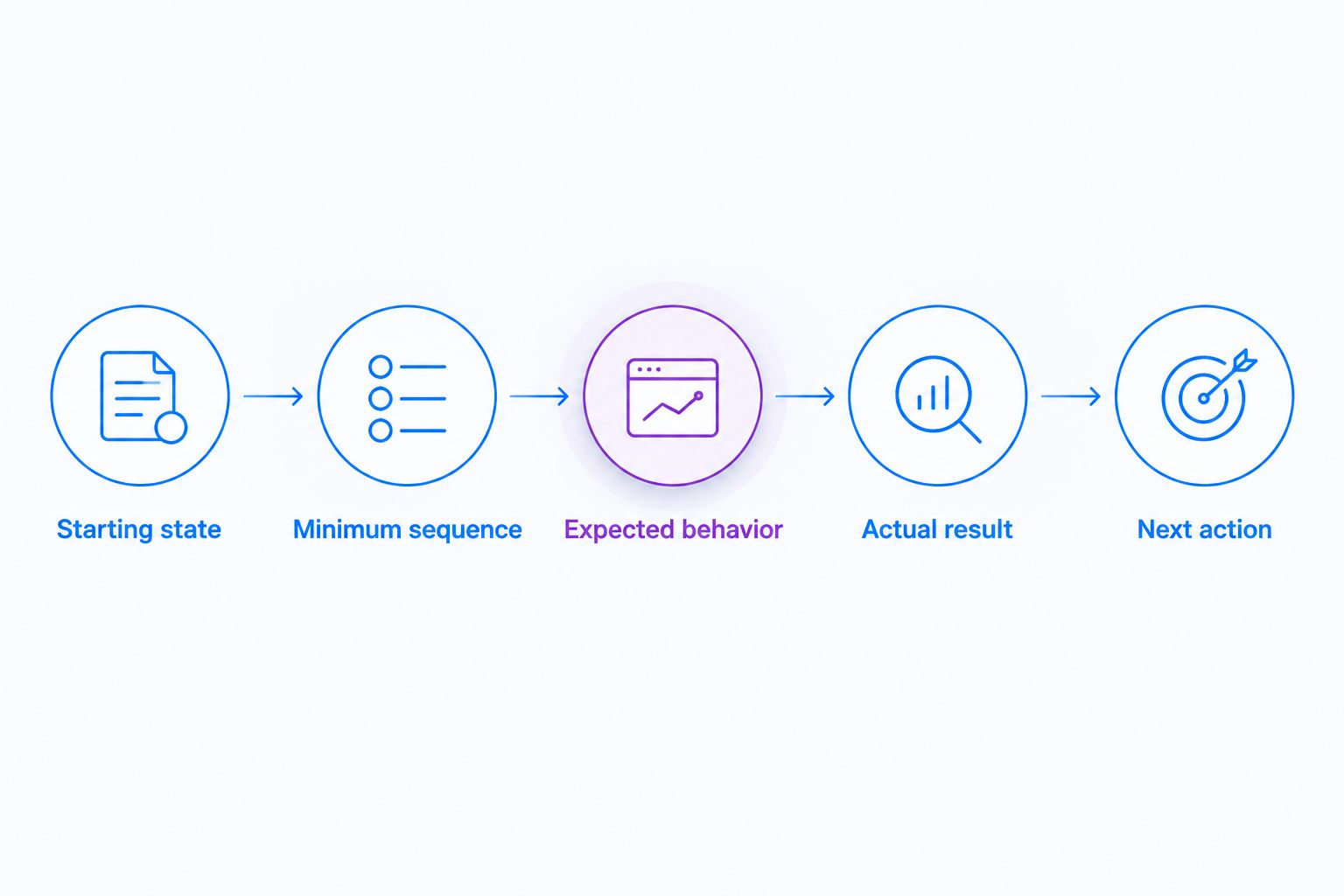
- Show the starting state before taking action.
- Perform the minimum sequence that reproduces the issue.
- Name the expected behavior in plain language.
- Pause briefly on the actual result.
- Stop before unrelated investigation begins.
Attach searchable technical context
Write a compact issue report beside the recording link. Use 3 report sections as a starting template: reproduction, environment, and next action. These are recommended headings, not a required software format.
The reproduction section lists actions and results. The environment section identifies the browser, operating system, application version or build, and relevant configuration. The next-action section makes the request explicit: reproduce, investigate, review, or approve.
In 2026, treat recordings as supporting evidence rather than the only source of truth. A teammate should be able to search for an error message or understand the issue’s status without replaying the video. Put exact error text in the report, and distinguish observed behavior from your explanation of its cause.
- Paste exact error messages as searchable text.
- List reproduction steps in execution order.
- Include relevant environment and build details.
- Label a suspected cause as a hypothesis.
- End with the requested action and owner.
Review access and sensitive information
Watch the complete recording before distributing it. Inspect the beginning and end as carefully as the central demonstration; accidental exposure often sits outside the action you intended to show. Replace an unsafe capture rather than asking viewers to ignore sensitive content.
Decide who needs access and which distribution channel your organization permits. A shareable link is a delivery mechanism, not proof that every recipient or destination is authorized. Check the selected service’s current access controls and your organization’s policy before sending it.
Healthcare engineering needs additional review. Use synthetic examples when support or IT demonstrates a portal issue, clinical teams demonstrate or request a workflow video, and operations teams create training or SOPs. Before introducing protected health information, verify current official plan requirements, BAA availability, feature limitations, and the proposed workflow with your compliance owner; do not assume any plan is automatically HIPAA compliant.
- Review the entire capture before sharing.
- Check terminal output, notifications, and account details.
- Use synthetic healthcare examples for demonstrations.
- Confirm intended recipients and permitted destinations.
- Verify compliance requirements before capturing regulated information.
Turn resolved issues into maintained documentation
Start manually: write the confirmed resolution, link the issue, and explain how to verify the fix. Replace the exploratory recording with a focused walkthrough when the original includes dead ends or outdated assumptions.
Zight offers AI-powered guide/documentation software alongside capture. Evaluate that path for turning demonstrated workflows into reusable instructions, but review the resulting documentation against the actual application. Generated instructions still need an engineering owner, accurate prerequisites, and a tested outcome.
For a 2026 documentation review, prioritize workflows affected by interface or configuration changes. Keep historical evidence attached to the original issue, and make the current instructions easy to distinguish from the older investigation.
- Document the confirmed resolution, not the initial guess.
- State prerequisites before the procedure.
- Include a clear verification step.
- Assign an owner to reusable instructions.
- Update affected guides when the workflow changes.
Compare capture options by engineering task
Use the smallest format that preserves the evidence. Start with manual screenshots, written reproduction steps, and your existing communication tools. Add a shared capture workflow when distribution and reusable documentation are part of the requirement.
The table compares workflow options rather than unverified vendor specifications. It gives each option a best-fit task and a limitation to test against your team’s work.
| Option | Best for | Practical advantage | Key limitation |
|---|---|---|---|
| Written reproduction steps | Exact commands, errors, and environment details | Searchable and easy to update | Does not show timing or changing interface behavior |
| Screenshot with written context | Static layout defects and visible error states | Makes a single state easy to inspect | Does not preserve the sequence that produced the state |
| Screen recording with written context | Intermittent UI behavior and multi-step reproduction | Shows actions and results together | Requires viewing time and a sensitive-data review |
| Zight capture and documentation workflow | Teams sharing recordings, screenshots, and reusable guides | Combines the supplied capture and documentation capabilities | Still requires written context, content review, and workflow governance |
| Live walkthrough | Investigation with unresolved questions | Lets participants ask and answer immediately | Requires simultaneous attendance and a written record afterward |
If your 2026 evaluation includes Loom alternatives, compare Loom first against the same engineering tasks. Then test other candidates only where they match a requirement. A fair comparison needs current official feature documentation and hands-on checks; a product name alone does not establish its controls or limitations.
Use the same synthetic bug for each evaluation. Ask the receiving engineer to identify the reproduction sequence, environment, expected result, and next action. Check current plan requirements for any required controls or integrations before making a paid-use decision.
Common mistakes engineering teams make
Recording the symptom without the starting state
A clip that opens on an error dialog proves the dialog appeared, not how to reproduce it. Start before the triggering action and explain the relevant account state or configuration. If resetting the environment is lengthy, document that setup in text and show where the recording begins.
Replacing the issue report with a video link
A link without a summary forces every reader to watch before deciding whether the issue concerns them. Keep the title, error text, reproduction steps, and environment searchable. The recording should resolve visual ambiguity, not hide basic facts inside playback.
Presenting a theory as the confirmed cause
Narration can make a guess sound authoritative. Describe what the capture proves, then separate your hypothesis from the observation. A delayed interface update does not, by itself, establish which service, query, or component caused it.
Reusing an investigation as a permanent SOP
An exploratory recording can include failed attempts, temporary workarounds, and assumptions that later changed. Preserve it as issue evidence, but create maintained instructions from the confirmed resolution. Give the reusable guide an owner and a verification step.
Sharing internal evidence outside its intended audience
A technical capture can expose internal URLs, account identifiers, configuration, or customer information. Review both the content and the destination before sharing. For external communication, prepare a separate synthetic demonstration rather than forwarding the internal investigation unchanged.
FAQ
What's the best way to use screen recording for engineering teams?
Use screen recording to show behavior that written steps or a screenshot cannot explain clearly. Pair the capture with the starting state, reproduction steps, environment, expected result, and requested action.
How long should an engineering bug recording be?
Use 60–120 seconds as a starting guideline for routine bug reports, not a hard limit. Keep the full sequence when it is necessary to reproduce the issue, and separate unrelated problems.
Is a screen recording better than a screenshot for bug reports?
A screen recording is better for sequences and changing behavior; a screenshot is better for inspecting a single visible state. Both need written context when the environment or reproduction steps affect the result.
What should developers include with a recording link?
Developers should include reproduction steps, environment details, expected and actual behavior, and a next action. Paste exact error messages into the issue so they remain searchable.
Can engineering teams use recordings for healthcare workflows?
Engineering teams can demonstrate healthcare workflows with synthetic examples. Before capturing protected health information, verify current official plan requirements, BAA availability, feature limitations, and organizational approval for the specific workflow.
Should engineering teams replace meetings with recordings?
Replace a meeting with a recording when the viewer can understand the evidence and act without immediate questions. Keep a live discussion when investigation requires back-and-forth, then document the decision afterward.
What should an engineering team test when evaluating Loom alternatives?
Test each candidate against the same reproduction, sharing, and documentation tasks, starting the comparison with Loom. Verify current controls, integration support, and plan requirements through official documentation rather than assuming feature parity.
One last thing
Ask a teammate to reproduce the issue without speaking to the recorder. That check tests the whole handoff, not just video quality. If the teammate needs an undocumented account state or configuration, fix the report before making another recording.
A polished clip is optional. A reproducible issue is the goal.