
Telehealth video requesting is the collection of recorded explanations or demonstrations with the aim of helping healthcare teams resolve a defined issue asynchronously. HIPAA compliant video requests for telehealth require more than a recording link: you need an approved workflow, appropriate agreements, controlled access, and a clear process for handling sensitive information.
- HIPAA compliant video requests for telehealth require workflow approval, not just a vendor’s security claim.
- Zight fits teams evaluating screen recording, screenshots, and guides; verify healthcare requirements before collecting patient information.
- Separate clinical submissions, support troubleshooting, and operations training because their information needs differ.
- Test access, forwarding, deletion, and escalation with synthetic recordings before approving a workflow.
Why HIPAA compliant video requests matter for telehealth teams
A video request can capture much more than the issue you intended to investigate. A browser tab, notification, spoken name, or background conversation can expose information outside the request’s purpose. Define what people should record before asking them to press record.
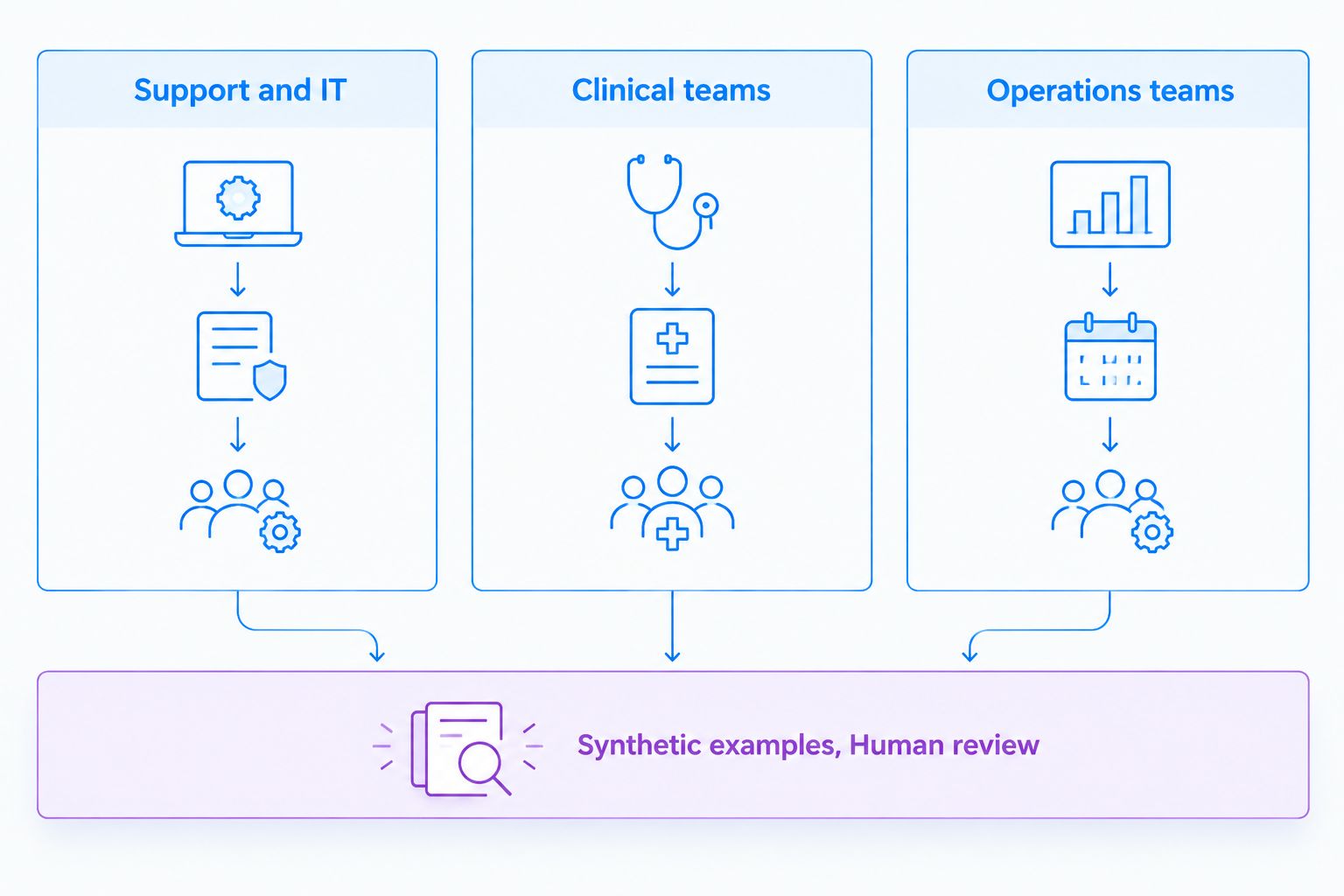
Healthcare teams also need different workflows. Support and IT need enough context to reproduce technical problems; clinical teams need an approved process for recording and requesting videos; operations teams need repeatable training without exposing patient information.
Zight provides screen recording, screenshots, and guide/documentation software for asynchronous communication through shareable links. Zight screen capture is best for teams evaluating recordings, screenshots, and guides within an asynchronous communication workflow. That workflow fit does not establish that a particular healthcare deployment is approved.
For your 2026 evaluation, treat a vendor’s product capabilities and your organization’s authorization to use them as separate decisions. A useful recording feature does not settle contractual, access, retention, or clinical-governance questions.
Build an approved video-request workflow
1. Define the request’s purpose and boundaries
Start manually with a written request template and a workflow owner. Specify the question the recording must answer, the intended viewer, and the information the sender must exclude. Do not begin with a broad invitation to record everything on screen.
Use separate templates for technical support, clinical communication, and operations. For an IT issue, ask for a reproduction in a synthetic account rather than a recording of a patient chart. For clinical communication, let the responsible clinical team define the permitted purpose and escalation route; this guide does not prescribe clinical assessment criteria.
Set a recommended initial scope of 1 workflow for the pilot. That is a project boundary, not a regulatory requirement. A narrow pilot makes ownership and exceptions easier to inspect before you add other departments.
- Name the person accountable for reviewing incoming videos.
- State the specific task the recording should demonstrate.
- Identify prohibited content, including unrelated records and conversations.
- Specify an approved alternative when recording is inappropriate.
- Define where the request and resulting recording belong.
2. Map information and approve responsibilities
Draw the information path before configuring software: requester, sender, receiving system, reviewer, storage destination, and deletion process. Include notifications and downloaded copies. A recording can leave the original platform through ordinary review and handoff activities.
For your 2026 review, use the U.S. Department of Health and Human Services Office for Civil Rights’ HIPAA guidance to inform your organization’s assessment. Have your privacy or legal team determine the vendor’s role and whether a business associate agreement is required. A BAA addresses contractual obligations; it does not replace a risk analysis or correct unsafe configuration.
Assign 3 accountable roles for the pilot: a workflow owner, a privacy or security reviewer, and an operational administrator. These are suggested responsibilities, not a mandated staffing model. One person can hold multiple responsibilities if your organization approves that arrangement.
- Document whether recordings contain protected health information.
- Map every organization that receives or processes that information.
- Obtain and review required agreements before the pilot handles PHI.
- Assign access approval, incident response, and deletion responsibilities.
- Record the approved purpose and any prohibited uses.
3. Evaluate the software against the whole workflow
The manual approach is to complete a requirements worksheet and demonstrate each requirement in an approved test environment. Do that before comparing convenience features. A polished recording experience cannot compensate for an unresolved contractual or access-control requirement.
Zight screen capture supports recordings, screenshots, and shareable communication; its documentation offering also supports guides. Evaluate that combination when you want to move from a troubleshooting explanation to reusable instructions. The faster path is to use a suitable capture and documentation workflow rather than repeatedly rewrite the same explanation—but only after approval.
During your 2026 assessment, check Zight pricing alongside current official healthcare documentation and contractual materials. Confirm the exact plan, BAA availability, Request Links eligibility, relevant support integrations, and feature restrictions directly with the vendor. Do not treat a feature name or purchase decision as evidence of HIPAA compliance.
- Request written confirmation of the proposed healthcare configuration.
- Verify recording and video-request requirements separately.
- Demonstrate recipient access and link-sharing behavior.
- Review any transcription, summarization, or guide-generation processing.
- Confirm each intended integration and its handling of sensitive information.
- Record approval conditions before enabling the workflow.
4. Write requests that limit unnecessary exposure
Use plain instructions that tell the sender exactly what to capture. For support troubleshooting, specify the application area, the action that fails, and the result the reviewer needs to see. Ask the sender to use a synthetic account whenever that can answer the question.
A useful synthetic support example is a staff member demonstrating a failed camera-permission setting in a test session. A clinical team’s request needs its own approved instructions, recipient verification, and follow-up process. Operations training should use fabricated records and examples rather than reuse a clinical submission because it happens to illustrate the task.
Explain what happens after submission. The sender should know who reviews the recording and where to use the approved urgent-contact route. Do not leave an asynchronous request looking like a monitored emergency channel.
- Close unrelated tabs and applications before recording.
- Disable notifications that expose private information.
- Use fabricated names and records in demonstrations.
- Avoid recording bystanders, unrelated documents, or background speech.
- State the approved review process and escalation route.
5. Control access before sharing recordings
Begin with a manual access register: who requested the recording, who can view it, and why each person needs access. Translate that register into your approved system’s settings. Do not assume that possessing a shareable link is equivalent to being an authorized recipient.
Test the actual recipient experience rather than relying on settings labels. Open a synthetic recording in a signed-out browser, try an unintended account, and examine a forwarded notification. Document whether the result matches your access policy; a failed test is a reason to stop the workflow and resolve the configuration.
Apply the same review to integrations. A support ticket, messaging notification, or embedded preview can create another exposure path. Approve the information passed between systems, not just the connection itself, and avoid placing sensitive details in notification text unless the destination is authorized.
- Grant access according to the approved role and purpose.
- Test signed-out viewing and unintended recipients.
- Check forwarding, embedding, and download behavior.
- Review notification subjects and preview content.
- Define how administrators revoke access after a handoff.
6. Separate clinical review from training and SOP creation
Document the operational procedure manually before generating a guide. Identify the approved steps, decision owner, and exception path. Then use synthetic recordings to create training materials that demonstrate the procedure without exposing a real person’s information.
Support and IT can document how staff report technical problems. Clinical teams can document the approved process for requesting, receiving, and routing recordings without turning the training material into medical advice. Operations teams can turn those procedures into onboarding guides and SOPs with named owners.
Zight’s guide/documentation software is relevant to this documentation workflow. A guide generated from a recording still needs human review. Check screenshots, extracted text, summaries, and instructions before publication; removing sensitive content from the original recording does not establish that every derivative copy has also been corrected.
- Keep clinical submissions separate from reusable training assets.
- Use synthetic examples for SOP demonstrations.
- Review every screenshot and generated text passage.
- Assign a procedure owner and review date.
- Withdraw outdated guides when the approved process changes.
7. Test the workflow and document the decision
Run a synthetic end-to-end pilot before collecting real submissions. Include a normal request, a mistaken recipient, an inappropriate attachment or recording, an access-revocation case, and a deletion request. These scenarios test operational behavior without introducing patient data.
Use 5 synthetic requests as a suggested starting test set, not as a compliance threshold. Expand the set to cover your actual systems and exceptions. Record observed results rather than a general statement that the platform worked.
For your 2026 launch decision, require the workflow owner and designated reviewers to resolve failures and document remaining restrictions. After launch, repeat relevant tests when settings, integrations, contracts, or responsibilities change. A successful pilot establishes evidence about the tested configuration, not every future use of the platform.
- Confirm that requests reach the intended recipient.
- Verify that unauthorized viewers cannot access recordings.
- Test the approved review and escalation process.
- Demonstrate revocation and the agreed deletion process.
- Document results, restrictions, owners, and approval status.
Compare options by workflow, not recording quality alone
Start with the system your organization already authorizes. An existing approval does not automatically cover a new recording use case, but it gives your reviewers a defined starting point. Evaluate new software against the same requirements rather than relaxing the checklist for a preferred interface.
Loom is the first named alternative to assess alongside Zight. Verify current healthcare terms, features, and limitations for both products before making a purchasing decision; the comparison below describes evaluation fit, not a finding that either deployment satisfies HIPAA requirements.
| Option | Best for | Practical advantage | Key limitation or approval gate |
|---|---|---|---|
| Existing approved communication system | Teams testing whether a new tool is necessary | Starts with an established organizational relationship | Confirm that approval covers recorded submissions and the intended information |
| Manual request and review procedure | Teams defining the process before automation | Makes ownership and exceptions explicit | Staff must perform routing and tracking consistently |
| Zight | Teams evaluating screen recordings, screenshots, and guides together | Combines capture and documentation workflows | Verify the proposed plan, agreements, request workflow, integrations, and restrictions |
| Loom evaluation | Teams comparing a named alternative before purchase | Provides a second candidate against the same requirements | Verify current healthcare terms and demonstrate each required workflow |
Choose the option that passes your workflow requirements, not the option with the most recording features. Keep the same acceptance criteria across candidates so an attractive demo does not change the approval standard.
Common mistakes telehealth teams make
Treating a BAA as the entire approval
A signed agreement does not configure access, teach staff what to record, or establish the review process. Pair contract review with documented technical and operational checks for the specific workflow.
Sending one request template to every department
An IT reproduction, a clinical submission, and an onboarding demonstration have different purposes. Give each workflow its own permitted content, reviewer, escalation route, and storage destination.
Turning a real submission into training material
A recording collected for one purpose should not become a general training asset by default. Recreate the procedure with synthetic content and review the resulting screenshots and guide text before distribution.
Forgetting copies outside the recording platform
Downloads, ticket attachments, notifications, and generated guides extend the information path. Include these destinations in access, retention, and deletion procedures rather than treating the original recording as the only copy.
FAQ
What makes video requests for telehealth HIPAA compliant?
HIPAA compliance depends on the approved end-to-end workflow, not merely the recording software. Evaluate applicable agreements, risk management, access controls, information handling, and staff procedures for the specific use case.
Can I use any screen recorder if the vendor signs a BAA?
No. A BAA does not establish that every feature, integration, setting, or use case meets your organization’s requirements. Review the proposed configuration and demonstrate the required controls before collecting PHI.
Is Zight automatically HIPAA compliant for every video request?
Do not assume automatic coverage for every Zight video request. Confirm current plan requirements, BAA availability, supported request workflows, integrations, and limitations through official vendor materials and your organization’s review.
How should clinical teams request videos?
Clinical teams should use an organization-approved request process with a defined purpose, authorized recipients, and an escalation route. The responsible clinical team must determine appropriate uses; a software guide does not replace clinical governance or medical advice.
What should support staff ask someone to record?
Support staff should request only the information needed to demonstrate the technical issue. Use synthetic accounts where possible and instruct the sender to exclude unrelated records, notifications, conversations, and applications.
Is Loom better than Zight for healthcare video requests?
Choose between Loom and Zight by testing the same healthcare workflow requirements. Verify current agreements, plan eligibility, request behavior, access controls, integrations, and limitations before deciding; recording convenience alone does not settle the comparison.
Can operations teams turn requested videos into SOPs?
Operations teams should create reusable SOPs from approved synthetic demonstrations rather than repurpose clinical submissions by default. Review screenshots, generated text, and distribution permissions before publishing the guide.
One last thing
Test the notification, not just the video. A recording can have appropriate access restrictions while its email subject, ticket preview, or attached screenshot reveals information to a different audience. Include those surrounding messages in your 2026 acceptance test.
Then write down the approval boundary in one sentence: the authorized team, permitted purpose, approved information, and supported configuration. That sentence gives staff a practical way to recognize when a new request needs another review.