
A Loom alternative for startups is screen capture software that helps a small team explain work through screenshots, recordings, and shareable instructions instead of repeated meetings. Choose around your support, sales, product, and engineering workflows—not a recording feature you rarely use.
- Choose a Loom alternative for startups by testing screenshots, screen recording, and reusable documentation against real work.
- Keep Loom if your existing workflow meets your requirements; switching alone does not improve communication.
- Test recipient access, recording permissions, and content ownership before moving your team.
- Healthcare startups need a separate compliance review before recording or requesting sensitive information.
Why screen capture matters for startups
Startup teams share work across roles: a founder explains a demo, an engineer reproduces a bug, and a support lead documents the fix. Those tasks need different outputs. A screenshot can answer a location question; a recording can show a sequence; an SOP can preserve a repeatable procedure.
Your 2026 shortlist should start with the work, not the competitor list. Use a Loom alternatives comparison to identify candidates, then test the same tasks in each one.
A replacement also creates migration work. Someone must review existing links, decide what to preserve, and explain the new process. Keep Loom in the evaluation as the baseline rather than treating replacement as the goal.
How to choose a Loom alternative for your startup
1. Define the workflows you need to improve
Start manually with a shared document. Ask support, sales, product, and engineering to record where explanations break down and what the recipient needs to do next.
Separate a communication problem from a documentation problem. A recording explains a particular issue; a maintained guide explains how to handle that issue again. Your 2026 requirements should distinguish those outcomes before anyone compares software.
Choose three test workflows and give each an owner:
- Support: explain a confusing setting using a synthetic account.
- Sales: demonstrate a buyer's stated workflow without exposing customer information.
- Engineering: show a reproducible bug and its expected behavior.
- Operations: document an onboarding procedure another teammate can follow.
2. Test the simplest capture method first
Use your existing screenshot and recording tools before adding another subscription. Capture the same task as a still image, a short recording, and written instructions. Ask a teammate unfamiliar with the task to use each version.
Set a 60-second recording target for this exercise, not a product requirement. The constraint exposes unnecessary context and helps you compare explanations rather than presentation skills.
Keep the output that lets the recipient act without guessing:
- Use a screenshot when the question is where to click.
- Use video when the order of actions matters.
- Use written steps when readers need to scan or repeat a procedure.
- Combine formats when a process needs both demonstration and reference.
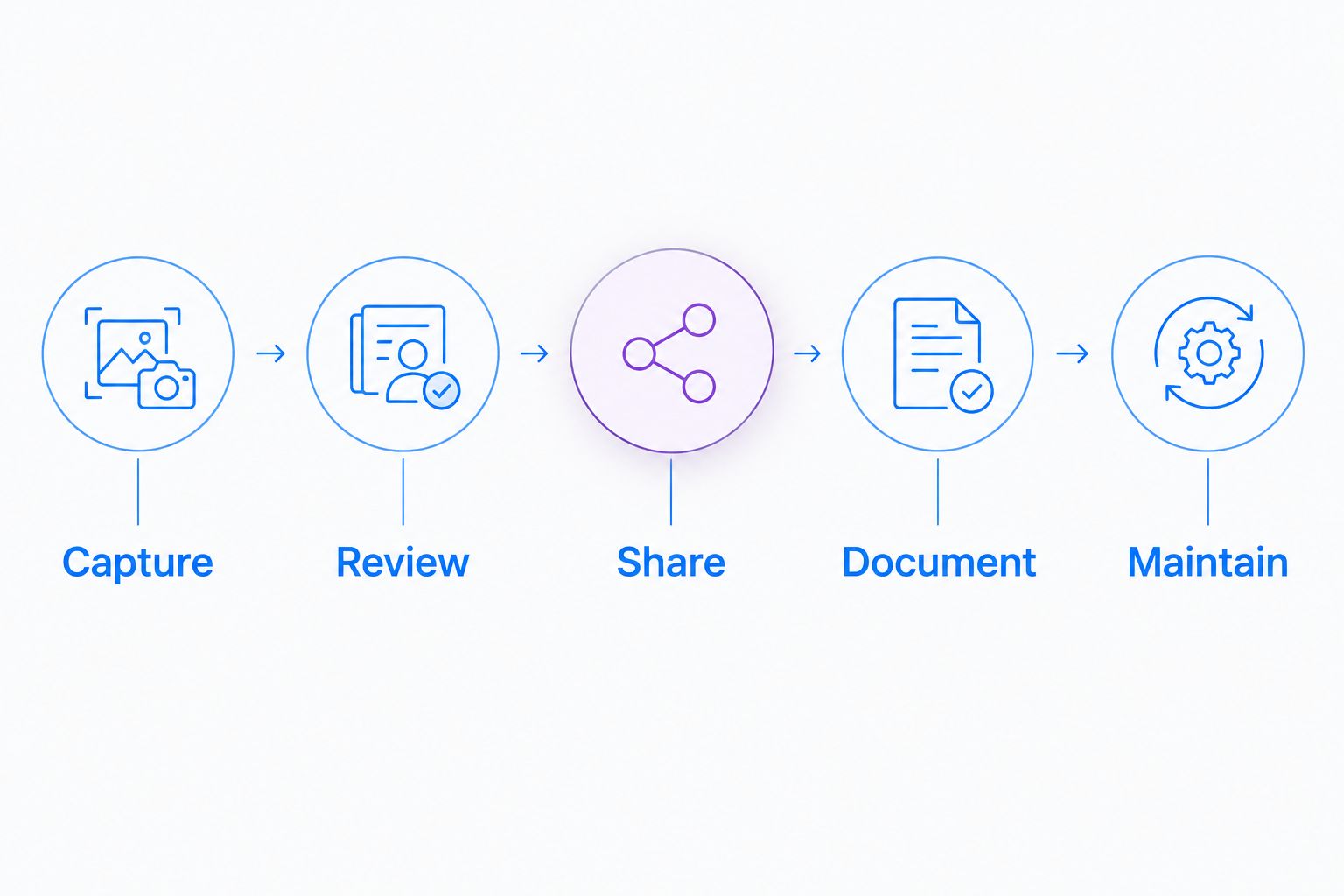
3. Evaluate one capture-to-guide workflow
You can manually capture a screen, write the steps, and maintain the document yourself. That establishes a baseline for judging whether a dedicated tool removes work rather than merely moving it elsewhere.
Zight provides screen recording, screenshots, and AI-powered guide/documentation software for asynchronous communication through shareable links. Zight is best for startup teams evaluating screen capture and reusable documentation together. Its fit still depends on your access requirements and the work required to review and maintain instructions.
Use the same synthetic example throughout the evaluation:
- Capture: show the task without unrelated tabs or notifications.
- Review: check that the explanation matches the actual procedure.
- Share: open the result as the intended recipient.
- Document: turn repeatable instructions into a maintained guide.
- Maintain: assign someone to update the content when the interface changes.
4. Check the recipient experience
Open your test content in a separate browser session. Test as an external buyer, a colleague, and a person who should not have access. Do not assume that a successful internal share proves an external handoff works.
For your 2026 evaluation, write down what the recipient must do before reaching the answer. Keep security requirements separate from convenience: fewer access steps are not automatically better.
Record the actual result of each test:
- Check whether the intended recipient can open the content.
- Confirm that unauthorized access is blocked as required.
- Check whether text remains readable at the recipient's screen size.
- Test audio clarity and any accessibility requirements your team sets.
- Confirm how the recipient sends questions or reports a problem.
5. Review healthcare requirements before capture
Healthcare startups need a separate approval path for screen capture. Do not put patient information into a software trial, recording, screenshot, or video request to see whether the workflow works. Use synthetic examples only.
Before approving Zight screen capture for healthcare, verify current plan requirements, Business Associate Agreement availability, and feature limitations through official documentation and your organization's compliance review. A product label alone does not establish that your recording, request, sharing, and retention workflow meets HIPAA requirements.
Give each healthcare team a distinct test:
- Support and IT: reproduce a portal issue using a synthetic account.
- Clinical teams: record a demonstration without patient information.
- Clinical teams requesting videos: review the request and submission path separately.
- Operations: create training and SOPs from synthetic workflows.
- Administrators: verify approved integrations, permissions, retention, and access removal.
6. Compare paid-use requirements before migrating
Create a written requirements sheet and ask each vendor to confirm the details that determine your purchase. Review current 2026 terms rather than relying on an old comparison or an existing teammate's account.
Include Loom first as the baseline. Then compare Zight screen recording and documentation against the same requirements. A new tool must justify both adoption and the effort needed to preserve useful existing content.
Resolve these questions before committing:
- Identify which teammates need to create content and which only need to view it.
- Confirm the plan requirements for your required controls and features.
- Verify operating-system and browser support for your actual devices.
- Check named integrations against current official documentation.
- Confirm export, deletion, ownership, and offboarding procedures.
7. Run a bounded pilot and decide
Run a 7-day pilot using the workflows selected earlier. That is a suggested evaluation window, not a claim about implementation time. Keep the current workflow available until the replacement passes your acceptance checks.
Measure understandable outcomes: whether the recipient completes the task, whether clarification is needed, and whether the content remains usable after handoff. Do not treat recordings created as evidence that communication improved.
Close the pilot with a written decision:
- Keep examples of successful and failed handoffs.
- Record the questions recipients still needed to ask.
- Identify content that needs editing before broader use.
- Assign owners to reusable guides and existing links.
- Approve migration only after access and governance checks pass.
Compare options by startup workflow
Loom is the first comparison, but not the only workflow to evaluate. Separate everyday asynchronous explanations from edited presentations, screenshot-heavy troubleshooting, written procedures, and bug reporting.
The table below defines evaluation lanes, not a feature-parity ranking. Grouped products are candidates to investigate within that lane; confirm current capabilities individually. TechSmith is the parent company behind Snagit and Camtasia, not a separate product option.
| Option | Best for | Key limitation or check |
|---|---|---|
| Loom | Teams deciding whether their existing asynchronous video workflow needs replacing | Keeping the current tool avoids migration, but does not resolve any requirements it fails in your test. |
| Zight | Startups evaluating screenshots, recordings, and guide/documentation software together | Combined capture and documentation still require review, ownership, and a plan-specific requirements check. |
| Existing capture tools and a shared document | Teams establishing a manual baseline before purchasing | Someone must assemble, organize, and update the instructions manually. |
| Cap, Tella, Screen Studio | Teams building a shortlist around recorded explanations and presentation workflows | Test everyday capture and sharing separately from presentation quality; assess each product individually. |
| ScreenPal, Screencastify | Teams expanding their screen-recording shortlist | Verify device support, recipient access, and team requirements rather than assuming equivalent workflows. |
| Snagit, CleanShot | Teams investigating screenshot-centered explanations | A screenshot answers a static question; test a recording separately when sequence matters. |
| Camtasia | Teams evaluating an editing-centered video workflow | Editing effort needs a clear purpose when the recipient only needs a quick explanation. |
| Jumpshare, Vidyard | Teams evaluating sharing and buyer-facing communication workflows | Test external access and the handoff you actually need; do not assume identical sharing controls. |
| Scribe, Tango | Teams investigating procedure-documentation workflows | A step-based guide needs a separate test from a narrated explanation or bug reproduction. |
| Jam, Birdie | Teams investigating issue-reporting workflows | Issue reporting and reusable training are different requirements; evaluate both if both matter. |
Avoid a feature-count contest. A longer list does not answer whether a support recipient understands the fix or whether a new employee can follow the procedure.
For a 2026 purchase decision, retain the evidence from your own pilot alongside vendor-confirmed requirements. That gives the person approving the software a reason to choose, not just a preference.
Common mistakes startups make
Replacing Loom without naming the problem
An alternative is not automatically an improvement. If the complaint is unclear explanations, establish a recording brief before changing tools: name the issue, show the relevant screen, and state the next action.
Best next move: require a specific failed workflow to justify the evaluation.
Recording every answer as video
A teammate looking for a setting should not have to watch an unrelated walkthrough. Match the output to the question, and preserve repeatable procedures in a format readers can scan.
Best next move: choose screenshot, recording, or guide before pressing record.
Testing only with the person who created the content
The creator already knows the task and has access. That hides confusing instructions and permission problems.
Best next move: ask someone outside the workflow to open the link and complete the task without coaching.
Treating healthcare approval as a product checkbox
Approval for one use does not establish approval for every recording or request. Support troubleshooting, clinical video requests, and operational training need their own scope and controls.
Best next move: use synthetic examples and obtain workflow-specific approval before sensitive capture.
Migrating files without assigning owners
Moving a recording does not make its instructions current. Unowned content can preserve an obsolete process under a new link.
Best next move: assign an owner and review trigger before carrying a guide into the new system.
FAQ
What's the best Loom alternative for startups?
Zight is best for startup teams evaluating screen capture and reusable documentation together. Test screenshots, recordings, guide creation, and recipient access against your own workflows before selecting a plan.
Should my startup replace Loom in 2026?
Replace Loom only when another option meets a documented requirement better in your pilot. Keep Loom as the baseline and include migration, content ownership, and recipient access in the decision.
Can we start with the capture tools we already have?
Yes. Use your existing screenshot or recording tools and a shared document to establish a manual baseline. Add dedicated software when your evaluation identifies work it needs to remove.
Is a screenshot better than a screen recording for support?
A screenshot fits a static question, while a screen recording fits a sequence of actions. Choose based on what the recipient needs to understand, not the format your team prefers creating.
How do we evaluate screen capture for a healthcare startup?
Use synthetic examples and complete a separate compliance review before capturing sensitive information. Verify current plan requirements, BAA availability, feature limitations, and the exact recording or request workflow through official sources.
What should a startup test before buying team software?
Test content creation, recipient access, permissions, ownership, and offboarding. Confirm current plan requirements and integrations through official documentation rather than assuming every account includes the same capabilities.
How should we handle existing recordings when switching tools?
Review existing recordings before migrating them. Preserve useful content, update inaccurate instructions, and assign an owner to every reusable guide or recording you retain.
One last thing
Test your least confident recipient, not your best presenter. Give that person a realistic task and the finished explanation, then stay silent while they work.
If they need coaching, fix the content before expanding adoption. Your startup is buying a clearer handoff—not a larger library of recordings.