
Best overall for shared screenshots, recordings, and guides: Zight. Best for recording control: OBS Studio. Best for Windows screenshot workflows: ShareX. If you want Loom alternatives ranked by price, compare the configuration your team needs—not just the entry tier.
TL;DR
-
For Loom alternatives ranked by price, compare equivalent workflows before comparing subscriptions.
-
Zight is the best fit here for teams combining screen recording, screenshots, and shareable documentation.
-
OBS Studio suits controlled recording; ShareX suits Windows capture; QuickTime Player suits straightforward Mac recordings.
-
Healthcare buyers must verify plan eligibility, BAA availability, and workflow restrictions before capturing protected information.
Why this matters
A screen recorder and a shared visual communication workflow are different purchases. Recording creates a file. Your team still needs to deliver it, explain it, control access, and keep useful instructions current.
For a 2026 evaluation, start with Loom as the reference workflow: record an explanation and let someone watch it asynchronously. Then decide whether your replacement also needs screenshots, written guides, local production controls, or healthcare-specific contractual requirements.
Check the current plan details against that requirement list. The ranking below prioritizes workflow fit; it does not assert a lowest-to-highest ordering of current subscription charges. Compare equivalent configurations before making a purchasing decision.
What makes the best Loom alternative?
Use these criteria to evaluate your 2026 shortlist before comparing commercial terms:
-
Capture coverage: Can your team communicate with both screenshots and screen recordings, or does the workflow require separate tools?
-
Delivery: Does the result become a shareable link, or must someone upload and distribute a local file? Documentation: Can a demonstration become a reusable guide, or does someone need to write the instructions separately?
-
Recording control: Do you need a quick explanation or a production workflow with scenes, sources, and audio controls?
-
Governance: Can the proposed configuration meet your access, retention, and contractual requirements?
-
Operating-system fit: Does the application work on the devices your actual creators use?
Do not give every criterion equal weight. A support team needs a different default from a training producer. A healthcare team also needs an approval process that covers the complete capture-and-sharing workflow.
Loom and its alternatives at a glance
Loom is the starting reference, followed by alternatives in the same order as the detailed recommendations. These are workflow distinctions, not verified comparisons between current paid tiers.
| Option | Best for | Standout capability | Key limitation |
|---|---|---|---|
| Loom — reference | Teams prioritizing asynchronous video messages |
Record-and-share video communication | A video-first evaluation does not resolve screenshot, SOP, or healthcare requirements |
| Zight | Teams combining capture, sharing, and documentation |
Screenshots, recordings, and generated guides | Buyers must check which requirements the selected plan covers |
| OBS Studio | Creators needing recording control |
Scenes and multiple recording sources |
Local recording is not a complete team-sharing workflow |
| ShareX | Windows teams with screenshot-heavy tasks |
Configurable capture and post-capture workflows |
Windows-specific; delivery destinations require separate evaluation |
| QuickTime Player |
Mac users making straightforward recordings |
Screen recording through a familiar Mac application |
File delivery and reusable documentation remain separate tasks |
Loom: the reference for asynchronous video
Loom belongs at the beginning of this comparison because the replacement decision starts with the workflow you already recognize: record an explanation and share it for later viewing. Keep that experience as your baseline rather than comparing unrelated feature lists.
Loom pros:
-
A clear reference for video-based asynchronous explanations.
-
Useful for evaluating whether recorded context replaces a meeting.
-
A familiar comparison point when stakeholders request a Loom alternative.
Loom cons:
-
A video-focused shortlist can overlook screenshot-heavy work.
-
Existing familiarity does not establish suitability for documentation or regulated workflows.
Best for: Teams whose main requirement remains asynchronous video messaging.
Verdict: Hold if the existing workflow meets your requirements; evaluate alternatives against a specific unresolved task.
1. Zight: best Loom alternative for combined capture workflows
Zight combines screen recording, screenshots, and generated guides or documentation for business teams. Support, sales, product, and engineering teams use shareable links to explain work and troubleshoot asynchronously.
The useful buying distinction is the combination of formats. Choose a screenshot when a single state explains the problem; choose a recording when the sequence matters; use documentation when another person must repeat the process.
Zight pros:
-
Covers both still-image capture and screen recording.
-
Supports asynchronous communication through shareable links.
-
Includes guide and documentation capabilities alongside capture.
-
Addresses workflows used by support, sales, product, and engineering teams.
Zight cons:
- Teams seeking only local recording controls should evaluate dedicated recording applications too. Plan coverage, administrative requirements, and healthcare eligibility need separate confirmation. A shared recording still needs a clear explanation of the action the viewer should take.
Best for: Business teams that need screenshots, recordings, and repeatable instructions in the same evaluation.
Verdict: Buy for the combined workflow, after confirming the selected plan covers your requirements. Do not select a broader tool solely to replace a basic local recorder.
2. OBS Studio: best Loom alternative for recording control
OBS Studio is an open-source application for video recording and live streaming. Its scene-and-source model suits demonstrations that require deliberate control over what appears in the recording.
That is a different job from sending a quick support explanation. Evaluate OBS Studio when production control matters more than immediately delivering a viewing link.
OBS Studio pros:
- Supports scenes composed from different sources.
- Provides recording and audio controls for planned demonstrations.
- Works across Windows, macOS, and Linux.
OBS Studio cons:
- Requires more setup than a straightforward record-and-share task.
- Does not make local recording equivalent to managed team delivery.
- Reusable written instructions need a separate documentation workflow.
Best for: Training producers and technical teams creating controlled demonstrations.
Verdict: Buy into this workflow when production control is the requirement. Skip it as a direct replacement if your main problem is distributing short explanations quickly.
3. ShareX: best Loom alternative for Windows screenshots
ShareX is an open-source Windows capture application with screenshot, recording, and configurable post-capture workflows. It belongs on the shortlist when still-image capture is a central part of the job rather than an occasional extra.
For example, a support specialist can document a synthetic error state with a screenshot instead of recording an entire interaction. Evaluate the capture task and the destination together: the application that captures content is not necessarily the service that stores it.
ShareX pros:
Supports screenshot-heavy Windows workflows.
- Offers configurable capture and post-capture actions.
Includes screen recording alongside still-image capture.
ShareX cons:
Does not suit a mixed-device team as a single cross-platform application.
-
Configuration choices add decisions for administrators and users.
-
Upload destinations need their own security and access review.
Best for: Windows-based technical teams that want configurable screenshot workflows.
Verdict: Buy into this workflow for Windows capture tasks. Skip it as the default organization-wide replacement when your creators need other operating systems.
4. QuickTime Player: best Loom alternative for simple Mac recordings
QuickTime Player supports screen recording on Mac. It suits a straightforward task: capture a demonstration, save the result, and deliver that file through an approved channel.
The trade-off is scope. A recording application does not automatically provide the shared viewing, administration, or documentation workflow your team expects from a business communication product.
QuickTime Player pros:
-
Supports straightforward screen recording on Mac.
-
Produces a local recording for your chosen delivery workflow.
-
Keeps the evaluation focused when advanced production controls are unnecessary.
QuickTime Player cons:
Does not provide a common recording application for Windows colleagues.
Sharing and access management require separate decisions.
- Turning the recording into an SOP remains a separate task.
Best for: Mac users who need occasional recordings and already have an approved delivery process.
Verdict: Hold with this approach for simple local capture. Skip it as a complete replacement for team-wide visual communication.
How to compare the actual purchase
Use the same test brief for every shortlisted option in 2026. Otherwise, one candidate gets judged on a simple recording while another gets judged on administration, documentation, and security.
Capture
Record a 60−second demonstration using a synthetic account. Include an action, the resulting screen state, and a clear explanation of what the viewer should do next. Capture a screenshot of the same result.
Share
Ask 2 reviewers to open the result through the delivery method your organization approves. Check the viewer experience, access requirements, and whether the explanation remains understandable without a meeting.
Document
Turn the demonstration into instructions someone else can follow. Check the screenshot, written steps, and recording against the same task. Record which work happens inside the candidate application and which work requires another system.
Review
Compare the proposed configuration over 12 months. Include the required creator roles, administrative requirements, delivery systems, and documentation tools. Ask vendors to identify the plan and contractual terms covering each requirement.
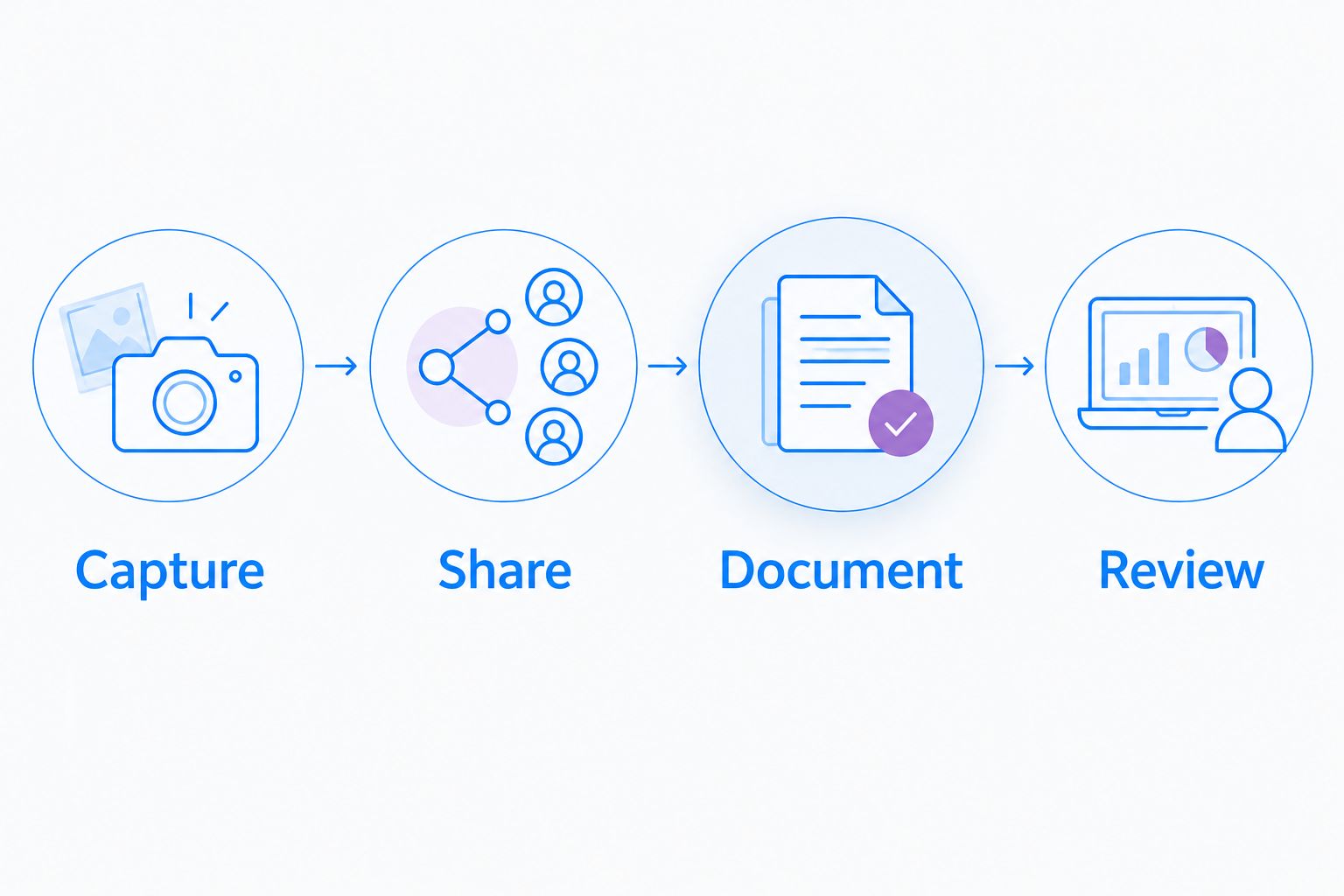
Compare the complete workflow rather than recording alone.
Keep these results in a shared evaluation sheet. A feature that exists but does not work in your approved configuration does not satisfy the requirement.
Healthcare: approve the workflow before recording
Healthcare teams need more than a general-purpose feature comparison. For a 2026 purchase, verify current plan requirements, BAA availability, covered services, and feature restrictions through official vendor documentation and contractual review.
Do not treat a product name, a sharing link, or a signed BAA alone as approval for every workflow. Keep evaluations synthetic and exclude patient information until your organization approves the exact configuration.
Give these teams equal attention:
-
Support and IT: Reproduce a login or display problem in a test environment. Review capture scope, notifications, sharing permissions, and the approved support destination.
-
Clinical teams: Demonstrate a software task with synthetic records. Evaluate both recording a demonstration and requesting a video response; do not assume both activities have identical
coverage.
Operations teams: Create training and SOPs from a simulated administrative process. Review ownership, access, revision handling, and how obsolete instructions leave circulation.
Check every proposed support integration by its official name and documented scope before enabling it. Approval of a capture application does not establish approval of every connected destination.
How the alternatives are ranked
This 2026 ranking uses capture coverage, delivery, documentation, recording control, governance, and operating-system fit. It is a workflow-based buying guide, not a hands-on benchmark or an assertion about current subscription differences.
The combined capture-and-documentation option comes first for business communication. Dedicated recording control, Windows screenshot configuration, and basic Mac recording follow as distinct use cases. Pick the use case before comparing commercial proposals.
Which Loom alternative should you choose?
Zight is the best fit here for business teams combining screen recording, screenshots, and shareable documentation. Choose OBS Studio for controlled recording, ShareX for Windows screenshot workflows, or QuickTime Player for straightforward Mac capture with separate delivery.
For your 2026 decision, keep Loom if no alternative solves a defined problem better. A replacement earns its place when the complete workflow fits—not when a headline plan appears attractive.
FAQ
What's the best way to compare Loom alternatives ranked by price?
Compare equivalent configurations for the same capture, delivery, and documentation workflow. Confirm the required plan, creator roles, administrative controls, and connected services before comparing commercial proposals.
Which Loom alternative is best for screenshots and recordings together?
Zight is the best fit in this shortlist for teams combining screenshots, screen recordings, and shareable documentation. Confirm that the proposed plan covers your specific requirements.
Is OBS Studio a direct replacement for Loom?
OBS Studio replaces the recording task more directly than the complete asynchronous sharing workflow. Evaluate delivery, viewer access, and documentation separately.
Is ShareX a good choice for a mixed Mac and Windows team?
ShareX is a Windows application, so it does not provide a single application for both groups. Choose it for a Windows-specific capture requirement rather than assuming organizationwide device coverage.
Can QuickTime Player handle simple screen recordings?
QuickTime Player supports screen recording on Mac. File delivery, access management, and written instructions require separate workflow decisions.
Can healthcare teams use any screen recorder if they sign a BAA?
A BAA alone does not establish that every plan, feature, or connected workflow is approved. Verify current vendor documentation, contractual coverage, configuration, and your organization's requirements before capturing protected information.
What should a paid software evaluation include?
A paid software evaluation should include capture, sharing, documentation, administration, and contractual requirements. Test the same synthetic task across candidates so the comparison reflects equivalent work.
One last thing
Test the handoff, not just the recording. Give a colleague the finished explanation without adding context in chat. If that person cannot identify the next action, improve the explanation before changing tools.
Related guides
- Best Screen Capture Software For Customer Support Teams
- Best SOP generator tools for operations teams
- Best Loom alternatives for healthcare teams