Convert Videos to GIFs for Free Using Zight
This guide walks you through how to convert videos to GIFs for free using Zight’s online tool. It’s fast, simple, and requires no signup. Try it here.
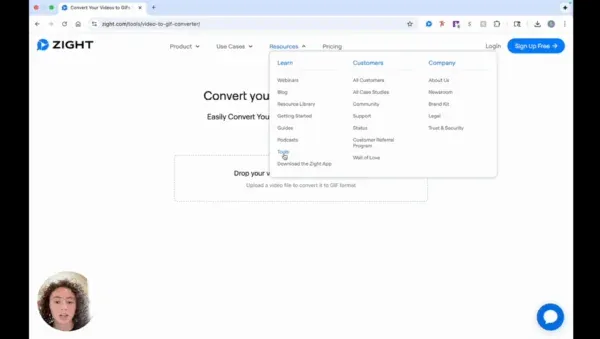
Step 1: Access the Zight Website
- Visit the Zight website and navigate to the ‘Resources’ section under ‘Learn’. Click on ‘Tools’ to view the available free tools.
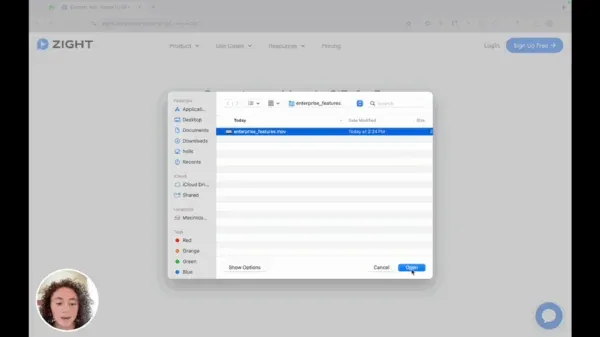
Step 2: Upload Your Video
- Click on the designated area to upload your video or simply drag and drop your video file that you wish to convert.
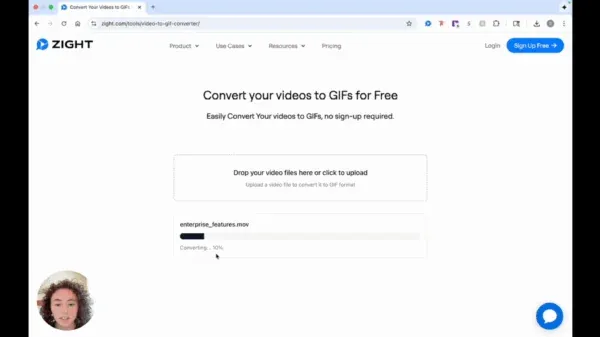
Step 3: Start the Conversion Process
- Once your video is uploaded, the conversion process to a GIF will begin automatically. No signup is required to use this tool.
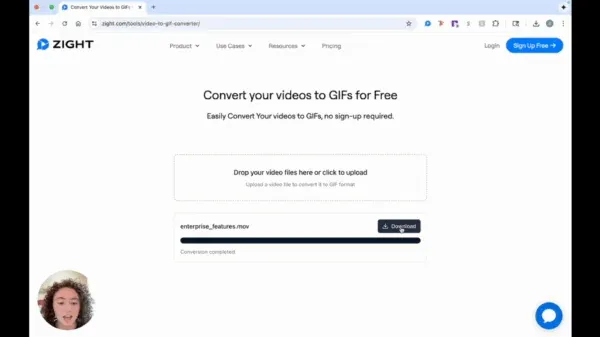
Step 4: Download the Converted GIF
- After a quick conversion, click on the ‘Download’ button to save your newly created GIF.
The Ultimate Guide to Converting Videos to GIFs for Free Using Zight
GIFs have become one of the most popular ways to communicate online. They are quick, fun, and easy to share across platforms like Slack, social media, or email. Whether you want to highlight a product feature, share a quick tutorial, or make your content more engaging, converting short videos into GIFs is a great way to do it.
Zight makes this process effortless. With its free online tool, you can convert any video to a GIF in seconds without downloading software or signing up for an account. It’s a fast, reliable, and user-friendly option for professionals, creators, and teams who need high-quality GIFs on the go.
Why convert videos to GIFs
GIFs are an ideal way to share visual snippets that grab attention. They are lightweight, loop automatically, and work across nearly every communication platform. Unlike full-length videos, GIFs don’t require playback controls, which makes them perfect for quick demonstrations or reactions.
Teams often use GIFs to explain workflows, showcase features, or capture highlights from meetings and recordings. Marketers love them because they boost engagement on social media, while educators and customer support teams use them to simplify complex instructions visually.
By converting short clips into GIFs, you make your content more interactive and accessible without overwhelming viewers.
The benefits of using Zight’s GIF converter
Zight’s free online GIF converter stands out for its simplicity. You don’t need any design or video editing experience—just upload your file, and Zight handles the rest.
Here’s why users love it:
-
Fast conversion: Upload your video, and Zight instantly processes it into a GIF.
-
No signup required: You can use the tool without creating an account or installing software.
-
High-quality results: The output GIFs retain smooth motion and crisp detail.
-
Universal compatibility: Works with most video formats, including MP4, MOV, and AVI.
-
Free to use: There are no hidden costs or limitations for basic conversions.
Because the process runs entirely online, you can access it from any device—whether you are working from a desktop, laptop, or mobile browser.
How Zight makes video-to-GIF conversion simple
Traditional video editing software often takes time to install and requires multiple steps to create a simple GIF. Zight eliminates all that complexity. Once you visit the Zight tools page, you can upload a video by dragging and dropping it directly into the converter.
The conversion begins automatically, and within seconds, your GIF is ready to download. The streamlined interface removes the need for manual adjustments or technical knowledge.
This makes Zight perfect for anyone who wants to share quick visuals without learning complicated tools or spending hours editing.
Best use cases for GIFs
There are endless ways to use GIFs in professional and creative settings. Here are a few popular examples:
-
Product demos: Show how a feature works in just a few seconds.
-
Tutorials: Turn short video instructions into quick visual guides.
-
Social media content: Capture attention with motion graphics that loop continuously.
-
Customer support: Use GIFs to walk customers through common troubleshooting steps.
-
Team communication: Add humor or emphasis to messages in Slack, Microsoft Teams, or email.
Because GIFs are easy to share and load quickly, they are one of the most efficient formats for visual communication.
Tips for creating high-quality GIFs
While Zight handles most of the work automatically, a few simple tips can help you create better GIFs:
-
Keep your video short. Aim for clips under 10 seconds for optimal looping.
-
Use videos with good lighting and contrast so details are clear.
-
Avoid adding too much text, as GIFs play fast and need to be easy to read.
-
Test your GIF on different platforms to ensure it displays correctly.
A well-designed GIF should be lightweight, visually appealing, and instantly convey the message you want to share.
Why Zight is the perfect tool for professionals
Zight’s video-to-GIF converter fits perfectly into modern workflows. Professionals in marketing, design, education, and software development use it to turn recordings and demos into reusable content.
Because the tool integrates seamlessly with Zight’s broader ecosystem of Screen Recording, Video Recording, and AI tools, users can capture, convert, and share content all in one place. This saves time, improves collaboration, and ensures consistency across every communication channel.
With Zight, creating and sharing GIFs is not just about convenience—it’s about improving the way teams visually communicate.
Conclusion
GIFs are one of the most effective ways to communicate visually, whether for business, education, or fun. With Zight’s free online tool, you can convert videos to GIFs instantly—no signups, no downloads, and no learning curve.
The process is simple: upload your video, let Zight do the conversion, and download your GIF to share anywhere. It’s fast, reliable, and completely free to use.
If you want to make your messages more engaging or share quick visual content with your audience, try converting a video with Zight today and experience how effortless GIF creation can be.
Frequently Asked Questions
Yes. You can use Zight’s video to GIF converter completely free, with no signup or download required.
Zight supports standard video formats such as MP4, MOV, and WebM.
No. You can access the converter directly from Zight’s website and start creating GIFs right away.
For best results, use short clips under 15 seconds. Shorter videos load faster and create smoother GIFs.
You can trim or crop your video before uploading it. Zight’s converter focuses on delivering quick, ready-to-use GIFs.
You can share them in Slack, Teams, email, social media, or embed them in documentation, tickets, or tutorials.
Yes. With Zight’s Screen Recording tool, you can capture your screen and turn that recording into a GIF in just a few clicks.


