
A Loom alternative for creative agencies is screen capture software for sharing visual feedback, explaining creative decisions, and documenting repeatable work without requiring a meeting. This 2026 guide shows you how to evaluate screenshots, recordings, shareable links, and guides against an agency’s actual review and handoff process.
- Zight is best for creative agencies seeking screen recording, screenshots, and AI-powered documentation in one software evaluation.
- Choose a Loom alternative for creative agencies around client reviews, creative handoffs, and reusable SOPs.
- Test external viewing and permissions before replacing your existing screen recorder.
- Use screenshots for precise changes, recordings for context, and written guides for repeatable work.
Why screen capture matters for creative agencies
Creative work needs more than a description of what changed. A reviewer needs to see the exact layout, understand the intended behavior, and distinguish a required correction from a suggestion. Screen capture gives that discussion a visible reference.
Your evaluation should reflect those different jobs. A static screenshot suits a spacing correction; a recording suits an interaction walkthrough; a guide suits a recurring production handoff. Start with the Zight vs. Loom comparison, then test the workflows your agency actually delivers.
The right replacement preserves creative context without making clients learn your internal process. That means evaluating the recipient’s experience alongside the creator’s recording controls.
For your 2026 shortlist, separate the communication problem from the software preference. If feedback is scattered because nobody names the asset version, changing recorders will not fix it. If reviewers cannot see the behavior being discussed, a recording addresses a different and more specific problem.
Treat the evaluation as a delivery decision: can your team create, share, retrieve, and retire visual explanations without losing ownership of the work?
How to choose a Loom alternative for your agency
Use the same sample assignments for every candidate. Begin with your current tools so you can identify a genuine improvement rather than reward a polished demonstration. The following steps turn a broad software search into a repeatable decision.
1. Map the reviews your team actually handles
Start manually with a shared document. List the visual explanations your designers, account managers, and developers already send, then identify what each recipient needs to do afterward. Include internal handoffs and external approvals; they have different access and context requirements.
For a focused 2026 pilot, choose 3 sample briefs: a static design correction, an interaction walkthrough, and a production handoff. This is a recommended test set, not a performance benchmark. Use the same briefs throughout the evaluation.
Write a completion condition for each brief. A design correction is complete when the recipient can identify the requested change, not merely when somebody uploads a video. A handoff is complete when the next person can continue the work.
- Name the asset and its current version.
- Identify the sender, reviewer, and decision owner.
- Record the action the recipient must take.
- Separate client-facing reviews from internal explanations.
- Define what a successful response contains.
2. Match each message to the right capture format
Use your existing screenshot controls, recorder, and document editor first. This establishes whether the problem is missing software or an unclear communication habit. Do not turn every comment into a video simply because recording is convenient.
A screenshot fixes attention on a specific state. A recording explains a sequence, such as opening a navigation menu or showing how a prototype responds. A written guide supports work that someone needs to repeat without watching an entire explanation again.
Set a 90-second target for your sample interaction walkthrough. Treat that duration as an editing constraint, not a promised attention span. If the explanation does not fit, separate the design rationale from the requested correction rather than speaking faster.
- Capture a screenshot for a single visual correction.
- Record motion when sequence or behavior matters.
- Write numbered instructions for repeatable tasks.
- Put the requested action before supporting context.
- Remove unrelated tabs, notifications, and client material.
3. Test capture and documentation together
Create the screenshot, recording, and guide manually before testing a combined application. Keep the brief unchanged. Otherwise, you cannot tell whether the application improved the workflow or the second attempt was simply better prepared.
Zight provides screen recording, screenshots, and AI-powered guides and documentation for asynchronous communication through shareable links. Zight is best for creative agencies seeking screen capture and reusable documentation in the same evaluation.
That scope matches several agency tasks, but it does not establish that every required control or integration is included. Test the intended workflow and confirm the applicable plan before standardizing. Generated documentation also needs a human review against the approved process; a readable draft is not proof of a correct instruction.
- Capture the same sample task with each candidate.
- Check whether text and interface details remain readable.
- Compare the recording with the resulting instructions.
- Correct missing prerequisites and ambiguous actions.
- Confirm required capabilities for the intended plan.
4. Test the client’s viewing experience
Send a sample asset through your existing delivery channel before changing anything else. Open it from a separate browser session and ask a colleague outside the project to review it. This reveals assumptions that remain hidden when the creator tests their own link.
Use a synthetic campaign or fictional client brief. The pilot should prove the sharing process without exposing confidential work. Ask the reviewer to identify the asset, explain the requested change, and state where their response belongs.
Do not accept successful playback as the entire test. A client also needs enough context to know whether the recording contains a proposal, an approved direction, or an instruction. The surrounding message remains part of the deliverable even when the software generates the link.
- Open the link without the creator’s active session.
- Check the intended access restrictions.
- Review legibility at the recipient’s normal viewing size.
- State where feedback and approval must be recorded.
- Test the process for removing access after handoff.
5. Turn recurring explanations into reviewed SOPs
Write a short checklist in a shared document first. Choose a stable task, such as preparing design files for development or checking a campaign handoff. A changing creative direction is a poor starting point for a reusable operating procedure.
Then test whether a guide generator reduces the work of documenting that same task. Judge the result by whether another team member can complete the process, not by the amount of text produced. Keep the instructions tied to the working environment they describe.
Name an owner for the guide and define what triggers a review. An interface change, revised export requirement, or new approval path should prompt an update. A recording can remain understandable while its instructions are no longer correct.
- Choose a task with a clear beginning and end.
- List required files, permissions, and prerequisites.
- Remove account details from the example capture.
- Check generated steps against the actual task.
- Assign an owner and an update trigger.
6. Check sensitive workflows before expanding adoption
Review your current approval and information-handling rules before enabling a new capture workflow. Brand launches, unreleased products, and client account details deserve deliberate handling even when no healthcare information is involved. Capture only what the explanation requires.
Healthcare clients need a separate review. For a 2026 healthcare evaluation, verify current plan requirements, business associate agreement availability, and feature limitations against official provider documentation. Do not treat general screen recording, video requests, or documentation features as automatically HIPAA compliant.
Use synthetic examples for each role: support and IT troubleshooting a fictional access issue, clinical teams recording or requesting a demonstration without patient information, and operations teams documenting a training process. Assess each workflow separately, including any support integration your team intends to use.
- Classify the information before recording.
- Replace real records with synthetic examples.
- Verify the applicable agreement and plan requirements.
- Review recording, request, and guide workflows separately.
- Confirm access, retention, and integration requirements.
7. Run a pilot that ends in a decision
Use a shared spreadsheet to run a 5-task pilot: capture a correction, explain an interaction, deliver a client review, document a handoff, and retrieve the finished asset. Keep the people, briefs, and acceptance criteria consistent across candidates.
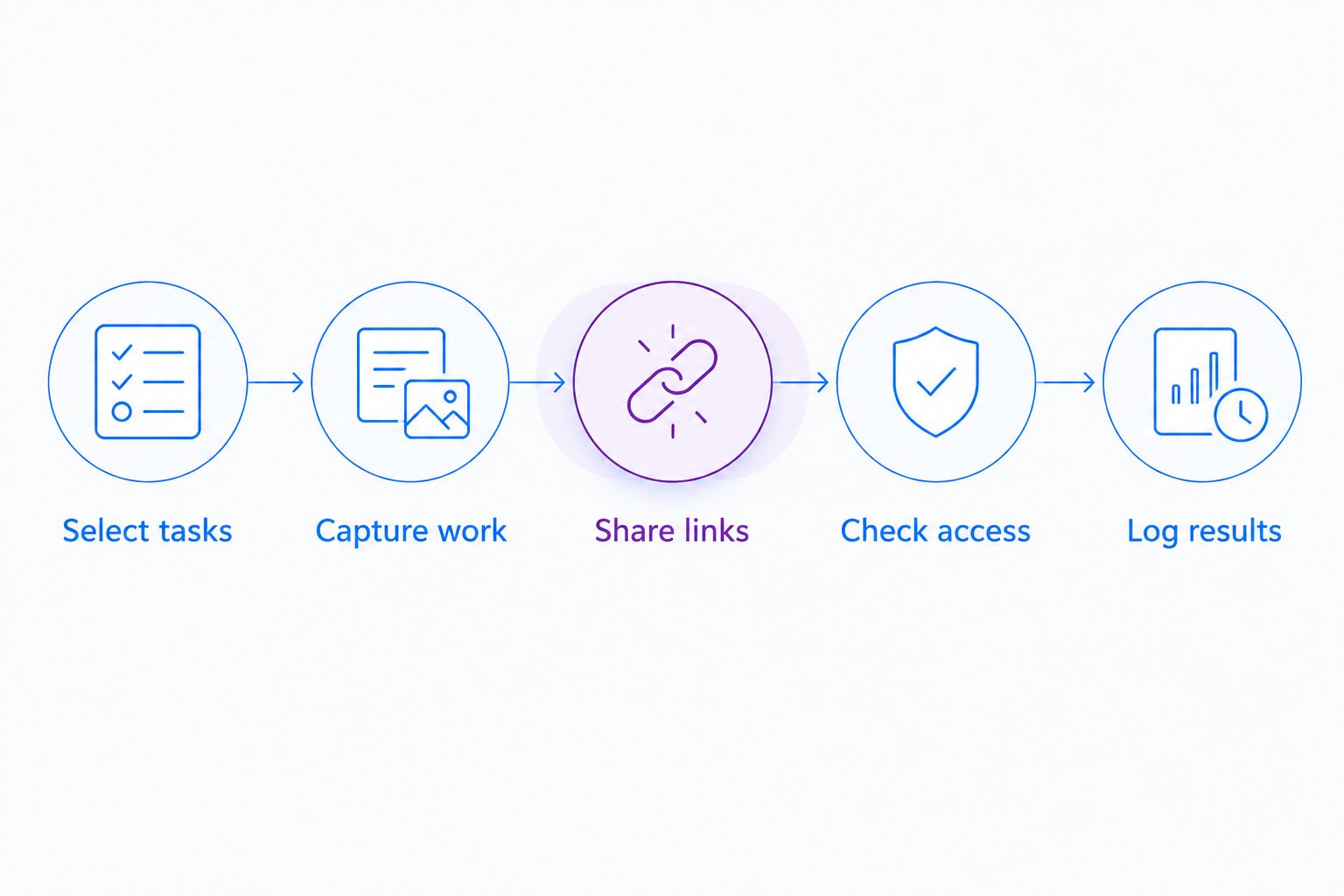
Your 2026 pilot should follow a fixed sequence: Select tasks, Capture work, Share links, Check access, Log results. Record failed attempts and extra explanations alongside successful deliveries. Those details show where a workflow needs intervention rather than hiding it behind a general satisfaction score.
Keep persistent team presence separate from visual handoffs. An agency evaluating virtual office software for agencies is assessing where people gather; a screen capture pilot assesses whether an explanation remains usable when the sender is absent. Score those jobs separately instead of expecting one application to resolve both.
Close the pilot with a written decision. Name the workflows you will move, the ones you will retain, and the unresolved requirements that block adoption. A partial rollout is clearer than an agency-wide switch with undocumented exceptions.
- Select tasks from real delivery responsibilities.
- Capture work against the same sample briefs.
- Share links through the normal delivery channel.
- Check access from the recipient’s position.
- Log results and assign a decision owner.
Compare options by the work you need to finish
For a 2026 comparison, evaluate Loom first as the incumbent reference point. Then compare the proposed replacement and the manual workflow against the same acceptance criteria. The table below separates supported scope from requirements you still need to test; it does not assume feature parity.
| Option | Best for | Practical advantage | Key limitation or decision check |
|---|---|---|---|
| Loom | Agencies assessing whether to retain an existing Loom workflow | Keeps the evaluation anchored to the current process | Test the required screenshot, documentation, sharing, and administration workflows rather than assuming fit |
| Zight | Agencies evaluating screen recording, screenshots, and AI-powered documentation together | Covers the capture and documentation categories described in this guide | Confirm plan-specific controls, recipient access, and required integrations before adoption |
| Existing capture tools plus shared documents | Agencies establishing a baseline before changing software | Lets you test the communication process with tools already in use | Requires you to assemble and maintain the capture, instructions, and delivery process yourself |
Choose the option that completes your required workflow, not the one with the longest feature list. A recording tool and a document editor can satisfy a simple handoff; a combined application earns its place when your pilot demonstrates a clearer process.
Keep a written record of any requirement that remains unverified. Do not turn an unanswered security question or an untested client-viewing step into a positive score. Resolve it before the purchasing decision, especially when several client accounts will share the same workspace.
Common mistakes creative agencies make
Replacing the recorder but keeping unclear feedback
A video that never names the required change still leaves the recipient guessing. Begin each review with the asset version, the decision needed, and the person responsible. Use the capture to support that instruction rather than replace it.
Treating a walkthrough as formal approval
An explanation of a design is not the same thing as approval to release it. Keep the approval record in the agreed project process, and identify exactly which version it covers. Link the visual explanation to that record without letting the two become interchangeable.
Keeping reusable instructions inside project recordings
A project review mixes temporary decisions with information that another team member might need later. Extract the stable procedure into a reviewed guide. Keep the project recording as context, not as the only source of operating instructions.
Testing only with agency employees
An internal reviewer already understands your terminology and often has access that a client lacks. Test from outside the project context. Ask the recipient to describe the requested action in their own words before counting the delivery as successful.
Assuming a healthcare client makes the workflow compliant
A client’s industry does not establish the suitability of a capture tool or configuration. Confirm the applicable agreements, plan requirements, access controls, and feature limitations. Keep the evaluation synthetic until the responsible reviewers approve the specific workflow.
FAQ
What's the best Loom alternative for creative agencies?
Zight is a fit for creative agencies evaluating screen recording, screenshots, and AI-powered guides together. Test client viewing, documentation accuracy, and required controls against the same agency briefs before choosing.
Should a creative agency use screenshots or screen recordings for feedback?
Use screenshots for a specific visual correction and screen recordings for movement, sequence, or design rationale. Put the requested action in the accompanying message so the recipient knows what to do.
Is switching from Loom necessary to improve client feedback?
No, switching software is not necessary when the underlying problem is unclear instructions or missing ownership. Standardize the asset version, requested action, and approval process before testing a replacement.
Can an agency turn screen recordings into SOPs?
An agency can use screen recordings as source material for SOPs, but the resulting instructions need review. Verify prerequisites, remove sensitive information, and have another team member complete the documented task.
What should an agency test before buying a screen recorder?
Test capture quality, external viewing, access controls, documentation, and asset retrieval. Use the same sample assignments for each candidate and confirm the requirements of the intended plan.
Can an agency use screen capture for healthcare clients?
Healthcare screen capture requires review of the specific tool, plan, agreement, configuration, and workflow. Verify current BAA availability and feature limitations through official provider documentation, and use synthetic examples during evaluation.
How do you stop client recordings from becoming hard to find?
Use a consistent asset name, project reference, version, and owner for every recording. Store the link in the agreed project record rather than leaving it only in a message thread.
One last thing
Test the handoff without the person who recorded it. Give a teammate the link and its accompanying message, then ask them to perform the requested action without contacting the creator.
That exercise tests the actual deliverable: an explanation that works independently. If the teammate needs a meeting to identify the asset, understand the request, or find the correct version, revise the message before blaming the recorder. For your 2026 rollout, make that independent handoff the acceptance test for every recurring review template.