Choose Zight if your team needs screenshots, screen recordings, and AI-powered guides in one visual communication workflow; choose Loom if your priority is narrated video messages and your team already works in Loom. This 2026 comparison focuses on the handoff: what you capture, what the recipient needs, and what your organization must approve.
- Zight vs Loom: choose Zight for screenshots, screen recordings, and AI-powered guides across support and documentation workflows.
- Choose Loom for video-first communication, especially when your team already uses it.
- Healthcare buyers must verify contractual coverage, approved features, and handling requirements before recording patient information.
- Compare paid plans against the same capture, sharing, documentation, and access-control requirements.
Why this matters
A recording is not always the best answer. Sometimes your customer needs a screenshot of one setting; sometimes your engineer needs to see the entire failure; sometimes your operations team needs a written procedure that survives the next software update.
Zight is best for business teams that need screenshots, screen recordings, and AI-powered documentation together. Loom is the clearer choice when your requirement is specifically video messaging and an established Loom workflow already serves your recipients.
For your 2026 evaluation, compare completed handoffs rather than recording buttons. The useful question is whether someone can understand the problem, take the next action, and find the explanation again without scheduling a meeting.
At a glance
| Dimension | Zight | Loom |
|---|---|---|
| Best for | Teams combining screenshots, recordings, and guides | Teams centered on video messages |
| Standout fit | Capture and documentation across different output formats | Narrated screen-video communication |
| Core screen capture | Fits workflows requiring both screenshots and recordings | Fits workflows where a recording is the intended output |
| Video-first communication | Relevant when video sits alongside screenshots and guides | Strong fit when the video itself is the deliverable |
| Reusable documentation | Explicit fit for AI-powered guides and documentation | Evaluate how recorded explanations become maintained instructions |
| Existing workflow | Evaluate when consolidating different capture needs | Prefer when an established Loom workflow already meets requirements |
| Healthcare | Require confirmation of contractual and workflow coverage | Require confirmation of contractual and workflow coverage |
| Pricing model | Compare the current paid offer against required users and features | Compare the current paid offer against the same requirements |
The table identifies buying fit, not exclusive capabilities. A workflow advantage does not mean the other product cannot complete part of the same task.
Zight fits mixed screenshot and recording workflows
Choose the broader capture workflow when your support queue contains different kinds of questions. A screenshot can explain which setting to change. A screen recording can show the sequence that produces an error. An AI-powered guide can turn an explanation into instructions someone follows later.
That mix matters because the right format depends on the problem, not the sender's favorite recording tool. Making every answer a video forces the recipient to watch for information that sometimes belongs in a still image or written step.
Use these practical selection rules:
- Screenshot: show a specific field, setting, or visible error.
- Screen recording: show movement, timing, or a sequence of actions.
- Guide: explain a repeatable task that needs written instructions.
The trade-off is standardization. Giving people several formats does not automatically produce consistent communication. Your team still needs rules for which format to use, what context to include, and where the finished explanation belongs.
For support and engineering teams, the mixed-format approach is the stronger fit when the same issue moves from an initial screenshot to a recorded reproduction and then into reusable documentation.
Loom fits video-first communication
Choose Loom when the recording is the product of the conversation: a narrated update, a walkthrough, or an explanation that benefits from hearing the speaker describe the screen. Its screen-video messaging purpose matches that job directly.
A product manager explaining a proposed interaction needs to show movement and explain intent. A salesperson walking through a proposal needs to connect the visible material with spoken context. In those situations, a video-first workflow is a sensible starting point.
The advantage is focus. If your organization has deliberately standardized on narrated videos, you do not need to broaden the evaluation into every possible documentation format.
The limitation belongs to the medium: recipients must locate the relevant moment, and changed interfaces can make an earlier recording harder to follow. Do not assume a video replaces a maintained procedure simply because it explains the procedure clearly today.
Choose Loom for an established video-message workflow, not because every workplace explanation needs a video. If your recipients repeatedly ask for a screenshot or written instructions afterward, include those outputs in the buying decision.
AI-powered guides favor a documentation-led workflow
Choose the guide-oriented option when the work needs to become a repeatable process rather than a one-time explanation. The client's stated feature set includes AI-powered guides and documentation, making that workflow an explicit part of its offering.
Consider an operations team documenting how to configure an internal application. The useful deliverable is not merely evidence that someone performed the task. It is a procedure another employee can follow, review, and update.
Evaluate the resulting document against practical questions:
- Does it preserve the correct order of actions?
- Does it explain prerequisites and decision points?
- Can an owner correct an inaccurate instruction?
- Can a reader distinguish the current procedure from an outdated version?
Generated instructions still need human review. A polished guide with an omitted prerequisite creates more confusion than a rough draft that correctly explains the task.
Loom remains a reasonable choice when the explanation itself needs narration and your written documentation already lives in an established process. Do not treat either product as a replacement for document ownership: someone must remain responsible for accuracy, review, and retirement.
An established Loom workflow wins on continuity
Keep the existing workflow when it already solves the business problem. If your organization uses Loom successfully, a switch needs a specific reason beyond a different recording interface.
Evaluate what would actually change:
- Where employees create and find explanations.
- How recipients open and understand shared material.
- Which existing recordings remain useful.
- Who owns content when an employee changes roles.
- How your team maintains training and support references.
This is a conditional advantage, not a claim about migration features. An organization with established habits has work to do whenever it changes software, regardless of the destination.
The counterargument is equally concrete. Existing adoption does not justify keeping a tool that leaves an important job unfinished. If support needs screenshots and operations needs guides, assess whether your current process handles those requirements without repeated manual work.
Keep Loom when the current video workflow meets the brief. Evaluate the alternative when the brief has expanded. That distinction keeps a software review focused on business requirements rather than novelty.
Healthcare is a governance tie until the workflow is approved
Neither a screen-recording category nor a product name establishes HIPAA compliance. For a 2026 healthcare purchase, require written confirmation covering the applicable plan, BAA availability, approved features, and the proposed handling of protected health information.
Treat recording, requesting videos, sharing links, and producing documentation as separate activities to review. Approval for one activity does not establish approval for every feature or connected system.
Give equal attention to these healthcare workflows:
- Support and IT troubleshooting: reproduce an application issue in a test environment before considering any capture that includes patient information.
- Clinical communication: demonstrate recording and video-request workflows with synthetic examples, including what the sender is instructed not to capture.
- Operations and training: create SOPs with synthetic records, then review the instructions before distributing them.
Verify every proposed support integration by name during procurement. Ask which information passes between systems, which party stores it, and whether that exact connection falls within your approved setup. A familiar integration name is not a substitute for reviewing the data flow.
Do not name a healthcare winner before approving the contract and workflow. A useful demonstration shows the complete path from capture to recipient access, including retention, deletion, and generated documentation—not just a successful recording.
Pricing: compare the paid workflow, not an isolated plan
For your 2026 purchase, use the current pricing information and a matching Loom offer. Compare the same users, required capabilities, and administrative requirements on each side.
Separate the commercial questions from the feature demonstration. A tool can complete a task during evaluation while the plan under consideration excludes a capability your team needs.
Ask both vendors to clarify:
- Which roles require paid access.
- Which capture and documentation capabilities the proposed plan includes.
- What limits or usage conditions apply to your intended workflow.
- Which governance requirements need a different agreement or plan.
- What changes when more people create, manage, or view content.
The pricing-model trade-off is predictability versus flexibility. Evaluate a fixed commitment for budget certainty; evaluate any usage-dependent component for how it behaves as adoption changes. Apply that distinction to the actual offers rather than assuming both vendors structure their plans identically.
Select the plan that covers the complete job. A narrower offer is not a better purchase if your team still needs a separate process to finish the handoff.
Run the same workflow test on both
Use the same synthetic task, recipient, and acceptance criteria. Otherwise, you risk comparing a polished demonstration on one side with an unfamiliar first attempt on the other.
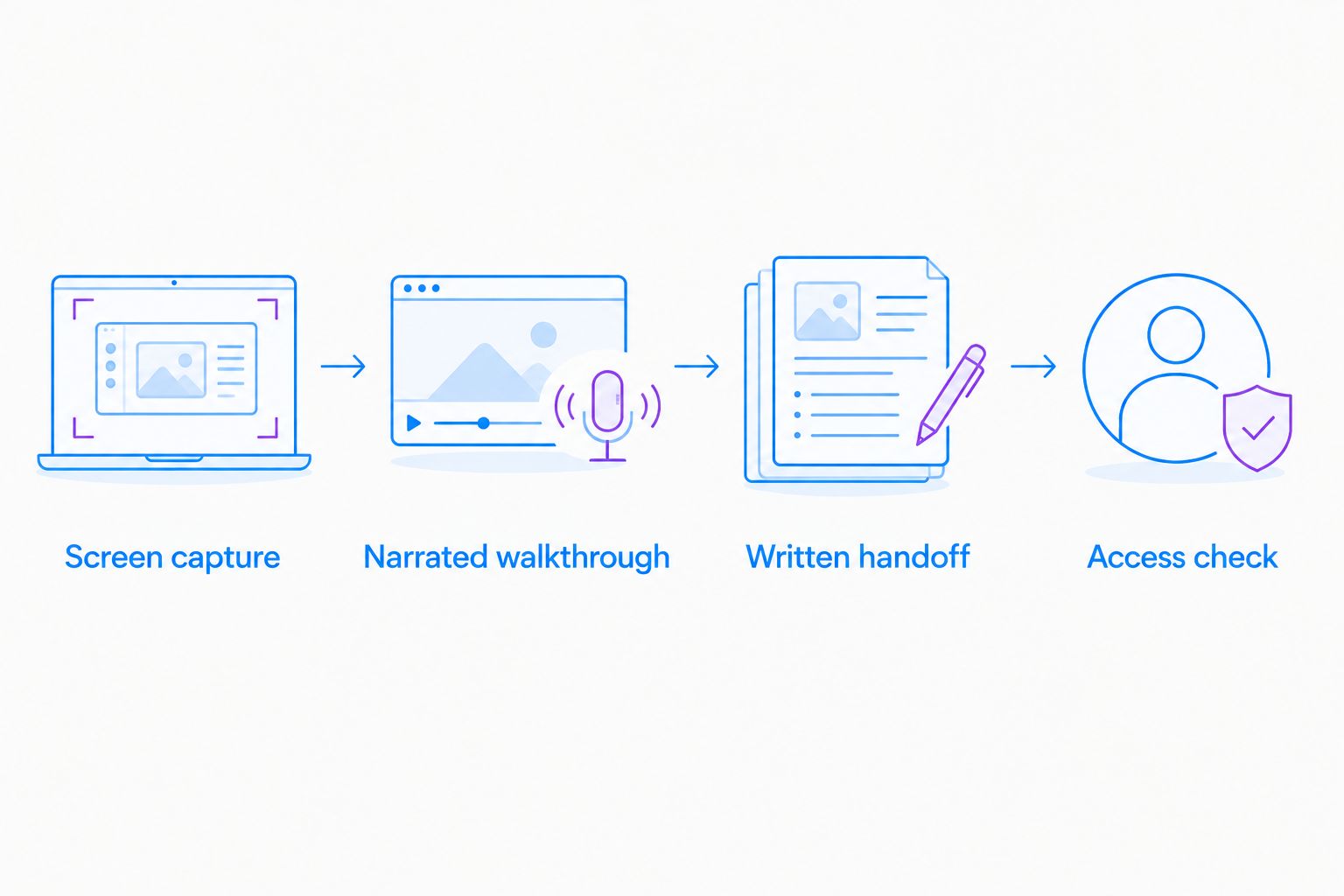
Build your evaluation around these outputs:
- Screen capture: explain a visible setting without requiring a meeting.
- Narrated walkthrough: reproduce a sequence and explain the expected result.
- Written handoff: turn the explanation into instructions another person can follow.
- Access check: confirm that the intended recipient can open the material under your required permissions.
Ask someone who did not create the material to complete the task. Record where that person needs clarification, switches formats, or returns to the sender with a question.
For healthcare evaluation, keep every example synthetic. Do not introduce real patient information to make the demonstration feel realistic.
Final verdict: choose for the output your team needs
Choose Zight if you own capture and documentation
Best for: support leads, engineering teams, and operations owners who need screenshots, recordings, and AI-powered guides. Choose this approach when different problems require different outputs and you want those requirements evaluated together.
The responsibility remains yours: establish capture rules, review generated instructions, and approve any sensitive-data workflow before use.
Choose Loom if you own a video-first workflow
Best for: team leads and communicators whose main deliverable is a narrated video message. Keep it when recipients already use the workflow successfully and the business case does not require a broader capture-and-documentation change.
For a 2026 decision, require a clear reason to switch: an unmet task, a governance requirement, or a documented handoff problem. Familiarity alone is not enough to justify staying, but a new feature alone is not enough to justify moving.
| Dimension | Winner |
|---|---|
| Mixed screenshots and recording requirements | Broader capture-and-guide workflow |
| Video-first communication | Loom |
| Guide-oriented documentation | Capture-and-guide workflow |
| Continuity for an established Loom team | Loom |
| Healthcare approval | Tie: approve the exact contract and workflow |
| Pricing | Tie: compare equivalent current offers |
FAQ
Is Zight better than Loom for support teams?
Zight is the stronger fit when support needs screenshots, screen recordings, and AI-powered guides together. Loom fits a support process centered on narrated videos, particularly when the team already uses it successfully.
Which should I choose for video messages?
Choose Loom when narrated video messages are your main requirement and the existing workflow meets your needs. Include screenshots and documentation in the evaluation if recipients need those outputs afterward.
Which option should I evaluate for SOPs?
Evaluate the capture-and-guide workflow when your main deliverable is a repeatable written procedure. Review generated instructions for accuracy, prerequisites, and ownership before publishing them.
Can healthcare teams use either tool with patient information?
Healthcare teams must approve the exact contract, plan, features, and data flow before using either tool with patient information. Confirm BAA availability and scope, and use synthetic examples during evaluation.
How should I compare the paid plans?
Compare current offers against the same users, capture tasks, documentation needs, and administrative requirements. Check which capabilities and usage conditions apply to the specific plan being purchased.
Should I switch if my team already uses Loom?
Switch only when the alternative addresses a defined unmet requirement. Keep the established workflow when it already supports your recipients and the complete business task.
One last thing
Test the recipient before judging the recorder. A clean recording is not a completed handoff if the next person still cannot identify the problem or perform the task.
Send a synthetic example without explaining it live. The follow-up questions will show whether you need a better recording, a screenshot, or a maintained guide.