Start with a help desk that owns the queue: Zendesk, Freshdesk, Help Scout, HubSpot Service Hub, Zoho Desk or Salesforce Service Cloud, or Front if your team works from a shared inbox. Add live chat and an AI agent where customers expect instant answers (Intercom or Tidio), and a phone system if they call (Aircall). Then add a visual layer so agents see the problem instead of reading about it: Zight or Jam collects a screen recording from the customer with no account or install.
This comparison covers 12 customer support tools across five layers. Zight wrote it and is listed first; the rest are grouped by layer, not ranked. Every price and free-plan limit below comes from the vendor’s own page, checked October 7, 2026.
Quick answer: which customer support tools do you need?
- Choose Zight when tickets stall until you can see the customer’s screen, and the customer should be able to record it without an account or an install.
- Choose Jam when support issues often become engineering bugs that need console and network logs attached.
- Choose Zendesk when you need ticketing and routing across email, chat, messaging and phone in one suite.
- Choose Freshdesk when you want a customer portal and a knowledge base on the entry plan.
- Choose Help Scout when most questions arrive by email and every plan should include a help center.
- Choose HubSpot Service Hub when sales and marketing already work in HubSpot’s CRM.
- Choose Zoho Desk when you want free email ticketing for three agents, then a low per-user price.
- Choose Salesforce Service Cloud when your company runs on Salesforce and support cases belong in the same org.
- Choose Front when your team answers from shared email addresses and wants ticketing without leaving the inbox.
- Choose Intercom when customers talk to you inside your product and you want Fin to take the first reply.
- Choose Tidio when a small business wants website chat and an AI agent priced by conversations, not seats.
- Choose Aircall when customers call and the phone system should sync with your CRM.
Customer support tools compared
Prices and free-plan limits come from each vendor’s own page: Jam pricing, Zendesk pricing, Freshdesk pricing, Help Scout pricing, HubSpot Service Hub pricing, Zoho Desk pricing, Service Cloud pricing, Front pricing, Intercom pricing, Tidio pricing and Aircall pricing, all checked October 7, 2026. Zight’s prices are on the Zight pricing page. Prices are in US dollars per month. Taxes, promotions and sales quotes can differ, so confirm at checkout.
| Tool | Layer | Best for | Free plan | Starting price (as published) |
|---|---|---|---|---|
| Zight | Visual support | Seeing the customer’s screen before the next reply | Yes: Share plan, recordings up to 5 minutes and 5 Video Requests a month | Create, Collaborate and Scale; prices on the Zight pricing page |
| Jam | Visual support | Bug reports that reach engineering with console and network logs | Yes: 30 Jams, 5 Recording Links, recordings up to 5 minutes | Team $14/creator/month billed yearly ($16 monthly) |
| Zendesk | Help desk and ticketing | Ticketing and routing across channels as a team grows | No: 14-day free trial, no credit card | Support Team $19/agent/month billed annually ($25 monthly); Suite Team $55 ($69 monthly) |
| Freshdesk | Help desk and ticketing | A customer portal and knowledge base on the entry plan | Not on the pricing page; a Free program covers 2 agents for 6 months | Growth $19/agent/month billed annually ($23 monthly) |
| Help Scout | Help desk and ticketing | Email support with a help center in the same tool | Yes: 5 users, 1 inbox, 1 Docs site, 100 contacts a month | Standard $25/user/month billed annually ($30 monthly) |
| HubSpot Service Hub | Help desk and ticketing | Tickets in the same CRM as sales and marketing | Yes: up to 2 users, no credit card | Starter list price $20/seat/month; new-customer offer $7 billed annually ($10 monthly), for a limited time |
| Zoho Desk | Help desk and ticketing | Free email ticketing for 3 agents, then a low per-user price | Yes: 3 users, email ticketing | Express $7/user/month billed annually ($9 monthly), up to 5 users |
| Salesforce Service Cloud | Help desk and ticketing | Support cases inside an existing Salesforce org | No: 30-day free trial, no credit card | Core $195/user/month billed annually; Starter Suite from $25/user/month |
| Front | Shared inbox | Email-heavy teams that want ticketing in a shared inbox | No: 14-day trial, no credit card | Starter $25/seat/month billed annually ($35 monthly), up to 10 seats |
| Intercom | Live chat, messaging and AI agents | In-app chat with an AI agent taking the first reply | No: 14-day free trial, no credit card | Essential $29/seat/month billed annually ($39 monthly), plus Fin at $0.99 per outcome |
| Tidio | Live chat, messaging and AI agents | Small-business website chat with an AI agent | Yes: 50 billable conversations a month, up to 10 seats | Starter $29/month billed monthly ($24.17 billed annually), per plan |
| Aircall | Phone | Phone support synced to your CRM | No: 7-day trial | Essentials $30/license/month billed annually ($40 monthly), 3-license minimum |
What goes in a customer support stack?
Customer service tools sort into layers. A help desk or a shared inbox owns the queue, and each other layer covers a channel or a job around it. Most teams start with one or two layers and add the rest as volume grows.
Help desk and ticketing
A help desk owns the queue. Every request becomes a ticket with an owner, a status and a place in the routing rules, and SLAs track how long it waits. Zendesk, Freshdesk, Help Scout and Zoho Desk are help desks first. HubSpot Service Hub and Salesforce Service Cloud put tickets on the CRM record, so if sales already works in HubSpot or Salesforce, keeping support there saves syncing two customer records.
For a deeper evaluation of the help desk itself, with pilot tickets and total-cost questions, read how to choose customer service software for your team.
Shared inbox
A shared inbox lets a team answer from one address and keeps the feel of email. Front is the pick here: its Starter plan includes a shared inbox and ticketing. Help Scout sits between the two layers. Small teams often start with a shared inbox and move to a help desk when routing and SLAs start to matter.
Live chat, messaging and AI agents
Chat and messaging serve customers who want an answer now, on your site, in your app or on WhatsApp and Instagram. Intercom and Tidio lead with chat and an AI agent, and most help desks now sell an AI agent of their own. AI agents are billed per resolution, outcome or session rather than per seat, so the bill follows volume. The table further down compares the units.
Phone
If customers call, add a phone system that connects to the rest of the stack. Aircall syncs calls to your CRM and lists more than 250 integrations. Zendesk’s Suite Team also includes telephony.
Knowledge base
A knowledge base answers the question before it becomes a ticket. Most help desks include one. Help Scout Docs is on every plan, including Free, and Freshdesk Growth includes a knowledge base and customer portal. Zendesk adds one at Suite Team, and HubSpot’s starts at Professional. Standalone options include Document360, which quotes a price for your setup instead of publishing one, and Helpjuice, which lists $249 a month for 30 users without saying how it bills.
To fill it from tickets you already answer, turn a support video into a knowledge base article, using the knowledge base article template for the structure. Then check it’s working: reduce support tickets without hiding the help button.
Visual support
Visual support works in two directions. In the first, the agent shows: a short screen recording or an annotated screenshot explains a fix that would take paragraphs to type. Loom and Zight both do this; see how Zight and Loom compare.
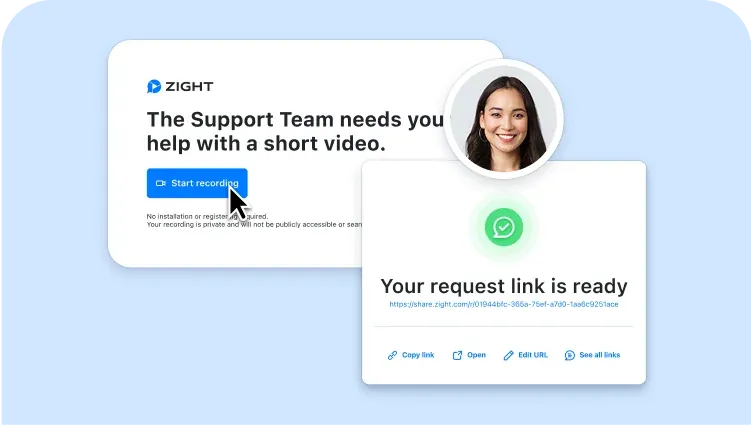
In the second, the customer shows. A request link lets the customer record their own screen with no account and no install, so the agent sees the problem instead of reading about it. Zight, Jam and Birdie offer this. Birdie prices in euros only; see how Zight and Birdie compare. For the workflow itself, read how to collect a screen recording from a customer.
1. Zight: see the customer’s screen before the next reply
Best for support teams whose tickets stall while the agent asks what the customer is seeing. Send a Request Video link in the ticket, chat or email. The customer records their screen, camera or voice in the browser, with no account and no install, and the recording lands in your Zight workspace. Agents can reply the same way: record the fix, or annotate a screenshot that points at the right setting.
Request Video is one of Zight’s request links, which also collect a file or a screenshot. Edward Wikstrom, Director of Technology at St. Dominic High School, puts it this way: “Request Video is so much better than users trying to explain what’s happening in an e-mail… I can see exactly when an issue occurs and what is causing it.”
Free plan: the Share plan is free, with recordings up to 5 minutes, 5 Video Requests a month, screenshots and 15-second GIFs.
Price: Create, Collaborate and Scale are the paid plans. Video Requests rise to 10 a month on Create and 50 on Collaborate, and Scale volume is custom. See current Zight plans and prices.
Where it stands out: the request is a link, so it works next to any help desk. Zight’s Zendesk and Intercom apps, and its Fin and Salesforce Service Cloud integrations, put the request inside the ticket or conversation. Those four are premium integrations: an add-on on Create and Collaborate, and included on Scale. Zight is HIPAA compliant on the Scale plan, with a signed BAA available. See the full video customer support workflow.
Skip it if you need a ticket queue, routing or SLAs. Zight isn’t a help desk, so pair it with one.
2. Jam: bug reports with console and network logs
Best for teams whose support tickets often turn into engineering bugs. Jam’s browser extension captures console and network logs, device metadata and user actions on every plan, so a report reaches engineering with the technical context attached. For customers, Jam’s Recording Links need “no browser extension, no account, no downloads” and work in desktop Chrome, Edge, Firefox and Safari. Logs on those customer recordings need your domain connected and Jam’s script installed on your site.
Free plan: 30 Jams, 5 Recording Links, recordings up to 5 minutes and 5 creator seats. Team also has a 14-day free trial.
Price: Team is $14 per creator per month billed yearly, or $16 monthly. It includes 150 Recording Links a month, recordings up to 15 minutes and up to 50 creators.
Where it stands out: Jam lists help desk integrations with Zendesk, Intercom, Intercom Fin AI, Freshdesk, HubSpot, Jira Service Desk and ServiceNow. For a side-by-side, read how Zight and Jam compare for support teams.
Skip it if you run Help Scout, which isn’t on Jam’s integrations list, or you want logs on customer recordings without installing Jam’s script on your site.
3. Zendesk: ticketing across every channel
Best for teams that need ticketing and routing, and expect to add channels as they grow. Zendesk pitches Support Team “for teams that have outgrown a shared inbox,” with email ticketing, routing, and automations and triggers. Suite Team adds AI agents, a knowledge base, messaging, live chat and telephony.
Free plan: none. Zendesk offers a 14-day free trial of Suite Professional, with no credit card required.
Price: Support Team is $19 per agent per month billed annually, or $25 monthly. Suite Team is $55 per agent per month billed annually, or $69 monthly.
Where it stands out: AI agents come with every plan. Support Team and Suite Team include 5 automated resolutions per agent a month, and Suite Professional includes 10. After that, each resolution costs $1.50 committed or $2.00 pay-as-you-go. Copilot is $50 per agent per month billed annually. Zight’s Zendesk app lets agents request a customer video from the ticket; it’s an add-on on Zight’s Create and Collaborate plans and included on Scale.
Skip it if you want chat, messaging and a knowledge base at the entry price. They start at Suite Team, $55 per agent per month billed annually.
4. Freshdesk: a customer portal and knowledge base on the entry plan
Best for teams that want a customer portal and a knowledge base without buying a suite. Freshdesk sells its Growth plan as “Launch AI-powered service over email,” and it includes ticketing, a shared inbox, a customer portal and a knowledge base.
Free plan: not on the pricing page. A Freshdesk support article describes a Free program for up to two agents, free for six months, after which you upgrade to a paid plan. The 14-day trial runs on the Enterprise plan.
Price: Growth is $19 per agent per month billed annually, or $23 monthly. Pro is $55 billed annually, or $66 monthly.
Where it stands out: the Freddy AI Agent includes 500 sessions, once per account, then costs $49 per 100 sessions. Freddy AI Copilot is $29 per agent per month billed annually, or $35 monthly.
Skip it if you need a free plan that lasts. The Free program covers two agents for six months.
5. Help Scout: a shared inbox with a built-in help center
Best for teams that answer most questions by email and want a help center in the same tool. Every plan includes Docs, Help Scout’s knowledge base: one site on Free and two on Standard. Standard adds multiple inboxes, live chat and SMS, WhatsApp, Instagram and Messenger, and multiple knowledge bases.
Free plan: yes. Help Scout says Free includes “5 users, 1 Inbox, and 1 Docs site,” with 100 contacts a month and no AI tools. Standard and Plus have a 15-day trial with no credit card.
Price: Standard is $25 per user per month billed annually, or $30 monthly. Plus is $45 or $54, and Pro is $75 or $90 with a 10-user minimum. Help Scout now prices per user rather than per contact.
Where it stands out: AI Answers is an add-on at $0.75 per resolution, with an optional monthly cap, and new accounts get three months of it free.
Skip it if you want AI on the free plan, which includes none, or you’ll pass 100 contacts a month before you’re ready to pay.
6. HubSpot Service Hub: tickets in the same CRM as sales
Best for teams whose sales and marketing already run on HubSpot’s CRM, so support tickets live in the same system. Starter includes simple ticket automation, multiple ticket pipelines and live chat. Professional adds a help desk workspace, Customer Agent (HubSpot’s AI agent) and a knowledge base.
Free plan: yes, free for up to 2 users, with no credit card required. Paid editions have a 14-day trial.
Price: Starter’s list price is $20 per seat a month. For new customers, HubSpot currently offers Starter at $7 per seat a month billed annually, or $10 monthly, and says the offer is available “for a limited time.” Professional is $90 per seat a month billed annually, or $100 monthly with an annual commitment, plus a required $1,500 onboarding fee.
Where it stands out: AI runs on HubSpot Credits. Starter includes 500 a month and Professional 3,000. Customer Agent uses 50 credits per resolved text conversation, and extra credits cost $0.010 each.
Skip it if you want the knowledge base or an AI customer agent on a small budget. Both start on Professional, with its $1,500 onboarding fee.
7. Zoho Desk: a free plan for three agents and a low entry price
Best for small teams that want email ticketing for free, then a low per-user price as they grow. Zoho Desk also takes support tickets from Instagram, Facebook and X.
Free plan: yes, with three user licenses and email ticketing. The 15-day trial needs no credit card, and the account drops to the free plan when it ends.
Price: Express is $7 per user per month billed annually, or $9 monthly, for up to 5 users. Standard is $14 per user per month billed annually, or $20 monthly.
Where it stands out: Zoho Desk’s AI agents run on your own model key or on Zoho’s LLM, with up to 30 million free tokens a month.
Skip it if you have more than five agents and want the Express price, which is capped at five users.
8. Salesforce Service Cloud: case management inside Salesforce
Best for companies that already run on Salesforce and want support cases in the same org as sales. Salesforce describes Service Cloud Core as “the CRM for service with every essential service tool to manage cases and resolve issues fast.”
Free plan: none. Salesforce offers a 30-day free trial with no credit card and no installation.
Price: Service Cloud Core is $195 per user per month billed annually. Advanced is $395 and Max is $550. Salesforce also sells Starter Suite, a multi-cloud CRM suite, from $25 per user per month, billed monthly or annually, with transaction fees.
Where it stands out: Zight’s Salesforce Service Cloud integration lets agents attach a recording to a case or request one from the customer; it’s an add-on on Zight’s Create and Collaborate plans and included on Scale. The Service Cloud screen-recording workflow walks through it from case to resolution.
Skip it if you aren’t on Salesforce already. Service Cloud’s own editions start at Core, $195 per user per month billed annually.
9. Front: shared inbox and ticketing for email-heavy teams
Best for teams that answer customers from shared email addresses and want ticketing without leaving an inbox. Starter includes a shared inbox and ticketing, with up to 10 automation rules.
Free plan: none. The 14-day trial includes Professional features and needs no credit card.
Price: Starter is $25 per seat per month billed annually, or $35 monthly, for up to 10 seats and a single channel type. Front’s help center sets the minimum at one license.
Where it stands out: Front prices its AI, Autopilot, by the outcome of each conversation: $0.05 for triage, $0.39 for a handoff and $0.89 for a resolution. Copilot is a $20 per seat a month add-on on Starter and Professional.
Skip it if you need several channel types on the entry plan. Starter covers one.
10. Intercom: in-app messaging with Fin answering first
Best for software companies that talk to customers inside their product and want an AI agent to take the first reply. Essential includes Messenger live chat and a shared inbox and ticketing system. Fin, Intercom’s AI agent, also runs on its own next to another help desk; Intercom says it “works with most helpdesks.”
Free plan: none. Intercom offers a 14-day free trial with no credit card, and the minimum is one full seat.
Price: Essential is from $29 per seat a month billed annually, or $39 monthly. Fin costs $0.99 per outcome on top of seats. Intercom counts at most one outcome per conversation, and charges nothing if the customer asks for a human. With another help desk, Fin is $0.99 per outcome with a $49 monthly minimum that includes 50 outcomes, and no seat costs.
Where it stands out: Zight’s Intercom app lets agents send a video or request a customer screen recording from the conversation, and Zight’s Fin integration lets a handoff from Fin start with the customer’s screen. Both are an add-on on Zight’s Create and Collaborate plans and included on Scale. See the Intercom screen-recording workflow.
Skip it if you want a predictable bill. Fin’s $0.99 per outcome comes on top of seats.
11. Tidio: live chat and an AI agent for small businesses
Best for small businesses that want website chat and an AI agent, priced by conversations rather than seats. Tidio puts chat, Instagram, Messenger and WhatsApp in “one intuitive inbox,” and its AI agent is called Lyro.
Free plan: yes, with 50 billable conversations a month and up to 10 seats. The first 50 Lyro conversations are free for the life of the account. The 7-day trial needs no credit card.
Price: Starter is $29 a month billed monthly, or $24.17 a month billed annually, for 100 billable conversations. The price is per plan, not per seat. The Lyro AI Agent plan starts at $39 a month ($32.50 billed annually) for 50 Lyro conversations.
Where it stands out: Lyro is also sold on its own and can be added to Zendesk, Salesforce or another help desk, so a team can try an AI agent without moving its tickets.
Skip it if most of your support arrives as email tickets that need routing and SLAs. A help desk fits that better.
12. Aircall: the phone layer, synced to your CRM
Best for teams whose customers call. Aircall describes Essentials as a “business phone system and customer conversations in one workspace, synced to your CRM,” and lists more than 250 integrations.
Free plan: none. Aircall’s help center describes a 7-day trial with 3 numbers, unlimited users and 100 call minutes. Plans include 50 free AI Voice Agent minutes a month.
Price: Essentials is $30 per license per month billed annually, or $40 monthly, with a three-license minimum. Professional is $50 billed annually, or $70 monthly.
Where it stands out: the AI Voice Agent costs $0.49 a minute pay-as-you-go ($0.39 above 2,500 minutes), or comes in bundles from $175 for 500 minutes. Standalone voice agents start at $100 a month billed annually, or $125 monthly.
Skip it if phone isn’t a support channel for you, or you’re fewer than three people, since the minimum is three licenses.
How we evaluated these tools
Zight wrote this comparison, and Zight is listed first. Read it with that in mind. Zight isn’t a help desk, so it sits in its own layer, and every entry, ours included, uses the same fields and ends with who should skip it. After Zight, the tools are grouped by layer, not ranked.
We read each vendor’s own pricing and product pages on October 7, 2026. We didn’t run timed tests, and nothing here is a hands-on benchmark. Where a vendor doesn’t publish a fact, such as Document360’s price, the entry says so instead of guessing, and promotions are labeled as promotions.
This page first ran in September 2020 as a guide to six types of customer support tool. We rebuilt it in October 2026 with current tools and published prices.
- Layer: which part of the support stack the tool covers.
- Free plan: what you get without paying, as the vendor lists it, and whether a free plan exists at all.
- Pricing unit and published price: per agent, user, seat, plan or license, and the billing period.
- AI pricing: what an AI resolution, outcome or session costs on top of the plan.
- Channels and integrations: which channels the entry plan covers, and what it connects to.
- Who skips it: the team or job each tool is a poor fit for.
A starter stack by team size
You don’t need every layer on day one. Start where your customers already reach you, then add the next layer when the volume shows up.
- Free start: Zoho Desk Free (3 users) or Help Scout Free (5 users, 100 contacts a month) for email tickets, Tidio Free (50 billable conversations a month) for website chat, and Zight’s free Share plan (5 Video Requests a month) when a customer needs to show you the problem.
- Growing team: a paid help desk such as Zendesk, Freshdesk or Help Scout, an AI agent billed per resolution or outcome, and Aircall once customers call. Build the knowledge base before you hire for repeat questions.
- Already on HubSpot or Salesforce: keep tickets on the CRM with HubSpot Service Hub or Salesforce Service Cloud, then add chat, phone and visual support around it.
What to look for in customer support tools
- Pricing unit: Zendesk and Freshdesk charge per agent, Help Scout and Zoho Desk per user, Front and HubSpot per seat, Tidio per plan by conversation volume, and Aircall per license. Count the people who need access before you compare prices.
- AI pricing: most AI agents are billed per resolution, outcome or session on top of the plan. Estimate your monthly volume first; the table below lists each unit.
- Free-plan ceilings: Help Scout Free stops at 100 contacts a month, Tidio Free at 50 billable conversations, HubSpot Free at 2 users and Zoho Desk Free at 3. Freshdesk’s Free program ends after six months.
- Channels on the entry plan: Front Starter covers a single channel type, and Zendesk adds messaging, live chat and telephony at Suite Team.
- Knowledge base: Help Scout includes one on every plan and Freshdesk on Growth. Zendesk adds it at Suite Team, and HubSpot at Professional.
- Minimums and onboarding fees: Aircall needs three licenses, Help Scout Pro needs ten users, and HubSpot Professional carries a $1,500 onboarding fee.
- Integrations: whether your chat, phone and visual tools connect to the help desk, or only arrive as pasted links.
What AI agents cost in each tool
AI agents are where support pricing changes fastest. These are the published units on October 7, 2026, for the tools above that list one. Salesforce isn’t included because its pricing page didn’t give a per-unit price we could read.
| Tool | AI agent | Published price | Billed per |
|---|---|---|---|
| Zendesk | AI agents | 5 automated resolutions per agent a month on Support Team and Suite Team (10 on Suite Professional), then $1.50 committed or $2.00 pay-as-you-go | Automated resolution |
| Freshdesk | Freddy AI Agent | 500 sessions once per account, then $49 per 100 sessions | Session |
| Help Scout | AI Answers | $0.75, with an optional monthly cap | Resolution |
| HubSpot Service Hub | Customer Agent | 50 credits per resolved text conversation; 500 credits a month on Starter, 3,000 on Professional; extra credits $0.010 each | Credit |
| Zoho Desk | AI agents | Your own model key or Zoho’s LLM, with up to 30 million free tokens a month | Token |
| Front | Autopilot | $0.05 triage, $0.39 handoff, $0.89 resolution | Conversation, by outcome |
| Intercom | Fin | $0.99; with another help desk, a $49 monthly minimum that includes 50 outcomes | Outcome |
| Tidio | Lyro | From $39 a month ($32.50 billed annually) for 50 Lyro conversations | Lyro conversation |
| Aircall | AI Voice Agent | $0.49 a minute pay-as-you-go ($0.39 above 2,500 minutes); bundles from $175 for 500 minutes | Minute |
Whatever help desk you choose, see the screen first
A help desk can route a ticket, but it can’t see the customer’s screen. Send a Request Video link from the ticket, and the customer records the problem in the browser, with no account and no install. Troubleshooting starts with evidence instead of a description of a description.
Unlike a recorder that only sends video out, Zight also asks for it. See how support teams run that loop, from request to reply to a reusable answer, on the Zight customer support page.
Frequently asked questions
What are customer support tools?
Customer support tools, also called customer service tools, are the software a support team uses to receive, answer and resolve customer requests. Most teams build them as a stack: a help desk or shared inbox that owns the queue, live chat and an AI agent for instant answers, a phone system if customers call, a knowledge base for self-service, and visual support for seeing and showing the problem on screen.
What are the best free customer support tools?
Several tools here have a free plan. Zoho Desk is free for 3 users, Help Scout for 5 users with 1 inbox, 1 Docs site and 100 contacts a month, and HubSpot for up to 2 users. Tidio’s free plan covers 50 billable conversations a month, Jam’s includes 5 Recording Links, and Zight’s Share plan includes 5 Video Requests a month. Freshdesk’s Free program covers 2 agents for 6 months. Zendesk, Salesforce Service Cloud, Front, Intercom and Aircall have no free plan, only trials.
What are the top 5 ticketing tools?
Zendesk, Freshdesk, HubSpot Service Hub, Help Scout and Zoho Desk. Across the 9 listicles ranking for “customer support tools” on October 7, 2026, they appeared on 9, 8, 8, 7 and 6 pages, which makes them the usual ticketing shortlist. Intercom appeared on 8 too, but it leads with chat and an AI agent, so it sits in that layer here. Which help desk fits depends on your channels, your CRM and your budget.
What are the best tools for customer communication?
Match the tool to the channel. For email, use a help desk such as Zendesk or Help Scout, or a shared inbox such as Front. For live chat and messaging, use Intercom or Tidio, and for phone, Aircall. When words aren’t enough, go visual: record a short video that shows the fix, or send the customer a request link so they can show you the problem.
What customer support tools does a small business need?
Start with one help desk and add layers when the volume shows up. A free stack covers a lot: Zoho Desk Free or Help Scout Free for email tickets, Tidio Free for website chat, and Zight’s Share plan for customer screen recordings. Add a phone system such as Aircall once customers call, keeping in mind its three-license minimum. The starter stack above has the version for a growing team.
How much do AI agents cost in customer support software?
Most vendors now charge for AI by result. As published on October 7, 2026, Intercom’s Fin is $0.99 per outcome, Help Scout’s AI Answers $0.75 per resolution and Front’s Autopilot $0.89 per resolution. Zendesk includes 5 automated resolutions per agent a month on its entry plans, then charges $1.50 committed or $2.00 pay-as-you-go. Freshdesk includes 500 Freddy AI Agent sessions once per account, then $49 per 100 sessions. HubSpot’s Customer Agent uses 50 credits per resolved text conversation, at $0.010 per extra credit, and Aircall’s AI Voice Agent is $0.49 a minute pay-as-you-go.