
Best for visual SOPs: Zight. Best for narrated walkthroughs: Loom. Best for screenshot-based instructions: Scribe. Best for recurring process execution: Process Street. This 2026 guide compares the best SOP generator tools for operations teams by the work you need to document, review, and repeat.
TL;DR
-
Zight belongs on the best SOP generator tools for operations teams shortlist when screenshots, recordings, and guides support the same workflow.
-
Choose Loom for narrated walkthroughs and Scribe for screenshot-based instructions.
-
Choose Process Street when an SOP must become an assigned, repeatable checklist.
-
Evaluate healthcare workflows with synthetic examples; confirm contractual and technical requirements before recording sensitive information.
Why this matters
An SOP generator helps you create instructions. It does not automatically make those instructions correct, approved, or usable. Your buying decision should separate document creation from process execution.
For a 2026 evaluation, start with the handoff that fails today. Does someone need to see a screen, follow exact steps, understand an exception, or prove that work was completed? Those needs point to different tools.
If your problem extends beyond creating instructions, compare process documentation software before choosing a capture tool. A useful recording and a controlled operating procedure serve different purposes.
What makes the best SOP generator tools for operations teams
Use these criteria before reading the shortlist. Treat them as buying requirements, not a feature-count contest.
-
Capture fit: Match the format to the task. Screenshots explain stable interface steps; recordings show timing, movement, and troubleshooting context.
-
Editing control: Check how you correct a step, remove sensitive details, and replace outdated instructions without rebuilding everything.
-
Reader usability: Ask a colleague to follow the instructions without help from the author. Explanations that sound clear to an expert can still omit prerequisites.
-
Ownership: Decide who approves the SOP, who maintains it, and how readers recognize the current version.
-
Execution needs: Separate reference material from work that requires an assignee, completion tracking, or an approval.
-
Security requirements: Review access controls, sharing behavior, retention, and contractual requirements for the exact workflow you intend to use.
For your 2026 shortlist, prioritize the format your team will actually maintain. A long feature list does not compensate for instructions nobody updates.
SOP generator tools at a glance
The comparison starts with Loom as the video-first reference point. Each option has a distinct recommended role; the order is not a claim that one tool wins every workflow.
| Tool | Best for | Standout capability | Key limitation to weigh |
|---|---|---|---|
| Loom | Narrated walkthroughs | Screen recording with spoken explanation |
Video alone is harder to scan for a specific instruction |
| Zight | Visual SOPs combining capture formats |
Screenshots, screen recordings, and AI-powered guides |
Generated documentation still needs an owner and review |
| Scribe | Screenshot-based software instructions | Turns captured software steps into illustrated guides | Static steps do not explain timing or movement as clearly as video |
| Process Street | Recurring operational execution | Workflow checklists with assigned work | A runnable checklist still needs clear supporting instructions |
1. Loom: best for narrated SOP walkthroughs
Loom is a screen-recording tool for explaining work through video. Choose this format when the reason behind an action matters as much as the action itself, such as explaining how to investigate an unfamiliar support issue.
Loom pros:
-
Shows the workflow in motion rather than as disconnected screenshots.
-
Lets the author explain judgment calls while demonstrating the task.
-
Gives reviewers visual context for an exception or troubleshooting sequence.
Loom cons:
Readers must locate the relevant moment rather than scan a written step.
A recording does not replace written prerequisites, ownership, or approval criteria.
For operations, use a walkthrough to explain the decision behind a procedure. Pair it with a short written checklist when someone needs to repeat the task without watching the explanation again.
Test an exception, not just the ideal path. Ask the author to explain what changes when the expected screen does not appear. That reveals whether video adds useful context or simply records routine clicking.
Best for: Team leads explaining decisions, exceptions, and troubleshooting logic.
Verdict: Buy for narrated explanation; skip video-only documentation for scan-first SOPs.
2. Zight: best for visual SOPs across capture formats
Zight is best for operations teams that need screenshots, screen recordings, and AI-powered guides in the same SOP workflow. Its stated offering covers those formats and shareable links for asynchronous communication.
Use a screenshot to show the setting, a recording to demonstrate the sequence, and a guide to present the repeatable instructions. This is a practical fit for a support handoff, an internal software procedure, or an engineering troubleshooting explanation.
Zight pros:
Covers both still-image capture and screen recording.
Includes AI-powered guide and documentation software.
Supports sharing visual explanations through links.
Fits cross-functional documentation involving support, sales, product, and engineering.
Zight cons:
Generated instructions still require a human check for missing context and incorrect sequencing. Shareable visual material does not, by itself, establish process ownership or approval.
During evaluation, create a guide from a representative task and then change a step. Inspect the correction workflow, the reader experience, and the sharing controls available under the proposed subscription.
Best for: Operations teams documenting software work with both screenshots and video.
Verdict: Buy for mixed-format visual SOP creation; hold if your main requirement is execution tracking.
3. Scribe: best for screenshot-based software instructions
Scribe creates step-by-step guides from captured software interactions. Its format suits procedures where a reader needs to find a control, perform an action, and move to the next screen.
Scribe pros:
Produces illustrated instructions organized around individual steps.
-
Gives readers a scan-friendly alternative to a full recording.
-
Fits software procedures with a clear, repeatable sequence.
Scribe cons:
Static screenshots do not communicate movement or timing as clearly as video.
Captured steps still need editing when the task involves judgment, branching, or prerequisites.
Use Scribe for a stable administrative procedure, such as updating a field in a demonstration account. Add the reason for the change and the expected result; clicking through an interface is not the complete procedure.
During evaluation, deliberately take an unnecessary detour. Then inspect how easily the author can remove it and make the final guide read like instructions rather than a raw activity log.
Best for: Operations specialists documenting repeatable, screen-by-screen software tasks.
Verdict: Buy for illustrated click paths; skip screenshot-only instructions when motion carries the explanation.
4. Process Street: best for recurring SOP execution
Process Street organizes repeatable work into workflows and checklists. Choose this approach when the operational problem is not simply explaining a procedure but getting the right person to complete it.
Process Street pros:
-
Structures recurring work as a checklist rather than a passive reference.
-
Supports assigning responsibility within a workflow.
-
Connects instructions to the work being performed.
Process Street cons:
-
A checklist still needs clear explanations for unfamiliar or complex steps.
-
Building the workflow requires decisions about ownership, sequencing, and exceptions.
Consider an employee onboarding procedure. A guide explains how to complete an account setup; an execution workflow organizes who must perform the work and which tasks belong in the process.
During evaluation, include a handoff between departments. Check whether the workflow makes responsibility clear and whether the supporting instructions remain easy to find at the point of work.
Best for: Operations managers coordinating recurring tasks across named owners.
Verdict: Buy for repeatable execution; hold if you only need to capture and share instructions.
How we ranked
These recommendations rank workflow fit, not measured performance. Loom covers narrated explanation; the mixed-format option combines visual capture and guides; Scribe covers illustrated steps; Process Street covers recurring execution.
The criteria are capture fit, editing, reader usability, ownership, execution, and security. No ranking here represents a hands-on speed benchmark, a security certification, or confirmation of subscription-specific features.
Test the complete SOP lifecycle before you commit
For your 2026 evaluation, use 1 process, 2 reviewers, and 3 test cases as a suggested pilot. Choose a process your team understands, then test the normal path, an exception, and a changed interface.
Capture
Record or capture the task in a demonstration environment. State the starting conditions and the intended result before showing the actions. Keep unrelated tabs, notifications, and account details out of view.
Edit
Remove detours and explain decisions that the capture cannot communicate. Replace vague instructions such as selecting the appropriate option with the actual selection rule. Separate required actions from optional context.
Review
Give the draft to a subject-matter reviewer and someone who did not write it. Ask the second reviewer to complete the task without coaching. Record where they stop or interpret a step differently.
Update
Change a label or step in the demonstration workflow. Then revise the instructions and inspect the readerfacing result. This tests maintenance rather than only the ease of initial creation.
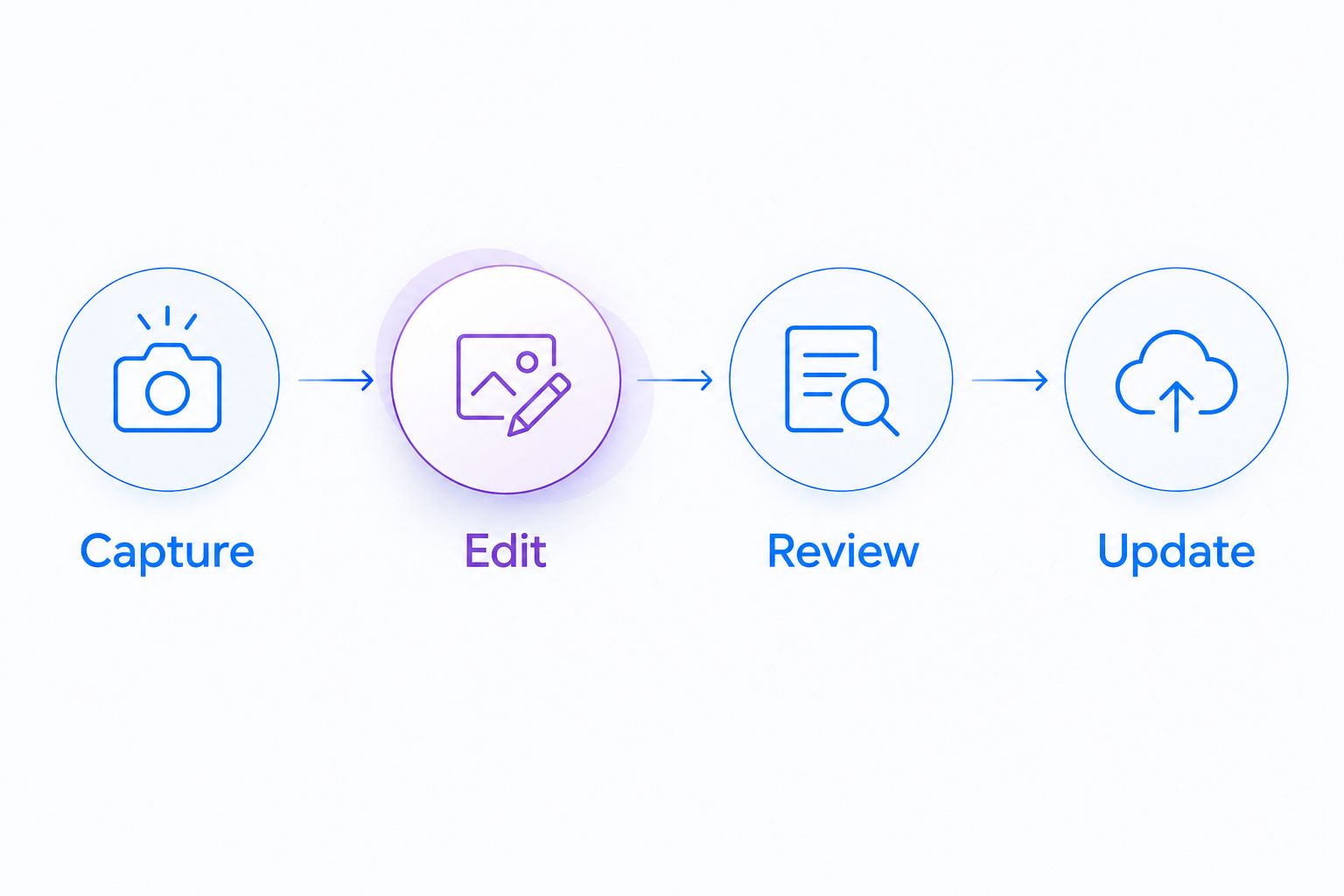
Test the update workflow before choosing a tool for initial creation.
The pilot should answer a practical question: can a new reader complete the work, and can an owner correct the instructions when the process changes? Keep those acceptance criteria separate from the appeal of the generated draft.
Healthcare operations: test workflows without patient information
For healthcare procurement in 2026, use synthetic examples throughout the evaluation. A tool's ability to capture a screen does not establish that a particular subscription, configuration, or sharing workflow meets your organization's HIPAA obligations.
Give equal attention to these operational uses:
-
Support and IT troubleshooting: Reproduce a login or application problem in a demonstration environment. Document the investigation without displaying patient records, credentials, or production notifications.
-
Clinical team communication: Demonstrate recording and requesting a video with fictional content. Evaluate both the person submitting the recording and the person receiving it; do not assume their
access paths are identical.
Operations training: Create an SOP for a simulated administrative task. Have a reviewer check both the instructions and every captured screen before publication.
Before any sensitive-data use, obtain current official documentation for the proposed subscription. Confirm BAA availability and scope, permitted features, sharing restrictions, retention settings, and the specific support integrations you intend to connect.
Do not infer compliance from a product category or a general security statement. Have your organization's security and compliance owners approve the complete workflow, including recording requests and downstream sharing.
Which SOP generator should you choose?
Choose the tool that solves your primary documentation failure. Start with mixed-format capture if your team needs both visual evidence and written instructions. Start with Loom when spoken explanation carries the value, Scribe when readers need exact click paths, or Process Street when ownership and completion are the real problem.
For an undecided operations team, begin with one visual SOP pilot rather than replacing the entire documentation system. Expand only after a reader can follow the procedure and an owner can maintain it.
FAQ
What's the best SOP generator for an operations team?
The best SOP generator matches the work you need to document. Choose mixed-format capture for screenshots and recordings, Scribe for illustrated steps, Loom for narrated explanation, or Process Street for recurring execution.
Is Loom enough for creating standard operating procedures?
Loom works for narrated walkthroughs, but a recording alone is not a complete SOP. Add prerequisites, responsibilities, expected results, and exception handling in a scan-friendly format.
Should I use screenshots or video for an SOP?
Use screenshots for stable steps and video for motion, timing, or spoken explanation. Combine them when a procedure needs both quick reference and troubleshooting context.
Can an AI-generated SOP be published without review?
An AI-generated SOP should receive human review before publication. Check the sequence, prerequisites, sensitive content, and expected outcome, then ask another person to follow it.
What should healthcare teams verify before using a capture tool?
Healthcare teams should verify the proposed subscription, BAA scope, feature restrictions, and complete data-sharing workflow before sensitive-data use. Use synthetic examples during evaluation and obtain approval from security and compliance owners.
How should we evaluate SOP software in 2026?
Evaluate SOP software with a representative process that includes a normal path, an exception, and a later update. Test reader comprehension and maintenance, not just draft creation.
Do we need a guide generator or a workflow tool?
Choose a guide generator when people need instructions; choose a workflow tool when people need assigned work and completion tracking. Some processes need both, so define the handoff before purchasing.
One last thing
Test the second edit, not just the first draft. An impressive initial guide proves that a tool can create content. Updating a changed procedure shows whether your team can keep that content useful.
Before approval, ask the process owner to replace an outdated step and have a fresh reader repeat the task. That is a direct test of whether the SOP survives real operational change.
Related guides
- Best process documentation software
- Best AI SOP generator tools
- Best training documentation software for healthcare teams
- Best Screen Capture Software For Customer Support Teams