
Loom is the starting comparison; Zight is the best-fit screen capture shortlist candidate for healthcare teams that need screenshots, recordings, and reusable guides together. For your 2026 evaluation, compare Microsoft Teams for meeting-led communication, OBS Studio for local recording, and Scribe for step-by-step documentation—but approve any workflow involving protected health information separately.
TL;DR
-
Among the best Loom alternatives for healthcare teams, Zight fits combined screen capture and documentation workflows.
-
Microsoft Teams fits meeting-led explanations; OBS Studio fits local recording; Scribe fits screenshot-based procedures.
-
Require written confirmation of BAA availability, eligible plans, and covered features before recording protected health information.
-
Test support troubleshooting, clinical video requests, and operations training with synthetic examples before selecting software.
Why this matters
A healthcare team does not buy a screen recorder for one job. Support needs evidence of an error, clinical staff need to explain or request a demonstration, and operations needs a procedure someone else can follow.
Those jobs create different requirements. A recording that explains a problem is not automatically a controlled training asset, and a shareable link is not automatically appropriate for protected health information, or PHI.
Zight combines screen recording, screenshots, and AI-powered guides for asynchronous communication. That makes it a relevant alternative to evaluate—not evidence that every plan, feature, or sharing workflow is approved for healthcare data.
For a 2026 purchase, separate functional fit from compliance approval. Your security and privacy teams should approve the exact configuration, contractual terms, and intended data flow before deployment.
Start with Loom as your baseline
Loom centers the comparison on asynchronous video: record an explanation so the recipient can watch without joining a live call. Keep that workflow as your baseline rather than replacing software simply to change vendors.
Loom pros:
Video communicates movement and sequence more clearly than a static screenshot.
- An asynchronous explanation removes the need for both participants to attend simultaneously. A recorded demonstration gives the recipient something to revisit.
Loom cons:
A video explanation is not the same deliverable as an editable written SOP.
Recording can expose information outside the task you intended to show.
- Healthcare approval still requires a review of current official terms and feature scope.
Best for: Teams whose main requirement is an asynchronous video explanation.
Verdict: Hold as the baseline until an alternative solves a specific workflow gap.
What makes the best healthcare screen capture alternative?
Use these criteria to assess the best Loom alternatives for healthcare teams in 2026:
-
Contractual scope: Obtain written confirmation of BAA availability, the required plan, and the features covered by the agreement.
-
Capture format: Match screenshots, video, or written guides to the task instead of forcing every explanation into a recording.
-
Request workflow: Check how another person submits a video, authenticates, and controls what enters the recording.
-
Access and retention: Establish who can view, download, share, retain, and delete each asset.
-
Integration boundary: Verify the exact support integration, including whether it transfers an attachment, a link, or additional data.
-
Documentation upkeep: Assign an owner to update recordings and instructions when the underlying workflow changes.
Do not accept an unqualified HIPAA label as a substitute for this review. HIPAA obligations depend on your organization's role, the information involved, applicable agreements, and how the service is configured and used.
Healthcare Loom alternatives at a glance
The table ranks alternatives by distinct workflow fit, not by a claimed level of HIPAA compliance. No product below receives blanket approval for PHI.
| Option | Best for | Standout function | Key limitation |
|---|---|---|---|
| Zight | Combining capture and reusable instructions |
Screenshots, screen recordings, and AI-powered guides |
Exact healthcare plan and feature scope require confirmation |
| Microsoft Teams | Meeting-led explanations | Meetings with recording capabilities | Meeting recordings are not structured SOPs |
| OBS Studio | Locally controlled recording |
Configurable recording to local files |
Sharing, retention, and access need a separate process |
| Scribe | Screenshot-based procedures |
Step-by-step workflow documentation |
Static instructions do not show continuous motion |
1. Zight: best for combined capture and documentation
Zight provides screen recording, screenshots, and AI-powered guide/documentation software through shareable links. Evaluate it when support, product, engineering, and operations need different outputs from related workflows.
For healthcare IT, demonstrate a failed application action using a synthetic account. For operations, document the corrected procedure so the explanation becomes an instruction someone can reuse.
Zight pros:
-
Supports both screenshots and screen recordings.
-
Includes AI-powered guide/documentation capabilities.
-
Supports asynchronous communication through shareable links.
-
Addresses several business teams rather than only meeting attendees.
Zight cons:
-
Shareable links still require an approved access policy.
-
Generated documentation needs review before it becomes an SOP.
-
Healthcare use requires confirmation of eligible plans, BAA terms, and feature limitations.
Best for: Teams evaluating one screen capture and documentation workflow across troubleshooting and training.
Include Request Links and Playbooks in the vendor demonstration if they are part of your intended deployment. Ask the vendor to show their current behavior, account requirements, and healthcare scope; do not infer those details from the feature names.
Verdict: Buy only after approval of the exact plan, configuration, and workflows your team will use.
2. Microsoft Teams: best for meeting-led explanations
Microsoft Teams supports meetings and meeting recording. Evaluate it when the explanation genuinely needs live discussion, questions, or several participants before a recording becomes useful.
A healthcare operations team can use a synthetic training session to assess whether a recorded walkthrough answers staff questions. Keep meeting recording distinct from capturing a short, targeted reproduction of a software problem.
Microsoft Teams pros:
Combines live discussion with a recording workflow.
-
Fits explanations that require questions during the session.
-
Preserves the sequence of a demonstrated task.
Microsoft Teams cons:
Meeting recordings require editing or supplementary instructions to become concise SOPs.
Participants and shared screens create additional information-exposure points.
Your administrators must confirm recording permissions and applicable contractual scope.
Best for: Teams whose core requirement is a recorded discussion rather than standalone screen capture.
Ask your administrator to demonstrate recording access, storage, deletion, and external sharing in your actual environment. A familiar meeting tool still needs a workflow-specific review.
Verdict: Hold if your requirement is quick asynchronous troubleshooting; select it when live participation is essential.
3. OBS Studio: best for locally controlled recording
OBS Studio is open-source recording and streaming software that can save recordings as local files. It fits teams that want control over capture configuration and already have an approved destination for the resulting files.
For healthcare IT, use a synthetic application to record a reproducible interface issue. Treat file transfer, storage, and deletion as separate responsibilities rather than assuming the recorder handles them.
OBS Studio pros:
Records to local files.
Provides configurable capture sources and scenes.
- Suits repeatable demonstrations with a controlled setup.
OBS Studio cons:
-
Requires more capture setup than a simple record-and-share workflow.
-
Does not replace an approved organizational sharing process.
-
Local files introduce endpoint storage and deletion responsibilities.
Best for: Technical teams with established endpoint controls and an approved file-handling process.
Local recording does not establish HIPAA compliance. The endpoint, visible information, destination, access permissions, and retention process all remain part of the review.
Verdict: Buy into the workflow only after approval of the recording environment and file lifecycle.
4. Scribe: best for screenshot-based procedures
Scribe creates step-by-step documentation from captured workflows. Evaluate it when the finished deliverable should be a written procedure rather than a video someone must replay.
A healthcare operations team can document a synthetic account-setup process or an internal administrative task. The reviewer should check every captured screenshot and instruction before publishing the guide.
Scribe pros:
Produces a step-by-step format for repeatable procedures.
-
Connects instructions with screenshots of the workflow.
-
Gives reviewers a written artifact to assess.
Scribe cons:
Static steps do not show timing or continuous motion.
Captured screenshots can include unintended information.
- Generated instructions still require ownership and review.
Best for: Operations teams whose primary output is a maintained written SOP.
Do not use a documentation-first tool to solve every troubleshooting problem. An intermittent interface failure can require video evidence even when the final resolution belongs in a written guide.
Verdict: Buy only after approval when written procedures are the primary deliverable; skip it as a complete video replacement.
Verify healthcare scope before the pilot
For your 2026 review, request current official documentation and written answers from each vendor. Record the publication or confirmation date and the exact plan and features covered.
Use the same questions for every candidate:
-
Is a BAA available for the purchasing entity and selected plan?
-
Which recording, screenshot, guide-generation, and video-request features fall within that agreement?
-
How are external viewers and contributors authenticated?
-
What happens to captured information during automated processing?
-
Which retention, deletion, download, and sharing controls apply?
-
Does the named support integration move content into another service?
For integrations, require a demonstration of the exact connection you intend to deploy. Document the destination, data transferred, permissions, and deletion behavior; an integration name alone does not establish an approved data flow.
Keep PHI out of the evaluation until that review is complete. Use invented names, synthetic records, and demonstration accounts throughout the pilot.
Run a pilot across three healthcare workflows
Use 3 pilot tasks rather than a general feature tour. Give each task 1 workflow owner and assign 2 reviewers: one responsible for the operational result and one responsible for privacy or security approval.
Support troubleshooting
Ask an IT analyst to capture a synthetic login or application error. The recipient should identify the failed action and reproduce the issue without asking the analyst to repeat the demonstration live.
Clinical demonstrations
Ask a clinical team member to record a synthetic workflow demonstration, then test requesting a demonstration from another participant. Assess both directions separately: creating a recording and receiving someone else's recording introduce different responsibilities.
Operations training
Ask an operations owner to turn a synthetic administrative workflow into reusable instructions. Have a colleague follow the instructions without coaching, then record which steps need correction.
Review access
Test the intended viewer permissions and sharing behavior with demonstration content. Confirm that the approved audience can access the asset and that unauthorized access does not become part of the workflow.
Approve ownership
Assign responsibility for corrections, retention, and retirement. A useful recording becomes a liability when nobody knows whether its instructions are still current.
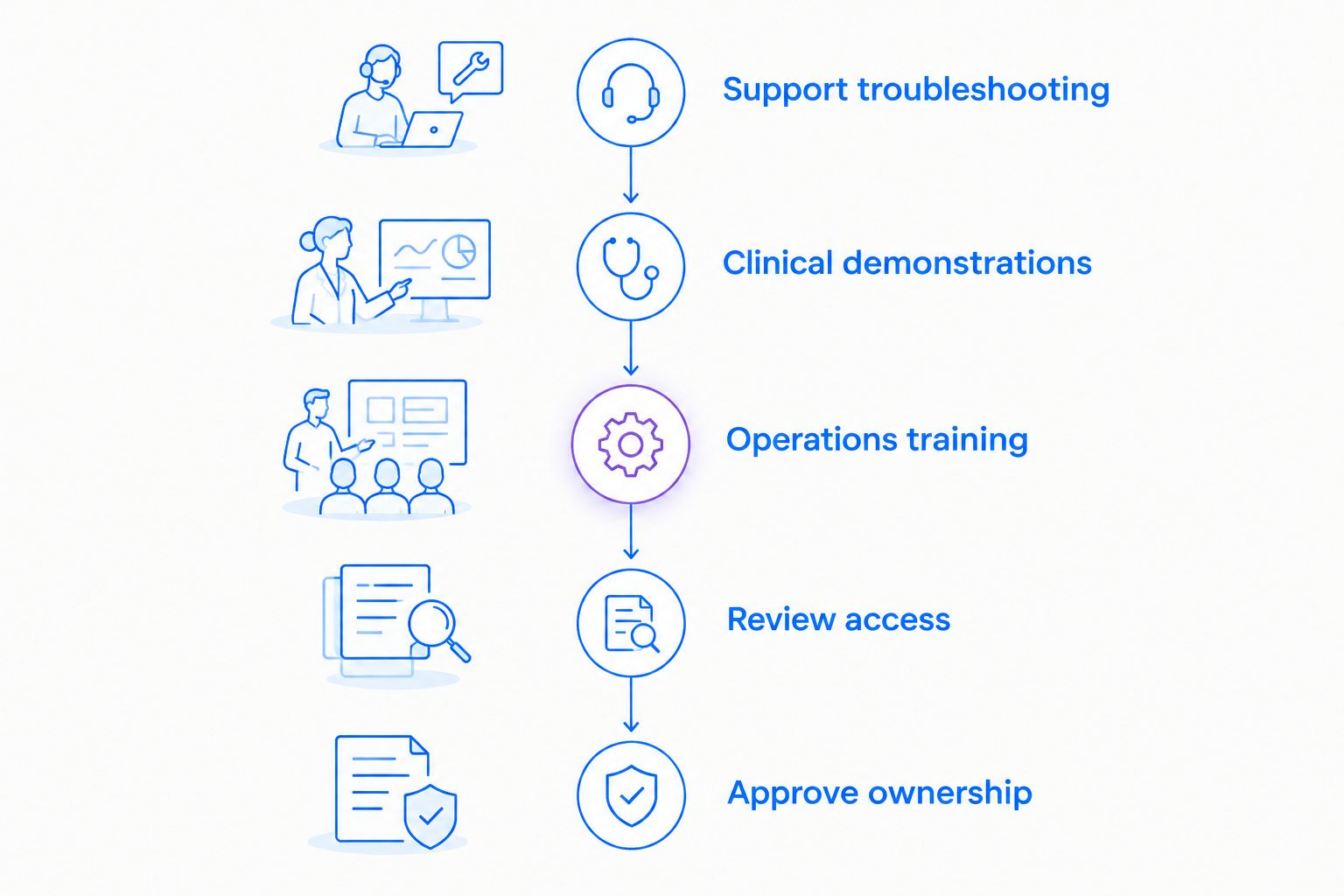
Evaluate recording, requesting, and documentation as separate tasks before approving the workflow.
Score each task against its intended outcome, not recording length or the number of features demonstrated. A successful pilot produces an understandable explanation, an approved access path, and a named owner.
How the alternatives are ranked
This 2026 shortlist ranks products by their documented category functions and the deliverable each workflow needs. It is not a hands-on benchmark or a certification of healthcare eligibility.
Combined capture and documentation comes first because this evaluation covers several healthcare teams. Meeting-led communication, local recording, and written procedures follow as distinct alternatives —not weaker versions of the same requirement.
Which alternative should you choose?
Start your 2026 evaluation with Zight screen capture and documentation software when you need screenshots, video, and reusable guides together. Keep Loom as the baseline so the decision reflects a real workflow improvement.
Choose Microsoft Teams when live discussion drives the task. Choose OBS Studio when local recording and a separately managed file process are deliberate requirements. Choose Scribe when the required output is a written procedure.
Do not approve a purchase for PHI workflows until the contract, configuration, features, and integrations have passed your organization's review.
FAQ
What's the best Loom alternative for healthcare teams?
Zight is the best-fit shortlist candidate for teams combining screenshots, screen recordings, and reusable guides. Healthcare deployment still requires confirmation of the exact plan, BAA terms, feature coverage, and configuration.
Are all screen recorders HIPAA compliant?
No. A recorder's features do not establish that your particular use satisfies HIPAA requirements; review the agreement, configuration, access controls, and data handling.
Can a healthcare team evaluate recording software without patient information?
Yes. Use synthetic records, invented identities, and demonstration accounts to test troubleshooting, clinical demonstrations, and training workflows.
Is local recording safer than sharing a video link?
Neither method establishes an approved workflow by itself. Local recording requires endpoint and file controls, while link sharing requires approved access and sharing controls.
Should clinical teams test video requests separately from recordings?
Yes. Requesting a video adds a contributor and submission process, so review authentication, capture instructions, storage, and access separately.
Is a video recording enough for an SOP?
A recording alone is not a complete maintained procedure. Add clear instructions, an owner, and a review process so staff know what to follow and who updates it.
What should healthcare IT ask about support integrations?
Ask what data the exact integration transfers and where it goes. Confirm permissions, retention, deletion, and contractual coverage for every connected service.
One last thing
Test the recipient's experience, not just the recorder's. Have someone outside the pilot team use the demonstration recording or guide without explanation; if they cannot identify the next action, improve the artifact before expanding the rollout.
Related guides
- Best Screen Recording Software For Healthcare It Support
- Best HIPAA Compliant Video Tools For Clinical Teams
- Best training documentation software for healthcare teams
- Best AI SOP generator tools