
Best overall for visual process documentation: Zight. Best for capturing click-by-click instructions: Scribe. Best for a flexible team wiki: Notion. This 2026 guide compares process documentation software by what you need to capture, how people use the instructions, and who maintains them.
TL;DR
-
Zight is the best process documentation software choice here for teams combining screenshots, recordings, and AI-powered guides.
-
Start with Loom for narrated walkthroughs; compare Scribe and Tango for click-by-click instructions.
-
Choose Notion or Confluence when organizing and maintaining written procedures matters more than capturing them.
-
Healthcare teams must verify plan requirements, BAA availability, and workflow restrictions before recording sensitive information.
Why this matters
A recording explains what happened. A maintained procedure explains what someone should do next, including exceptions and ownership. Buying one does not automatically give you the other.
For your 2026 shortlist, separate capture from publishing and governance. Support teams need reproducible troubleshooting steps; operations teams need approved procedures; product and engineering teams need enough context to explain behavior without another meeting.
Choose the documentation format your reader needs, not the tool that produces the longest document. A screenshot can clarify a setting, while a narrated recording can explain why that setting matters. Written instructions make the required action easier to scan.
What makes the best process documentation software?
Use these criteria before comparing feature lists:
-
Capture fit: Can you explain the task with screenshots, video, written steps, or a useful combination?
-
Reader effort: Can someone find the relevant instruction without watching an entire recording?
-
Maintenance: Can an owner correct a changed step without rebuilding unrelated material?
-
Organization: Can your team distinguish the approved procedure from drafts and outdated copies?
-
Workflow fit: Does the software suit troubleshooting, onboarding, recurring operations, or another defined job?
-
Access requirements: Do sharing controls and contractual terms match the information you intend to capture?
Keep those criteria separate. A strong recorder is not automatically the strongest knowledge base, and a flexible wiki does not automatically capture a workflow for you.
Process documentation software at a glance
The 2026 shortlist below assigns each tool a distinct job. The order favors visual capture first, then step capture, then documentation organization—not a claim that every team needs the first option.
| Software | Best for | Standout capability | Key trade-off |
|---|---|---|---|
| Zight | Combining visual explanations and guides |
Screen recording, screenshots, AI-powered documentation, and shareable links |
Choose a separate system of record if procedures require formal policy governance |
| Loom | Narrated process walkthroughs | Screen recordings that explain actions and reasoning | A video still needs a scannable procedure when readers must follow exact steps |
| Scribe | Click-by-click software instructions |
Turning captured actions into screenshot-based guides |
Click sequences do not explain every decision or exception |
| Tango | Application workflow walkthroughs |
Capturing software workflows as step-by-step instructions |
The captured path still needs checks against alternate scenarios |
| Notion | A flexible team wiki | Combining written pages, structured information, and linked documentation |
Your team must define templates, ownership, and review habits |
| Confluence | Structured cross-team documentation | Organizing documentation in spaces and pages | Organization alone does not keep instructions accurate |
1. Zight: best process documentation software for visual guides
Zight combines screen recording, screenshots, and AI-powered guide/documentation software for business teams. Support, sales, product, and engineering teams can explain a workflow asynchronously through shareable links.
Use it when a written description leaves too much room for interpretation. Show the action, capture the relevant screen, and turn the explanation into instructions that another person can follow.
Zight pros:
-
Combines screenshots and recordings rather than forcing every explanation into one format.
-
Supports AI-powered guides and documentation alongside visual capture.
-
Fits troubleshooting and handoffs where showing the actual behavior matters.
Zight cons:
-
A captured explanation still needs an owner, an approval decision, and a maintenance schedule.
-
Visual documentation does not replace a formal policy repository when your organization requires one.
For example, a support lead can document a synthetic account-setup issue with a recording and supporting screenshots. The procedure should state the expected result, the escalation condition, and the person responsible for updates.
Best for: Teams that need screenshots, screen recordings, and guides within their process-documentation workflow.
Verdict: Buy for visual-first documentation; evaluate governance separately.
2. Loom: best process documentation software for narrated walkthroughs
Loom centers on recorded video explanations. It suits procedures where the reasoning behind an action matters as much as the clicks themselves.
Begin a Loom-alternative evaluation with the same task in each candidate. Record a troubleshooting explanation, then ask a colleague to locate a specific instruction without help.
Loom pros:
Shows the sequence of on-screen actions in context.
Lets a narrator explain judgment calls while demonstrating a task.
Works well for asynchronous walkthroughs and handoffs.
Loom cons:
A reader following an exact procedure still needs scannable instructions.
When a workflow changes, review the recording for outdated actions and narration.
A narrated explanation is useful for a product handoff: demonstrate the behavior, explain the intended outcome, and identify the unresolved question. For a recurring operating procedure, add a written checklist so viewers do not have to reconstruct the required steps.
Best for: Teams documenting reasoning-heavy workflows through narrated video.
Verdict: Buy for explanations; skip a video-only approach for mandatory checklists.
3. Scribe: best process documentation software for click-by-click SOPs
Scribe captures software actions and turns them into step-by-step guides with screenshots. Its strongest fit is a repeatable application task with a clear beginning and end.
Use this format for instructions such as updating a setting or completing a routine internal workflow. Add the prerequisites and success conditions yourself; a sequence of clicks is not a complete operating procedure.
Scribe pros:
Converts a demonstrated software task into screenshot-based steps.
Gives readers individual actions to scan while completing the work.
Provides a useful starting point for repeatable application instructions.
Scribe cons:
Captured actions do not explain the business reason behind every decision.
Alternate permissions, exceptions, and error paths need separate review.
Before publishing, remove unnecessary steps and explain ambiguous field choices. A guide that says which button to press but not which account to select leaves an important decision undocumented.
Best for: Operations and enablement teams creating repeatable software SOPs.
Verdict: Buy for linear application procedures; add context before publishing.
4. Tango: best process documentation software for workflow walkthroughs
Tango captures application workflows as step-by-step instructions. Evaluate it when your main documentation task is showing colleagues how to complete work inside business software.
The decision between workflow-capture tools should come from your actual task, not a generic feature checklist. Capture the same process and compare the usefulness of the resulting instructions.
Tango pros:
Presents software actions as an ordered walkthrough.
Helps a process owner document a task by demonstrating it.
Gives reviewers a concrete sequence to check against the intended workflow.
Tango cons:
A successful captured path does not document every exception.
Application changes still require an owner to inspect and correct affected instructions.
For an internal handoff, test whether a new colleague can follow the walkthrough with their normal permissions. Instructions captured by an administrator need review before you assign them to someone with a different role.
Best for: Teams standardizing application workflows through demonstrated steps.
Verdict: Buy when the captured walkthrough fits your users; test role differences first.
5. Notion: best process documentation software for a flexible team wiki
Notion combines pages and databases in a workspace that teams can organize around their own documentation model. It suits procedures that need written context, related resources, and a home within a broader team wiki.
Start with a consistent page template. Without one, flexibility becomes a collection of procedures that describe the same kind of work in incompatible ways.
Notion pros:
Combines narrative instructions with structured information.
-
Lets teams connect procedures to related documentation.
-
Supports a wiki organized around the team's operating model.
Notion cons:
-
Your team must define the documentation structure and ownership rules.
-
Writing a page does not capture the underlying software workflow for you.
Use a standard procedure layout: purpose, prerequisites, actions, exceptions, and owner. Keep background discussion separate from the instructions someone needs during the task.
Best for: Teams building a flexible home for written procedures and shared knowledge.
Verdict: Buy for a team wiki; assign an editor before expanding it.
6. Confluence: best process documentation software for cross-team knowledge
Confluence organizes documentation into spaces and pages. It suits organizations that need procedures to sit alongside project context, technical explanations, and departmental knowledge.
Evaluate the information structure as carefully as the page editor. A procedure is useful only when the intended reader can find the approved version.
Confluence pros:
Provides spaces and pages for organizing related documentation.
-
Supports detailed written explanations beyond a captured click sequence.
-
Gives teams a shared location for procedures and supporting context.
Confluence cons:
-
A documentation repository still needs editorial ownership.
-
Organizing pages does not automatically resolve conflicting or outdated instructions.
Give each procedure a clear scope and accountable owner. Link supporting explanations where they help, but keep the required actions visible on the procedure itself.
Best for: Cross-functional teams organizing a substantial written knowledge base.
Verdict: Buy for structured documentation; skip an unowned page-library approach.
How to evaluate your shortlist in 2026
Run a small, repeatable evaluation instead of documenting your entire operation during a trial. Use 1 representative workflow, 2 reviewers, and 3 output formats: screenshots, a recording, and a written procedure. These are evaluation instructions, not performance benchmarks.
-
Capture: Document the same task in each shortlisted tool using synthetic information.
-
Follow: Ask someone unfamiliar with the task to complete it from the documentation.
-
Revise: Change an instruction and inspect everything that now needs updating.
-
Approve: Confirm the owner, audience, access rules, and publication decision.
Record where reviewers hesitate. A missing prerequisite, unclear field choice, or unexplained exception gives you a concrete improvement to make.
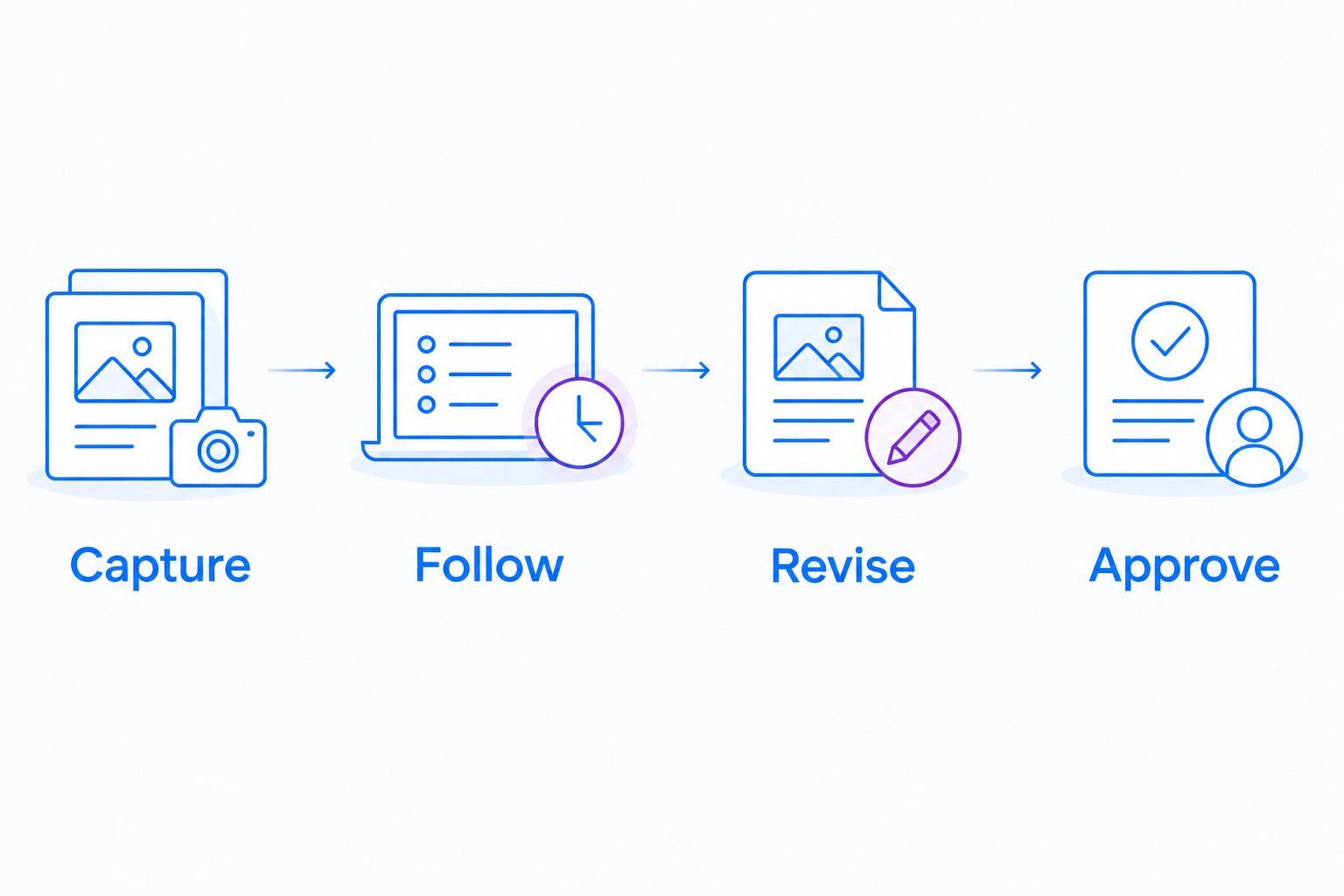
Test whether someone can follow and maintain the procedure, not just create it.
Repeat the evaluation with a changed screen or alternate user role. That exposes maintenance work and permission assumptions before you commit to a documentation format.
Healthcare: approve the workflow before capturing it
For healthcare evaluations in 2026, use synthetic examples only. Do not put patient information into a software trial or a demonstration guide.
Before adopting a healthcare workflow, verify current plan requirements, BAA availability, feature limitations, sharing settings, and relevant support integrations against official vendor documentation. A product-level compliance statement does not approve every recording, video request, or downstream destination.
Give these workflows equal attention:
- Support and IT: Reproduce an application issue with a synthetic account; check the capture and any support-system destination.
Clinical teams: Demonstrate a software workflow using fictional information; review both recording and video-request paths before enabling them.
Operations: Create training and SOPs with synthetic screenshots; assign an approver and a process owner.
Keep the compliance decision separate from the usability decision. Clear instructions are necessary, but clarity alone does not establish that a workflow is authorized.
How the recommendations are ranked
These recommendations prioritize capture fit, reader effort, maintenance, organization, workflow fit, and access requirements. They are use-case recommendations, not a claim of hands-on testing or measured time savings.
Visual capture leads this list because the page serves teams documenting software processes. A policyheavy organization should weight organization and approval requirements more heavily than recording convenience.
Which process documentation software should you choose?
Choose Zight for process documentation software that combines visual capture with AI-powered guides. Choose Loom when narrated explanation is the primary deliverable, and compare Scribe with Tango when a click-by-click walkthrough is the central requirement.
Choose Notion or Confluence when the immediate problem is organizing written knowledge. Keep one approved home for each procedure rather than letting a recording, wiki page, and captured guide become competing sources of truth.
FAQ
What's the best process documentation software in 2026?
Zight is the best fit here for teams combining screenshots, screen recordings, and AIpowered guides. Choose a wiki-focused option when organizing written procedures is the main requirement.
Is Loom enough for documenting a process?
Loom fits narrated walkthroughs, but video alone is not a complete procedure for every task. Add scannable instructions, prerequisites, and exception handling when readers need an exact checklist.
Should I choose Scribe or Tango?
Compare Scribe and Tango by capturing the same application workflow. Have an unfamiliar colleague follow each result, then compare the corrections and maintenance each guide needs.
Can Notion replace a screen recorder?
Notion provides a home for written documentation rather than replacing the act of capturing a screen workflow. Use written pages for instructions and add visual explanations where they clarify the task.
What should a complete SOP include?
A complete SOP should state its purpose, prerequisites, required actions, exceptions, expected result, and owner. Screenshots and recordings support those instructions rather than replacing them.
Can healthcare teams record process documentation?
Healthcare teams should use only workflows approved for their information and contractual requirements. Verify current plan terms, BAA availability, feature restrictions, and downstream destinations before capturing sensitive information.
How do I keep process documentation current?
Assign an accountable owner and review a procedure when its workflow changes. Check related screenshots, recordings, and written instructions together so they do not contradict one another.
One last thing
Test the exception, not just the successful path. Ask what happens when the reader lacks permission, sees a different screen, or cannot complete a required step. Document the escalation action before publishing; otherwise, the procedure stops exactly where the reader needs help.
Related guides
- Best Screen Capture Software For Customer Support Teams
- Best training documentation software for healthcare teams
- Best Screen Recording Software For Healthcare It Support
- Best Async Video Messaging Tools For Remote Teams