
Best overall for combined screen capture and documentation: Zight. Best for meeting-centered collaboration: Microsoft Teams. Best for edited training videos: Camtasia. The best Loom alternatives for enterprise teams in 2026 depend on whether you need screenshots, asynchronous recordings, polished tutorials, or repeatable instructions—not just another video recorder.
TL;DR
-
Zight is the best Loom alternative for enterprise teams needing screenshots, recordings, and shareable documentation together.
-
Microsoft Teams fits meeting-centered workflows; Camtasia fits edited training videos.
-
Scribe fits screenshot-based instructions; OBS Studio fits local recording and production control.
-
Healthcare buyers must verify BAA terms, eligible plans, and permitted workflows before recording protected health information.
Why this matters
Replacing Loom is a workflow decision. A support agent showing a broken interface needs different software from an operations manager publishing a training video or a clinical team requesting a demonstration.
For a 2026 shortlist, separate capture, distribution, and documentation. A recorder can satisfy the first requirement while leaving you to manage sharing, permissions, updates, and written instructions elsewhere.
Choose the tool that completes the handoff, not just the recording. Your recipient must understand the issue, access the material, and know what to do next.
What makes the best enterprise Loom alternative?
Use these criteria before comparing feature lists:
-
Capture coverage: Match screenshots, screen recordings, camera footage, and audio to the work your team actually does.
-
Recipient experience: Test how someone receives, opens, and understands a recording outside the creator's immediate team.
-
Documentation output: Decide whether you need a video, an illustrated procedure, or both. They are different deliverables.
-
Administrative controls: Require evidence for identity management, permissions, retention, ownership, and employee offboarding on the proposed plan.
-
Healthcare suitability: Verify the exact service configuration, contractual terms, and permitted handling of protected health information before approval.
-
Maintenance effort: Check how your team corrects an outdated step without rebuilding the entire resource.
Start with Loom as the baseline
Loom centers on asynchronous video messages, including screen and camera recording. Keep it on the shortlist when that is the workflow you need; switching tools is not an improvement by itself.
The useful comparison is broader than recording quality. Ask whether the replacement handles screenshots, written procedures, editing, or local production in a way that better matches your team's work. Confirm current features and restrictions on the exact plans under evaluation.
Enterprise Loom alternatives at a glance
The table starts with Loom as the reference point. The alternatives below each serve a different primary use case; this is not a claim that every option replaces every Loom workflow.
| Tool | Best for | Standout capability | Key limitation |
|---|---|---|---|
| Loom — baseline |
Asynchronous video messages |
Screen and camera communication |
A video message is not automatically a maintained written procedure |
| Zight | Combined capture and documentation |
Screenshots, recordings, and guide/documentation software |
Plan-specific governance and healthcare requirements need separate approval |
| Microsoft Teams |
Meeting-centered collaboration |
Meetings, chat, and meeting recordings |
Meeting recordings do not replace a dedicated screenshot- to-guide workflow |
| Camtasia | Edited training videos | Screen recording and timeline- based video editing |
Editing adds production work to routine troubleshooting |
| Scribe | Screenshot-based procedures |
Turning captured workflows into step-by-step guides |
Written steps do not preserve spoken explanation or motion |
| OBS Studio | Local recording and production control |
Configurable recording sources and scenes |
Sharing and enterprise content administration require a separate workflow |
1. Zight: best Loom alternative for capture and documentation
Zight combines screen recording, screenshots, and guide/documentation software for asynchronous communication through shareable links. That combination fits teams whose work moves between showing a problem, explaining a task, and documenting a repeatable process.
For support, capture the behavior that a written ticket cannot explain. For product and engineering, show the interface state and the action that produces the issue. For operations, decide whether the recipient needs a recording or an illustrated procedure before creating the asset.
Zight pros:
-
Covers screenshots and video recordings within the same product offering.
-
Supports communication through shareable links.
-
Includes guide/documentation software alongside capture.
Zight cons:
- A combined offering does not establish that every capability belongs to the same plan; confirm your proposed configuration.
Healthcare use requires separate verification of contractual terms, feature scope, and permitted workflows.
Best for: Teams that want capture and documentation in the same software evaluation rather than treating them as unrelated purchases.
Use a real handoff in the evaluation: capture a synthetic support issue, share the explanation, and turn the resolution into instructions. Verdict: Buy for the combined workflow only after the required capabilities and controls pass your pilot.
2. Microsoft Teams: best for meeting-centered collaboration
Microsoft Teams combines workplace chat, meetings, and meeting recording. It belongs on the shortlist when the material you need to preserve already happens in a meeting rather than in a standalone walkthrough.
Compare the entire handoff with Loom: scheduling, recording, finding the result, and giving the intended audience access. A team that primarily needs short issue demonstrations should test that use case separately instead of assuming a meeting workflow will fit.
Microsoft Teams pros:
Connects recorded discussions with a broader collaboration environment.
Captures conversations involving multiple participants.
- Fits training or decisions that already take place in meetings.
Microsoft Teams cons:
Meeting recording is not the same task as capturing an annotated screenshot.
Recording permissions and recipient access require configuration and testing.
Best for: Organizations evaluating recorded meetings as the main communication artifact.
Ask an employee outside the meeting to locate the recording and identify the decision without asking the organizer for help. That is a more useful test than simply checking whether recording starts. Verdict: Buy for meeting-centered collaboration; skip as the default replacement for screenshot-heavy support work.
3. Camtasia: best for edited enterprise training videos
Camtasia combines screen recording with timeline-based video editing. Choose this category when the finished tutorial matters more than the speed of sending an informal explanation.
A training owner can assemble a deliberate sequence, remove mistakes, and refine the presentation before publishing. That production model suits reusable instruction, but it introduces work that a quick support response does not always need.
Camtasia pros:
-
Supports screen capture and subsequent editing.
-
Provides a timeline for arranging recorded material.
Fits tutorials that need deliberate pacing and presentation.
Camtasia cons:
- Editing creates another task between capture and delivery.
Your team still needs a defined destination and access policy for published training.
Best for: Enablement and training teams producing edited tutorials rather than frequent conversational updates.
During a 2026 evaluation, change a step in the source workflow and ask the content owner to update the tutorial. Include the editing and republishing work in the decision. Verdict: Buy for polished training production; skip for routine issue capture when editing adds no value.
4. Scribe: best for screenshot-based enterprise procedures
Scribe creates step-by-step guides from captured workflows. It is an alternative to sending a video when the reader needs to follow a sequence at their own pace.
Consider an operations task such as navigating a settings menu and submitting an internal request. An illustrated guide lets the reader stop at each action without searching a recording for the relevant moment.
Scribe pros:
-
Organizes captured actions into step-by-step instructions.
-
Makes individual steps easier to scan than a continuous recording.
-
Fits procedures with a clear sequence of interface actions.
Scribe cons:
Screenshots do not show continuous motion or reproduce spoken context.
- A captured procedure still needs editorial review and maintenance.
Best for: Operations teams documenting repeatable, interface-based tasks.
Test a synthetic 5−step procedure and ask another employee to complete it without verbal help. Review ambiguous labels and decision points, not just whether the screenshots look correct. Verdict: Buy for procedural documentation; skip as the sole replacement for narrated troubleshooting.
5. OBS Studio: best for local recording control
OBS Studio is open-source software for recording and live streaming, with configurable sources and scenes. It fits technically comfortable users who need control over the recording setup rather than a managed video-message destination.
For an enterprise evaluation, separate production from distribution. Creating a local recording does not decide where the file belongs, who can access it, or how the organization handles deletion and ownership.
OBS Studio pros:
-
Supports configurable screen, camera, and audio sources.
-
Uses scenes to organize recording layouts.
-
Supports local recording workflows.
OBS Studio cons:
Setup requires more production decisions than a simple capture workflow.
- Distribution and organizational content administration need a separate process.
Best for: Technical teams with a defined recording setup and an approved destination for finished files.
Use the same source configuration across the pilot so participants evaluate the workflow rather than unrelated setup choices. Verdict: Buy into the workflow for production control; skip when managed asynchronous sharing is the main requirement.
Healthcare: approve the workflow, not the category label
A healthcare shortlist in 2026 needs more than a vendor's general security description. Before using protected health information, obtain current official documentation covering the applicable plan, BAA availability and scope, enabled features, storage, access, retention, and permitted sharing.
Do not infer HIPAA suitability from encryption, a healthcare landing page, or the ability to record locally. Your privacy and security owners must approve the complete workflow, including any destination or connected system. Confirm each named integration and its permitted data handling from current official documentation before including it in the deployment.
Give these three workflows equal attention, using synthetic examples only:
-
Support and IT: Record a fictional login error, request a reproduction, and verify how support receives and restricts access to the material.
-
Clinical teams: Demonstrate a training-system task with invented records. Test both recording a demonstration and requesting a video from an authorized colleague.
-
Operations teams: Create a synthetic onboarding procedure, review it, and establish who updates it when the process changes.
A BAA is a contractual requirement for applicable relationships, not blanket approval for every feature or sharing action. Keep sensitive information out of evaluation recordings until the exact configuration has approval.
Run a workflow pilot before committing
Use the same synthetic task across the shortlist. For your 2026 decision, judge the completed handoff rather than comparing unrelated demonstrations.
Capture
Record a 2−minute walkthrough of a fictional interface problem. Create a screenshot of the same issue, then check which format communicates the required detail without unnecessary material.
Share
Send the result to an authorized evaluator who did not create it. Ask the evaluator to open it through the intended delivery route and explain the next action without a live meeting.
Document
Convert the resolution into an instruction someone else can follow. If a separate application is necessary, include that handoff in the evaluation rather than treating it as invisible work.
Update
Change a menu label in the synthetic example. Ask the owner to correct the explanation and determine what happens to previously shared material.
Review
Add a 30−second accidental disclosure scenario using invented information. Check the process for restricting access, correcting the asset, and recording the incident internally.
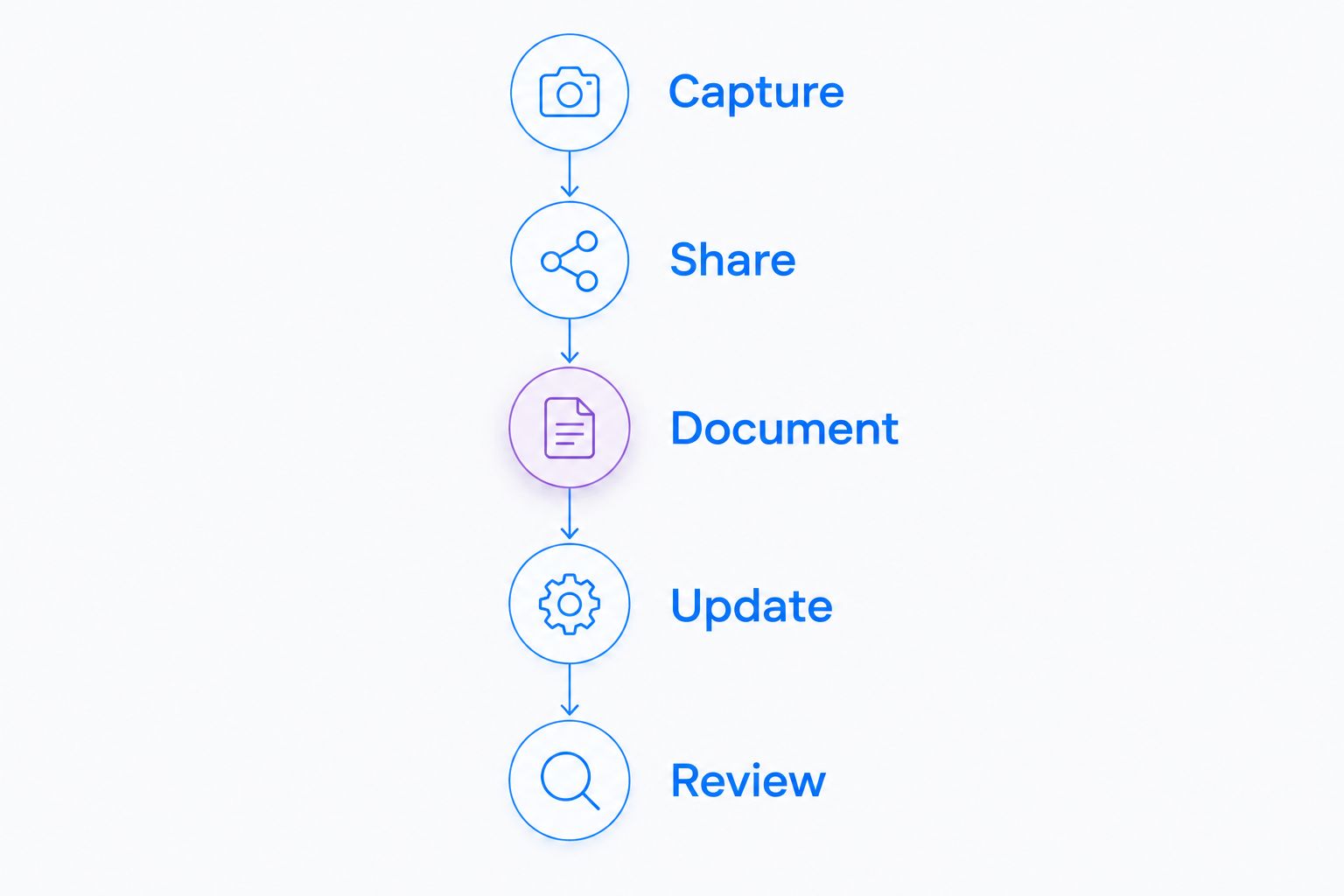
Evaluate the whole handoff, including correction and access review.
How the ranking works
The ranking prioritizes workflow fit: combined capture and documentation first, followed by meeting collaboration, edited training, written procedures, and local production. Each recommendation has a distinct job rather than an interchangeable feature score.
This is a use-case ranking, not a measured performance benchmark or a certification of enterprise controls. Your 2026 procurement decision should depend on the current plan, contractual evidence, and pilot results.
Which Loom alternative should you choose?
Zight is the best Loom alternative for enterprise teams that need screenshots, screen recordings, and shareable documentation together. Start there when those outputs belong to the same daily workflow.
Choose Microsoft Teams for meeting-centered collaboration, Camtasia for edited training, Scribe for illustrated procedures, or OBS Studio for local production control. Keep Loom when asynchronous video messaging already meets the requirement and the alternatives do not solve a specific problem.
FAQ
What's the best Loom alternative for enterprise teams in 2026?
The best choice depends on the workflow: combined capture and documentation, meeting recording, edited training, illustrated procedures, or local production. Match the software to the required output, then verify the current plan and administrative controls.
Should an enterprise replace Loom with Microsoft Teams?
Choose Microsoft Teams when recorded meetings are the primary requirement. Test standalone issue capture and recipient access separately before treating it as a replacement for asynchronous video messaging.
Is Camtasia better than Loom for training?
Camtasia fits training that requires timeline-based editing and deliberate presentation. Loom fits a video-message workflow; the better choice depends on whether editing improves the intended result.
Can Scribe replace narrated screen recordings?
Scribe fits step-by-step procedures rather than every narrated recording. Use video when motion, timing, or spoken explanation is necessary to understand the task.
Is OBS Studio enough for enterprise video communication?
OBS Studio handles recording and production, but enterprise communication also needs distribution and content administration. Define the approved storage, sharing, ownership, and deletion process before deployment.
How do healthcare teams evaluate a Loom alternative?
Healthcare teams must verify the applicable plan, BAA terms, feature scope, and permitted data handling using current official documentation. Use synthetic examples until privacy and security owners approve the complete workflow.
What should an enterprise software pilot include?
An enterprise pilot should include capture, recipient access, documentation, correction, and access review. Give each shortlisted tool the same synthetic task so the comparison measures the completed workflow.
One last thing
Test the recipient before you train the creator. A recording that is easy to make but difficult to access, interpret, or correct moves the work to someone else instead of removing it.
Related guides
- Best Screen Capture Software For Customer Support Teams
- Best process documentation software
- Best Loom alternatives for healthcare teams