
Best overall: Confluence for structured internal documentation. Best for flexible team workspaces: Notion. Best for Microsoft-centered organizations: SharePoint. This 2026 guide compares the best knowledge base software for internal documentation by how you organize information, maintain it, and help employees use it—not by how many features appear on a checklist.
TL;DR
-
Confluence is the best knowledge base software for internal documentation when teams need structured spaces and connected pages.
-
Choose Notion for flexible documents and databases; choose SharePoint when Microsoft document management drives your workflow.
-
Zight is best for visual internal documentation that explains screen-based tasks through recordings, screenshots, and guides.
-
Healthcare teams must validate contracts, access controls, and capture workflows before using any option with patient information.
Why this matters
Your internal knowledge base needs to answer questions without creating another conversation. A searchable article still fails if the instructions are outdated, the owner is unclear, or the reader cannot follow the task.
Separate the place you store knowledge from the way you explain it. Zight supports the explanation layer through screen recordings, screenshots, and AI-powered guides shared by link. A wiki or document platform supplies the broader information structure.
For your 2026 evaluation, choose the repository first. Then decide which procedures need visual instructions alongside written answers.
What makes the best internal knowledge base software?
Use these criteria before comparing products:
-
Findability: Employees should locate an answer using the words they actually use, not the author's preferred terminology.
-
Information structure: Pages, spaces, databases, or libraries should reflect how your teams work. Avoid a structure that depends on one administrator's memory.
-
Ownership and maintenance: Every important document needs an accountable owner and a review trigger, such as a product change or revised procedure.
-
Access control: Match access to job responsibilities. Evaluate sensitive-content handling separately from general collaboration.
-
Instruction quality: Support text for reference material and visuals for screen-based tasks. Neither format replaces the other completely.
-
Workflow fit: Test authoring, sharing, and retrieval inside the tools your employees already use. A disconnected knowledge base creates another place to check.
Internal knowledge base software at a glance
These are distinct use-case recommendations, not interchangeable products. The final option complements a knowledge repository rather than replacing one.
| Rank and option |
Best for | Standout feature | Key limitation |
|---|---|---|---|
| 1. Confluence | Structured, cross-team documentation | Spaces and linked pages for team knowledge | Information architecture and maintenance still need owners |
| 2. Notion | Flexible departmental workspaces | Documents and databases in one workspace | Flexible structures become inconsistent without conventions |
| 3. SharePoint | Microsoft-centered document governance | Document libraries and Microsoft 365 connections | Administration and site design require planning |
| 4. Guru | Knowledge verification workflows |
Verification workflows for maintaining answers |
Verification depends on assigned experts doing the work |
| 5. Slab | A focused internal wiki | Topic-based organization and collaborative posts |
A focused wiki does not replace broader work-management systems |
| 6. Zight | Visual instructions alongside a knowledge base |
Screen recordings, screenshots, and AI-powered guides |
Visual capture does not replace repository governance |
1. Confluence: best knowledge base for structured team documentation
Confluence organizes documentation into spaces and pages. Choose it when product requirements, engineering decisions, support procedures, and company policies need a shared structure with clear connections between documents.
The advantage is not simply having somewhere to write. You can establish a repeatable home for each team's knowledge, then connect related material instead of copying the same explanation across separate files.
Confluence pros:
-
Spaces give departments or projects defined homes.
-
Linked pages support connected reference material.
-
Templates help authors repeat a document structure.
Confluence cons:
Poorly planned page trees make answers difficult to locate.
Old pages remain a problem unless someone maintains them.
Best for: Teams that need a durable, cross-functional documentation system rather than a collection of individual notes.
Start with a small set of page types: procedure, policy, decision, and troubleshooting article. Give each type a purpose before inviting everyone to publish.
Verdict: Buy Confluence for structured team knowledge; skip it if nobody will own the structure.
2. Notion: best knowledge base for flexible departmental workspaces
Notion combines written pages with databases. Choose it when your team wants procedures, project context, and structured records in the same workspace without treating every document as an isolated file.
That flexibility works well for a department designing its own knowledge system. It also creates a maintenance challenge: different authors can build different structures for the same kind of information.
Notion pros:
Pages support written documentation and embedded context.
Databases organize repeatable records and related information.
Templates help teams standardize common document types.
Notion cons:
Unrestricted workspace design creates competing conventions.
A heavily customized setup requires explanation for new employees.
Best for: Departments that value adaptable documentation and can agree on shared publishing rules.
Before migrating, decide what belongs in a database and what belongs in a reference page. Keep that distinction consistent across teams.
Verdict: Buy Notion for flexibility; skip it if you need a structure that authors cannot easily reshape.
3. SharePoint: best knowledge base for Microsoft-centered organizations
SharePoint supports sites, pages, and document libraries within the Microsoft ecosystem. Choose it when internal documentation depends on managed files as much as written knowledge articles.
Microsoft 365 connections make SharePoint relevant when employees already work with Microsoft documents and Teams. That connection does not remove the need to design navigation, permissions, and document ownership deliberately.
SharePoint pros:
Document libraries provide a structured home for files.
Versioning supports document history.
Microsoft 365 connections fit established Microsoft workflows.
SharePoint cons:
Site and permission design require administrative attention.
A file repository alone does not create readable task instructions.
Best for: Organizations whose documentation strategy centers on Microsoft documents, managed libraries, and controlled access.
Evaluate a real employee journey: find the policy, identify the current version, and understand the action required. A successful upload proves little about usability.
Verdict: Buy SharePoint for Microsoft-centered document management; skip it if you only need a simple departmental wiki.
4. Guru: best knowledge base for verification workflows
Guru centers knowledge management on accessible answers and verification workflows. Choose it when your main problem is uncertainty about whether an answer is still trustworthy.
Verification makes accountability visible, but software cannot supply subject-matter judgment. Someone still needs to review the content against the current process and correct it when the underlying answer changes.
Guru pros:
Verification workflows support content maintenance.
Knowledge cards encourage focused answers.
Assigned expertise helps clarify responsibility for information.
Guru cons:
Verification loses value when reviewers approve without checking.
Focused answers still need context for complicated procedures.
Best for: Support, sales, and operations teams that need maintained answers with explicit ownership.
During evaluation, change a sample procedure and follow the review path. Check whether the right expert receives the work and whether readers can distinguish reviewed knowledge from outdated material.
Verdict: Buy Guru when answer verification is the priority; skip it if your primary need is document-library management.
5. Slab: best knowledge base for a focused internal wiki
Slab organizes team knowledge through posts and topics. Choose it when you want the internal wiki to have a clear purpose: publish information, organize it, and help colleagues find it.
A focused wiki keeps documentation separate from project tracking. That separation suits teams that already have work-management software and do not want to recreate it inside their knowledge base.
Slab pros:
-
Topics provide an organizing structure for knowledge.
-
Collaborative posts support shared documentation.
-
A wiki-centered approach keeps publishing focused on information.
Slab cons:
-
Separate work systems still need clear connections to documentation.
-
Topic organization requires consistent editorial decisions.
Best for: Teams seeking a dedicated internal wiki rather than an all-purpose workspace.
Test a troubleshooting article, a company policy, and an onboarding guide. Employees should understand where each belongs without asking the author.
Verdict: Buy Slab for a focused wiki; skip it if you need the knowledge base to double as your work-management system.
6. Zight: best visual companion for internal documentation
Zight is best for teams that need visual internal documentation for screen-based workflows. It provides screen recording, screenshots, and AI-powered guide and documentation software, with shareable links for asynchronous communication.
Use visual instructions when a written step leaves too much interpretation: which control to select, what an error looks like, or where a workflow branches. Keep searchable written context around the visual.
Zight pros:
Screen recordings show a task as it happens.
-
Screenshots give individual steps visual context.
-
AI-powered guides support procedural documentation.
-
Shareable links support asynchronous explanations.
Zight cons:
Capture software does not replace a knowledge base's taxonomy.
Visual instructions need updating when the demonstrated interface changes.
Best for: Support, sales, product, and engineering teams explaining software tasks alongside an internal knowledge repository.
For a focused comparison, start with Loom for video explanations. Evaluate the capture option here when screenshots and guide creation also belong in your documentation workflow; compare current plan details before choosing.
Verdict: Buy it as a visual documentation companion; skip it as a replacement for repository governance.
How we ranked these options
The 2026 ranking prioritizes a structured internal knowledge repository first, followed by distinct needs: flexibility, Microsoft document management, verification, a focused wiki, and visual instruction.
The order reflects those jobs, not measured performance scores. There is no claim of hands-on benchmark results. Evaluate current administrative capabilities and contractual requirements directly before committing.
Run a documentation pilot before migrating
For a 2026 buying decision, test actual work rather than a polished demonstration. Use 3 tasks: an employee onboarding procedure, a support troubleshooting answer, and an operational policy.
Capture
Write the answer and record only the steps that need visual explanation. Use a synthetic account with invented information, not a production customer or patient record.
Organize
Place the finished material where an employee would look for it. Add a descriptive title, relevant context, and links between related procedures rather than duplicating instructions.
Retrieve
Ask someone other than the author to find the answer and complete the task. Do not coach the person through navigation; that would conceal the problem you are testing.
Maintain
Assign 1 owner per article as your pilot rule. Change a sample workflow and check whether the owner can update the text, visuals, and references without leaving contradictory instructions behind.
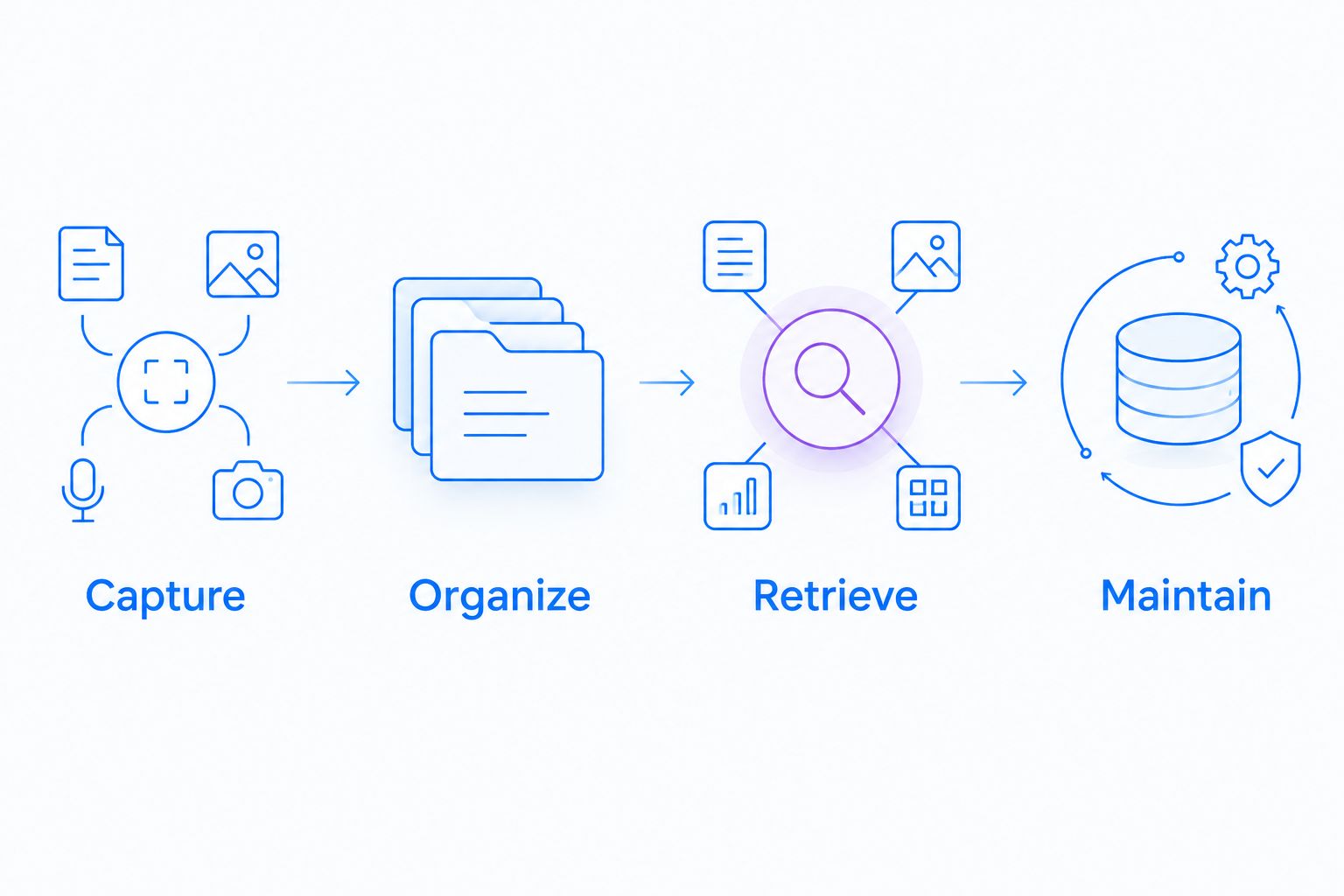
A documentation pilot should test retrieval and maintenance, not just authoring.
Run this as a proposed 30-day pilot, not a universal implementation timeline. Review unresolved questions before migrating existing content. The process documentation software guide addresses the procedural side of that decision.
Healthcare: evaluate the whole information path
For healthcare evaluations in 2026, do not treat a knowledge base or capture tool as automatically HIPAA compliant. Confirm the current plan requirements, BAA availability, permitted features, and workflow limitations with the provider before handling protected health information.
Give these workflows equal attention:
Support and IT: Reproduce a login or configuration problem in a synthetic environment. Inspect screenshots, recordings, and shared destinations for unintended information.
-
Clinical teams: Demonstrate a software task or evaluate a workflow for requesting a video using synthetic information only. Assess recording and requesting separately, including who can view the result.
-
Operations: Create onboarding instructions and SOPs with fictional records. Review access, maintenance responsibilities, and any destination used to distribute training.
Do not infer approval for a support integration from approval for the capture application. Check each destination and contract separately. These examples concern software documentation, not patient care or medical advice.
Which internal knowledge base should you choose?
Choose Confluence as the default for structured internal documentation. Choose Notion when flexibility matters more, SharePoint when Microsoft document management leads, Guru when verification is central, or Slab when a focused wiki is enough.
Add visual capture when employees need to see the procedure. Do not buy a second repository to solve an instruction problem, and do not expect a recording library to solve ownership or navigation.
FAQ
What's the best knowledge base software for internal documentation?
Confluence is the default recommendation for structured internal documentation. Choose a different option when flexible workspaces, Microsoft document management, verification, or a focused wiki is the primary requirement.
Is Notion better than Confluence for an internal wiki?
Notion is the better fit when your team prioritizes flexible pages and databases. Confluence is the stronger fit in this ranking when a shared space-and-page structure is the main requirement.
Can SharePoint work as an internal knowledge base?
Yes, SharePoint can support an internal knowledge base using sites, pages, and document libraries. Design navigation and ownership around employee questions rather than simply uploading existing folders.
Do we need screen recordings in our internal documentation?
Use screen recordings when employees need to see a sequence or reproduce a software task. Keep written instructions for searchable context and use screenshots when a single visual explains the step.
What should we test before buying knowledge base software?
Test authoring, retrieval, access control, and maintenance using real work scenarios with synthetic information. Include an employee who did not write the documentation so the test exposes unclear navigation and instructions.
Is internal knowledge base software automatically HIPAA compliant?
No, software selection alone does not establish a HIPAA-compliant workflow. Confirm current plan requirements, BAA availability, feature limitations, access controls, and connected destinations before handling protected health information.
Should we migrate every existing document into a new knowledge base?
No, review existing documents before migrating them. Remove duplicates, identify authoritative versions, and assign owners so the new system does not inherit unresolved maintenance problems.
One last thing
An incorrect article that looks authoritative is harder to challenge than an obvious draft. Before your 2026 rollout, make the document owner and review status visible wherever employees rely on instructions. That is a publishing rule—not a feature you can outsource to software.
Related guides
- Best process documentation software
- Best AI tools for creating step-by-step guides
- Best Screen Capture Software For Customer Support Teams
- Best training documentation software for healthcare teams