
Best overall: Zight for combining screen recordings, screenshots, and AI-powered guides. Best for video walkthroughs: Loom; best for screenshot-led procedures: Scribe; best for browser-process documentation: Tango; best for narrated instructional videos: Guidde. This 2026 shortlist separates the tools by the instructions your team needs to publish, maintain, and use.
TL;DR
-
Zight leads the best AI tools for creating step by step guides when teams need recordings, screenshots, and documentation.
-
Loom suits video explanations; Scribe and Tango suit screenshot-led software procedures.
-
Guidde suits narrated video instructions; check editing requirements against your actual workflow.
-
For healthcare SOPs, verify the agreement, plan, access controls, and workflow before recording sensitive information.
Why this matters
A recording shows what happened. A usable guide tells someone what to do next. Choosing between those outputs matters more than choosing the longest feature list.
For your 2026 evaluation, start with the deliverable: a video explanation, a screenshot sequence, or a maintained operating procedure. Then check whether the software produces that deliverable without forcing your team to rebuild it elsewhere.
Choose the tool that produces the instructions your reader will actually follow. A polished video is the wrong default when someone needs to scan a procedure while completing a task.
What makes the best AI guide creation tool?
Use these criteria before comparing vendors:
-
Capture coverage: Match screenshots, screen recordings, or browser activity to the work you need to document.
-
Instruction quality: Check whether generated steps identify the action, location, and expected result. Editing control: Confirm you can correct wording and remove irrelevant material before sharing.
-
Reader usability: Test whether someone can find a particular step without replaying the entire explanation.
-
Maintenance: Check the effort required when a screen, policy, or process changes.
-
Governance: Evaluate access, sharing, retention, and contractual requirements for the intended workflow.
Do not treat automatic text generation as a substitute for process ownership. The person responsible for the workflow still needs to approve the instructions.
AI guide creation tools at a glance
Loom is the first competitor to evaluate when your current workflow centers on recorded explanations. Scribe, Tango, and Guidde address different documentation formats; compare the finished output rather than treating every tool as interchangeable.
| Tool | Best for | Standout approach | Key limitation to evaluate |
|---|---|---|---|
| Zight | Teams combining capture and documentation |
Screen recordings, screenshots, and AI-powered guides |
Check the editing and publishing requirements of your final SOP |
| Loom | Video-first walkthroughs | Recorded screen explanations | A video explanation does not automatically become a maintained procedure |
| Scribe | Screenshot-led software instructions |
Captured actions presented as step-by-step guides |
Decision points and process context still need review |
| Tango | Repeatable browser workflows | Captured software actions organized into instructions | Exceptions outside the captured path need separate explanation |
| Guidde | Narrated instructional videos | AI-assisted video documentation | Video-first instructions require a separate check for scanability |
These are workflow recommendations, not claims that every edition includes the same functionality. For a paid evaluation in 2026, confirm the features included in the edition you intend to purchase.
1. Zight: best AI guide tool for mixed capture workflows
Zight combines screen recording, screenshots, and AI-powered guide/documentation software. It serves support, sales, product, and engineering teams that communicate and troubleshoot asynchronously through shareable links.
That combination fits work where the source material varies. A support explanation needs a recording of the problem; a product handoff needs a screenshot; a repeatable procedure needs written instructions. Start with the format that makes the task clear rather than forcing everything into video.
Zight pros:
-
Covers both screenshots and screen recordings.
-
Includes AI-powered guide and documentation capabilities.
-
Supports asynchronous communication through shareable links.
Zight cons:
Capture and generated documentation still require factual review.
- Formal SOP requirements need a separate publishing and governance check.
Best for: Teams that need visual explanations and reusable instructions within the same working process.
For a practical evaluation, record a synthetic support issue, capture the decisive screen, and create a guide for the repeatable resolution. Check whether the finished instructions stand alone without the author explaining them.
Verdict: Buy for a verified mixed-capture workflow; hold until the generated guide passes your editing and reader tests.
2. Loom: best AI guide tool for video-first explanations
Loom is a screen-recording and video-messaging tool suited to explaining work visually. Use it when the viewer needs to see a sequence unfold and hear the reasoning behind it.
A product walkthrough is a useful test. Record the task, explain the important choices, and ask a colleague to locate the part that answers a specific question. Then check the current AI-assisted documentation options against the written output you require.
Loom pros:
-
Shows motion and task sequence directly.
-
Keeps spoken reasoning alongside the screen explanation.
-
Fits demonstrations that benefit from a presenter’s commentary.
Loom cons:
Watching a recording is different from scanning a written procedure.
Changing one instruction requires checking the surrounding recording for consistency.
Best for: Teams whose primary deliverable is an explanatory video rather than a screenshot-led SOP.
Compare Loom with the mixed-capture option above using the same task. Judge whether the recipient needs the explanation, the written procedure, or both; do not assume an AI-generated summary satisfies the procedure requirement.
Verdict: Buy for video-led explanations; skip as your default when readers primarily need scannable steps.
3. Scribe: best AI guide tool for screenshot-led procedures
Scribe creates step-by-step documentation from captured software activity. Its screenshot-led format fits instructions that readers follow while working in another application.
Use a repeatable administrative task as your test case. Capture the approved path, then review the generated steps for vague labels, unnecessary actions, and missing prerequisites. Keep the useful sequence; edit the rest.
Scribe pros:
Organizes captured activity into a written sequence.
Pairs instructions with screenshots.
Suits procedures readers need to scan while working.
Scribe cons:
Captured actions do not explain every business decision.
Exceptions and recovery instructions need deliberate documentation.
Best for: Operations and enablement teams documenting repeatable software tasks in screenshot-led guides.
The decisive test is not whether Scribe captures every click. Check whether a new reader understands why a step exists and how to recognize success. A technically accurate sequence remains incomplete when it omits those details.
Verdict: Buy for screenshot-led procedures; hold if the workflow depends on extensive judgment or branching decisions.
4. Tango: best AI guide tool for repeatable browser workflows
Tango captures software actions and turns them into step-by-step instructions. Evaluate it for browserbased tasks where the approved path is consistent and the reader needs visible action cues.
Choose a workflow with a clear beginning and end, such as updating a synthetic account record. Review whether the instructions identify the correct controls and exclude the detours taken during capture.
Tango pros:
Converts demonstrated software activity into instructions.
-
Keeps the guide anchored to visible actions.
-
Fits repeatable browser-process documentation.
Tango cons:
- A captured path does not cover every exception.
Instructions need review after the underlying interface changes.
Best for: Teams standardizing recurring browser workflows for colleagues who need action-by-action guidance.
Compare Tango with Scribe on the same procedure rather than separate demonstrations. Check the editing work, the reader’s ability to follow the guide, and the effort needed to update a changed screen.
Verdict: Buy for a stable browser workflow; hold when exceptions dominate the process.
5. Guidde: best AI guide tool for narrated instruction videos
Guidde focuses on AI-assisted video documentation, including instructional content with narration. Evaluate it when your desired output is a concise teaching video rather than a primarily written procedure.
A feature tutorial is a useful starting point. Demonstrate the task, review the narration, and check that the explanation describes the visible action accurately. Remove commentary that adds length without helping the viewer finish the task.
Guidde pros:
-
Centers the workflow on instructional video.
-
Supports narrated explanations of software tasks.
-
Fits demonstrations intended for repeated viewing.
Guidde cons:
- Narration needs review for terminology and meaning.
Video-first output needs a separate check for step-level reference use.
Best for: Enablement teams publishing narrated software tutorials.
Test the output with someone unfamiliar with the process. A confident voice does not prove an instruction is correct, and a clear demonstration still needs the right prerequisites.
Verdict: Buy for narrated tutorials; skip when the required deliverable is a primarily written SOP.
How the recommendations are ranked
The ranking prioritizes output fit, capture coverage, editing, reader usability, maintenance, and governance. It does not represent a hands-on performance benchmark or a claim that one vendor wins every category.
The overall recommendation favors mixed capture because the supplied business use cases span troubleshooting, explanation, and documentation. The specialist recommendations favor a narrower deliverable: video explanation, screenshot procedure, browser guidance, or narrated tutorial.
Run a practical evaluation before buying
Use the same source material for every candidate in your 2026 shortlist. Otherwise, you are comparing demonstrations rather than tools.
-
Choose a workflow: Use a synthetic task containing 5 steps and a clear completion state.
-
Capture the task: Follow the approved path without recording unrelated tabs or messages.
-
Edit the guide: Correct wording, remove detours, and add prerequisites.
Test the instructions: Ask 2 reviewers unfamiliar with the task to follow the result independently.
Update the source: Change one interface label and revise the guide.
Record the problems reviewers encounter. Did they miss the starting point, misunderstand a label, or fail to recognize completion? Those observations give you a concrete purchasing decision without relying on a vendor’s demonstration.
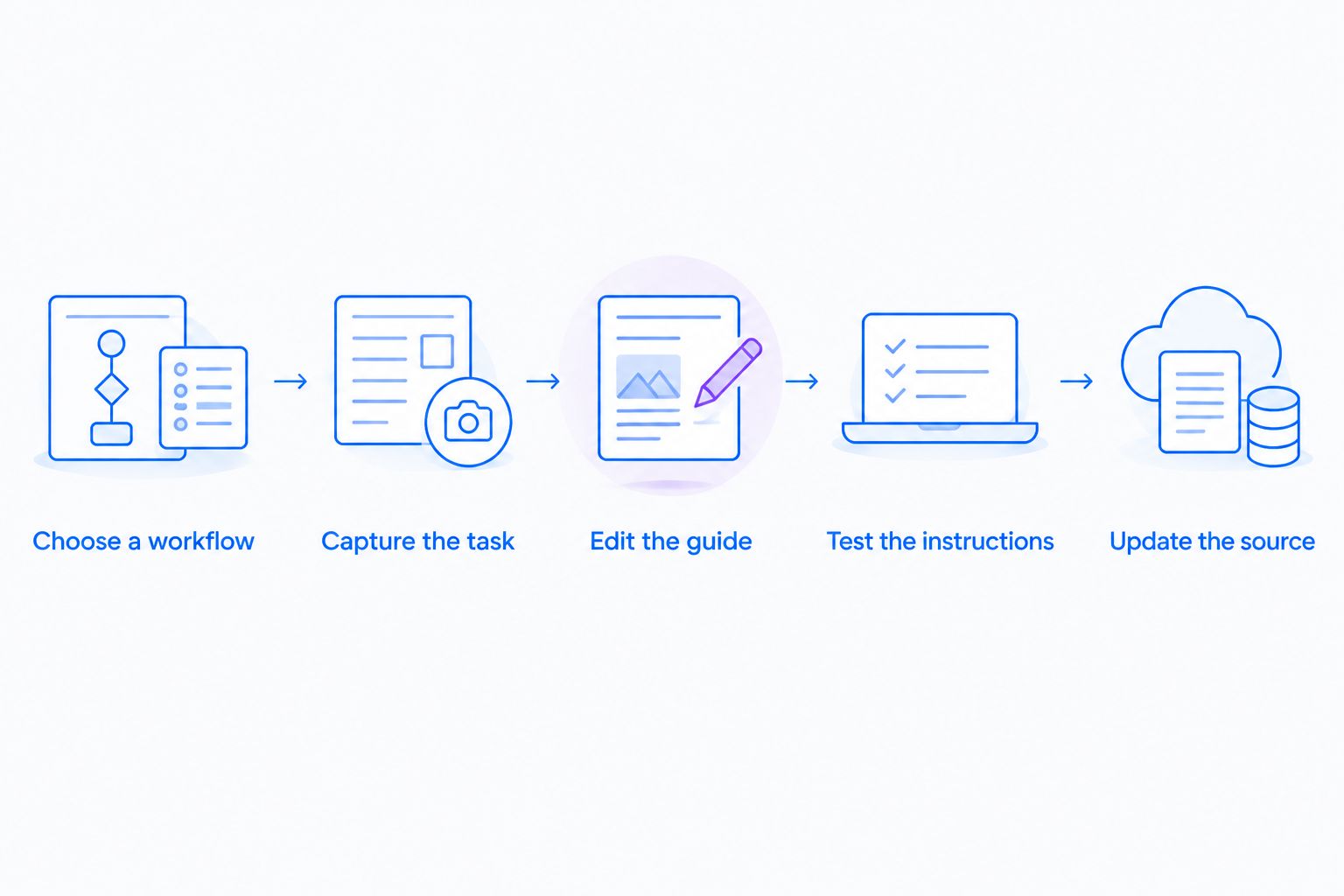
Evaluate the complete documentation cycle, including the next update.
Before purchasing, compare your required capabilities with the current plan details. Confirm capture scope, editing, sharing, and administrative requirements rather than assuming the demonstration matches the intended edition.
Healthcare: approve the workflow before recording
For healthcare evaluations in 2026, treat compliance as a separate approval decision. A guide generator is not automatically suitable for protected health information because it records a screen or offers sharing controls.
Use synthetic examples across these workflows:
-
Support and IT: Reproduce a login or configuration issue in a demonstration environment, then document the approved troubleshooting path.
-
Clinical teams: Evaluate recording and video-request requirements with synthetic demonstrations, not patient recordings.
-
Operations: Create training and SOPs using fictional accounts and administrative examples.
Before introducing protected health information, require official documentation confirming the applicable plan, BAA availability, feature limitations, access controls, and retention arrangements. Check the entire workflow, including uploads, requested videos, generated text, sharing, and integrations.
For support integrations, verify each named integration in the vendor’s current official documentation. Approval of the capture tool does not establish approval of the connected destination or every transfer between them.
Which AI guide tool should you choose?
Zight is the best fit for teams that need screen recordings, screenshots, and AI-powered guides together. Choose Loom for video-first explanations, Scribe for screenshot-led procedures, Tango for repeatable browser workflows, or Guidde for narrated tutorials.
For your 2026 purchase, make the final decision on the finished instructions and the next update. Select the tool that lets your reader complete the task and your process owner keep the guide accurate.
FAQ
What's the best AI tool for creating step-by-step guides?
The best choice depends on the required output. Choose mixed-capture software for recordings plus documentation, Scribe or Tango for screenshot-led software procedures, Loom for video explanations, or Guidde for narrated tutorials.
Is Loom better than a screenshot guide generator?
Loom fits video explanations better than a primarily screenshot-led workflow. Choose screenshot instructions when readers need to scan individual actions while completing a task.
Can AI turn a screen recording into a complete SOP?
Generated documentation still needs process-owner review before it becomes an approved SOP. Check prerequisites, decision points, exceptions, and the expected result rather than accepting the captured sequence alone.
Should I choose Scribe or Tango for software instructions?
Compare Scribe and Tango using the same software task. Choose based on the finished guide, correction effort, reader usability, and maintenance requirements rather than the initial capture alone.
Can healthcare teams use AI guide creation tools?
Healthcare teams should evaluate tools with synthetic examples before introducing protected health information. Verify the applicable plan, BAA availability, feature limitations, and complete data flow through official vendor documentation.
How do I test an AI-generated guide before sharing it?
Ask someone unfamiliar with the workflow to complete the task using only the guide. Correct every missing prerequisite, unclear action, and ambiguous completion state before publication.
One last thing
Test the second version, not just the first draft. Change a screen label, revise a step, and check whether the guide remains consistent. Your first capture demonstrates creation; that update reveals the maintenance work you are buying into.
Related guides
- Best Screen Capture Software For Customer Support Teams
- Best training documentation software for healthcare teams
- Best Async Video Messaging Tools For Remote Teams