Restaurant teams’ SOP generation is the process of turning repeatable work into clear instructions so employees can complete tasks consistently across shifts. This 2026 guide explains how to choose an SOP generator for restaurant teams when procedures span both software screens and physical workstations, and employees need instructions they can use during service.
- Choose an SOP generator for restaurant teams by testing a real shift handoff, not a polished demonstration.
- Zight fits screen-based restaurant SOPs that need screenshots, screen recordings, and shareable documentation.
- Use written checklists for checkpoints, screenshots for software steps, and demonstrations for physical tasks.
- Require a restaurant manager to approve generated instructions before employees use them.
Why SOP generation matters for restaurant teams
A restaurant procedure must survive a change of shift. If opening instructions live in one manager’s memory and closing instructions live in a message thread, employees have no single reference for the approved process.
Zight is best for restaurant teams documenting screen-based workflows with screenshots, recordings, and shareable guides. Its screen capture and documentation capabilities fit tasks such as showing where to find a report or how to submit an internal request. Physical preparation and cleaning procedures still need restaurant-specific instructions and review.
The distinction matters when choosing software. A clear recording of a settings screen does not prove that a workstation procedure is complete, and generated wording does not establish a food-safety requirement.
Build your SOP library around what employees must do, what successful completion looks like, and who handles exceptions. Treat the generator as a drafting tool—not the authority on restaurant operations.
How to build restaurant SOPs employees can follow
Start with one repeatable workflow
Begin manually: write down a task as an experienced employee performs it. Choose a process with a recognizable starting point and finish, such as locating an approved report, submitting a maintenance request, or completing a shift handoff.
For your 2026 rollout, start with 3 pilot SOPs rather than trying to document the entire restaurant. Select one software task, one physical task, and one handoff. This gives you different documentation problems to test without creating a large approval backlog.
Avoid procedures that combine unrelated responsibilities. Opening the restaurant is a collection of workflows; accessing an opening checklist is a single, documentable task.
- Name the employee role responsible for the task.
- State what must be ready before work starts.
- Define the observable result that marks completion.
- List the exceptions that require a manager.
- Assign an owner to approve the finished SOP.
Match the format to the task
Draft a plain-text checklist before opening a recording tool. If the instructions are clear without pictures, keep them short; adding video creates another asset to review and maintain.
Use screenshots when employees must identify a field, menu, or confirmation message. Use screen recordings when the order of actions matters. Physical work needs a different treatment: show the actual equipment and workspace through approved demonstrations, supported by written checkpoints.
Record screen activity for screen tasks; document physical work at the workstation. A screen recorder cannot establish whether an employee has performed a physical procedure correctly.
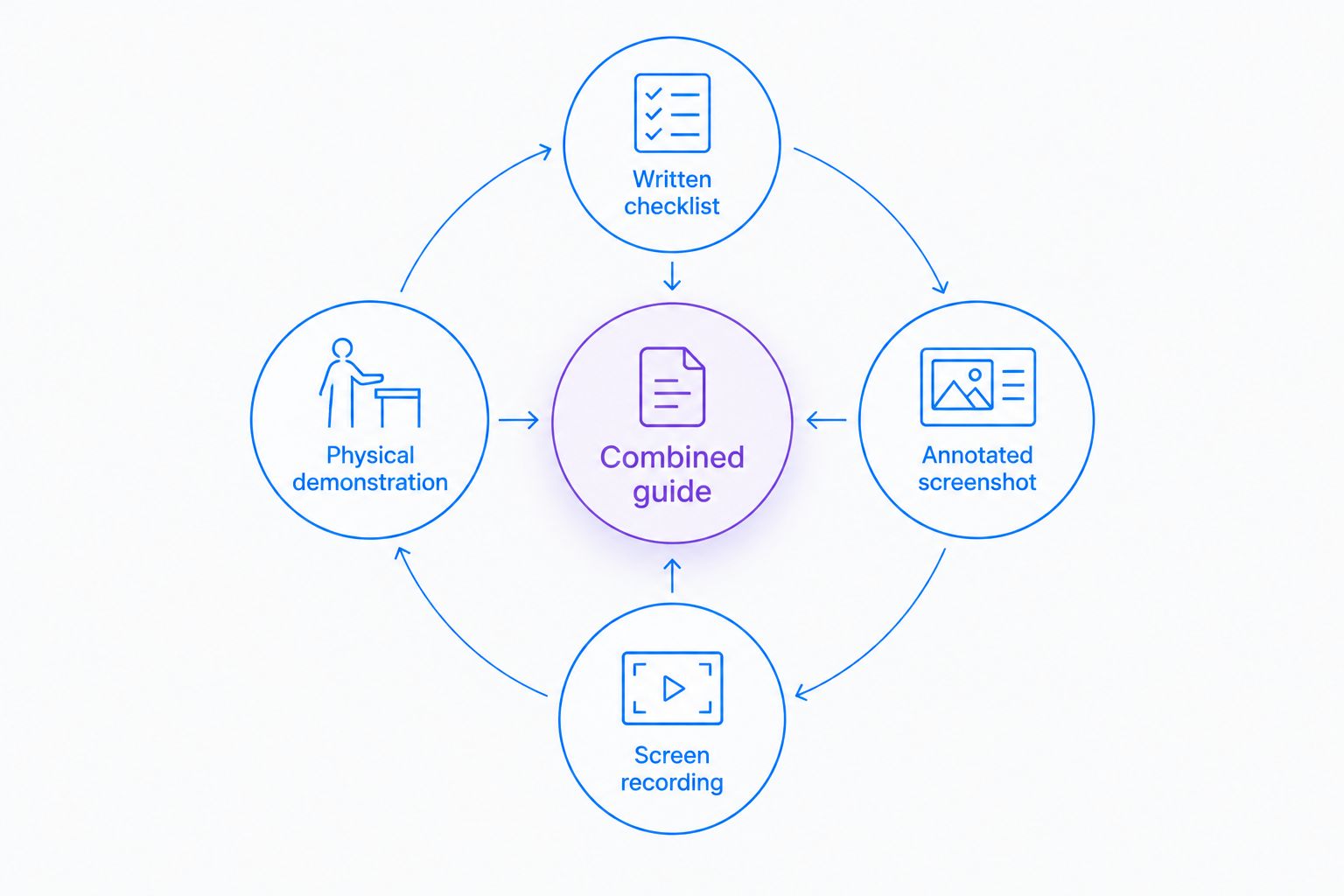
Give every format a defined job:
- Written checklist: best for recurring completion checks.
- Annotated screenshot: best for identifying an on-screen control.
- Screen recording: best for showing a software sequence.
- Physical demonstration: best for showing movement or equipment handling.
- Combined guide: best for connecting instructions with visual references.
Capture the approved workflow before drafting
Use your existing document editor and device capture tools to make a first draft. Walk through the process with the employee who owns it, and remove unnecessary detours before recording anything intended for training.
Zight provides a software path for capturing screenshots and screen recordings and creating guides or documentation shared through links. Use those capabilities for restaurant software workflows; do not assume a connection to your point-of-sale, scheduling, or inventory system without verifying it.
For example, document a report workflow in a demonstration account: show the starting screen, the selection employees make, and the result they should recognize. Avoid exposing customer details, employee records, payment information, passwords, or access codes.
- Prepare a demonstration account or sanitized example.
- Close unrelated windows and silence notifications.
- Capture the approved path rather than troubleshooting live.
- Show the expected result, not just the clicks.
- Write separate instructions for exceptions and escalation.
Turn the capture into an actionable SOP
Write the procedure yourself first, or use the captured workflow as the basis for a generated draft. Either way, review the instructions against the actual task instead of approving fluent wording on sight.
A useful SOP tells an employee what to do, what to check, and when to stop. Replace vague directions such as checking that everything looks correct with the specific confirmation the employee should recognize.
For a 2026 document-control convention, put the procedure owner, approval date, and revision status in the same place on every SOP. A recording’s creation date is not a substitute for approval: the process shown in that recording still needs review.
Keep safety instructions tied to approved restaurant policies, applicable requirements, and equipment documentation. Do not ask a generator to invent handling limits or cleaning directions.
- Use imperative step titles, such as Open the report.
- Put one employee action in each instruction.
- Describe the visible completion check.
- Identify the manager responsible for exceptions.
- Separate background explanation from required actions.
Test the SOP with someone who did not write it
Print the checklist or share the draft, then ask 2 employees who did not create it to follow the process separately. Choose people who understand the role but cannot fill every gap from memory.
Observe without explaining each step. When an employee asks which screen, where to start, or what happens next, record the question and revise the relevant instruction. The test measures the document, not the employee.
For physical procedures, the appropriate supervisor must verify performance against the restaurant’s approved requirements. A completed checklist or watched recording alone does not demonstrate competence.
Keep a short record of the test so future editors understand why a warning or screenshot was added. Do not treat an employee’s workaround as the new standard without approval.
- Test access from the device employees actually use.
- Check that text and screenshots remain readable.
- Record every question the draft fails to answer.
- Verify the completion check against the real task.
- Repeat the affected steps after making revisions.
Publish one approved version and maintain it
Start with an approved index in the document system your team already uses. Give each procedure a stable title and a clear owner, then remove obsolete copies from training folders and shift materials.
Shareable links can help direct employees to a reference, but access still needs testing. With Zight, verify the exact sharing behavior your workflow requires before rollout; do not assume that having a link establishes the right permissions or revision controls.
Set an initial review 30 days after launch as an operating choice, not a universal compliance interval. Also review a procedure when equipment, software, responsibilities, or approved policies change.
Your 2026 SOP library should make the current instruction easy to identify. Preserve records according to your organization’s requirements rather than deleting history indiscriminately.
- Publish only manager-approved procedures.
- Put the current version in the training index.
- Remove outdated references from active shift materials.
- Provide a clear route for reporting unclear instructions.
- Recheck access whenever employee responsibilities change.
Compare SOP approaches before choosing software
Choose the format that explains the task with the least maintenance. The table compares documentation approaches rather than assuming every restaurant needs the same software package.
| Option | Best for | Main advantage | Key limitation |
|---|---|---|---|
| Written checklist | Routine opening, closing, and handoff checks | Easy to scan while completing work | Cannot show movement or clarify an unfamiliar screen by itself |
| Screenshot-led SOP | Software tasks with identifiable menus and fields | Places visual references beside written instructions | Screenshots need review when the interface changes |
| Screen-recorded walkthrough | Software sequences where order matters | Shows actions and their visible results | Employees must locate the relevant moment during repeat use |
| Physical demonstration with checklist | Equipment and workstation procedures | Connects visible technique with completion checks | Requires approved operational guidance and supervisor assessment |
| Zight capture and documentation | Screen-based restaurant procedures shared asynchronously | Combines screen capture with guide and documentation capabilities | Does not replace physical-task assessment or restaurant-specific approval |
A combined guide adds context but also creates more material to maintain. A written checklist is simpler, yet leaves more room for interpretation when employees do not recognize the task.
Before evaluating paid use, define your required users, capture formats, sharing controls, and maintenance process. Check the current plan details against those requirements rather than selecting a plan from a recording demonstration alone.
Use the same pilot procedure throughout the evaluation. Compare whether an employee can find the instruction, complete the task, recognize the result, and report a problem. Those checks matter more than how polished the first draft looks.
Test a real restaurant workflow
Start with a screen-based procedure, then review capture, sharing, and documentation against your requirements.
Common mistakes restaurant teams make
Documenting an entire shift as one procedure
A long opening-to-closing recording mixes roles and makes individual instructions hard to find. Split the material by task, then connect the approved procedures through a shift checklist. Keep the checklist as the index, not a second competing instruction set.
Treating generated text as food-safety guidance
A generator can help draft instructions; it does not approve restaurant operating requirements. Have the responsible manager check safety-related wording against applicable requirements, approved policies, and equipment documentation. Never publish an invented temperature, chemical concentration, or holding time.
Showing screens without explaining the result
Employees need to know whether the task succeeded. A sequence of clicks is incomplete without the expected confirmation and a defined response when the result differs. Include an escalation route instead of encouraging employees to improvise.
Keeping outdated copies beside the current SOP
An old printout can contradict an updated digital guide. When you revise a procedure, update the places employees actually consult and identify which copy is authoritative. Include posted materials and onboarding packets in your 2026 maintenance checks.
Measuring publication instead of usability
A library full of approved documents does not establish that employees can use them. Test retrieval and task completion during onboarding, and record where instructions cause questions. Improve the procedure before adding more explanation to training conversations.
FAQ
What is an SOP generator for restaurant teams?
An SOP generator for restaurant teams helps turn repeatable work into documented instructions. Depending on the software, those instructions can include written steps, screenshots, recordings, or guides; a restaurant manager still needs to approve the procedure.
What is Zight best for in a restaurant SOP workflow?
Zight is best for documenting screen-based restaurant workflows with screenshots, screen recordings, and shareable documentation. Use it to explain software tasks, while keeping physical procedures subject to restaurant-specific instructions and supervisor review.
Should restaurant SOPs use video or written checklists?
Use written checklists for quick checkpoints and video when employees need to see a sequence or demonstration. Pair visual material with concise instructions so employees can find the relevant step without replaying an entire recording.
Can a restaurant SOP generator write food-safety procedures?
A generator can draft wording, but it cannot establish or approve your restaurant’s food-safety requirements. The responsible manager must check instructions against applicable requirements, approved policies, and equipment documentation before publication.
How do I test whether a restaurant SOP works?
Ask employees who did not write the SOP to follow it without coaching, then record where they need clarification. Check access, step order, completion criteria, and exception handling before approving the document.
How often should restaurant SOPs be updated?
Update restaurant SOPs whenever the underlying equipment, software, responsibilities, or approved requirements change. Assign an owner and a review schedule so unchanged procedures also receive deliberate checks.
What should a restaurant evaluate before choosing SOP software in 2026?
Evaluate capture formats, employee access, sharing controls, approval responsibilities, and the work required to maintain instructions. Test a real restaurant workflow rather than relying only on a vendor demonstration.
One last thing
Make the SOP searchable by the problem an employee recognizes. A title such as Submit a maintenance request is more useful during a shift than Operations procedure.
Before expanding the library, ask an employee to find the right instruction without help. If the employee cannot locate it, fix the title and index before rewriting the steps.