
Retail training with an AI SOP generator is the process of turning demonstrated tasks into draft standard operating procedures so store teams can perform approved work consistently. Zight is best for retail teams documenting on-screen tasks with screenshots, recordings, and shareable guides; physical tasks still need demonstrations that show the actual equipment and environment.
- Choose an AI SOP generator for retail training by workflow, not by how polished its first draft looks.
- Zight fits screen-based retail training that combines screenshots, recordings, and shareable documentation.
- Separate software instructions from physical demonstrations, policy decisions, and supervisor approvals.
- Publish only after a store employee completes the task using the draft instructions.
Why an AI SOP generator matters for retail training
Retail procedures cross software, physical work, and customer conversations. A return procedure can involve finding a transaction, inspecting merchandise, applying policy, and requesting approval. A screen recording explains the software portion, but it does not establish the inspection standard or approval policy.
Use generated documentation to explain approved work, not to decide what your policy should be. The source demonstration needs to show the correct process before a draft becomes useful.
For your 2026 training library, separate procedures by role and task. A cashier needs instructions for the action at the register; a shift supervisor needs the exception and escalation rules. Combining both into a long document makes the required action harder to find.
The practical value is a reviewable connection between what an experienced employee demonstrates and what a new employee must do. Keep that connection visible through screenshots, short recordings, written steps, and an observable completion check.
Build retail SOPs that employees can actually follow
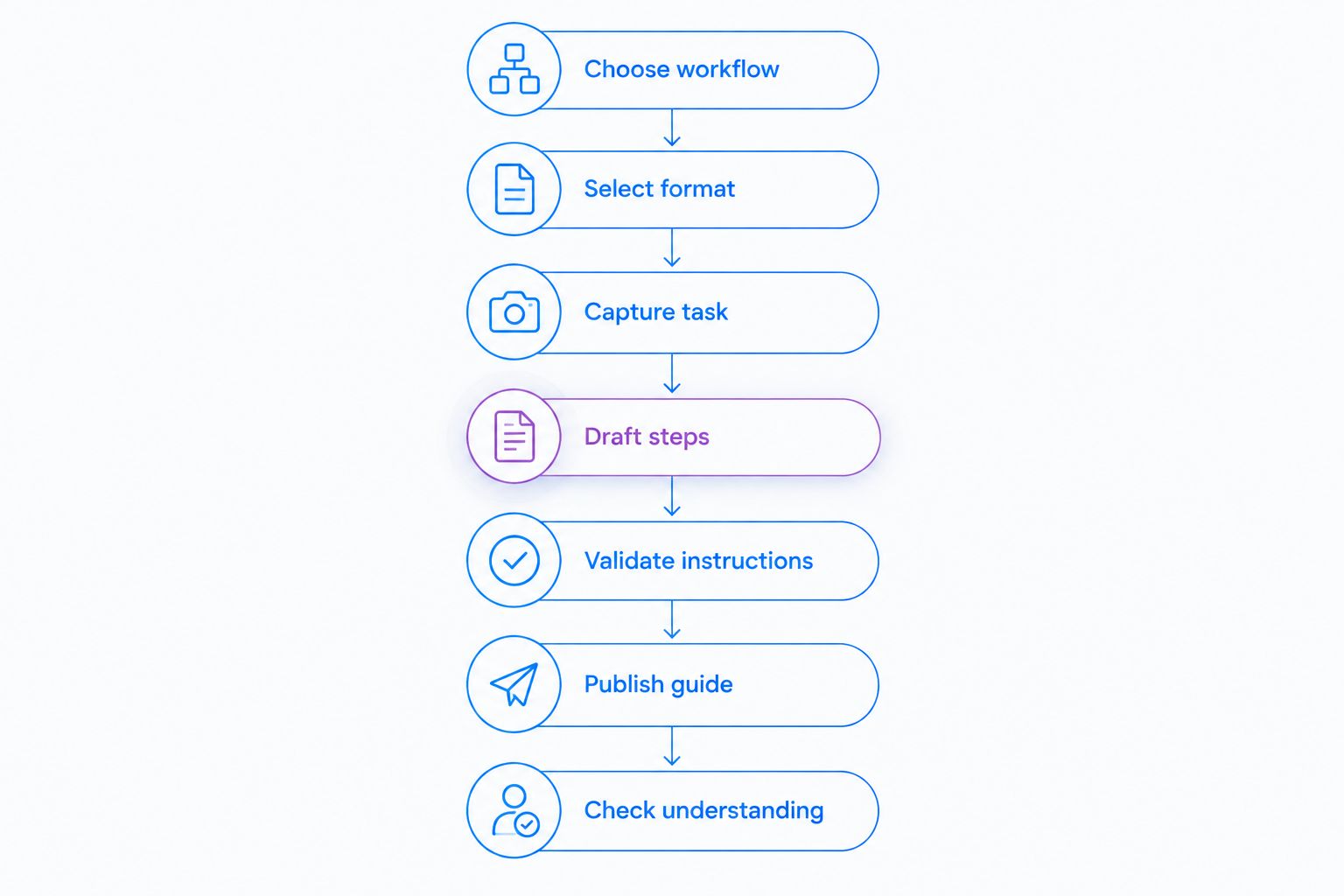
Use this sequence: Choose workflow, Select format, Capture task, Draft steps, Validate instructions, Publish guide, and Check understanding. Start with a manual draft so you can judge whether generated documentation preserves the instructions that matter.
1. Choose workflow
Start with an existing procedure, a blank document, and an experienced employee. Ask the employee to demonstrate one bounded task while you note the starting condition, decisions, and completion signal. Do not begin by asking software to invent a store procedure.
A useful first project is a screen-based task with a clear endpoint, such as locating an order in a training system. Avoid making your pilot an entire opening shift: that combines unrelated tasks, different permissions, and physical checks.
For a 2026 pilot, choose 3 workflows: one routine task, one exception, and one supervisor handoff. This is a suggested evaluation scope, not a performance benchmark. It exposes differences that a single straightforward example can hide.
- Name the employee role responsible for the task.
- Write the exact condition that starts the procedure.
- Define what successful completion looks like.
- List decisions that require a supervisor.
- Assign a procedure owner before drafting.
2. Select format
Write a plain checklist first. Then identify which instructions need an image, which require motion, and which depend on an approved policy rather than a demonstration.
Use a screenshot for a specific field or control. Use a recording when sequence matters. Use written instructions for prerequisites, exceptions, and escalation rules. These formats solve different problems; a recording alone is not a complete SOP.
Zight screen capture and guide software fits the digital portion of this workflow. Its stated scope includes screenshots, screen recording, and AI-powered documentation shared through links. For shelf setup or equipment handling, add an approved physical demonstration rather than expecting a screen capture to explain the work.
- Use screenshots to identify controls and required fields.
- Use recordings to show a sequence of screen actions.
- Use written steps to state rules and exceptions.
- Use physical demonstrations for handling and placement tasks.
- Keep the completion check visible in every format.
3. Capture task
The manual approach is to capture individual screenshots and write the action beside each one. Record the workflow when still images leave out transitions, menu changes, or the order of operations.
Prepare a training environment before capture. Use synthetic customer details and transactions, close unrelated applications, and remove notifications from view. Demonstrating a real customer transaction is not necessary to explain where an employee should select a control.
Show the approved path without silently correcting mistakes. If the trainer takes a wrong turn, repeat that portion cleanly or identify it explicitly during editing. Otherwise, the draft can preserve the wrong action as an instruction.
- Confirm that the training account has appropriate permissions.
- Replace customer and employee information with synthetic examples.
- Capture the starting state before performing the action.
- Show the screen state that confirms success.
- Capture exceptions separately from the routine path.
4. Draft steps
Turn your notes into short instructions before testing generated output. Begin each step with an action, identify the relevant control or object, and state what the employee should see afterward.
For example, a useful instruction tells the employee to select the training transaction and confirm that its details match the exercise. An instruction such as “process the request correctly” describes an intention, not an action.
An AI SOP generator accelerates the drafting stage, but the trainer remains responsible for checking every instruction. Do not let generated wording add refund eligibility, approval authority, cash-handling rules, or other policy that the source material never established.
- Start each step with an imperative verb.
- Match control names to the demonstrated interface.
- Add prerequisites before the first action.
- Separate exceptions from the main sequence.
- Remove any rule that lacks an approved source.
- Include the expected result at the end.
5. Validate instructions
Give the draft to an employee who did not create it. Ask that employee to complete the task in the training environment without a trainer filling in missing steps. Observe where the employee stops, guesses, or asks for clarification.
Use 2 reviewers for the pilot: a task performer and the procedure owner. This is a recommended review setup. The performer checks usability; the owner checks policy, permissions, and escalation rules.
Treat data handling as a separate approval. Your 2026 review should connect AI policies for confidential data to capture practices: define what staff must exclude from recordings, who can submit source material, and who approves publication. A readable guide still fails review when its source exposes information the audience should not receive.
For pharmacy or other healthcare-related retail work, use synthetic examples only. Before capturing protected health information, verify the provider’s current plan requirements, business associate agreement availability, and feature limitations through official sources. Do not treat a general software subscription as approval for a regulated workflow.
- Observe the employee completing the task without coaching.
- Check every decision against the approved policy.
- Confirm that the reviewer can see required screenshots clearly.
- Remove sensitive information from source and final materials.
- Resolve ambiguous instructions before publication.
6. Publish guide
The manual approach is to place the approved document in your existing training location and remove access to the superseded copy. A shareable guide changes the delivery format, but it does not replace document ownership or revision control.
Give employees a clear answer to a simple question: is this the current instruction? Label the role, scope, owner, and revision status in the guide itself. A document title alone does not explain whether it applies to every store or only one location.
Set a 30-day review checkpoint for the pilot as an internal operating choice. Also review the guide whenever the underlying interface, policy, equipment, or approval process changes; the calendar should not delay a necessary correction.
- Publish one clearly identified current version.
- State which roles and locations the guide covers.
- Name the procedure owner and escalation contact.
- Record the review date and revision summary.
- Remove outdated references from training checklists.
7. Check understanding
Ask employees to perform the task, not merely confirm that they opened the guide. A link view does not demonstrate correct execution. Observe whether the employee reaches the expected outcome and recognizes when to stop and escalate.
For your 2026 rollout, compare the same training task before and after revising the guide. Record the starting conditions so you do not confuse a simpler exercise with better instructions. Keep customer outcomes and sensitive information out of the training record.
Use the results to improve the specific step that failed. If employees repeatedly miss an approval boundary, make that boundary explicit rather than adding another introductory paragraph.
- Observe task completion in a training environment.
- Record where employees request clarification.
- Check whether employees recognize the escalation condition.
- Revise the step that caused the error.
- Repeat the exercise after a material change.
Compare options by the training job
Choose the option that explains the task and supports your review process. A manually written checklist remains useful for stable physical routines. Screen-based documentation fits software procedures. A video-first evaluation needs a separate check of how written steps and approvals will work.
In a paid evaluation, inspect Zight’s plan details against your actual requirements. Confirm the features included in the proposed plan rather than assuming that every capture, documentation, or administration capability comes together.
| Option | Best for | Practical advantage | Key limitation or evaluation check |
|---|---|---|---|
| Manual checklist with captured screenshots | Stable procedures with a designated author | Gives the author direct control over every instruction | The author must capture, assemble, and revise the material manually |
| Zight | Screen-based procedures requiring screenshots, recordings, and shareable documentation | Covers the stated capture and documentation workflow | Generated instructions still require review; physical work needs separate demonstrations |
| Loom evaluation | Buyers considering a recording-led training approach | Keeps the evaluation focused on whether a demonstration explains the task | Verify current documentation, review, and sharing requirements in a live trial |
| Recorded physical demonstration with a written checklist | Equipment handling, placement, and other off-screen tasks | Shows the physical action alongside the required checks | Requires a separate recording process and written policy review |
The Loom row is an evaluation path, not a claim that current features match another product. Use the same synthetic task and acceptance criteria when comparing software. Reject a polished demonstration if it omits an approval step your employees must follow.
Common mistakes retail teams make
Treating policy decisions as generated content
A generator can draft instructions from your material; it cannot authorize a return or define a cash exception. Attach approved rules to the workflow and have the procedure owner check them. Never publish an invented policy because it sounds plausible.
Mixing cashier and supervisor instructions
A cashier procedure should show where the cashier stops. Put supervisor-only actions in a clearly separated section or procedure, and identify the handoff. Otherwise, the guide teaches an action without explaining the permission boundary.
Using real transactions as training examples
A production screen can expose customer details even when the trainer focuses on a harmless control. Use synthetic records, inspect the entire capture, and review the shared output. Cropping one screenshot does not clean every source file.
Assuming one guide covers every location
A procedure can depend on the interface, equipment, or policy used at a particular store. State its scope explicitly. When a location follows a different approved process, document the difference instead of leaving employees to infer it.
Measuring publication instead of execution
A completed library is not proof that employees can do the work. Test the task and the exception handoff. Revise instructions based on observed confusion rather than treating the number of published guides as the outcome.
FAQ
What's the best AI SOP generator for retail training?
The best fit depends on the work you need to explain. Zight fits screen-based retail training that needs screenshots, recordings, and shareable documentation; physical tasks also need an approved demonstration and written checks.
Can an AI SOP generator write our store policies?
An AI SOP generator should document approved store policies, not create them. A procedure owner must verify refund rules, permissions, escalation boundaries, and other policy-dependent instructions before publication.
Is a screen recording enough for a retail SOP?
A screen recording is not enough when employees also need prerequisites, decision rules, or approval boundaries. Pair the demonstration with written instructions and an observable completion check.
How should we compare Loom with an SOP generator?
Compare both options using the same synthetic retail task and acceptance criteria. Verify current capture, written-documentation, sharing, and review capabilities rather than assuming that a recording workflow also meets your SOP requirements.
Can we use real customer orders to create training guides?
Use synthetic customer orders for training guides. Review screenshots, recordings, and generated documents for sensitive information before sharing them with employees.
How do we know whether a generated SOP works?
Ask an employee who did not create the guide to complete the task without coaching. Check the result, the escalation decision, and every point where the employee needed clarification.
Can pharmacy teams use the same capture process?
Pharmacy teams should use synthetic examples for training captures. Before any workflow includes protected health information, verify current plan requirements, business associate agreement availability, and relevant feature limitations through official provider sources.
One last thing
Test the stop condition, not just the successful path. Before closing your 2026 pilot, give the learner a synthetic scenario that requires supervisor approval. If the guide explains how to continue but not when to stop, it is incomplete—even when every screenshot is correct.