
🔍 How to Use Zight's Team Collaboration Assessment Tool
Here's how to estimate how well you teams collaborate. You'll get valuable insights on how to use visual communication tools to collaborate, share feedback, and so much more.
Complete the Quick Assessment
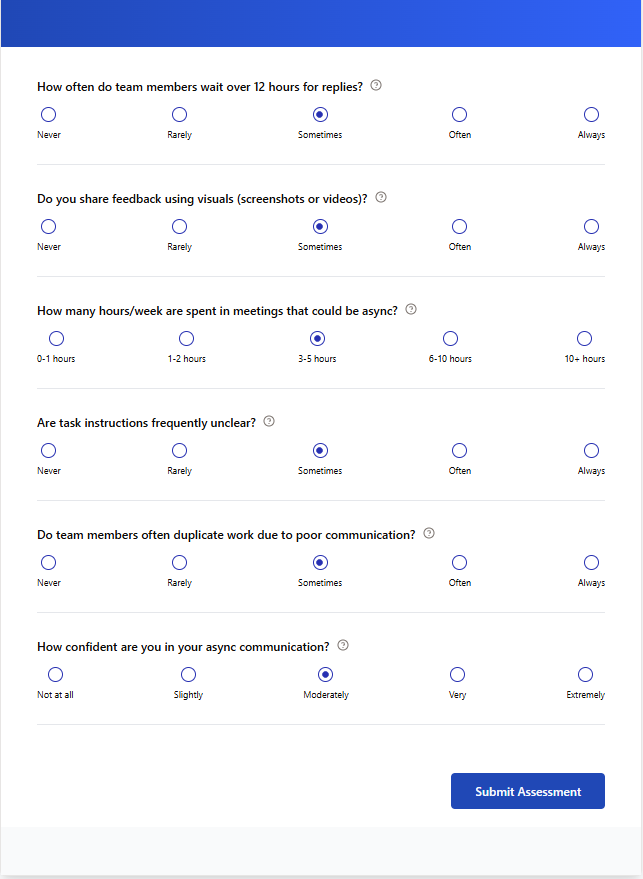
Answer simple questions about your team's communication patterns, meeting efficiency, and async collaboration habits. The assessment takes less than 2 minutes and covers key areas like feedback sharing, meeting effectiveness, and task clarity.
Review Your Collaboration Score
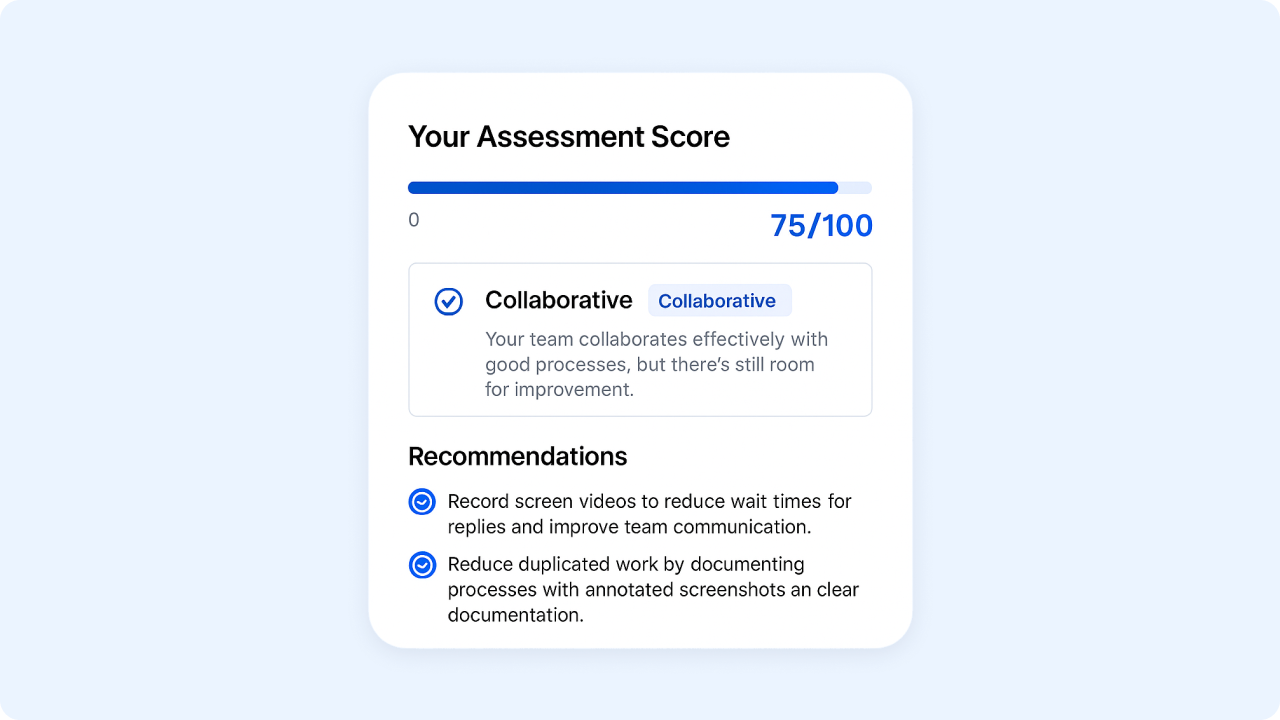
Receive an instant assessment score (out of 100) that measures your team's collaboration effectiveness. Your score places you in a category (like "Moderate" or "Highly-Efficient") with a summary of your team's current collaboration strengths and challenges.
Explore Tailored Recommendations
Get specific, actionable recommendations designed to address your team's unique collaboration gaps. These recommendations leverage Zight's visual communication tools to solve your specific challenges.
Request Your Detailed Report
Enter your email to receive a comprehensive report with deeper insights and step-by-step implementation plans for improving team collaboration using Zight's suite of visual communication tools.
Why Try Our Team Collaboration Assessment?
We’ve all been there — stuck in meetings that could’ve been emails, waiting forever for replies, or redoing work because the instructions weren’t clear. It’s frustrating, right?
✅ Completely free — The assessment is completely free and always will be. No downloads or installations required.
✅ Find your actual pain points — The assessment asks targeted questions about wait times, meeting loads, and task clarity to pinpoint exactly where your team’s communication breaks down.
✅ Takes just 2 minutes to complete — Six simple questions to get a clear picture of your team’s collaboration metrics. The assessment is designed to be quick but thorough.
✅ Get a real collaboration score — After answering the questions, you’ll immediately see where your team stands on a scale of 0–100, with a clear category placement that shows your collaboration maturity level.
✅ Tailored to modern work challenges — The assessment focuses on today’s critical collaboration issues: async communication, visual feedback, meeting efficiency, and task clarity — not outdated office dynamics.
✅ No data collection — Take the assessment anonymously or enter your email for the detailed report. Either way, you control what information you share.

Perfect for Teams Facing These Collaboration Challenges
When Responses Take Forever
Identify why your team waits hours for simple answers and which visual methods actually speed up communication cycles without adding meeting burden.
When Meetings Consume Your Calendar
Discover exactly how many hours your team wastes in meetings that could be replaced with more efficient async communication alternatives.
When Task Instructions Create Confusion
Pinpoint why directions get misinterpreted and how clearer visual context eliminates the “that’s not what I meant” frustration.
When Work Gets Duplicated
Uncover the root causes of redundant effort and how visual documentation prevents costly overlap between team members.
When Async Communication Falls Flat
Learn what’s undermining your team’s confidence with asynchronous work and which visual tools overcome these specific barriers.
When Constant Interruptions Destroy Focus
See what drives the endless stream of clarification questions and how the right visual context preserves deep work time.
When Feedback Cycles Drag On
Identify why alignment takes so many rounds and which visual communication methods cut revision cycles dramatically.
When Remote Collaboration Creates Gaps
Discover which communication challenges are affecting your remote teams and how visual tools bridge the distance effectively.
🚀 Implement Your Assessment Recommendations with Zight's Visual Tools
After completing your assessment, put the recommendations into action with these powerful visual communication tools:
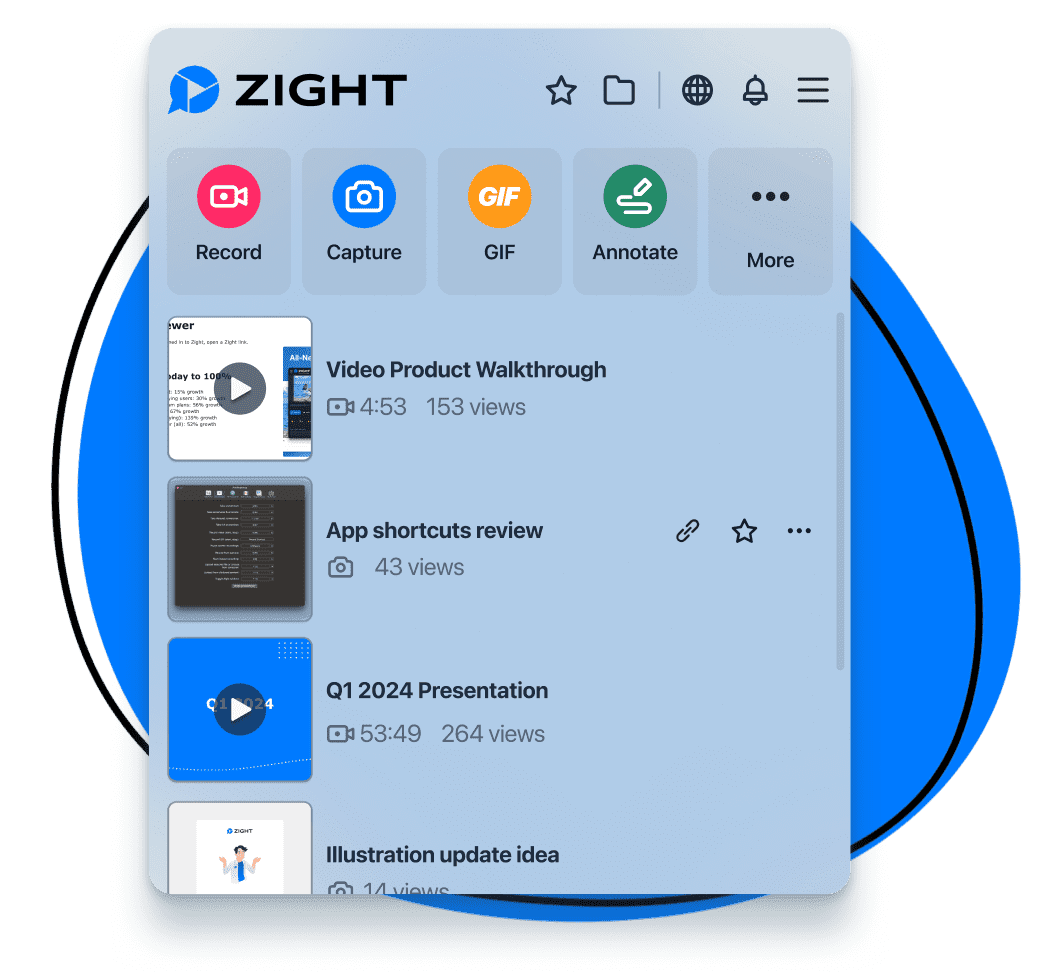
📸 Screenshot Tool — Capture and annotate any screen with precision. Add arrows, text highlights, and callouts to provide crystal-clear feedback that eliminates confusion and speeds up revisions.
🎥 Screen & Webcam Recording — Create quick video walkthroughs to explain complex concepts in seconds instead of scheduling another meeting or writing lengthy explanations.
📱 GIF Maker — Design simple animations that demonstrate processes step-by-step. Show exactly how something works in a format that’s easy to share and reference.
🧠 Smart Actions — Transform videos into searchable meeting notes, checklists, and documentation automatically. Extract key information without manually transcribing or summarizing content.
✂️ Video Editing — Polish your recordings with professional yet simple editing tools. Create seamless visual narratives that keep your team engaged and informed.
🎙️ Audio Recording — Capture high-quality voice explanations when visuals need verbal context. Add rich audio elements to your communication for greater clarity.
🎬 Request Video — Collect personalized video responses from teammates without scheduling meetings. Ask for demonstrations or explanations and receive them on everyone’s own time.
Unlock More Tools
Expand your toolkit with these additional free converters and utilities.
Ready to Boost Your Productivity?
Save time and money while boosting your productivity with Zight — free tools for screen recording, screenshots, GIFs, and webcam capture.
Try Zight for FreeFAQs About Zight's Team Collaboration Assessment Tool
The Team Collaboration Assessment takes just 2 minutes to complete. We’ve designed it to be quick yet thorough, with six targeted questions that identify your team’s specific collaboration challenges without taking up your valuable time.
The assessment is completely free with no hidden charges or credit card required. We created this tool to help teams identify their collaboration gaps and understand how visual communication can help.
You’ll receive completely personalized recommendations based on your specific assessment answers. If your team struggles with meeting overload, you’ll get suggestions that are different from those of teams with task clarity issues. Each recommendation is tailored to address your unique collaboration challenges.
No, you’ll see your collaboration score and basic recommendations immediately after completing the assessment, no email required. Providing your email is optional and only necessary if you want to receive a detailed report with implementation steps and additional insights.
Transform Your Team's Collaboration with Zight's Free Assessment Tool

Have you ever sat through yet another meeting that could have been an email? Or waited days for a response to a simple question? Or had to deal with the aftermath when several people unknowingly worked on the exact same task?
Poor collaboration is both frustrating and expensive — according to Atlassian’s State of Teams 2024 report, a staggering 25 billion work hours are lost annually to ineffective collaboration.
If you’ve been nodding along, thinking, “That’s exactly what happens on my team,” then it’s time for a change. Today, we’ll introduce you to Zight’s Free Team Collaboration Assessment Tool — a simple, quick way to identify exactly where your team’s communication breaks down and get tailored recommendations to fix it.
In just two minutes, this assessment will reveal your team’s collaboration blind spots and provide actionable strategies using visual communication and collaboration tools that can transform how your team works together.
The Hidden Cost of Poor Team Collaboration
Before we explore the assessment tool, let’s understand what’s at stake when collaboration fails.
When we researched workplace collaboration statistics, we found that teams that collaborate effectively are 50% more productive than those that don’t. Meanwhile, this study has also found that diverse and collaborative teams make better decisions 87% of the time, thus further showing why effective collaboration can bring teams closer to achieving their targets.
These statistics paint an even more concerning picture of modern team collaboration challenges:
- According to McKinsey research, employees save an average of 50 minutes daily through efficient collaboration across communication channels
- Poor communication costs organizations billions annually, with the Radicati Group reporting employees receive around 121 emails per day that they typically need to reply to
In simple terms, many teams are spending too much time in meetings, drowning in notifications, and losing focus on key work that needs to be completed fast — all key performance indicators of collaboration breakdowns. The result of this is often poor financial performance and project outcomes and a serious dip (or even lack of) proper employee engagement, satisfaction, and growth.
If you’re in this predicament, you can use a collaboration assessment tool like Zight as the first step to building effective collaboration and creating a productive workplace for your employees.
How to Use Zight’s Team Collaboration Assessment Tool
Using this free and easily accessible online tool, your assessment will provide valuable insights that you can use to gauge your employees’ productivity, track progress for your business operations, and, as a trickle-down effect, enhance customer satisfaction when communication and collaboration flow easily.
Simply launch the tool on any device with an internet connection. No downloads, installations, or account creation required — it’s completely free and should complement any project management software you already use.
Then, measure your team’s performance as follows:
Step 1: Complete the Quick Questionnaire
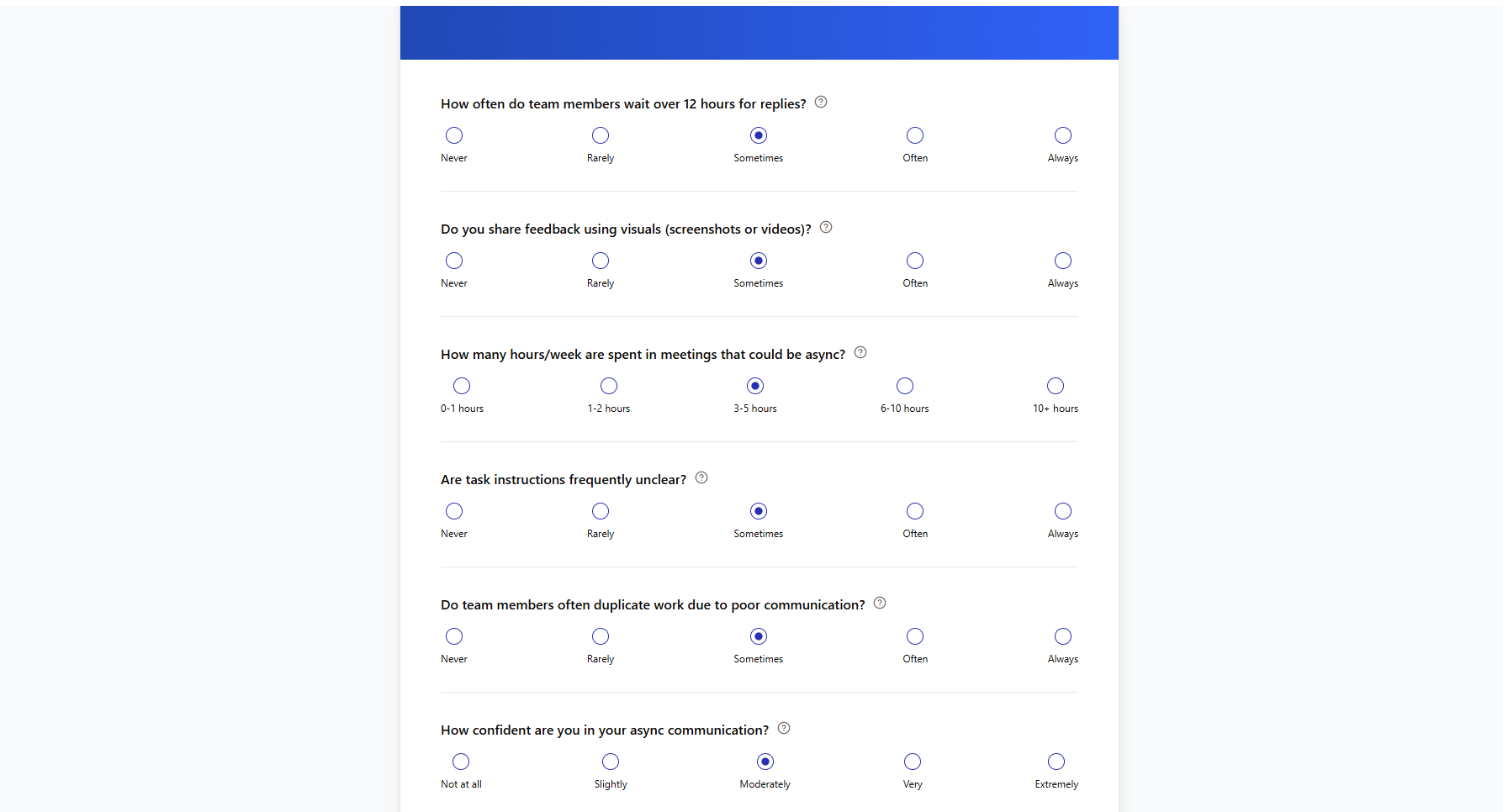
To start the assessment, answer the six questions about your team’s communication patterns and collaboration challenges. You’ll get five options for each question, which basically range from the lowest possibility (like “Never” or “0-1 hours”) to the strongest (like “Always” or “10+ hours”). Simply click the option that best describes your team’s current situation.
Step 2: Submit Your Answers and Analyze Your Results

Once you finish answering, click the “Submit Assessment” button and wait a few seconds for the tool to evaluate your team collaboration health.
You will then get a collaboration score out of 100 points, along with your team’s category placement (like “Reactive,” “Moderate,” or “Highly-Efficient”). This score reflects how effectively your team currently communicates and collaborates.
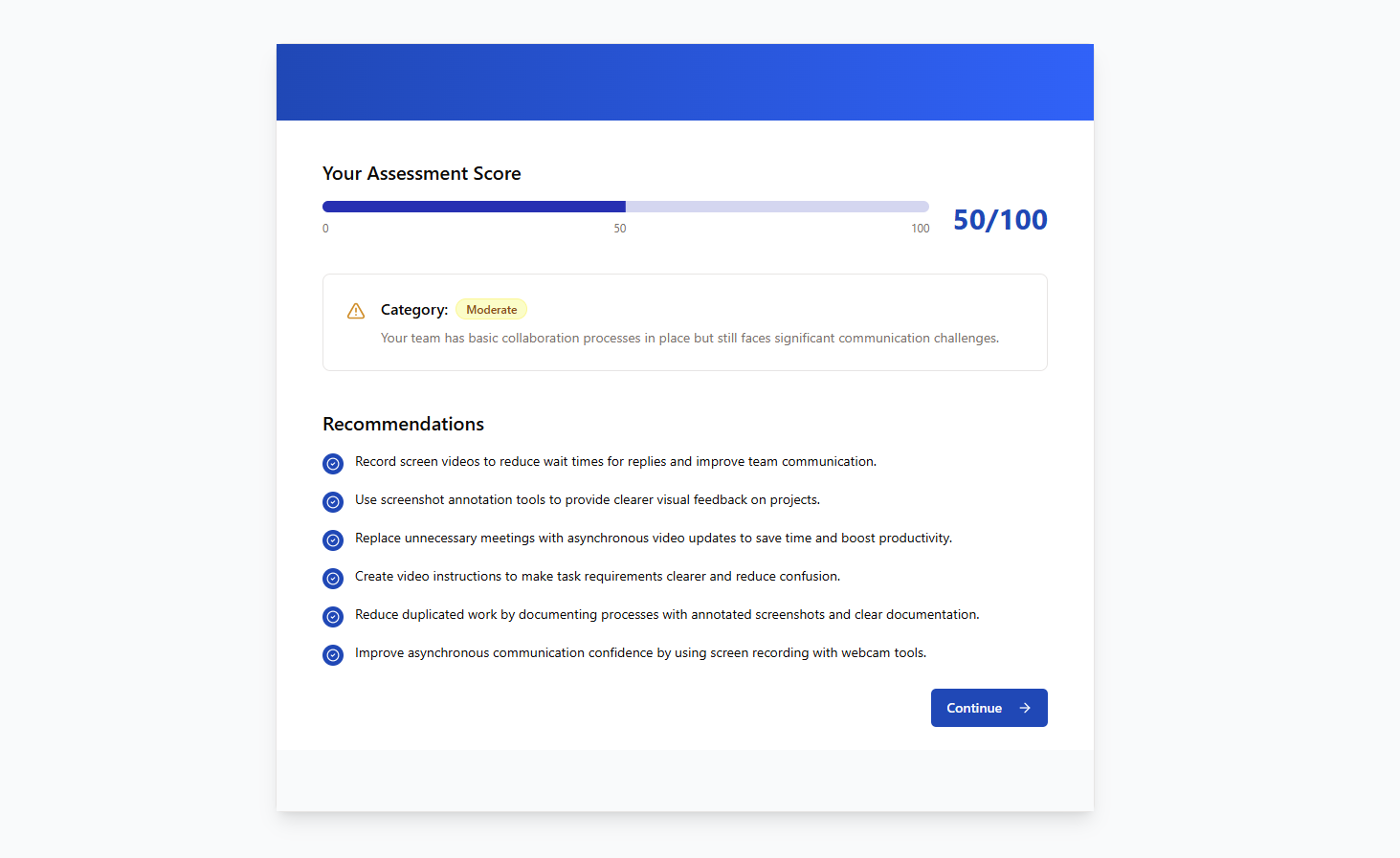
The results page will also provide a summary of your team’s specific strengths and challenges, plus customized recommendations designed to enhance collaboration. These valuable insights identify exactly where your team’s communication breaks down and what tools can fix those issues.
The assessment provides tailored recommendations based on your specific answers. These might include:
- Recording screen videos to reduce wait times for replies
- Using screenshot annotation tools for clearer visual feedback
- Replacing unnecessary meetings with asynchronous video updates
- Creating video instructions to make task requirements clearer
- Reducing duplicated work through better documentation
- Improving async communication confidence with screen recording tools
Each recommendation directly addresses the collaboration challenges identified in your assessment: you can use specific Zight tools to solve these issues.
Step 3: Get Your Detailed Report
For even deeper insights, click the “Continue” button to access the option to receive a comprehensive report.

You’ll then need to provide your name and email address to get the full report. When you add your details, click the “Get My Report” button to continue.

This report can help you when evaluating collaboration challenges for your team and ultimately guide you when you need to improve workplace collaboration. Here are some of the insights you might get:
- A detailed breakdown of each collaboration dimension
- Step-by-step implementation plans for each recommendation
- Statistics comparing your team to industry benchmarks
- Long-term strategies for building a stronger collaborative culture
- Additional resources specific to your team’s collaboration maturity level
The full report expands on the initial recommendations and provides actionable plans to transform your team’s communication patterns using visual collaboration tools.
Transform Your Assessment Insights into Action with Zight
After you measure collaboration with our free tool, you’ll have discovered significant communication gaps — but identifying problems is only half the battle. Now, you need the right tools to implement these recommendations and elevate your team’s collaboration.
Zight’s complete visual communication platform gives you everything you need to transform your team’s communication effectiveness:
1. Screen Recorder — Show, Don’t Tell
Zight’s screen recorder transforms complex instructions into easy-to-follow visual guides. Instead of writing lengthy explanations that are easily misinterpreted, simply record your screen and voice while completing a task.
This will help you save time and significantly improve employee engagement by catering to visual learners and creating more personal connections through voice and video.
Even better, you can share the videos instantly with a link via email, Slack, or any messaging platform without file size limitations. If the link is too long, use Zight’s free URL shortener for a professional look.
2. Screenshot & Annotation — Precision Feedback in Seconds
With Zight, you get a reliable screenshot app to replace vague text feedback with crystal-clear visual content. You can add arrows, highlights, text callouts, and shapes to pinpoint exactly what you’re referring to.
This way, you’ll prevent misunderstandings, reduce back-and-forth questions, and accelerate project timelines for a continuous improvement cycle where feedback is implemented more accurately the first time. You can share annotated screenshots instantly via links that recipients can view without downloading anything.
3. Request Video — Seamless Collaboration
Need feedback or visual information from teammates or clients? Instead of asking them to install software, simply send a Request Video link. Recipients can record their screen and send it back to you without creating an account or downloading anything.
Doing this eliminates friction in collecting visual feedback, troubleshooting issues, and gathering information — making collaboration effortless and encouraging broader participation across your organization.
4. Smart Actions — Automate Documentation in One Click
Zight’s AI-powered Smart Actions will transform your screen recordings into perfectly formatted documentation automatically. With a single click, create:
- Step-by-step guides with screenshots
- Process documentation with key points
- Meeting summaries with action items
- Bug reports with technical details
The feature not only saves hours of manual documentation work but also creates a strong knowledge-sharing system where critical information is preserved and easily accessible to everyone on your team. In addition to that, you will also reduce duplication of effort and ensure valuable expertise remains with your organization even when team members change.
5. GIF Maker — Lightweight Visual Instructions
Create looping GIFs that demonstrate short processes or highlight important interface elements without the file size of full videos. These lightweight visuals are perfect for quick explanations and can be easily embedded in documentation, emails, or chat messages.
GIFs provide an effective middle ground between static screenshots and full video recordings, making them ideal for concise visual instruction that drives continuous improvement in team processes.
Wrapping Up…
There you have it! Your collaboration assessment will pinpoint where visual communication can transform your team’s effectiveness, and then Zight will provide the all-in-one toolkit to implement these recommendations immediately. With screen recording, smart annotations, AI-powered documentation, and seamless integrations, you can eliminate confusion, reduce meeting time, and build a visual knowledge base that keeps your team aligned.
Start your free trial today and turn insights into action with Zight.












