
- Faster decisions: Instant feedback avoids back-and-forth delays.
- Clear communication: Visuals reduce misunderstandings.
- Team alignment: Everyone works on the same page.
- Improved workflows: Integrated tools save time and keep things organized.
- Remote teams break geographical barriers.
- Designers and developers need quick feedback.
- Educators use it for interactive learning.
- Cross-functional teams align on complex projects.
- Screen sharing, live annotations, and simultaneous editing.
- Version control to manage changes.
- Integrations with tools like Slack, Teams, and Jira.
- AI tools for transcription, translation, and summaries.
Core Features and Requirements for Effective Collaboration
Required Features of Visual Collaboration Tools
The backbone of successful real-time visual collaboration lies in having the right tools with the right features. Screen sharing is a must-have, allowing teams to showcase processes, review designs, or resolve issues together in real time. It eliminates the confusion that often comes with just verbal explanations. Live annotation takes things a step further by turning static visuals into interactive conversations. Team members can mark up, highlight, or comment directly on shared content, making even the most complex ideas easier to understand. This not only encourages participation, especially from quieter team members, but also ensures everyone is on the same page by transforming abstract ideas into actionable visuals.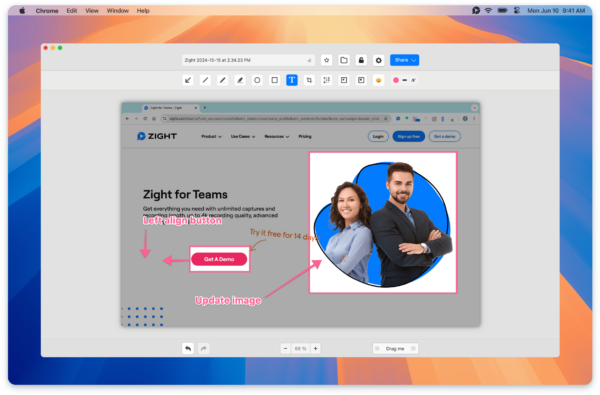 Simultaneous editing is another game-changer. Instead of waiting for one person to finish before someone else can contribute, multiple team members can work on the same project at the same time. This speeds up decision-making, boosts efficiency, and ensures transparency, as everyone can see changes in real time and provide feedback instantly. Version control keeps everything organized. It tracks who made changes and when, while also allowing teams to revert to earlier versions if needed. This is especially valuable when several people are working on the same visual assets, preventing conflicting edits or data loss. Finally, integrated chat, video, or audio tools make communication seamless. Instead of switching between apps, teams can discuss and provide feedback directly within the collaboration platform, keeping conversations focused and tied to the content at hand. These features are the building blocks of a smooth and effective collaboration experience.
 Technical Requirements for Smooth Collaboration
For real-time collaboration to work without a hitch, a strong technical foundation is essential. Reliable high-speed internet is the lifeline here. Without it, delays in uploading or sharing visuals can derail the entire process. Cross-platform compatibility ensures that everyone can join in, no matter what device or operating system they’re using. Whether it’s Windows, Mac, iOS, or Chrome, the ability to work seamlessly across platforms removes technical hurdles, which is especially important for distributed or hybrid teams. Security is another key consideration. Robust security protocols, like end-to-end encryption and secure user authentication, are essential for protecting sensitive data. Compliance with regulations such as GDPR and CCPA is also critical, especially for organizations handling confidential information. User permission settings offer granular control over who can view, edit, or share content. This prevents accidental changes and ensures sensitive information is only accessible to the right people. For larger teams or cross-functional groups, this level of control is indispensable.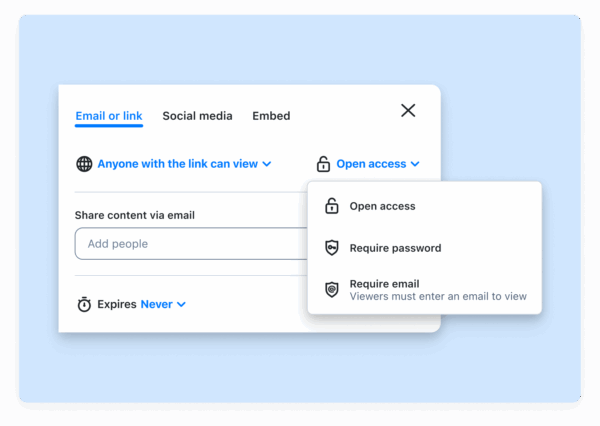 Lastly, cloud storage plays a vital role. It allows teams to store and access updated content instantly, ensuring everyone is working with the latest version. Without it, real-time collaboration would be bogged down by delays and inefficiencies. A solid technical setup ensures that collaboration tools not only work smoothly but also integrate seamlessly with existing workflows.
 Why Integrations with Existing Tools Matter
Integrations are the glue that binds collaboration tools to an organization’s existing workflows. By connecting with platforms like Slack, Microsoft Teams, and Jira, visual collaboration tools eliminate the need for constant app-switching and manual data transfers. These integrations enhance productivity by allowing teams to share visuals, updates, and feedback directly within the tools they already use. For example, marketing teams can brainstorm on a shared digital whiteboard, annotate designs in real time, and share updates in Slack, leading to faster approvals and fewer miscommunications.“Primarily I use it as a visual reference in Slack messages. I will write up instructions/updates etc and link specific words to Zight screenshots to illustrate my point. As a designer this happens a lot, so I’m doing quick UI mocks to get concepts across fast.” – Kate Frappell, Senior Design Lead, OfloadProduct development teams can also benefit from these integrations. They can record walkthroughs, share annotated screenshots, and track feedback directly in tools like Jira. This keeps the iteration process smooth and ensures that important visual feedback doesn’t get lost in email threads or scattered across multiple apps.
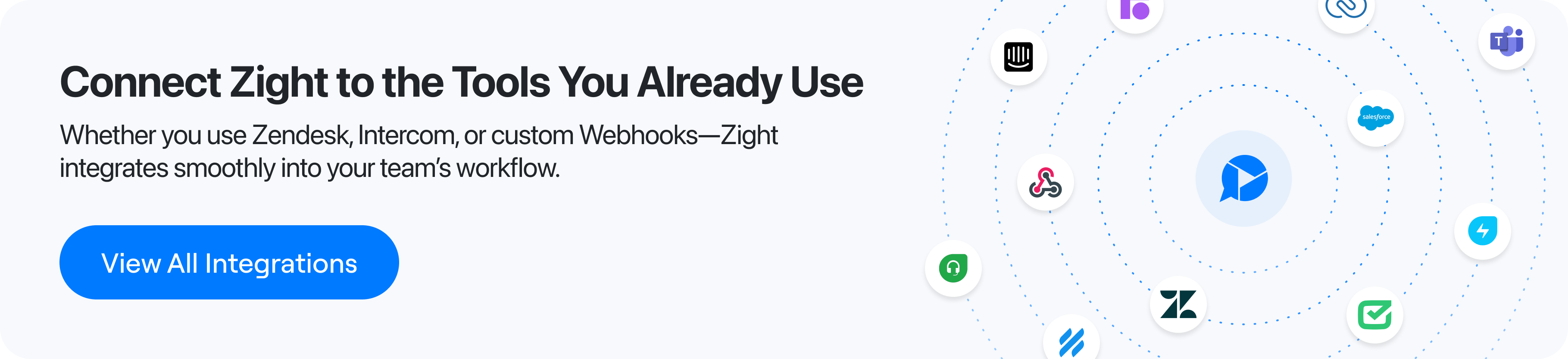 Moreover, integrations ensure that updates made in the collaboration tool are reflected across connected platforms. This synchronization reduces the risk of teams working with outdated information and helps maintain alignment across departments and stakeholders. The best collaboration tools don’t force teams to reinvent the wheel. Instead, they enhance existing workflows, making visual collaboration a natural extension of how teams already work. By integrating seamlessly with familiar tools, these platforms create a cohesive work environment where collaboration feels effortless, not disruptive.
 How Zight Improves Real-Time Visual Collaboration
Zight transforms how remote and hybrid teams communicate visually. With 69% of workers emphasizing the importance of visuals in collaboration, Zight’s user-friendly tools make a noticeable difference right away.Main Features of Zight
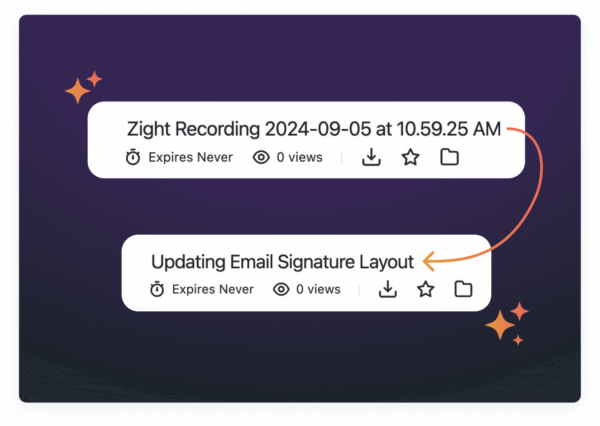
Screen recording lies at the heart of Zight’s functionality. Whether capturing your entire screen, a specific app, or webcam footage, Zight supports up to 4K resolution. Recordings are instantly saved to the cloud, and built-in editing tools make it easy to polish your content.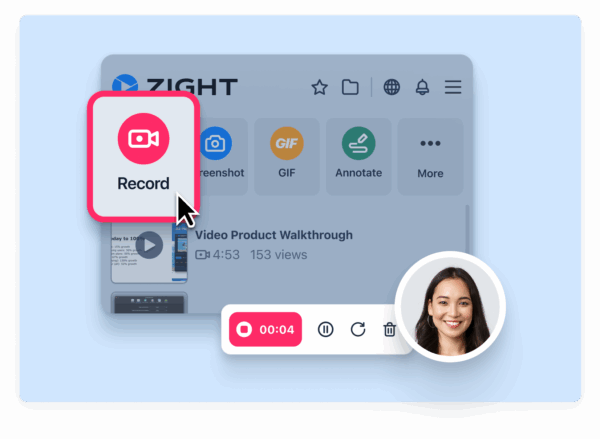 Screenshot and annotation tools go beyond simple captures. Whether you’re grabbing a full screen or a specific section, Zight lets you store screenshots in the cloud and enhance them with arrows, text, cropping, blurring, or redaction. This is especially helpful for marking up designs, highlighting interface elements, or safeguarding sensitive details – all while keeping communication clear and precise. GIF creation provides a quick, lightweight solution for demonstrating processes. Instead of recording a full video, you can create loopable GIFs that are perfect for short, visual explanations. Zight’s AI-powered tools take productivity to the next level. The platform can automatically turn transcripts into meeting notes, guides, or bug reports. Features like Smart Titles and video summarization save time, while auto-transcription ensures accessibility for all team members.
  With AI Translation, Zight supports transcription and translation in over 50 languages, making it easier for global teams to work together. These features enable seamless collaboration across platforms and languages.
 Zight’s Integrations and Multi-Platform Support
Zight doesn’t just offer powerful features, it integrates smoothly into existing workflows. It connects with Slack, Microsoft Teams, and Jira, allowing users to share content effortlessly via auto-generated links or drag-and-drop functionality. This integration eliminates the hassle of switching between tools. For example, marketing teams can brainstorm visual ideas and instantly share annotated mockups in Slack, while developers can record bug reproductions and attach them directly to Jira tickets, providing clarity that text alone can’t offer. Zight works across Mac, Windows, Chrome, and iOS, ensuring everyone can contribute regardless of their device. This cross-platform compatibility is essential for distributed teams that rely on diverse operating systems. Even better, viewers don’t need a Zight account to access and comment on shared content. This makes it easy for external collaborators, clients, or stakeholders to review and provide feedback without additional software or sign-ups, simplifying the entire process.Examples of Workflow Improvement with Zight
Zight’s analytics tools give teams valuable insights into how their content is being used. You can track who views shared content, how often, and for how long. For instance, sales teams can identify which product demo videos grab the most attention and adjust their strategies based on real engagement data.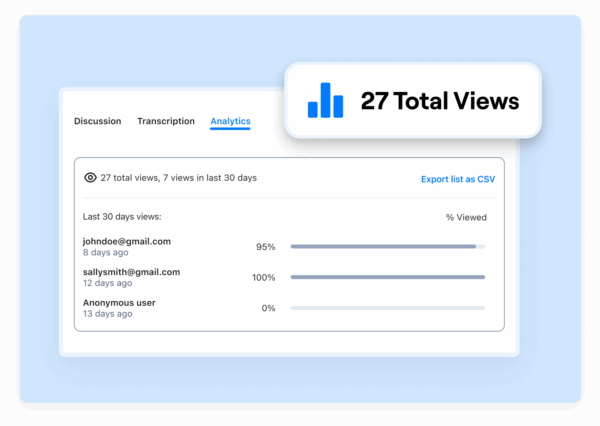 Custom branding ensures all shared visuals maintain a polished, professional look, reinforcing your company’s identity, especially important when working with external clients or stakeholders. The platform also tackles common collaboration headaches with its version control and centralized feedback. Instead of juggling multiple file versions across email threads and apps, Zight offers a single, organized location for visual assets. Teams can provide feedback directly on shared content, whether in real time or asynchronously, ensuring everyone works with the latest updates and reducing review cycle delays. Research shows that 30% of workers believe visuals improve alignment and speed up task completion. Zight’s tools make visual communication as simple as sending a text message while offering far greater clarity for complex ideas and collaborative decisions.
 Best Practices for Real-Time Visual Collaboration
Effective visual collaboration doesn’t just happen, it requires thoughtful strategies to avoid common challenges and make the most of available tools. By following key practices, teams can turn disorganized efforts into smooth, productive workflows.Setting Up Clear Collaboration Rules
One of the first steps to successful collaboration is setting clear rules. Standardized naming conventions play a big role in keeping things organized. For instance, using a format like “ProjectName_Date_Version” ensures files are easy to locate and eliminates the hassle of digging through vaguely named documents. In addition to naming conventions, having a well-organized file structure is essential. Centralized folders with consistent labeling make it simple for team members to find and access the latest visual assets. Clear communication expectations are another cornerstone of effective teamwork. From the start, teams should agree on response times for feedback, determine the best channels for different types of communication, and establish protocols for urgent requests. When everyone knows how and when to participate, projects flow more efficiently, and misunderstandings are minimized. To keep workspaces clean and workflows efficient, teams can use visual indicators to show file statuses and regularly archive outdated versions. This not only declutters the workspace but also preserves important project history for future reference. These foundational rules make it easier to incorporate automation tools that boost efficiency.Using AI and Automation for Better Efficiency
Automation can take collaboration to the next level, and tools like Zight’s AI features demonstrate how. AI can handle tasks such as automatic transcription, file organization, and summarizing discussions, which reduces the need for manual note-taking and ensures no critical details slip through the cracks. This allows teams to quickly revisit decisions and action items without wasting time. Instead of spending hours managing files or creating meeting notes, team members can focus on their core responsibilities. Features like Zight’s Smart Titles and video summarization tools save time while ensuring comprehensive documentation. For global teams, AI-powered translation is a game-changer. Supporting over 50 languages, these tools allow international collaborators to participate fully in discussions, eliminating language barriers and fostering seamless communication.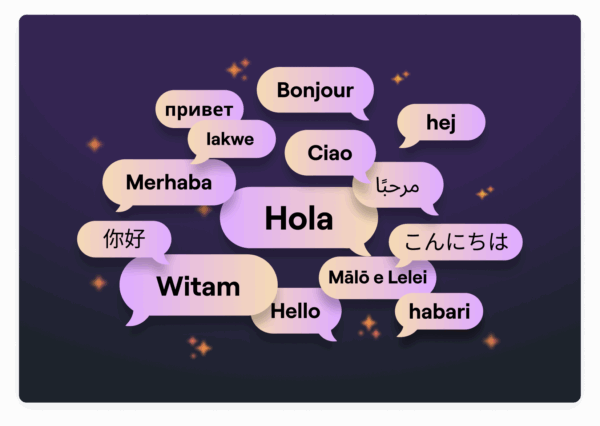 Teams that embrace these automated tools often report quicker project completion and fewer errors, as routine tasks are handled by technology, freeing team members to focus on creative solutions and strategic goals.
 Solving Common Collaboration Problems
Even with clear guidelines and advanced tools, it’s important to address common challenges that can disrupt collaboration. Version control is a frequent issue, but built-in tools that track changes and maintain file histories can prevent conflicts. When discrepancies do arise, having access to past versions and detailed change logs can help resolve them quickly. Onboarding new team members can also be tricky, but preparation makes a big difference. Visual walkthroughs and standardized templates simplify the process, while mentorship programs provide additional support. Interactive templates and clear workflows help new members transition smoothly and reduce confusion. To measure how well collaboration efforts are working, teams can track metrics like project completion times, feedback cycles, user engagement, and version conflicts. Many visual collaboration platforms offer built-in analytics dashboards, making it easier to identify bottlenecks and areas for improvement. Miscommunication is another common hurdle. Vague feedback or assumptions about project requirements often lead to endless revisions. Setting protocols for clear, actionable feedback can prevent these issues. Tools that allow for visual annotations, where team members can directly mark up elements, help reduce misunderstandings and speed up reviews. Statistics back up the importance of visuals in collaboration. Research shows that 69% of workers find visuals critical for teamwork, and 30% say they improve alignment and speed up task completion. Teams that adopt these best practices often see measurable improvements, with some reporting up to a 25% reduction in project turnaround times. By addressing these challenges, teams can fully unlock the potential of real-time visual collaboration.Conclusion and Main Takeaways
Collaborating visually in real time has become a cornerstone of effective teamwork. As remote and hybrid work models continue to grow, the ability to share ideas visually and instantly is helping teams boost productivity, spark creativity, and achieve project goals more efficiently.Key Benefits and Practices for Success
Research shows that teams using visual collaboration tools see noticeable improvements in how they work together. Some of the standout benefits include:- Faster decision-making: Visualizing problems and solutions helps teams align quickly.
- Improved communication: Instant feedback and fewer back-and-forth exchanges streamline discussions.
- Greater transparency: Everyone stays on the same page, with shared goals clearly in sight.
- Enhanced productivity: Delays are reduced, and workflows move more smoothly.
Why Zight Stands Out
A well-rounded platform is essential for making visual collaboration seamless, and Zight delivers exactly that. It combines screen recording, visual communication, and file-sharing capabilities into one unified tool, eliminating the hassle of switching between multiple apps and keeping workflows uninterrupted. Zight’s AI-powered features take things further, offering automatic transcription, smart summaries, and translation support for over 50 languages. These tools make visual content more accessible and actionable for every team member. Plus, with compatibility across Mac, Windows, Chrome, and iOS, Zight ensures smooth collaboration no matter the device. Its integrations with tools like Slack, Microsoft Teams, and Jira also mean it fits naturally into your existing workflows. The data speaks for itself: teams equipped with comprehensive visual collaboration tools like Zight are better positioned to thrive in today’s fast-moving, visually-driven work environments. By embracing the right tools and practices, organizations can unlock new levels of efficiency, creativity, and alignment that lead to meaningful results.FAQs
How do real-time visual collaboration tools enhance communication and decision-making for remote teams?
Real-time visual collaboration tools like Zight simplify how teams communicate and make decisions by allowing them to share ideas in a visual and interactive way. With features such as screen recording, screen capture, and annotations, these tools make it easier to clarify concepts, give feedback, and stay aligned on tasks. On top of that, AI-driven features like transcriptions, summaries, and translations ensure that team members remain connected, no matter their language or time zone. These tools help remote teams work more effectively and make quicker, well-informed decisions.What technical setup is needed for effective and secure real-time visual collaboration?
To create a smooth and secure environment for real-time visual collaboration, keep these technical essentials in mind:- Compatibility: Opt for tools that function seamlessly across various platforms like Mac, Windows, Chrome, and iOS. This ensures everyone on your team can join in without running into tech issues.
- Integrations: Select platforms that connect effortlessly with tools you already use, such as Slack, Microsoft Teams, or Jira. This can help streamline workflows and improve productivity.
- Security: Make sure the platform offers robust security features to safeguard your data and enable safe sharing of information.












