
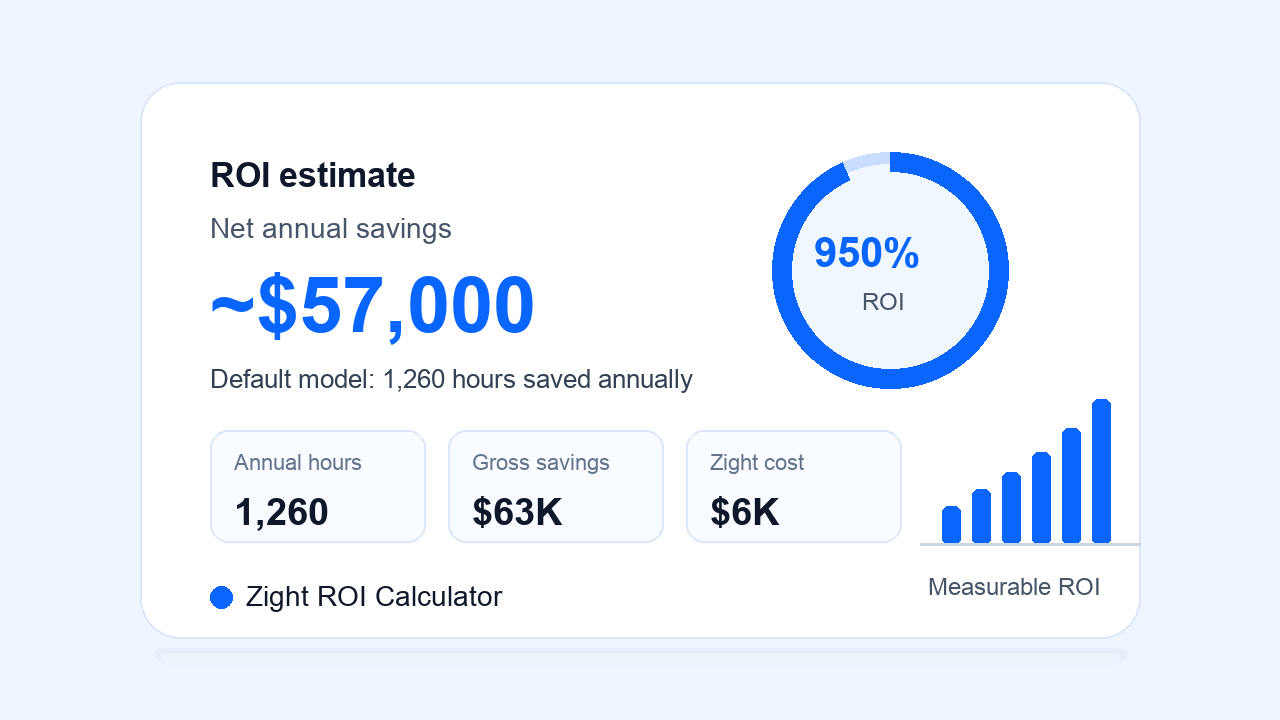
See what Zight saves your team.
Net annual savings
~$57,000
based on your inputs, zight saves your team ~$57,000 a year.
Adjust assumptions
How the estimate is calculated
A simple business-case model your team can edit.
Total annual hours saved
Start with the hours Zight can give back by replacing repetitive meetings, repeat support questions, documentation work, and Request Video back-and-forth.
Annual savings
Multiply those hours by your fully loaded hourly cost, then subtract your annual Zight subscription cost for a net savings estimate.
ROI
Compare net annual savings against the annual Zight investment to show the return your team gets from clearer visual communication.
Use the example numbers above, edit them here, or adjust the full calculator to model your team’s workflow.
Trusted by teams that move faster with visual communication
Join teams using Zight screenshots, screen recordings, GIFs, AI summaries, and Request Video to share clearer context in less time.






How Zight unlocks ROI across your team
Every Zight link can replace a meeting, reduce a back-and-forth, or turn tribal knowledge into reusable visual documentation.
Fewer repetitive meetings
Replace quick status updates, walkthroughs, and “can you show me?” calls with short visual messages people can watch on their own time.
Faster support and customer success
Use screenshots, screen recordings, annotations, and AI summaries to explain fixes once, share them instantly, and reduce repeat tickets.
Quicker onboarding and enablement
Turn common workflows into reusable visual guides so new teammates and customers get productive faster.
Better request collection
Use Zight Request Video to collect customer or internal context without scheduling another meeting.
Ready to calculate your team’s savings with Zight?
Try the calculator above, then talk to our team about the workflows where Zight can save the most time.
Talk to SalesFrequently Asked Questions
Include recurring walkthroughs, quick status updates, product explanations, bug reproduction calls, onboarding sessions, and other short meetings where a screenshot, screen recording, GIF, or Request Video could deliver the same context asynchronously.
Teams can respond with annotated screenshots, short videos, AI summaries, and reusable links instead of typing the same explanations repeatedly or scheduling a call for every question.
Request Video helps collect customer or teammate context asynchronously. Instead of booking time, chasing screenshots, or exchanging long email threads, teams can request a video response and move faster with clearer information.
Yes. The inputs are designed to be editable so teams can model their own meeting volume, support volume, documentation workload, hourly cost, and Zight subscription estimate.
No. It is an estimate for planning and business-case conversations. Actual ROI depends on adoption, workflows, team size, and how broadly Zight is used.












