
How to Share Large Files with Zight
Quickly share large files with Zight in just a few clicks. This guide shows you how to upload your file, generate a shareable link, and send it to platforms like Canvas or via email.
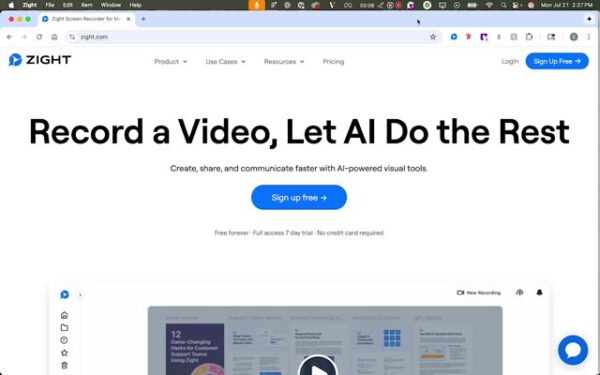
Step 1: Access Zight
- Go to the top of your screen and click on the Zight Icon.
Step 2: Initiate Upload
- Click on the upload option. If it’s not visible, check the more section.

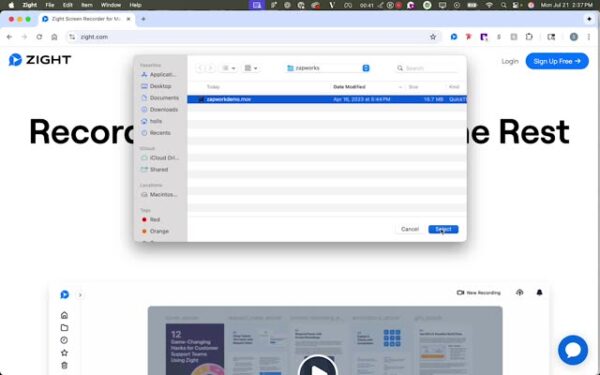
Step 3: Select Your File
- Choose the file you want to upload.
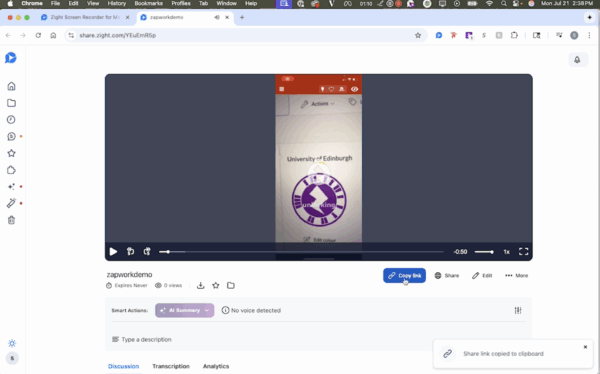
Step 4: View and Share
- Copy the link to upload to platforms like Canvas or share via email.
The Ultimate Guide to Sharing Large Files with Zight
Sending large files has always been a challenge. Email attachments often hit size limits, cloud storage links can be confusing, and file transfers take longer than they should. That is why Zight makes file sharing simple, fast, and secure.
With Zight, you can upload large files, generate a shareable link, and send it to anyone, whether it is through email, Slack, Canvas, or any other platform your team uses. This guide will walk you through how Zight simplifies large file sharing so you can spend less time worrying about logistics and more time getting work done.
Why use Zight to share large files
Traditional file sharing methods can be frustrating. Email services typically cap attachments at 25 MB, and transferring large media files through chat apps can lead to compression or slow uploads. Zight eliminates these problems by letting you upload and share large files instantly with a single, secure link.
Whether you are sending a design file, a presentation, or a full-length video recording, Zight ensures that your content reaches its destination quickly and without file size restrictions.
How Zight simplifies file sharing
Zight is designed to make file sharing as seamless as possible. You can drag and drop your file directly into the app or use the upload option from the Zight menu. Once your upload is complete, Zight automatically generates a unique shareable link that you can copy and send to anyone.
The recipient simply clicks the link to view or download the file, no account required. This makes it ideal for teams that collaborate across tools or share assets with clients, partners, or students.
Zight also keeps everything organized. Each file you upload is stored in your account, allowing you to manage, rename, or delete files as needed.
Perfect for collaboration and education
Zight is widely used by professionals and educators who need a reliable way to share large files. Teachers can upload lessons, video lectures, or assignments and share them directly to Canvas or other learning platforms.
For teams, Zight makes it easy to share large design mockups, training videos, or sales presentations without clogging inboxes. The quick link feature also allows users to preview files before downloading them, helping streamline communication and reduce unnecessary back-and-forth.
Security and privacy made simple
When sharing large files, security is just as important as speed. Zight’s secure sharing feature ensures that your files are protected at every stage of the process. You can set access permissions, limit visibility, or even require authentication to view certain files.
Each link is unique to your upload and can be modified or revoked at any time, giving you full control over who can access your content. Zight also uses encrypted file transfers, so your data stays private and secure from upload to delivery.
Benefits of sharing files with Zight
Using Zight for file sharing offers a range of advantages beyond convenience:
-
Unlimited size potential: Share large files that would otherwise exceed email limits.
-
Faster collaboration: Get instant shareable links for quick team communication.
-
Cross-platform compatibility: Send files to anyone, even if they do not use Zight.
-
Access tracking: Know when your file has been viewed or downloaded.
-
Clean organization: Store all your uploads in one accessible dashboard.
Zight gives you both speed and structure, allowing your workflow to stay smooth and efficient.
Conclusion
Zight takes the frustration out of sending large files by giving you a fast, secure, and intuitive way to share them. With instant uploads, shareable links, and built-in privacy controls, you can deliver files of any size to anyone in just a few clicks.
Whether you are collaborating with teammates, sharing assignments with students, or sending deliverables to clients, Zight ensures your files get where they need to go without delays or restrictions.
Start sharing large files with Zight today and experience how effortless and reliable file sharing can be.
Frequently Asked Questions
You can share almost any file type, including videos, PDFs, presentations, images, and documents. Zight supports all common file formats used in business and education.
Zight is built for large files. While free accounts may have smaller upload limits, paid plans allow significantly larger file uploads with no compression.
Yes. Anyone with the shareable link can view or download the file, even if they do not have a Zight account.
After uploading your file, simply copy the Zight link and paste it into Canvas. Students or collaborators can open the link to access the file directly.
Yes. Zight uses encrypted transfers and optional access controls, such as password protection and expiration dates, to keep your files safe.
Yes. Zight’s analytics feature lets you see how many times your file has been viewed or downloaded, giving you insight into engagement.
You can upload a new version and share the updated link. Zight keeps older versions accessible in your version history if you need to refer back.
No. Zight maintains original file quality during upload and sharing, ensuring your videos and visuals look exactly as intended.












