
AI voiceover sync matches audio to video for a polished viewing experience. Once a tedious manual task, AI tools now make it faster and more efficient. In 2026, as video content dominates, syncing audio and visuals is vital for engaging audiences. Here’s what you need to know:
- What it is: Aligning voiceovers with video for smooth playback.
- Why it’s important: Ensures quality production and keeps viewers engaged.
- Key features of AI tools: Timing adjustments, multi-language support, and transcription tools.
Quick Steps:
- Finalize your video and script.
- Use AI tools to create voiceovers with proper pacing, tone, and clarity.
- Sync audio with video using visual markers and fine-tune timing.
- Test across devices to ensure alignment.
Pro Tip: Tools like Zight simplify the process with integrated transcription, editing, and multi-language support.
Stay compliant with copyright laws, secure consent for voice cloning, and disclose AI usage to build viewer trust. For U.S. audiences, localize content with American English, date formats (MM/DD/YYYY), and neutral accents. AI voiceover sync transforms workflows, master it to stay ahead.
How to Choose AI Voiceover Sync Tools
Top AI Voiceover Sync Tools Overview
There are plenty of options out there when it comes to AI voiceover synchronization tools, each with its own strengths. The key is to evaluate how well each platform aligns audio with video while meeting your specific needs.
Take Zight, for instance. It’s a versatile platform that combines screen recording, video editing, and AI-driven transcription, all in one place. With Zight, you can record, transcribe, and sync voiceovers seamlessly. Its AI transcription features include automated meeting notes and support for multiple languages, making it a great choice for projects that require flexibility and precision. Let’s dive deeper into what makes tools like Zight effective for voiceover tasks.
How Zight Makes AI Voiceover
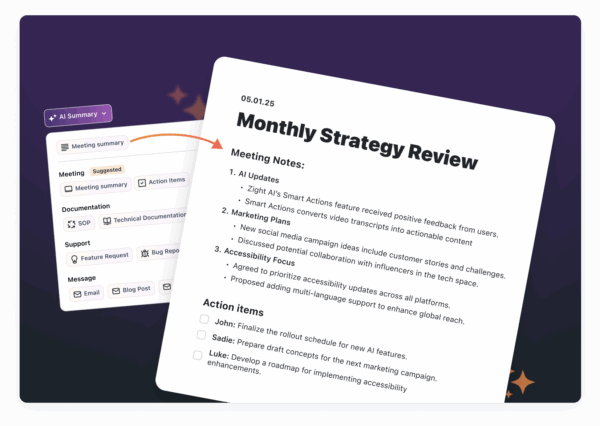
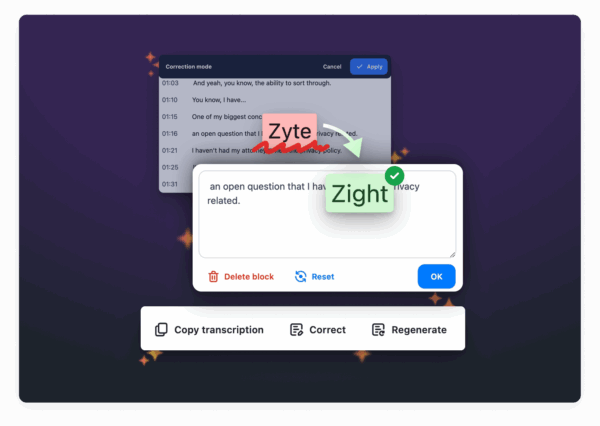
Zight simplifies the process of syncing voiceovers with its AI-powered transcription tools. The Meeting Notes feature automatically converts recordings into well-organized notes, while the Transcription Correction option allows users to fine-tune transcripts for better accuracy. For multilingual projects, Zight’s multi-language support ensures that timing stays consistent across different language versions, an essential feature for global audiences. Combined with its video creation tools, Zight provides a streamlined workflow where you can record, edit, and sync voiceovers without ever leaving the platform. This level of integration makes it a standout option for professionals looking to save time and effort.
What to Look for When Picking a Tool
When choosing an AI voiceover sync tool, keep these factors in mind:
- Accuracy and Flexibility: The tool should produce precise transcripts and allow you to make adjustments as needed to ensure your voiceovers align perfectly with your content.
- Integration: A good tool should work seamlessly with platforms like Slack, Microsoft Teams, or Jira. It should also be compatible across multiple systems, such as Mac, Windows, Chrome, and iOS. Zight, for example, offers extensive integration options that make it easy to incorporate into your existing workflows.
- Pricing: Budget is always a factor. Many platforms have free plans with limited features, but paid plans for individuals typically start at $7–$8 per month. Team and enterprise plans are also available for larger-scale needs.
- Language and Format Support: Look for tools that can handle multiple languages and a variety of video and audio formats. This flexibility is especially important if you’re working on international or multi-format projects.
Step-by-Step AI Voiceover Sync Process
Getting Your Video and Script Ready
Before diving into AI voiceover generation, make sure both your video and script are finalized. This is especially important for narration-heavy content.
Keep your script clean and easy to follow. Use short, straightforward sentences and proper punctuation to help the AI deliver a natural flow. For tricky pronunciations, consider phonetic spelling, write “Art-liss-t” for “Artlist” or “Ay-eye” for “AI”.
When it comes to dates and numbers, clarity is key. For example, instead of “1/26/25”, write “January 26th, 2025” to ensure the AI reads it correctly. If your script includes sequences like phone numbers or codes, spell out each character and include pauses where natural breaks would occur.
Once your script is polished and your video is ready, you can move on to generating and refining the AI voiceovers.
Creating and Improving AI Voiceovers
Select the right voice parameters, pace, pitch, and tone, to match the mood of your content. Most AI tools offer these settings, so experiment with a short sample before applying them to the entire script.
If you’re working with existing audio, Zight’s AI transcription features can be a game-changer. Use the Meeting Notes tool to convert recordings into text, then refine the transcript with the Transcription Correction option before generating new voiceovers.
Break your script into smaller segments for better control over pacing. Generating voiceovers scene by scene or topic by topic not only ensures smoother delivery but also makes it easier to identify and fix problem areas. Review each segment carefully to check for clarity and natural flow.
Watch out for robotic-sounding sections. If you notice awkward pauses, incorrect emphasis, or rushed delivery, regenerate those parts until they sound right.
Explore different voice models to find the best fit for your content. Some voices are better suited for technical material, while others excel at conversational tones. The choice should align with your audience and the nature of your content.
Once your voiceover is polished, it’s time to sync it with your video.
Matching Voiceovers with Video
The synchronization step requires careful attention to detail. Start by importing your video and voiceover into your editing software. Keep separate audio tracks for your voiceover, background music, and sound effects to make adjustments easier.
Use visual markers in your video, like scene changes, text overlays, or specific actions, as anchor points for syncing the voiceover. These markers help ensure the audio aligns naturally with the visuals.
If your video features on-screen speakers, focus on syncing the voiceover with their lip movements. Viewers are quick to notice if the audio doesn’t match the visuals.
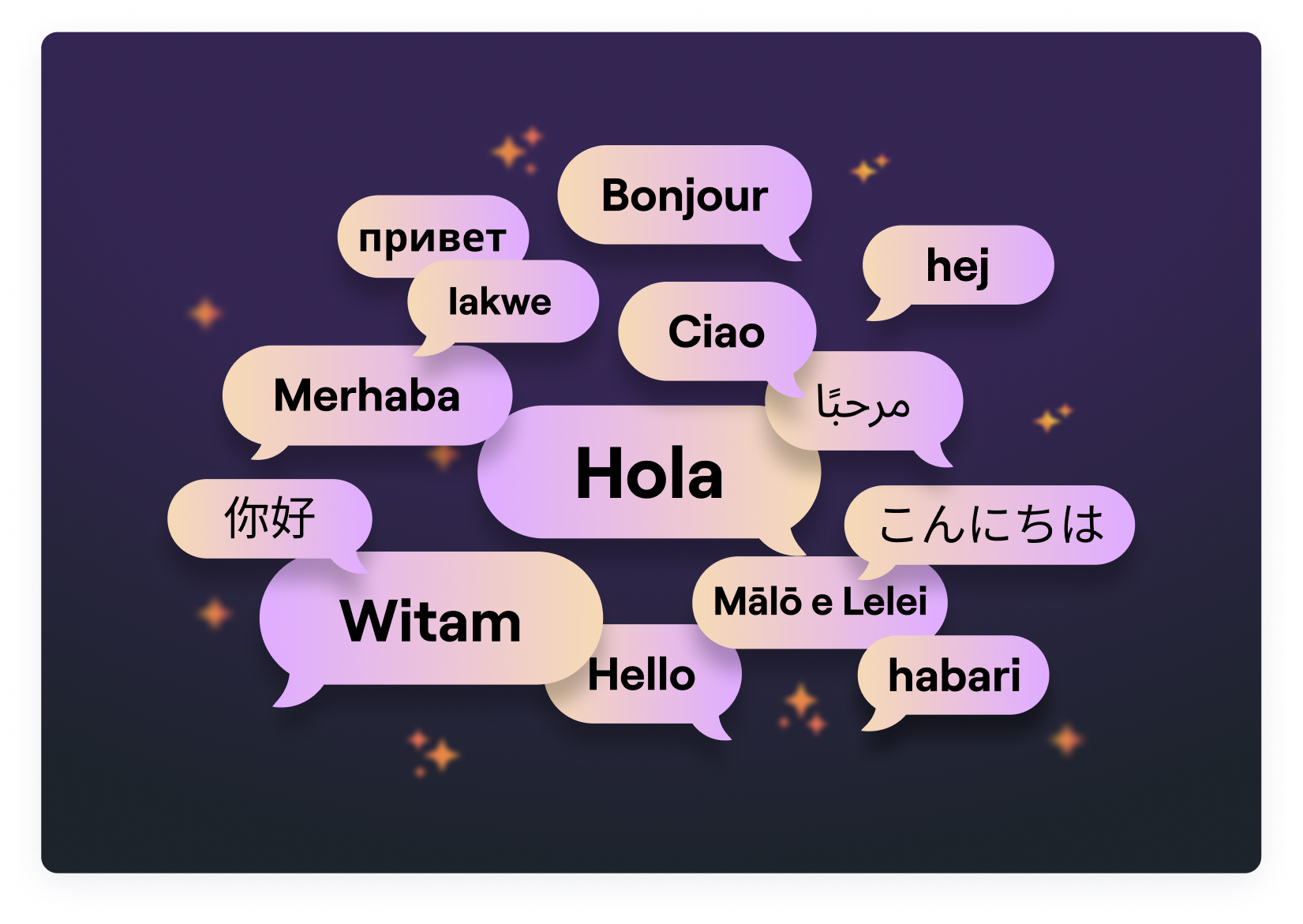
For multilingual projects, tools like Zight’s multi-language support can help keep timing consistent across different language versions, ensuring your sync points hold up globally.
Fine-tune the timing by adjusting individual audio clips instead of stretching or compressing entire sections. Adding small pauses, such as before key points or after questions, can make the delivery feel more natural and give viewers time to absorb the information.
Finally, test your synced content on various devices and playback speeds. Something that feels perfectly aligned on your editing setup might not translate well to a smartphone or tablet. Export a test version and review it in the environment your audience will use. For precise adjustments, zoom in and tweak the audio frame by frame, particularly when syncing to lip movements.
Advanced AI Voiceover Sync Methods
Adjusting Voice Settings
Fine-tuning voice settings is what separates basic voiceovers from polished, professional productions. With AI tools, you can tweak pitch, speaking rate, and emotional tone, but using these features effectively is where the magic happens.
For example, adjusting pitch can make speech sound more natural. Raise the pitch slightly for questions, lower it for authoritative statements, and add subtle variations within longer sentences to keep listeners engaged. This prevents the monotony that often plagues robotic voiceovers.
When it comes to the speaking rate, context is key. For technical or detailed explanations, a slower pace, around 140-160 words per minute, helps the audience absorb information. On the other hand, conversational parts can flow faster, at around 180-200 words per minute. Varying the speed can also emphasize critical points and create smoother transitions.
Emotional inflection plays a huge role in making AI-generated voices sound human. Many advanced AI tools let you add enthusiasm, warmth, or urgency to your narration. Experiment with these settings to see how they transform the impact of your message. For instance, the same sentence can feel welcoming, serious, or even urgent depending on the emotional tone applied.
Strategic breath placement adds rhythm and makes the narration feel conversational. Pauses before key ideas, after questions, or between sections not only make the content easier to follow but also give it a more natural flow.
Using tools like Zight’s AI-powered transcription system, you can analyze pacing patterns from successful videos and replicate them in your own projects. These adjustments ensure your voiceover is ready for seamless multi-language dubbing.
Multi-Language Dubbing and Translation
Creating content for global audiences requires more than just translation – it demands thoughtful localization. AI-powered multi-language dubbing involves addressing cultural nuances, timing differences, and voice consistency to ensure the final product resonates across languages.
Start with meaning-focused translation to preserve the intent of the original message while adapting to the natural flow of each language. This ensures the voiceover feels authentic rather than forced.
Timing becomes a challenge because sentence lengths vary between languages. For instance, English often uses more words than Spanish to express the same idea, while German condenses concepts into fewer, longer words. To account for this, plan for 15-25% timing variations and adjust your video pacing accordingly.
Maintaining voice consistency is also crucial. It’s not just about matching the gender or age of the narrator, it’s about ensuring the same energy and tone carry over. If your English voiceover has a friendly, conversational style, the Spanish or French versions should reflect that same warmth rather than sounding overly formal or distant.
Localization goes beyond language. Measurements, currency, and even date formats need to be adapted for specific audiences. For example, U.S. audiences expect Fahrenheit, dollars, and MM/DD/YYYY formats, while European viewers are accustomed to Celsius, euros, and DD/MM/YYYY formats.
Using tools like Zight’s multi-language support, you can maintain consistent project structures across languages, ensuring that timing and tone remain aligned for a polished final product.
Batch Processing and API Setup
For large-scale voiceover projects, automation is your best friend. Features like API integration and batch processing simplify repetitive tasks and help you maintain quality across multiple videos.
Batch processing works best when your input formats are standardized. Set up templates for scripts, voice settings, and output parameters. This allows you to process multiple videos simultaneously without compromising on quality.
With API workflows, you can automate tasks like generating voiceovers, applying consistent settings, and syncing audio with video files. For example, you can configure triggers to automatically produce voiceovers as soon as new scripts are uploaded. Automated systems can also check audio levels, durations, and silence gaps, flagging issues before final rendering. This saves hours of manual review time.
Handling multiple languages and voice variations can get messy without a clear system. Establish organized naming conventions and folder structures, such as “ProjectName_Language_VoiceType_Version”, to keep track of different iterations.
When processing large batches, resource management is critical. Schedule rendering tasks during off-peak hours, prioritize urgent projects, and use progressive processing for tight deadlines. Platforms like Zight make this easier by offering API integrations and automated features that scale with your needs.
During the initial setup, monitor results carefully. Track metrics like processing times, error rates, and output quality to fine-tune your workflows. This will help you strike the right balance between speed, reliability, and quality as you scale up your content production.
Best Practices and Legal Guidelines
Tips for Professional Voiceovers
Creating professional-quality AI voiceovers starts with a well-crafted, spoken-friendly script. Keep it concise and conversational, using shorter sentences, contractions, and phrases that sound natural when spoken. Matching the AI voice to the tone of your content is equally important for achieving a natural delivery.
For instance, a corporate training video might require a neutral, authoritative tone with clear articulation. Educational materials could benefit from a warm, steady pace, while marketing content often calls for more energy and enthusiasm tailored to the audience and purpose.
Timing precision is what separates amateur voiceovers from professional ones. Use strategic pauses to emphasize key points, giving listeners time to process the message. When transitioning between topics, extend pauses slightly to create a natural rhythm and flow.
High-quality audio is non-negotiable. Ensure a consistent volume level throughout your project to avoid distortion. Remove background noise and any unintended sounds, and consider applying gentle compression to smooth out volume fluctuations.
Pronunciation consistency is another must, especially when dealing with technical terms, brand names, or industry-specific jargon. Creating a pronunciation guide and testing how the AI handles these terms can save you from inconsistencies and ensure accuracy across your project.
To streamline the process, tools like Zight’s transcription features can help you check voiceover timing and pronunciation before finalizing your work. Once these technical aspects are covered, you can shift your focus to the legal and ethical considerations of AI voiceover creation.
Legal and Ethics Rules
In addition to professional practices, it’s essential to follow legal and ethical guidelines when working with AI voiceovers. Copyright laws regarding AI-generated content are still evolving. In the United States, works created entirely by AI without human input may not qualify for copyright protection under current regulations.
Consent is a critical ethical factor, particularly for voice cloning. Always obtain explicit, written permission before using someone’s voice, this applies to colleagues, public figures, and celebrities alike. States like California and New York have enacted laws to protect individuals’ voice rights, and violations can lead to legal repercussions.
Transparency is equally important. While not always legally required, disclosing AI-generated content in video descriptions or credits builds trust and minimizes the risk of claims of deception. A simple disclaimer like “This content features AI-generated voiceover” can suffice.
Data privacy is another key concern. Be cautious with the scripts and audio files you upload to AI platforms. Review the platform’s terms of service carefully, as some providers may reserve the right to use your content for training purposes. For sensitive or proprietary material, choose platforms that offer strong data protection policies and clear content deletion options.
Additionally, verify licensing terms before using AI-generated content commercially. Some services may have restrictions or require attribution for commercial projects.
When targeting global audiences, stay informed about regional regulations. For example, new initiatives in the European Union may require transparency disclosures for AI-generated content. Always ensure your projects meet the legal standards of the regions you’re targeting, while tailoring your approach for US audiences specifically.
US Market Localization Tips
When adapting voiceover projects for the US market, following localization standards ensures consistency and resonance. Stick to US conventions, such as MM/DD/YYYY for dates, a 12-hour clock with AM/PM, US dollars (e.g., $1,234.56), Fahrenheit for temperature, and imperial units like miles, pounds, and feet/inches.
Spelling is another area to get right. Use American English spellings, such as “color” instead of “colour”, “organize” rather than “organise”, and “center” instead of “centre”, to align with local expectations and improve regional SEO performance.
Cultural references and idioms should feel natural to an American audience. Phrases like “touch base”, “circle back”, or “reach out” are commonly understood, whereas expressions from other English dialects might feel out of place.
Lastly, consider accents. A neutral American accent works well for most professional projects, but regional accents, like Southern, Midwestern, or East Coast, can add authenticity for location-specific content. Just be careful not to alienate viewers who may not connect with certain accents.
Zight’s multi-language support makes it easier to uphold these localization standards, ensuring your projects are properly formatted and culturally aligned for success in the US market.
Replace Your VOICE with AI and SYNC it Perfectly
Conclusion
AI voiceover synchronization has come a long way, turning what was once a painstaking process into something far more streamlined when you use the right tools and techniques.
Choosing a platform that combines screen recording, video editing, and AI features in one place can make all the difference. These all-in-one tools save time, simplify workflows, and help avoid quality issues caused by switching between multiple applications.
Getting the details right, like audio levels, timing, and pronunciation, can elevate your voiceovers from amateur to polished. Even minor timing issues between the voiceover and visuals can disrupt the viewer’s experience, so precision is key.
On top of technical execution, it’s essential to stay on the right side of legal and ethical considerations. The rules surrounding AI-generated content are constantly changing, especially in the U.S. To protect yourself and your audience, make sure to comply with copyright laws, get proper consent for voice cloning, and be transparent about using AI. These steps not only safeguard your work but also build trust with your audience.
Localization is another important piece of the puzzle. For content aimed at U.S. viewers, details like using American English spelling, the MM/DD/YYYY date format, and culturally relevant references can make your work feel more authentic and improve its performance in search rankings.
Zight’s platform simplifies these challenges by offering screen recording, AI transcription, and multi-language support in one seamless solution. Its integrated features make syncing voiceovers and localizing content much easier.
As technology advances, we can expect even greater automation and improved quality in AI voiceovers. Platforms like Zight are paving the way, and by mastering these techniques now, you’ll be well-prepared to stay competitive as the industry continues to evolve.
FAQs
How does AI voiceover syncing enhance my video content?
AI voiceover syncing takes your video content to the next level by aligning narration perfectly with on-screen visuals. This harmony not only makes your videos look more polished but also helps viewers stay engaged and understand the content better.
On top of that, AI tools simplify the process by automatically tweaking audio timing, cutting down on the time and effort needed in post-production. The outcome? Smoother, high-quality videos that feel more professional and are easier for everyone to enjoy.
What should I look for in an AI voiceover synchronization tool?
When choosing an AI voiceover sync tool, prioritize how accurately it matches audio with visuals and ensures a natural flow. Explore the range of voice options it offers and whether they can be tailored to fit your specific project needs. A user-friendly design is crucial – opt for tools with simple, intuitive interfaces that don’t require extensive training to use effectively.
It’s also important to evaluate the tool’s performance and how well it integrates with your current workflow. Reliable customer support and consistently high-quality output are vital for producing polished, professional results.
How does AI voiceover synchronization work for multi-language projects while keeping timing consistent?
AI voiceover synchronization for multi-language projects leverages cutting-edge tools like voice cloning, translation, and lip-syncing to create smooth and natural audio results. These technologies align the translated dialogue with the original audio, ensuring the timing stays consistent and the synchronization is spot-on across different languages.
By carefully matching speech patterns and timing, AI delivers translated voiceovers that are both polished and natural, even for intricate multilingual projects. This approach preserves the original message and flow of the content while making it accessible to audiences worldwide.












