
When it comes to file sharing, Slack and Microsoft Teams cater to different needs. Slack prioritizes ease of use for small teams, while Microsoft Teams integrates tightly with Microsoft 365 for enterprise-level collaboration. Here’s a breakdown:
- Storage & File Size: Slack offers limited storage (5 GB team-wide on the free plan, up to 20 GB per user on paid plans) and a 1 GB file upload limit. Microsoft Teams provides more storage (5 GB on the free plan, up to 1 TB per user on paid plans) and supports file uploads up to 15 GB.
- Collaboration: Slack requires downloading and re-uploading files for edits, while Teams allows real-time co-editing of Office documents directly in the app.
- Integrations: Slack supports over 2,400 third-party tools, including Google Drive and Dropbox. Teams focuses on seamless integration with Microsoft 365 tools like OneDrive and SharePoint.
- Security: Both platforms offer encryption, but Teams provides advanced admin controls, compliance certifications (e.g., HIPAA), and more robust access management.
- Video & Real-Time Features: Teams supports video streaming, real-time comments, and larger video calls (up to 300 participants). Slack has simpler tools but requires external apps for advanced collaboration.
Quick Comparison
For smaller teams (5–15 members), Slack’s storage and upload limits are usually adequate for day-to-day tasks like sharing documents and spreadsheets. However, for teams regularly working with large media files or high-resolution assets, Microsoft Teams offers a clear edge with its higher upload limit and significantly larger storage per user. For example, in a 100-person organization, Slack’s Business+ plan provides a total of 2 TB, while Teams’ Business Basic or Standard plans deliver up to 100 TB of storage.
Another key difference lies in file retention. Slack’s 90-day retention policy on its free plan can pose challenges for teams with compliance needs or long-term projects. In contrast, Teams allows users to retain files indefinitely, even on its free plan. This distinction becomes evident in scenarios like streaming an 800 MB video: Teams enables immediate streaming, while Slack requires downloading the file first.
To mitigate storage limitations, teams can leverage tools like Zight, which integrates with both Slack and Microsoft Teams. Zight allows users to create and share screen recordings, screenshots, and GIFs without consuming much storage space. For instance, a 30-second GIF made with Zight typically uses only 5–50 MB, offering an efficient way to share complex ideas, especially valuable for teams navigating Slack’s stricter file upload constraints.
File Upload and Sharing Experience
The way you upload and share files plays a big role in how quickly your team can collaborate. Both Slack and Microsoft Teams make file sharing straightforward, but their workflows differ in design and functionality. Let’s break down how each platform handles file uploads.
Slack’s File Sharing Process
Slack keeps things simple when it comes to file sharing. You can upload files by dragging and dropping them into a conversation or by using the attachment button. Plus, Slack integrates seamlessly with cloud storage services like Google Drive, Dropbox, and OneDrive, making it easy to share files stored elsewhere without leaving the app.
Once a file is uploaded, it appears directly in the conversation thread, complete with a preview for supported formats like images and PDFs. This ensures your team can see the content immediately. However, Slack does have a drawback: to edit files, you’ll need to download them, make changes, and then re-upload the updated version. This process can slow things down, especially for videos or editable documents.
Microsoft Teams’ File Sharing Process
Microsoft Teams takes a more integrated approach, leveraging OneDrive and SharePoint to handle file sharing. When you upload a file in Teams, it’s automatically stored in OneDrive or SharePoint, making it accessible across your Microsoft 365 tools.
Teams really shines with its real-time collaboration features. Multiple team members can edit Office documents simultaneously, with updates appearing instantly. For videos, you can stream them directly within Teams, skipping the need to download large files. Files are neatly organized within channel tabs, making them easy to find, and the platform supports uploads up to 15 GB, perfect for large video files, high-resolution designs, or extensive project archives.

User Experience Differences
These differences in file-sharing workflows can significantly impact team productivity. Slack is great for quick file distribution, while Teams offers a more structured system with integrated editing tools. For collaborative editing, Slack users often need to download files and switch to external apps, which can disrupt workflows.
Microsoft Teams, on the other hand, provides a more cohesive experience. Its interface, with tabs and organizational features, might feel overwhelming at first, but it’s invaluable for managing large projects with numerous files. Real-time editing within Teams eliminates the need to switch between apps, streamlining collaboration.
If your team’s needs are as simple as sharing a PDF for review or an image for feedback, Slack’s straightforward approach works well. But for tasks like co-editing documents, reviewing videos in real time, or sharing files larger than 1 GB, Microsoft Teams, with its deep integration into the Microsoft 365 ecosystem, offers a smoother workflow.
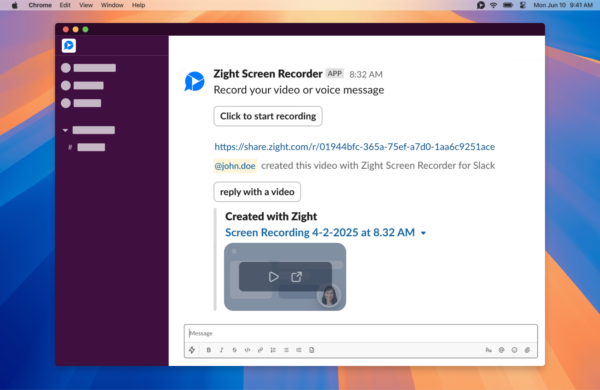
Slack users can work around some of its limitations by using third-party tools. For example, Zight integrates with Slack, allowing users to create shareable links for screen recordings and GIFs, which simplifies visual communication without requiring downloads.
Cloud Service Integrations
Slack and Microsoft Teams approach cloud storage connections in distinct ways: Slack emphasizes a wide range of third-party integrations, while Teams focuses on seamless connections within the Microsoft ecosystem.
Slack’s Cloud Integrations
Slack shines when it comes to third-party integrations, offering compatibility with Google Drive, Dropbox, and OneDrive, among others. With over 2,400 integrations available, Slack provides teams with the flexibility to connect their favorite tools effortlessly.
Sharing files from these cloud services is straightforward. For instance, you can link your Google Drive account to Slack and share documents directly within conversations, avoiding the need to switch between platforms. Similarly, files from Dropbox can be pulled into discussions with just a few clicks, keeping workflows smooth and efficient.
Microsoft Teams’ Cloud Integrations
Microsoft Teams, on the other hand, leverages native integration with Microsoft 365, SharePoint, and OneDrive. Any file uploaded in Teams is automatically stored in SharePoint or OneDrive, creating a unified and centralized file management system across Microsoft tools.
This native integration offers a significant advantage: Teams users benefit from 1TB of storage per user (for Business Basic and higher plans), compared to Slack’s 2GB on Essentials or 5GB on the Free plan. Additionally, Teams organizes shared files in SharePoint, ensuring they remain accessible and manageable over the long term, particularly useful for larger organizations handling complex projects.
Collaboration is another strong point for Teams. Since it’s built into the Microsoft 365 ecosystem, multiple users can edit Word documents, Excel spreadsheets, or PowerPoint presentations simultaneously, with updates appearing in real time. There’s no need to download files, switch apps, or worry about version mismatches.
While Teams offers fewer third-party integrations, around 250 compared to Slack’s 2,400+, its deep integration with Microsoft tools often makes up for this limitation, especially for organizations already using Microsoft 365.
Cloud Integration Comparison
Here’s a quick breakdown of how Slack and Teams compare in terms of cloud service connections:
The choice between these platforms often depends on your organization’s existing tools and future plans. If your team relies on a variety of tools from different vendors, like Salesforce, Google Workspace, or specialized software, Slack’s extensive integration marketplace offers unmatched flexibility. It allows you to connect virtually any tool your team needs without locking into a single ecosystem.
On the flip side, if your organization is already deeply invested in Microsoft 365, Teams’ native integrations simplify workflows and eliminate the need for additional setup. Features like editing Office documents directly in Teams and SharePoint’s robust file organization create a seamless experience that’s hard to replicate with third-party tools.
For industries with strict compliance requirements, Teams’ centralized file management through SharePoint adds an extra layer of control. Admins can set detailed permissions, such as view-only links, download restrictions, expiration dates, and access revocation. Slack Connect, by contrast, operates through separate workspace controls, which can offer independence but may introduce challenges when security policies differ across partner organizations.
Your long-term strategy is also worth considering. If your organization plans to standardize on Microsoft 365, Teams offers a more cohesive and future-ready solution. However, if flexibility and adaptability to various tools are priorities, Slack’s expansive integration library ensures your team can evolve and grow as new technologies emerge.
These differences in integration approaches lay the groundwork for the platforms’ security and collaboration features, which are explored in the next section.
Security, Compliance, and Access Controls
When protecting your organization’s files, security features and compliance certifications are just as critical as ease of use. Both Slack and Microsoft Teams prioritize data protection, though their approaches differ, which could influence your platform decision. Let’s break down how Slack handles file-sharing security.
Slack’s Security Features
Slack secures data with encryption both in transit and at rest. Data moving between users is protected using TLS (Transport Layer Security), while stored files benefit from AES-256 encryption.
The platform is SOC 2 Type II certified, which covers security, availability, processing integrity, confidentiality, and privacy standards. It also complies with GDPR, ensuring proper data handling and safeguarding user privacy rights.
Slack offers access controls that allow you to manage file access through @mentions and permissions. Paid plans enable inviting guests to specific channels with limited permissions, allowing external collaborators to participate without compromising the entire workspace.
One potential downside is Slack Connect, which applies separate security policies for each organization, making cross-company collaboration a bit more complex.
Microsoft Teams’ Security Features
Microsoft Teams builds on its integration with Microsoft 365 to deliver robust security and compliance options. Like Slack, Teams uses TLS for data in transit and AES-256 encryption for data at rest. However, Teams stands out with its extensive compliance certifications and advanced admin controls.
Teams holds certifications such as HIPAA, ISO 27001, and SOC 2 Type II, making it especially suitable for industries like healthcare that require strict data protection measures.
Its role-based access controls (RBAC) let administrators define detailed permissions for file sharing. Through SharePoint and OneDrive integration, admins can implement features like view-only links, blocking downloads, setting expiration dates, and revoking access. Teams also provides admin tools and audit trails, which are invaluable during regulatory audits or security investigations.
For external collaboration, Teams supports guest access and shared channels secured via Azure Active Directory, offering a secure framework for working with partners outside your organization.
Security and Compliance Comparison
Here’s a side-by-side look at how Slack and Microsoft Teams compare:
Your choice between these platforms may hinge on your industry and compliance needs. For heavily regulated fields like healthcare or finance, Microsoft Teams’ HIPAA and ISO 27001 certifications provide the necessary framework to meet strict regulations. Its admin controls and audit features also simplify compliance during regulatory reviews.
For organizations with less demanding compliance requirements, or those looking for flexibility, Slack offers robust security features that cater to a variety of use cases. However, when dealing with highly sensitive or regulated data, Teams’ advanced certifications and admin capabilities can provide greater peace of mind.
Another factor to consider is how these platforms integrate with your existing tools. Microsoft Teams’ deep integration with Microsoft 365 ensures consistent security policies and encryption standards across SharePoint, OneDrive, and Teams. On the other hand, Slack’s support for over 2,000 third-party integrations offers flexibility, but it requires thorough vetting to ensure compliance with your security protocols.
The differences in security become more apparent during file collaboration. Teams ensures files remain encrypted even during real-time editing. In contrast, Slack’s process of downloading and re-uploading files temporarily exposes them outside the encrypted environment.
For external file sharing, Microsoft Teams’ identity-based access control through Azure Active Directory provides a more secure solution compared to Slack’s guest access model.
Real-Time Collaboration on Shared Files
Real-time collaboration is a game-changer when it comes to team productivity, especially when working on shared documents. Both Slack and Microsoft Teams offer distinct approaches to this, reflecting their unique design philosophies. These differences in how they handle file interactions can have a big impact on your team’s workflow.
Slack’s Collaboration Features
Slack takes a communication-focused approach, but it doesn’t offer native tools for real-time document editing. If your team needs to collaborate on a file, you’ll have to download it, make changes in an external app, and then re-upload it. This process can lead to version conflicts, as Slack doesn’t provide automatic change tracking or version history unless you use a third-party tool.
To work around this, many teams rely on integrations with apps like Google Drive, Dropbox, or OneDrive for file sharing and editing. While Slack’s ecosystem includes over 2,400 third-party apps, allowing for a customized workflow, switching between tools can add complexity and slow things down.
When it comes to video collaboration, Slack’s Huddles feature is somewhat limited. It doesn’t support meeting recordings or built-in whiteboarding. Additionally, if a video file is shared, team members must download it to view, which means they can’t watch and comment simultaneously.
h3 style=”font-weight: semi-bold; font-size: 24px;”>Microsoft Teams’ Collaboration Features
Microsoft Teams, on the other hand, offers a more integrated experience. It includes native real-time co-authoring, which allows multiple users to edit documents simultaneously within the Teams app. Thanks to its integration with Microsoft 365 apps, you can see collaborators’ cursors as changes happen, with updates syncing instantly and auto-saving.
Teams also simplifies version management. Files stored on SharePoint and OneDrive come with built-in version control, letting you review edit histories, track who made changes, and even restore earlier versions, all without leaving the Teams interface. This eliminates confusion and ensures a smooth workflow.
For video collaboration, Teams outshines Slack by streaming video files directly within the app. This allows team members to watch and comment in real time. It also supports built-in whiteboarding tools and lets users brainstorm with real-time comments. Plus, Teams accommodates much larger video calls, up to 300 participants on paid plans, compared to Slack’s limit of 15.
Real-Time Collaboration Comparison
Ultimately, the right choice depends on your team’s needs. If you’re already working within the Microsoft 365 ecosystem and frequently collaborate on Office documents, Teams provides a streamlined experience that keeps everything in one place. On the other hand, if your team values flexibility and prefers a simpler interface, Slack, with the help of external tools, might be a better fit.
For teams managing large media files or dealing with compliance requirements, Teams’ higher upload limits, real-time streaming, and built-in version control can make a big difference. Meanwhile, Slack may appeal to those who prioritize adaptability and don’t mind piecing together their workflows with third-party apps.
Conclusion: Choosing the Right Platform for File Sharing
When deciding on the best platform for file sharing, it’s essential to consider what fits your team’s specific needs and daily operations.
Microsoft Teams is ideal for organizations heavily using the Microsoft 365 suite. With 1 TB of storage per user on paid plans, a 15 GB file upload limit, and real-time co-authoring for Office documents, Teams offers a seamless, integrated experience. Its strong security and compliance features make it a standout choice for industries like healthcare, finance, and legal services. If your team often collaborates on Office documents or needs to share large video files, Teams provides the tools to do so securely and efficiently.
Slack, on the other hand, excels for smaller teams that value simplicity and flexibility. Its user-friendly interface allows for quick onboarding, and with over 2,600 third-party integrations, you can easily connect tools like Google Drive, Dropbox, and OneDrive. While Slack’s storage and file upload limits are more modest, they’re usually sufficient for teams that focus more on messaging and quick communication than extensive file sharing.
For real-time collaboration, Teams has the edge with features like simultaneous document editing, real-time syncing, and video calls with up to 300 participants. It also supports video streaming with live commenting and built-in whiteboarding. Slack, by comparison, requires users to download, edit, and reupload files, and its video call participant limit is capped at 15.
If your team uses a mix of tools and wants to enhance file-sharing capabilities, Zight can be a valuable addition to either platform. Zight integrates seamlessly with both Slack and Microsoft Teams, allowing users to create, edit, and share screen recordings, screenshots, GIFs, and step-by-step guides directly within the chosen platform. This makes it a versatile option for teams seeking better visual communication.
Choose Teams if your priorities include enterprise-level security, ample storage, large file handling, and tight Microsoft 365 integration. Opt for Slack if you need quick setup, a customizable interface, and a communication-first approach. The key is to align your choice with your team’s workflow and ecosystem to ensure the best fit.
FAQs
What are the differences in file retention policies between Slack and Microsoft Teams, and how do they affect long-term project management?
Slack and Microsoft Teams take different approaches to file retention, which can play a big role in managing long-term projects. Slack gives admins the ability to set custom file retention rules, allowing them to decide how long messages and files are kept. There’s even an option to automatically delete content after a specified time. While this feature helps manage storage, it does require careful planning to avoid accidentally losing key project files.
Microsoft Teams, however, handles file storage through its integration with SharePoint and OneDrive. Retention policies are managed within these platforms, offering more advanced options like legal holds for compliance purposes. This makes Teams a solid choice for projects that need long-term file storage or must meet regulatory requirements.
Knowing how these platforms handle file retention can help you pick the one that fits your project’s needs and ensures your important files stay accessible for as long as necessary.
How do Slack and Microsoft Teams compare in terms of security and compliance for industries with strict regulations?
Both Slack and Microsoft Teams provide solid security and compliance features, but their offerings cater to different needs depending on your industry. Microsoft Teams, integrated into the Microsoft 365 suite, comes with a range of compliance tools like eDiscovery, legal hold, and advanced auditing. These features make it a strong choice for industries with strict regulations, such as finance and healthcare. It also adheres to key certifications, including HIPAA, GDPR, and FedRAMP.
Slack, on the other hand, ensures robust security with enterprise-grade encryption and compliance with standards like GDPR and ISO/IEC 27001. That said, more advanced compliance options, such as Enterprise Key Management (EKM), are only offered on its higher-tier plans.
When deciding between the two, it’s essential to assess your industry’s specific regulatory demands and how much control you require over data security and compliance.
How do Slack and Microsoft Teams support real-time collaboration on shared documents, and what does this mean for team productivity?
Slack and Microsoft Teams both provide powerful tools for real-time collaboration, but they take different paths to get there. Slack connects smoothly with platforms like Google Drive and OneDrive, making it easy to share and work on files directly within the app. Meanwhile, Microsoft Teams is tightly integrated with Microsoft 365, allowing users to co-edit Word, Excel, and PowerPoint documents in real time without leaving the platform.
The choice between the two often comes down to how your team already works. If your team relies heavily on Microsoft 365, Teams might feel like a natural extension of your workflow. On the other hand, if you value a variety of integrations and more flexibility, Slack could be a better match. Both options are designed to simplify document collaboration and boost productivity.












