
How to Scale Healthcare Staff Training With Video
If you’re a training coordinator at a multi-site healthcare organization, you already know the math doesn’t work. There are more people to train, more systems to update, more compliance requirements to communicate — and exactly the same number of hours in your day. Figuring out how to scale healthcare staff training with video isn’t a nice-to-have anymore. It’s the only way to keep distributed teams aligned without burning out your training department or ballooning your headcount.
The traditional model — live sessions, in-person walkthroughs, screen-share meetings repeated for every shift and every site — was never designed for organizations with hundreds or thousands of staff spread across multiple facilities. It was designed for a single room with a single audience. And yet, most healthcare organizations are still trying to force that model to scale.
There’s a better approach. A library of async screen recordings and video messages lets you record training once and deliver it everywhere — on every shift, at every location, on every staff member’s schedule. Tools like Zight, a HIPAA-compliant async video and screen recording tool for healthcare teams, turn your training coordinators from live presenters into content producers. The result? Training that scales without scaling headcount.
Why Scaling Training With Video Matters for Healthcare Teams
Healthcare organizations are not static. New policies arrive from regulatory bodies. Software systems get updated quarterly. Processes change as organizations grow, merge, or adopt new workflows. Every one of these changes triggers a training need — and in healthcare, that training often carries compliance implications that make it non-optional.
The challenge isn’t creating training content. Most coordinators know their material inside and out. The challenge is delivering that content consistently to a workforce that operates around the clock, across geographies, and under intense time pressure. A nurse working the night shift at a satellite clinic has the same training requirements as a day-shift administrator at the main campus — but getting them both into the same live session is nearly impossible.
This is where scalable training videos in healthcare become essential. When training is captured in a recorded format — particularly screen recordings that walk through actual systems and workflows — it becomes a reusable asset. One recording serves the same purpose as fifty live sessions. Staff watch it when they have time. They can pause, rewind, and revisit it weeks later. And the training coordinator who made it is free to focus on the next priority instead of repeating themselves.
For multi-site healthcare organizations, the impact is even more dramatic. Instead of flying a trainer to each facility or relying on local managers to relay information (with all the distortion that introduces), you deliver a single, authoritative video to every site simultaneously. The message stays consistent. The quality stays high. And your training operation finally keeps pace with the organization it supports.
Common Challenges in Distributed Healthcare Staff Training
Before exploring the async video solution, it’s worth naming the specific problems that make healthcare training so difficult to scale. These aren’t hypothetical — they’re the daily reality for training coordinators, IT departments, and operations leaders across the industry.
Back-and-Forth Communication That Drains Time
Training rollouts in healthcare frequently involve a chain of communication that looks something like this: the training coordinator prepares materials, schedules a live session, sends calendar invites, follows up with people who didn’t attend, answers the same clarifying questions from multiple individuals, and then repeats the entire cycle for the next shift or location. Each link in that chain introduces delay, and each delay increases the risk that staff are operating with outdated information.
Email threads pile up. Slack messages go unread. The coordinator spends more time on logistics than on actual training. And at the end of it all, there’s no guarantee that the message was received consistently. One person heard the live presentation. Another read a hastily forwarded email summary. A third heard about the change from a colleague in the breakroom. The information degrades with every hop.
Misalignment Across Sites and Departments
Multi-site healthcare organizations face a fundamental alignment problem. When training is delivered live and locally, each site inevitably develops its own interpretation of the material. The trainer at one location emphasizes certain steps. The manager at another location skips what they consider non-essential details. Within weeks, you have five sites with five slightly different versions of the same process.
This misalignment creates real operational problems. When staff transfer between sites, they encounter unfamiliar workflows. When compliance auditors review documentation, they find inconsistencies. When IT supports a software rollout, they field different questions from every location because each location received a different version of the training. The root cause isn’t negligence — it’s that live, person-to-person training naturally drifts over time and distance.
Repetitive Explanations and Constant Re-Training
Perhaps the most frustrating challenge is sheer repetition. Training coordinators and IT staff find themselves explaining the same thing over and over — not because the content is complicated, but because there’s no persistent reference anyone can go back to. A live session is ephemeral. Once it ends, the only record is whatever notes the attendee happened to take.
This means every new hire triggers another round of the same onboarding walkthrough. Every software update means another round of live demos. Every policy change means another round of meetings. The coordinator becomes a human replay button, delivering the same content to a rotating audience indefinitely. It’s not sustainable, and it’s certainly not scalable — especially when the organization is growing and the pace of change is accelerating.
How Async Video Training Solves the Scale Problem for Healthcare Teams
Async video — particularly screen recording — is the efficiency unlock that transforms healthcare training from a live-event model to a content-library model. Instead of delivering training in real time, coordinators record it once and distribute it to as many people as needed, whenever they need it.
Here’s why this works so well for healthcare specifically:
It respects shift-based schedules. Healthcare staff don’t work 9-to-5. They work nights, weekends, rotating shifts, and on-call hours. Async video training for large healthcare teams means every staff member can complete training during a time that works for their schedule — no calendar Tetris required.
It eliminates geographic barriers. A screen recording made at the main campus is just as useful at a rural satellite clinic two hundred miles away. Distributed healthcare staff training video content travels instantly, with zero quality loss.
It ensures message consistency. Everyone watches the same recording. There’s no telephone game, no local reinterpretation, no drift. The policy rollout video that plays in January says exactly the same thing in June.
It creates a persistent reference library. Async videos don’t disappear after the session ends. They live in a shared library where staff can revisit them at any time — during onboarding, before a software update goes live, or when they simply need a refresher three months later.
It frees coordinators to focus on strategy. When you’re not spending forty hours a week delivering the same live presentations, you can focus on creating better content, identifying knowledge gaps, and improving training outcomes across the organization.
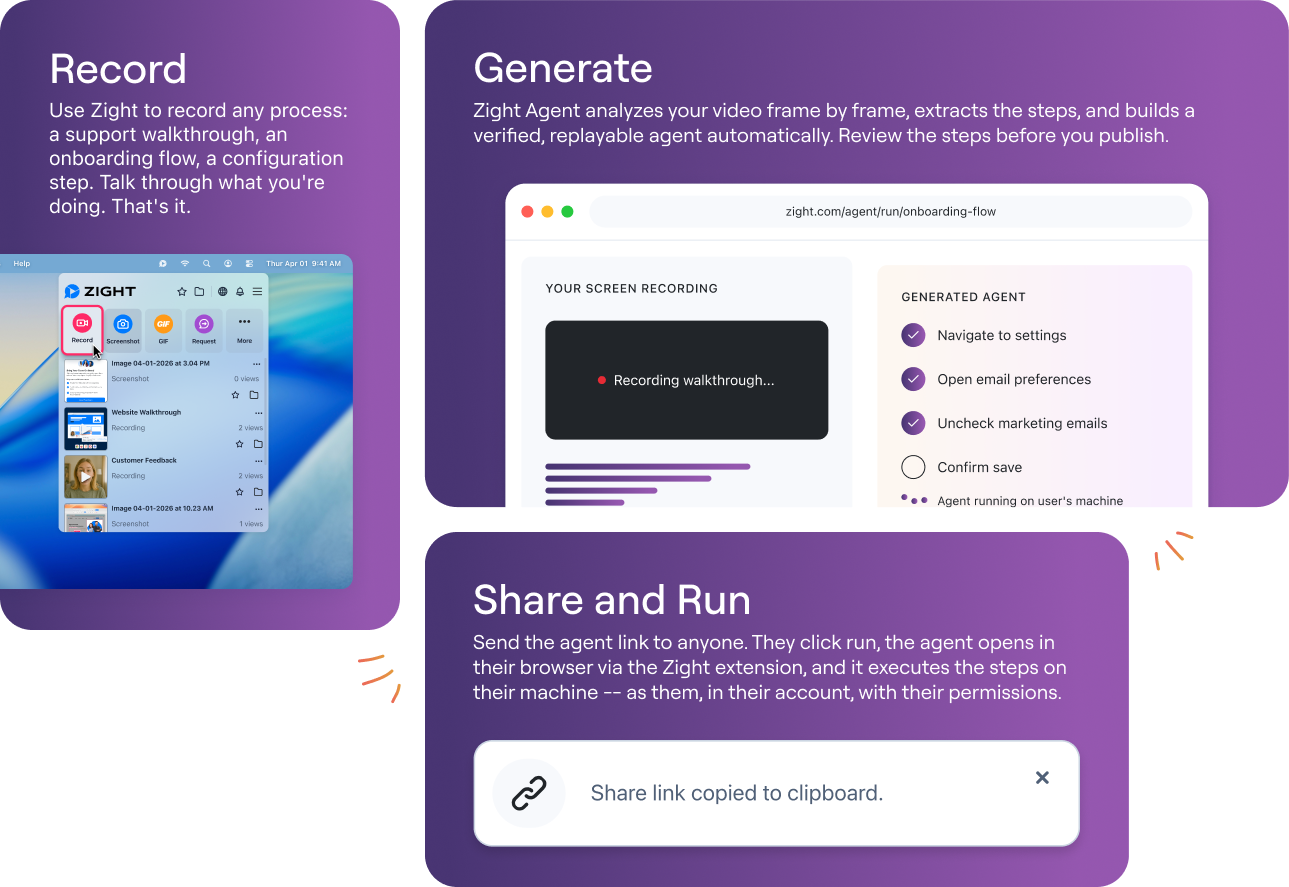
Zight is purpose-built for this workflow. As a HIPAA-compliant async video and screen recording tool, it lets healthcare teams record screen walkthroughs, annotate them in real time, and share them through secure links with access controls. The Zight Teams workspace makes it easy to organize recordings into shared collections that training coordinators, IT staff, and department leads can all contribute to — building the kind of scalable training video library that grows with your organization.
Practical Use Cases: How to Scale Healthcare Staff Training With Video
The real power of async video training shows up in the specific, recurring scenarios that every healthcare organization faces. Here are the most impactful use cases — all focused on operational workflows, not clinical decisions.
Policy Rollouts and Compliance Reminders
Healthcare organizations regularly need to communicate policy changes — updated HIPAA procedures, new documentation requirements, revised safety protocols, changes to internal codes of conduct. These rollouts often come with tight timelines and mandatory completion requirements.
With async video, a compliance officer or training coordinator records a short screen recording walking through the updated policy document, highlighting what changed and what staff need to do differently. That video is distributed organization-wide through a secure link. Staff watch it on their own time. Managers can track who has and hasn’t viewed it. And because the recording exists permanently, it serves as the reference point for any future questions or audits.
Compare that to the alternative: scheduling a dozen live sessions across shifts and locations, following up with no-shows, answering the same questions repeatedly, and hoping the message was delivered consistently everywhere. The video approach is faster, cheaper, and more reliable.
Software Updates and EHR System Walkthroughs
Software changes are one of the most common training triggers in healthcare — and one of the most disruptive when handled poorly. An EHR update that changes a navigation flow, a new scheduling tool, a revised billing interface — each of these requires staff to learn new steps, and each generates a flood of support tickets when the training doesn’t land.
Screen recordings are the ideal medium for software training. A coordinator or IT team member opens the application, records their screen as they walk through the new workflow step by step, narrates what they’re doing and why, and shares the result. Staff see exactly what they’ll see when they sit down at their own workstation. There’s no ambiguity, no text-heavy documentation to parse, no gap between the training and the actual experience.
Using Zight’s screen recorder, IT teams can produce these walkthroughs in minutes — not days. The recordings can be organized by system, department, or update version, creating a searchable library that reduces support tickets and accelerates adoption.
IT Troubleshooting Guides
Healthcare IT departments field the same support requests over and over: how to reset a password, how to connect to the VPN from a remote site, how to configure a printer, how to access a shared drive. Each of these requests takes a support technician ten to fifteen minutes to resolve — often through a screen-share session that pulls both parties away from other work.
A library of short screen recordings covering the most common issues gives staff a self-service option. Before submitting a ticket, they check the video library. In many cases, a two-minute recording resolves their issue instantly. The IT team saves hours each week, response times improve for genuinely complex issues, and staff feel more empowered and less dependent on waiting for support.
New Hire Onboarding
Onboarding in healthcare is notoriously time-intensive. New staff need to learn organizational policies, software systems, departmental workflows, and compliance requirements — often within their first few days. Training coordinators who handle onboarding at scale can spend the majority of their time on this single task.
An async onboarding video library changes the equation entirely. Core modules — systems access, compliance orientation, departmental processes — are recorded once and assigned to every new hire. The new employee works through the library at their own pace, pausing to take notes or revisiting sections they didn’t fully absorb the first time. The coordinator steps in only for questions and hands-on components that genuinely require a live interaction.
This model scales effortlessly. Whether you’re onboarding five people this month or fifty, the video library handles the load without additional coordinator hours.
Process Changes and Internal Documentation
Healthcare operations evolve constantly. A department changes its intake workflow. A new referral process is introduced. A form is updated. A handoff procedure is revised. Each of these changes needs to be communicated, understood, and adopted — and each is an opportunity for confusion and inconsistency if the communication isn’t clear.
Short async video messages from the process owner — walking through what changed, why it changed, and what the new steps look like — are dramatically more effective than email announcements or updated PDF documents. Staff can see the new workflow in action. They can hear the reasoning behind the change. And they can reference the video weeks or months later when memory fades.
Best Practices for Scaling Healthcare Training With Video
Building a scalable video training operation isn’t just about hitting “record.” Here are the operational best practices that separate organizations with a handful of unused videos from organizations with a thriving, high-impact training library.
1. Keep Videos Short and Focused
The most effective training videos are between two and seven minutes long. Each video should cover a single topic, a single workflow, or a single system. Resist the urge to create one long video that covers everything — staff are more likely to watch and retain a focused recording, and shorter videos are easier to update when something changes.
2. Organize by Category, Not by Date
Structure your video library by topic — onboarding, compliance, software systems, department-specific workflows — rather than by the date each video was created. Staff searching for help with a billing system don’t care when the video was recorded. They care about finding the right video quickly. Use clear, descriptive titles and organize collections within your team workspace so nothing gets lost.
3. Record at the Point of Change
The best time to create a training video is the moment a change happens. When a software update ships, the IT team should record the walkthrough that same day. When a policy is finalized, the compliance team should record the explainer before the all-staff email goes out. Building recording into the change management process — rather than treating it as a follow-up task — ensures your library stays current and comprehensive.
4. Empower Multiple Contributors
Your training coordinator doesn’t have to be the only person making videos. Department leads, IT staff, compliance officers, and operations managers all have subject matter expertise that should be captured. Give them access to a simple recording tool and a shared workspace where they can contribute. The more contributors you have, the faster your library grows — and the more accurate each video is, because it’s made by the person who knows the topic best.
5. Use a HIPAA-Compliant Platform
This is non-negotiable. Any tool used to create or share training content in a healthcare environment must meet HIPAA requirements — encryption in transit and at rest, access controls, and a signed Business Associate Agreement (BAA). Consumer-grade tools like Loom or standard YouTube uploads don’t meet this bar. Zight’s HIPAA-compliant video platform is built specifically for this requirement, with the security infrastructure healthcare organizations need and the ease of use that encourages adoption.
6. Review and Retire Outdated Content
A training library is only useful if its content is current. Set a quarterly review cycle to audit your video library. Archive or delete recordings that reference outdated systems, superseded policies, or former workflows. Label active videos with version numbers or last-reviewed dates so staff can trust that what they’re watching is still accurate.
7. Pair Videos With Lightweight Documentation
Async video works best when paired with a brief written summary or checklist. Some learners prefer visual demonstrations; others prefer a quick reference they can print or bookmark. Providing both ensures broader adoption and gives staff a fallback for quick lookups when they don’t have time to re-watch an entire video.
Building Your Scalable Training Video Library With Zight
Implementing a scalable video training program doesn’t require a production studio, a dedicated videographer, or an enterprise learning management system. It requires a recording tool that’s secure, simple, and designed for the way healthcare teams actually work.
Zight is a HIPAA-compliant async video and screen recording tool that gives healthcare teams everything they need to build, organize, and distribute training content at scale:
- One-click screen recording — Capture your screen, your webcam, or both. Walk through any system, workflow, or document in real time with narration.
- Annotation and drawing tools — Highlight key areas of the screen, draw attention to specific buttons or fields, and add visual emphasis that makes recordings easier to follow.
- Secure sharing with access controls — Share recordings through links with password protection, expiration dates, and view tracking. Control who sees what.
- Team workspaces — Organize recordings into shared collections by department, topic, or site. Multiple contributors can add content to the same library.
- HIPAA-compliant infrastructure — Encryption, access controls, and a signed BAA. Your compliance team can approve Zight with confidence.
- Fast production, zero learning curve — Training coordinators and IT staff can create polished recordings in minutes, not hours. No editing software. No production experience required.
The combination of simplicity and security is what makes Zight uniquely suited for distributed healthcare staff training video workflows. Your coordinators aren’t video editors — they’re subject matter experts who need to capture their knowledge quickly and share it securely. Zight is the production and delivery layer that makes that possible.
Conclusion: Scale Training Without Scaling Headcount
The question of how to scale healthcare staff training with video isn’t theoretical. It’s the practical difference between a training operation that keeps pace with organizational growth and one that falls further behind with every new hire, every policy change, and every software update.
Async video transforms training from a logistics challenge into a content strategy. Record once. Distribute everywhere. Build a library that gets more valuable over time. Free your coordinators from the treadmill of repetitive live sessions and let them focus on the work that actually requires a human in the room.
The organizations that figure this out will train faster, onboard more efficiently, maintain tighter compliance, and operate with greater consistency across every site and shift. The ones that don’t will keep scheduling meetings, chasing no-shows, and wondering why the same questions keep coming up.
Ready to build a scalable training video library for your healthcare organization? See how Zight’s HIPAA-compliant video tools help healthcare teams communicate, train, and troubleshoot securely — across every site, every shift, and every department.












