
The Best CloudApp Alternative in 2026? It’s Zight — Here’s the Full Story
⚡ Quick Answer
If you’re searching for a CloudApp alternative, you’ve already found it — CloudApp rebranded to Zight in 2023. Zight is the same screen recording, screenshot, and async video tool you remember, rebuilt with faster performance, AI-powered features, and an improved interface. There’s no need to migrate your data or learn a new tool. If you’re a former CloudApp user, your account and files are already waiting for you at zight.com.
Every month, thousands of people search for a “CloudApp alternative.” Some are former users who lost track of the product. Others are people who heard about CloudApp from a colleague and can’t find it anymore. And a significant number are researchers evaluating screen recording and screenshot tools who keep bumping into outdated CloudApp reviews from 2021 and 2022.
Here’s what happened: CloudApp rebranded to Zight in May 2023. The product didn’t disappear — it evolved. Zight is a screen recording, screenshot, GIF maker, and async video platform for Mac, Windows, and Chrome that helps teams communicate visually without jumping on yet another call. It’s the direct successor to CloudApp, built by the same team, with all the original features plus a wave of meaningful improvements.
This post is going to clear up all the confusion. We’ll explain exactly what happened to CloudApp, what changed (and what got better) with Zight, compare it honestly against the other tools you might be evaluating, and help you decide whether Zight is the right tool for your workflow in 2026.
What Happened to CloudApp? The Full Rebrand Story
CloudApp launched in 2015 and quickly became a favorite among developers, designers, and support teams who needed a fast way to share screenshots, screen recordings, and GIFs. At its peak, CloudApp had over 4 million users and was particularly popular in the Mac community for its lightweight, menu-bar-first design.
In May 2023, the company announced a full rebrand from CloudApp to Zight. The reasons were straightforward:
- Name confusion: “CloudApp” was frequently confused with cloud storage services like iCloud, Google Cloud, and similar products. This created constant friction in search, word-of-mouth, and enterprise procurement. Try telling your IT department you need to install “CloudApp” — the conversation never went well.
- Product evolution: The tool had grown far beyond simple cloud-based sharing. It now included AI-powered features, team collaboration workflows, and deep integrations — the old name didn’t capture what it had become.
- Trademark and discoverability: Securing and defending a generic name like “CloudApp” was an ongoing legal and SEO challenge. “Zight” is distinctive, trademarkable, and ownable.
What didn’t change: Your account, your files, your links, your integrations — all of it carried over seamlessly. If you had a CloudApp account, you have a Zight account. Old share links (cl.ly) still work. The desktop apps updated automatically. If you stopped using CloudApp before the rebrand, you can log in at zight.com with your original credentials and pick up right where you left off.
Why People Are Looking for a CloudApp Alternative
When we dig into the “CloudApp alternative” search intent, it breaks down into a few distinct groups:
1. Former Users Who Lost Track of the Product
You used CloudApp two or three years ago. It was great. Then you switched laptops, changed jobs, or just fell out of the habit. Now you need that tool again, you Google “CloudApp,” and the branding looks completely different. You’re not sure if it’s the same product, so you search for alternatives as a safety net.
If this is you: Zight is CloudApp. Same team, same product, better features. You don’t need an alternative — you need to log back in.
2. People Who Heard About CloudApp From a Colleague
Someone on your team shared a screen recording using an old CloudApp link. You liked the experience, searched for the tool, and couldn’t find “CloudApp” as an active product. So you’re looking for alternatives that offer the same quick-share workflow.
If this is you: Your colleague was using Zight (or the product that became Zight). Head to Zight’s screen recorder to get the exact same experience.
3. Evaluators Comparing Screenshot and Screen Recording Tools
You’re doing a proper tool evaluation — maybe for a team rollout — and CloudApp keeps appearing in older “best of” lists. You want to know how it stacks up today, or whether there’s a better option in 2026.
If this is you: Keep reading. We’ll do an honest comparison of Zight (the rebranded CloudApp) against other tools you might be evaluating, and help you decide if it’s the right fit.
4. Users Who Left CloudApp Over a Specific Pain Point
Maybe CloudApp felt slow. Maybe the pricing didn’t work for your team. Maybe you needed a specific integration that wasn’t available in 2022. If you left for a real reason, it’s worth knowing that Zight has addressed many of the issues that drove users away — including faster upload speeds, a refreshed UI, more flexible pricing, and deeper integrations with tools like Jira, Zendesk, Slack, and Notion.
If this is you: Check the “What Changed After the Rebrand” section below. The thing that frustrated you might be fixed.
CloudApp vs Zight: What Changed After the Rebrand
A rebrand is only as good as what ships alongside it. Zight didn’t just change its name — the team used the rebrand as a catalyst to ship features that had been in development for months. Here’s what’s actually different:
AI-Powered Features
This is the biggest leap forward. Zight now uses AI to:
- Auto-generate titles and descriptions for your recordings and screenshots, so your content library stays organized without manual effort.
- Smart annotations that suggest highlights and callouts based on the content of your capture.
- Searchable content — Zight can recognize and index text within your screenshots and recordings, making it easy to find that one bug report you captured three weeks ago.
- AI-powered summaries for longer screen recordings, so recipients can get the key points without watching the full video.
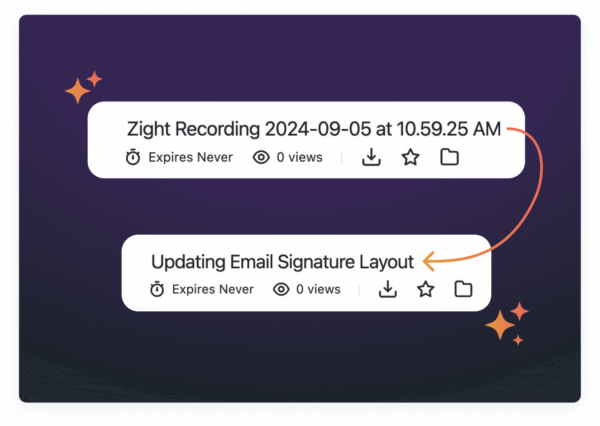
None of this existed in the CloudApp era. It’s the kind of improvement that compounds — every capture becomes more useful and easier to find over time.
Faster Performance
One of the most common complaints about CloudApp in its later years was speed — uploads could lag, and the desktop app occasionally felt sluggish. Zight’s engineering team prioritized performance in the rebuild:
- Screen recordings upload significantly faster — in most cases, the shareable link is ready within seconds of stopping the recording.
- The screenshot tool captures and uploads instantly, with the link copied to your clipboard before you can switch tabs.
- The desktop apps (Mac and Windows) use less memory and launch faster.
Redesigned Interface
The share page — the page recipients see when you send them a Zight link — got a complete overhaul. It’s cleaner, loads faster, and works better on mobile. For teams using Zight for client-facing communication, this matters more than you’d think. A polished share page reflects well on your professionalism.
Expanded Team Features
CloudApp was primarily an individual productivity tool. Zight for Teams adds real collaboration infrastructure:
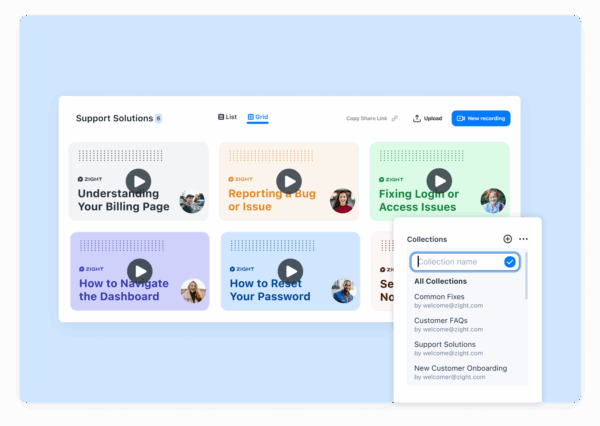
- Shared collections — organize team assets in folders everyone can access.
- Team analytics — see which content gets viewed and how often, useful for sales and customer success teams tracking engagement.
- Custom branding — add your company logo and colors to share pages.
- Admin controls — manage team members, set permissions, and enforce security policies.
- SSO support — enterprise-grade single sign-on for larger organizations.
Deeper Integrations
CloudApp had basic integrations. Zight expanded the integration library to include tighter connections with the tools modern teams actually use daily:
- Jira & Linear — embed screen recordings directly in bug reports.
- Slack & Microsoft Teams — share captures inline without leaving your messaging app.
- Zendesk & Intercom — attach visual context to support tickets.
- Notion & Confluence — embed recordings in documentation.
- Gmail & Outlook — insert captures into emails with one click.
Feature Comparison: Zight vs Other CloudApp Alternatives (2026)
If you’re genuinely evaluating tools — not just trying to find CloudApp again — here’s an honest comparison of Zight against the tools most commonly listed as CloudApp alternatives.
| Feature | Zight (formerly CloudApp) | Loom | Snagit | Droplr | CleanShot X |
|---|---|---|---|---|---|
| Screen Recording | ✅ Yes (with webcam) | ✅ Yes (core feature) | ✅ Yes | ✅ Yes | ✅ Yes |
| Screenshots with Annotation | ✅ Yes (AI-powered) | ❌ No | ✅ Yes (best-in-class editor) | ✅ Yes (basic) | ✅ Yes (excellent) |
| GIF Creation | ✅ Built-in | ❌ No | ✅ Yes (from video) | ✅ Yes | ✅ Yes |
| Instant Link Sharing | ✅ Auto-copied to clipboard | ✅ Yes | ❌ Requires Screencast.com | ✅ Yes | ❌ Upload to cloud manual |
| AI Features | ✅ Titles, summaries, search | ✅ Transcripts, chapters, summaries | ⚠️ Limited (Step Tool) | ❌ No | ❌ No |
| Team Collaboration | ✅ Collections, analytics, admin | ✅ Workspaces, comments | ⚠️ Limited (via TechSmith) | ✅ Team features | ❌ Individual only |
| Mac App | ✅ Native | ✅ Native | ✅ Native | ✅ Native | ✅ Native (Mac only) |
| Windows App | ✅ Native | ✅ Native | ✅ Native | ✅ Native | ❌ No |
| Chrome Extension | ✅ Yes | ✅ Yes | ❌ No | ✅ Yes | ❌ No |
| Custom Branding | ✅ On paid plans | ✅ On Business plan | ❌ No | ✅ On paid plans | ❌ No |
| Free Plan | ✅ Yes | ✅ Yes (limited) | ❌ No (free trial only) | ✅ Yes (limited) | ❌ One-time purchase |
| Starting Price | $9/mo | $18/mo | $62.99 one-time | $8/mo | $29 one-time |
How Zight Compares to Each Alternative
Zight vs Loom
Loom is the closest competitor and the tool most people consider alongside Zight. The key difference: Loom is primarily a video messaging tool. Zight is a visual communication platform. Loom is excellent for async video — recording yourself talking through a presentation, leaving feedback, or onboarding new hires. But it doesn’t do screenshots, GIFs, or image annotation at all.
If your workflow involves quickly capturing a bug, annotating a design, and sharing a GIF of a UI issue — all in the same tool — Zight handles that. With Loom, you’d need a separate screenshot tool alongside it. For teams that need the full visual communication toolkit, not just video, Zight is the more complete solution.
Zight vs Snagit
Snagit by TechSmith is a powerful screenshot and screen recording tool with the best image editor in the category — no contest. If your primary job is creating polished, annotated screenshots for documentation or training materials, Snagit’s editor is hard to beat.
The trade-off: Snagit lacks instant cloud sharing. You capture locally, edit locally, and then have to manually share files. There’s no auto-generated link, no team library, and no AI features. It also costs $62.99 upfront with paid annual maintenance for updates. Zight is faster for the capture-annotate-share loop that most teams live in every day.
Zight vs Droplr
Droplr is the tool most similar to what CloudApp originally was — a lightweight capture-and-share utility. It’s solid, affordable, and does the basics well. Where Zight pulls ahead is in AI features, team analytics, and the depth of its integration ecosystem. If you’re an individual user who just needs quick screenshots and shares, Droplr works fine. If you’re rolling out a tool for a team of 10+, Zight’s collaboration features and admin controls make it the stronger choice.
Zight vs CleanShot X
CleanShot X is a Mac-only screenshot tool that’s beloved by designers and developers for its clean capture experience and excellent annotation tools. If you’re a solo Mac user who primarily takes screenshots and doesn’t need cloud sharing, team features, or cross-platform support, CleanShot X is a great tool at a fair one-time price.
But it’s Mac-only, it doesn’t have built-in cloud hosting with auto-generated share links, and there are no team or collaboration features. For cross-platform teams that need screen recording, GIFs, instant sharing, and team management, Zight covers a much wider use case.
Who Should Use Zight in 2026?
Zight isn’t for everyone — no tool is. Here’s a honest breakdown of who gets the most value:
Zight Is a Great Fit If You…
- File bug reports and need to show developers exactly what’s broken with a screen recording or annotated screenshot — not a paragraph of text.
- Work in customer support and want to send customers a quick how-to video instead of writing step-by-step instructions they won’t read.
- Give design or product feedback asynchronously and need to annotate mockups, record your screen, or create GIFs showing interaction issues.
- Onboard new team members and want to create short walkthrough videos without scheduling yet another Zoom call.
- Work on a remote or hybrid team where “let me just show you” communication needs to work without both people being online at the same time.
- Need one tool that handles screenshots, recordings, GIFs, and annotation across Mac, Windows, and Chrome — instead of stitching together three separate apps.
You Might Want a Different Tool If You…
- Only need long-form async video (10+ minute recordings with chapters, CTAs, and engagement analytics) — Loom is purpose-built for this.
- Need a professional screenshot editor for creating polished training documentation — Snagit’s editor is deeper.
- Are a solo Mac user who only needs screenshots and light recording with no cloud sharing — CleanShot X is simpler and cheaper.
- Need a full video editing suite — Zight is for quick captures and communication, not post-production editing. Look at Camtasia or ScreenFlow for that.
How Teams Actually Use Zight (Real Use Cases)
Abstract feature lists don’t tell you much. Here’s how different roles use Zight in their daily work:
Developers: Bug Reports Without the Back-and-Forth
Instead of writing “the dropdown doesn’t work on the settings page” and triggering three rounds of clarifying questions, a developer records a 15-second screen capture showing the exact behavior, annotates it, and pastes the link in a Jira ticket. The receiving developer sees exactly what’s wrong, in context, on the first try. Average time saved per bug report: 10–15 minutes.
Customer Success: Visual Replies That Actually Help
A customer asks “how do I export my data?” Instead of typing a 6-step process, a CS rep records a 30-second screen recording walking through the export flow, adds an annotation highlighting the export button, and drops the link in the support ticket. Resolution time drops, customer satisfaction goes up, and the recording can be reused for future customers with the same question.
Product Managers: Async Feedback That Ships Faster
A PM reviewing a new feature prototype takes a screenshot, annotates three areas that need revision with clear callouts, and shares the link in a Slack channel. The designer sees the feedback immediately, without needing to sync calendars for a review meeting. What used to take a 30-minute call now takes 2 minutes.
Remote Teams: Onboarding Without Calendar Overload
A new hire starts on Monday. Instead of blocking half the team’s calendar for walkthroughs, the manager records five short Zight videos covering key tools and processes. The new hire watches them on their own time, replays confusing parts, and comes to their first sync meeting with informed questions instead of a blank stare. The videos live in a shared Zight collection and get reused for every subsequent hire.
Getting Started With Zight (If You’re Coming From CloudApp)
Whether you’re a returning CloudApp user or completely new, setup takes less than two minutes:
For Former CloudApp Users
- Go to zight.com and click “Sign In.”
- Use your old CloudApp email and password. Your account transferred automatically.
- Download the latest desktop app for Mac or Windows (or install the Chrome extension). If you had CloudApp installed, it may have already updated to Zight.
- Check your content library. All your old screenshots, recordings, and GIFs are there — including the original share links.













Leave a Reply