
How I built an AI bot that sends me an email from my dad every Sunday
Once a week I get an email from my dad.
He passed away on May 18, 2023, after a twenty-year fight with Parkinson’s.
I pulled 1,584 messages he sent me from Gmail, going back to 2004. I cleaned out the “call me” notes, the forwards, the signatures, and the junk. Then I ran the remaining emails through an LLM and scored each one for the things I wanted to find again: wisdom, jokes, spiritual reflections, proud-dad moments, grandpa stuff.
193 made the cut.
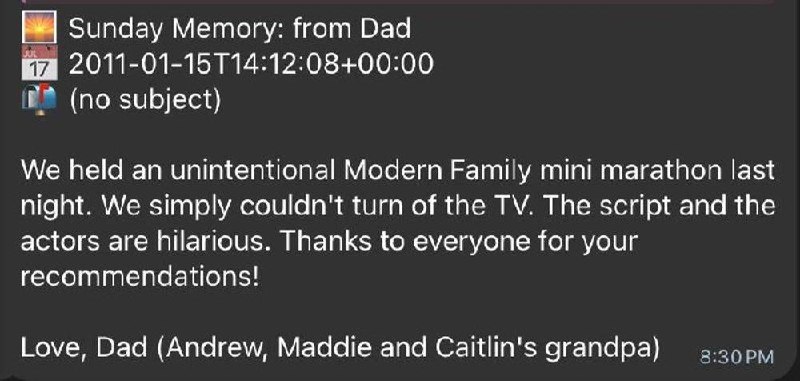
Now one shows up every Sunday morning.
This week’s email was very much him. Even the signature had the exact kind of grandpa pride I miss.
I posted about this on LinkedIn last week and a bunch of people asked how I built it. So here’s the writeup. The whole thing is open source: github.com/scotcha1/family-letters.
Who this is about
A. Kim Smith. Goldman Sachs partner for 28 years, then BYU finance professor and managing director of the Peery Institute. Father of four. Grandpa to 15. Bishop, stake president, Area Authority Seventy. He called my mom multiple times a day from his Wall Street office. “Happy wife, happy life” was his signature phrase, and he meant it. Parkinson’s started taking his voice around age 60. He died at 69.
Elise Smith Caffee. My older sister. Twin to Kristina. Born 15 weeks premature and small enough to fit in my dad’s palm. Grew up in New Jersey and Tokyo. BYU English major, NYU Summer Publishing Institute, editor at Cengage and SAGE, then founder of her own publishing house, Jumelle Press. Wife to Dan. Mother to Madeline, Olivia, and Lauren. Lacrosse coach who took Skyline High to a state championship. Always said: “Take the trip!” She died on March 12, 2025, from injuries sustained in a car accident in Cancun six days earlier.
I built the same system for both of them. Every Sunday, I get one email from Dad and one from Elise.
What the bot actually sends
Here’s one from Dad, originally sent in June 2005 while I was on my LDS mission:
The other day as I was driving home it hit me yet again how wonderful your mother is, and what a lucky husband and father I am.
And one from Elise, sent in May 2005. She was 25, single, living in California:
I also “invited” myself to attend our “new arrivals class” in our ward every sunday…and that way i’m the first girl to meet all of the new guys in the ward…pretty sneaky huh.
That’s the voice. Both of them.
Twenty-one years ago, sitting in Gmail the whole time, and I never would have found those again on my own.
The problem
I had about 4,600 emails across Dad and Elise in my Gmail archive.
Most were not treasures. They were forwards, quick logistics, auto-replies, Dropbox notifications, and “pick you up at 7?” emails. Inside that pile were the things I actually wanted, but search was not going to find them.
I could have spent a weekend reading all 4,600 emails. I have four kids and run a company. That was not going to happen.
The real problem was not “I want to read old emails.”
It was: “I want to encounter my dad’s voice on Sunday mornings the way I might have if he were still here.”
The mechanism matters. Rediscovery on a schedule. Some surprise. His voice, not mine.
The architecture
Three pieces:
Clean. Strip MIME attachments, HTML, signatures, forwarded chains, and anything under 15 words of original writing. Output one plain text file per message.
Tag. Send each cleaned email through Claude Haiku with a person-specific scoring prompt. Get back structured JSON: Sunday score, themes, tone, pull quote, one-line summary.
Pick and deliver. Every Sunday at 7am, a cron job grabs one unserved email from each person at score 7+, formats it, sends it to Telegram, and logs what was served so it does not repeat.
That’s it. Three Python scripts, two prompts, a shell loop, and a JSON index file per person.
Step 1: Clean
The cleaner is the least glamorous part of the project and the part that matters most.
A few things I learned:
Raw email word counts lie. Gmail said my dad’s longest email was 901,616 words. It was a forwarded PDF of Baseball Cartoons from the New Yorker. The actual text he wrote was maybe four sentences. Embedded image base64 was being counted as words. Strip that first.
Forwarded content buries the good part. A lot of my dad’s emails were structured as: BYU article + two sentences of commentary. The two sentences were the point. The cleaner needed to detect the forward marker and keep only what came before it.
Signatures are noise. Dad’s signature ran a third of some emails: full title, BYU phone, Peery Institute address, the works. After stripping signatures, his real word counts dropped 40%.
Sometimes the cleaned email becomes nothing. Good. Drop it.
Here’s the core of the cleaning script:
#!/usr/bin/env python3 """ Clean Gmail-exported emails for tagging. """ import re from html import unescape MIN_WORDS = 15 FORWARD_MARKERS = [ re.compile(r"^-+\s*Original Message\s*-+", re.IGNORECASE | re.MULTILINE), re.compile(r"^-+\s*Forwarded message\s*-+", re.IGNORECASE | re.MULTILINE), re.compile(r"^On .{1,80}wrote:\s*$", re.MULTILINE), re.compile(r"^From:\s+.+@.+", re.MULTILINE), re.compile(r"^Sent from my (iPhone|iPad|BlackBerry)", re.MULTILINE), re.compile(r"^>+\s", re.MULTILINE), ] def strip_html(text: str) -> str: text = unescape(text) text = re.sub(r"<(script|style)[^>]*>.*?</\1>", "", text, flags=re.DOTALL | re.IGNORECASE) text = re.sub(r"<br\s*/?>", "\n", text, flags=re.IGNORECASE) text = re.sub(r"</p>", "\n\n", text, flags=re.IGNORECASE) text = re.sub(r"<[^>]+>", "", text) return text def strip_forwarded(text: str) -> str: """Keep only content BEFORE the first forwarded/quoted marker.""" earliest = len(text) for pat in FORWARD_MARKERS: m = pat.search(text) if m and m.start() < earliest: earliest = m.start() return text[:earliest].strip() def clean_body(raw: str) -> str: text = strip_html(raw) text = strip_forwarded(text) text = re.sub(r"https?://\S+", " ", text) text = re.sub(r"[ \t]+", " ", text) text = re.sub(r"\n{3,}", "\n\n", text) return text.strip()I ran this against my Gmail export and dropped anything under 15 words after cleaning.
Dad started with 3,926 raw emails. 1,831 survived cleaning.
Elise started with 705. 381 survived.
The full script, including signature stripping and a Mom filter, is in the repo.
The Mom problem. My dad and mom shared a Hotmail account. Roughly 16% of “Dad’s” emails in my archive were actually written by my mom. Subject lines like “hi from mom” were a pretty good tell. I wrote a filter to detect them by sender header and signature pattern, then set them aside in a separate folder.
Step 2: Tag
This is where the LLM does the work I could not do manually at any reasonable scale.
The job is simple: read an email, decide whether it is a Sunday treasure or a piece of logistics, and tag it with metadata I can filter later.
The key decision was writing separate scoring prompts for Dad and Elise. They had different voices, different roles in my life, and different kinds of emails. A generic “rate this email” prompt would have flattened both of them.
Here’s the prompt I used for Dad:
You are reading an email from Kim Smith (Scott's father, now passed away) to his son Scott. Your job is to tag this email so Scott can rediscover it on a future Sunday morning. Kim was a thoughtful father. His emails range from forwarded articles with brief commentary, to personal reflections, faith observations, fatherly advice, family logistics, and humor. The most precious emails for Sunday reading are ones where his own voice, character, and love come through. Read the email below and return ONLY a single JSON object with this exact schema (no preamble, no markdown fences): { "one_line_summary": "string, max 20 words", "themes": ["fatherly-advice, faith, humor, family-update, reflection, ..."], "tone": ["warm, funny, reflective, proud, encouraging, ..."], "people_mentioned": ["array of names"], "spiritual_intensity": 0-3, "personal_voice_strength": 0-3, "sunday_score": 1-10, "sunday_reason": "one sentence", "best_pull_quote": "the single best 1-2 sentence quote, or null" } Scoring rubric for sunday_score (be honest, most emails should score 3-6): - 9-10: A treasure. Personal voice, captures who Kim was, something Scott would be glad to rediscover years later. - 7-8: Worth reading. Substantive personal content, a good memory or thought. - 5-6: Pleasant but minor. A small update, a brief sweet note. - 3-4: Mostly forwarded content with thin commentary, or pure logistics. - 1-2: Junk, auto-replies, pure scheduling. Penalize heavily: emails that are 90%+ forwarded articles or chain emails with no personal commentary. Reward heavily: emails where Kim writes from the heart, gives advice, reflects on life, shares faith, or shows his sense of humor. EMAIL: ---The Elise prompt is different. Her emails were shorter and often looked trivial from the outside: one sentence, a kid update, a quick caption on a video. Both prompts are in the repo.
Calibration is the whole game. Before tagging the full corpus, I ran the prompt on 20 emails and inspected the scores. The first version rated too many emails at 7+. I tightened the rubric with one sentence: “be honest, most emails should score 3-6.”
That fixed the distribution.
Dad ended up with 3 emails at score 10, 50 at 9, 61 at 8, and 79 at 7. Elise had 1 at 10, 14 at 9, 15 at 8, and 22 at 7.
That became the Sunday inventory.
Batching saved 4x runtime. My first tagging loop called Claude once per email. Per-call overhead dominated the run: auth, connection setup, model load, all the boring parts. Switching to 10 emails per Claude call cut runtime from about 18 seconds per email to about 5 seconds per email.
The model returns a JSON array. I parse it and write one file per email. Resumable, idempotent, boring in the best way.
Here’s the single-email version:
#!/usr/bin/env bash set -euo pipefail PERSON="$1" CLEANED_DIR="$2" TAGS_DIR="$3" PROMPT_FILE="prompts/score-${PERSON}.md" PROMPT_BASE=$(cat "$PROMPT_FILE") MODEL="${CLAUDE_MODEL:-claude-haiku-4-5-20251001}" for txt in "$CLEANED_DIR"/*.txt; do base=$(basename "$txt" .txt) out="$TAGS_DIR/$base.tags.json" [ -f "$out" ] && continue # skip already tagged body=$(cat "$txt") full_prompt="${PROMPT_BASE} ${body} --- END EMAIL. Return only the JSON object." response=$(echo "$full_prompt" | claude -p --model "$MODEL") if echo "$response" | python3 -c "import sys, json; json.load(sys.stdin)" 2>/dev/null; then echo "$response" > "$out" fi doneFor the batched version, see tag_emails_batched.py in the repo.
Step 3: Build the index
Once everything is tagged, the script rolls the per-message JSON files into a single index.json per person, sorted by Sunday score.
That index is what the picker queries later.
entries = [] for tag_file in sorted(tags_dir.glob("*.tags.json")): base = tag_file.name.replace(".tags.json", "") meta = json.loads((cleaned_dir / f"{base}.meta.json").read_text()) tags = json.loads(tag_file.read_text()) entries.append({ "id": base, "txt_path": str(cleaned_dir / f"{base}.txt"), "meta": meta, "tags": tags, }) entries.sort(key=lambda e: e["tags"].get("sunday_score", 0), reverse=True) out_path.write_text(json.dumps(entries, indent=2))At that point I had the thing I actually needed: two ranked, queryable corpora. One for Dad. One for Elise.
Step 4: Pick and deliver
The weekly picker is intentionally simple:
Load the index for each person. Load served.json. Filter to sunday_score >= 7 and not yet served. Penalize picks from the same year or theme as recent picks, so I do not get four 2012 emails in a row about the same trip. Use weighted random selection, biased slightly toward higher scores. Render the date, subject, summary, pull quote, and full body. Send it to Telegram and append the email ID to served.json.
The core picker:
def pick_weekly(archives, person, served, min_score=7): entries = load_index(archives, person) served_ids = {s["id"] for s in served["served"]} pool = [e for e in entries if e["tags"].get("sunday_score", 0) >= min_score and e["id"] not in served_ids] if not pool: return None # Avoid years and themes from last 4 picks recent = recent_picks(served, person, 4) recent_years = {parse_year(e["meta"]) for e in recent} recent_themes = set() for r in recent: for t in r["tags"].get("themes", [])[:2]: recent_themes.add(t) def penalty(entry): p = 0.0 if parse_year(entry["meta"]) in recent_years: p += 0.4 themes = set(entry["tags"].get("themes", [])) p += 0.2 * len(themes & recent_themes) return p weighted = [ (max(0.1, e["tags"]["sunday_score"] - 6 - penalty(e)), e) for e in pool ] total = sum(w for w, _ in weighted) r = random.uniform(0, total) upto = 0 for w, e in weighted: upto += w if upto >= r: return eIt runs every Sunday at 7am via cron. By the time I’m awake, both emails are waiting in Telegram.
A second feature: ad-hoc search
After the weekly bot was running, I wanted to ask my agent things like:
Find me a memory about my dad and faith.
So I added a find subcommand.
It parses the query for person aliases like dad/father/sister/Elise, scans the tagged corpus for matches in themes, tone, summary, and pull quote, then returns the top three results.
I tested it with “dad and faith.” The top result was an email from 2005, sent while I was on my mission, where my dad wrote:
In your ministry, don’t ever confuse length of time with the ability to make an impact.
I had completely forgotten he wrote that.
It is exactly the thing I need to hear right now at this point in my career. The bot does not just give me Sunday mornings. It gives me a way to reach for my dad when I need him.
What I learned
Build the pipeline before you build the agent. My first instinct was to make this interactive: “find me a good memory from Dad.” But Sunday morning is not the time to run an LLM over 4,000 emails. Pre-process once, build the index, and make runtime boring.
Calibrate ruthlessly. Tag 20 emails. Read the scores. Tighten the prompt. Repeat. The difference between a good Sunday delivery and a mediocre one is whether the LLM learned what a treasure looks like. That takes a few iterations.
Use per-person prompts. Dad’s long reflective letters and Elise’s short sister-voice notes needed different rubrics. A generic prompt would have buried the best parts of one under the style of the other.
Do not auto-mark search results as served. If I ask the bot to find a memory about Dad and faith, I still want that same email to be eligible for a future Sunday. Rediscovery through a different door still counts.
Boring infrastructure. Resumable scripts. Idempotent file outputs. JSON sidecars instead of a database. A served.json log. None of that is clever. All of it means this can run for years without needing me to babysit it.
What it cost
About $15 in Claude API costs for the full tagging run. A weekend of evening hacking to build it. After that, basically free.
If you want to build your own
Repo is here: github.com/scotcha1/family-letters.
What you need:
A Gmail export of the person’s emails to you. Google Takeout works. Claude API access or Claude CLI installed locally. A few hours to run the pipeline. A delivery path for the weekly result. I use Telegram through my home agent. Email would work fine.
The whole thing is about 600 lines of code across all the scripts. Most of it is the cleaner, because email is a mess.
Scott Smith is the CEO of Zight, a visual communication platform. He lives in South Jordan, Utah with his wife and four children, and coaches youth lacrosse.












