How to Create Custom, Trackable Links
Learn how to create trackable links with Zight to shorten URLs, personalize paths, and monitor click analytics.
Step 1: Paste the URL You Wish to Customize and Track
- Start by locating the URL you wish to track and copy it.
- Return to the Zight page and paste the URL into the designated field.
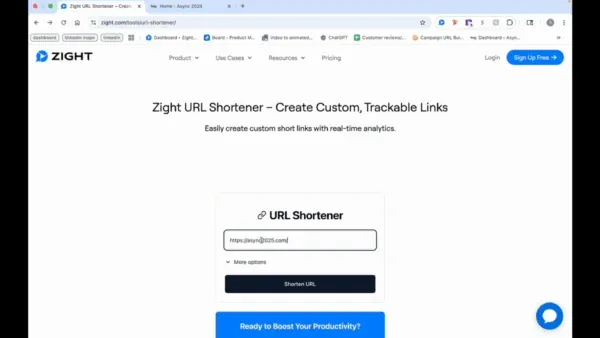
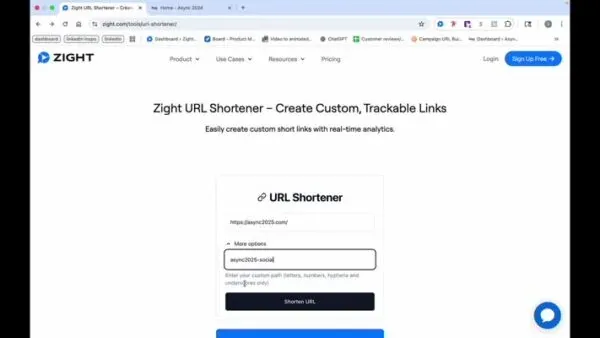
Step 2: Customize the Path
- Choose to shorten the URL or click on “more options” to create a custom path. For example, use “social” if posting on social media.
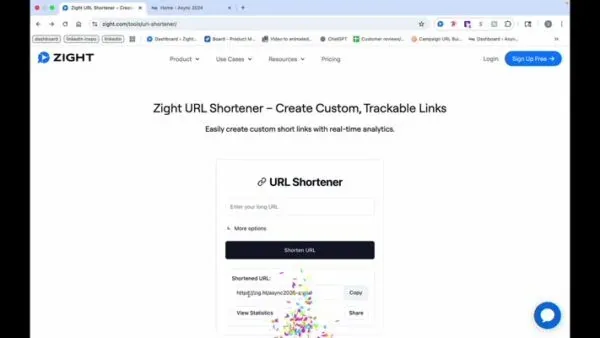
Step 3: Shorten the URL
- Once shortened, you can copy the link, share it, or view statistics.
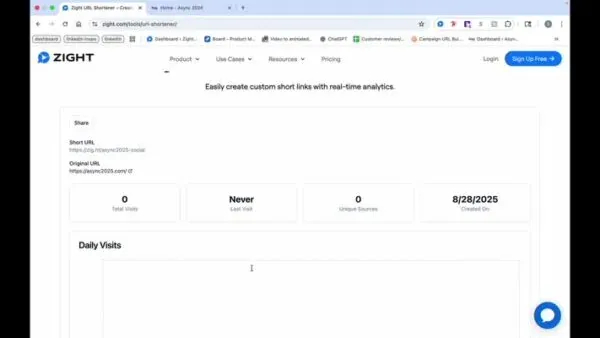
Step 4: Monitor Analytics
- As people start clicking the link, you can view total visits, last visit, unique source, and creation date for analytics.
The Ultimate Guide to Creating Custom, Trackable Links with Zight
In a world full of endless links, standing out and staying organized is key. Whether you’re sharing product updates, marketing campaigns, or internal content, knowing how your links perform can make a huge difference. With Zight’s custom, trackable links, you can shorten URLs, personalize link paths, and monitor engagement all in one place.
This feature gives you a simple way to share links that not only look clean but also provide real-time insights into how your audience interacts with them. From social media posts to email campaigns, trackable links help you understand what’s driving traffic and where your clicks are coming from.
Why use custom, trackable links
Regular URLs often look long and cluttered, especially when you’re sharing them across multiple channels. A custom link, on the other hand, keeps your messaging consistent and easy to recognize. With Zight, you can create links that align with your brand while also gathering valuable analytics.
For marketers, sales teams, and content creators, this data is essential. It helps you measure the success of your outreach, optimize your messaging, and identify which platforms deliver the most engagement. Instead of guessing what works, Zight’s analytics give you clear answers backed by numbers.
Personalizing your link paths
Creating custom, trackable links in Zight starts with personalization. You can take any long URL and turn it into a short, branded version that’s easy to remember. For example, if you’re sharing a video or document on social media, you can customize the path to something like “zight.com/social-demo” or “zight.com/team-update.”
This makes your links look professional and trustworthy, increasing the likelihood of clicks. Personalized links also make it easier for teams to identify which links belong to which campaign without needing to open them.
Zight’s interface gives you full control over each link, letting you tailor them for specific audiences or purposes. It’s a small detail that makes a big impact on both presentation and performance.
Tracking link performance
Once your links are live, Zight automatically starts tracking how they’re used. You can view insights such as total visits, unique clicks, referring sources, and last visit time. These metrics provide a detailed view of audience behavior, helping you identify trends over time.
For example, if one link consistently outperforms others on social media, you’ll know that particular channel resonates best with your audience. Likewise, if engagement drops on another platform, you can adjust your strategy accordingly.
Because Zight gathers this data in real time, you can make faster, smarter decisions about where to focus your marketing or outreach efforts.
Best practices for creating trackable links
To get the most out of your custom links, it’s worth keeping a few best practices in mind.
-
Use clear naming conventions. When customizing link paths, make them descriptive and easy to understand. For example, “zight.com/product-launch” is more meaningful than a random string of characters.
-
Stay consistent. Use the same format for all your links to make analytics comparison easier.
-
Monitor regularly. Check your analytics dashboard often to see how each link performs over time.
-
Update campaigns as needed. If you notice one link performing better than others, consider adjusting your messaging or distribution to match that success.
These small habits can significantly improve how you manage and analyze your link performance across campaigns.
Why analytics matter for content strategy
Understanding how your audience engages with links can guide nearly every aspect of your content strategy. Click analytics show what’s resonating, which helps you refine your voice and tone.
For instance, if certain topics or formats consistently drive more engagement, you can prioritize them in your future campaigns. Over time, these insights help you build a more data-driven approach to content creation.
With Zight, all this information is readily available in one place, helping teams make faster, smarter decisions about what to create and share next.
Conclusion
Creating custom, trackable links with Zight is one of the simplest ways to improve how you share and measure content. By shortening long URLs, adding personalized paths, and analyzing click data, you gain valuable insights that drive smarter marketing and communication decisions.
Whether you’re managing social media posts, internal updates, or email campaigns, Zight makes it easy to stay organized and data-informed. The combination of clean presentation and actionable analytics ensures every link you share contributes to your broader goals.
If you’re ready to take control of your links and make them work harder for you, start creating trackable links with Zight today.
Frequently Asked Questions
Trackable links are shortened URLs that include analytics, allowing you to see how many people clicked, where they came from, and when the clicks occurred.
Zight automatically collects engagement data for every custom link you create, including visits, sources, and unique clicks.
Yes. Zight allows you to personalize each link path to reflect your campaign or platform, such as “/social” or “/newsletter.”
Nope! This tool is 100% free.
Yes. Zight’s analytics track clicks no matter where the link is shared, including email, social media, or chat apps.
Zight provides key metrics such as total clicks, unique visitors, referral sources, and engagement trends over time.
Absolutely. You can share both links and their analytics reports with team members to align on performance insights.
Unlike simple link shorteners, Zight combines branding, customization, and in-depth analytics in one easy-to-use platform.


