
Best Vidyard Alternative in 2026: Why Teams Are Switching to Zight
If you’re searching for a Vidyard alternative, chances are you’ve hit the same wall thousands of other teams have: Vidyard is powerful for enterprise sales workflows, but it’s expensive, complex, and wildly overkill if you’re not running personalized sales outreach at scale. You don’t need a sales-centric video platform. You need a fast, simple way to record your screen, share it instantly, and move on with your day.
⚡ Quick Answer: Best Vidyard Alternative
Zight is the best Vidyard alternative for teams that need fast screen recording, screenshots, GIFs, and async video without enterprise sales complexity. Zight is a screen recording, screenshot, and async video tool that lets you capture and share visual content in seconds — available on Mac, Windows, and Chrome. It costs significantly less than Vidyard’s paid plans, requires zero setup or CRM configuration, and gives you instant shareable links the moment you stop recording. If Vidyard feels like too much tool for your actual workflow, Zight is purpose-built for you.
Why People Are Looking for a Vidyard Alternative in 2026
Vidyard built its reputation as a video platform for B2B sales teams. And for that specific use case — personalized prospecting videos with CRM integrations, viewer analytics, and sales cadence embedding — it delivers. But here’s the problem: the vast majority of people who sign up for Vidyard aren’t running enterprise sales motions.
They’re developers filing bug reports. Product managers giving async feedback. Customer success teams walking clients through a dashboard. Remote workers replacing meetings with quick screen recordings. And for all of these people, Vidyard creates the same set of frustrations:
1. Vidyard Is Too Expensive for Non-Sales Teams
This is the number-one complaint, and it’s not subtle. Vidyard’s Pro plan starts at $29/month per user (billed monthly), and the Business tier — where you unlock most analytics and integrations — jumps considerably higher with custom pricing. If your team has 10 people who occasionally need to record a screen walkthrough, you’re looking at hundreds of dollars a month for a tool most of them will use a few times a week. Vidyard too expensive isn’t just a search query — it’s a sentiment echoed across G2, Reddit, and Capterra reviews throughout 2025 and 2026.
2. It’s Overkill If You Don’t Need Sales Features
Vidyard’s interface is designed around sales workflows: video hubs, CTAs embedded in videos, Salesforce and HubSpot integrations, viewer-level engagement tracking, and video playlists for nurture sequences. If you just want to record your screen, annotate a screenshot, or make a quick GIF, all of that is noise. You end up navigating around features you’ll never use to do something that should take five seconds.
3. Slow Setup, Slow Sharing
Multiple user reviews cite slow upload times, a clunky Chrome extension, and a sharing workflow that feels heavier than it should be. When you record a quick video to explain a bug or answer a teammate’s question, you need the link in your clipboard immediately — not after navigating a video management dashboard.
4. Free Tier Limitations Push You to Upgrade
Vidyard’s free plan exists, but it’s designed as a conversion funnel: limited video length, Vidyard branding, restricted analytics, and no team features. If you’re searching for a Vidyard alternative free option that actually works for daily use, the free tier doesn’t cut it — and the jump to paid is steep.
Vidyard vs Zight: Honest Feature Comparison
Let’s put both tools side by side. This comparison is honest — we’ll call out where Vidyard wins and where Zight is the stronger choice depending on your use case.
| Feature | Zight | Vidyard |
|---|---|---|
| Screen Recording | ✅ Instant recording + instant shareable link | ✅ Screen recording with sales-focused features |
| Screenshots & Annotation | ✅ Built-in screenshot tool with markup, blur, arrows | ❌ No native screenshot tool |
| GIF Creation | ✅ Native GIF maker — record and share GIFs instantly | ❌ Not available |
| Async Video Messaging | ✅ Webcam, screen, or both — lightweight & fast | ✅ Core strength — built for video prospecting |
| Instant Link Sharing | ✅ Link copied to clipboard the moment you stop recording | ⚠️ Requires navigating video dashboard first |
| Platform Support | ✅ Mac, Windows, Chrome, iOS | ✅ Chrome extension, desktop app, mobile |
| CRM Integrations (Salesforce, HubSpot) | ❌ Not a core focus | ✅ Deep CRM integrations — Vidyard’s strength |
| Sales Video Analytics (viewer tracking, heatmaps) | ❌ Basic view tracking | ✅ Advanced — individual viewer tracking, engagement data |
| Video CTAs & Sales Cadence Embedding | ❌ Not available | ✅ Built for this |
| Team Collaboration | ✅ Shared collections, team workspace, comments | ⚠️ Team features gated behind Business plan |
| Custom Branding | ✅ Available on paid plans | ✅ Available on paid plans |
| Free Plan Usability | ✅ Generous — fully functional for individuals | ⚠️ Limited recording length, heavy branding |
| Pricing (Paid, per user/month) | ✅ Starts at $9/month | ⚠️ Starts at $29/month (Pro) |
| Setup Time | ✅ Under 2 minutes — install and record | ⚠️ Longer setup, especially with CRM configuration |
| Best For | Developers, PMs, support teams, remote workers | B2B sales teams running video prospecting |
The bottom line: Vidyard wins if your primary use case is personalized sales video outreach with CRM tracking. Zight wins at everything else — and it wins decisively on price, speed, and simplicity.
Zight’s Top Advantages as a Vidyard Replacement
Here’s why teams across engineering, product, design, customer success, and operations are choosing Zight as their Vidyard replacement:
1. Record → Share in Under 10 Seconds
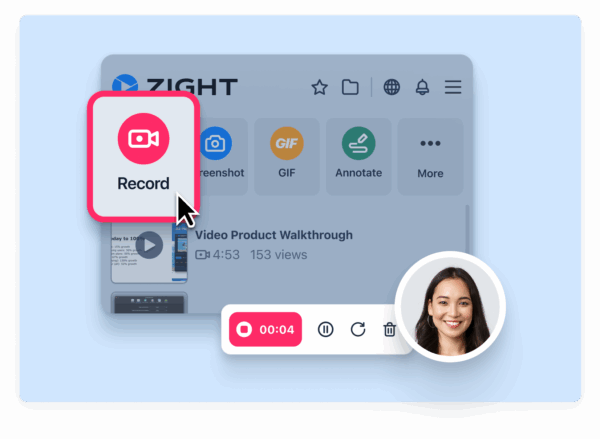
Zight’s screen recorder is built for speed. Hit the keyboard shortcut, record your screen (with or without webcam and audio), stop recording, and the shareable link is instantly copied to your clipboard. No dashboard. No upload wait. No extra clicks. Paste it in Slack, Jira, an email, a Notion doc — wherever your team communicates. The recording is live and viewable in seconds.
2. Screenshots, GIFs, and Video in One Tool
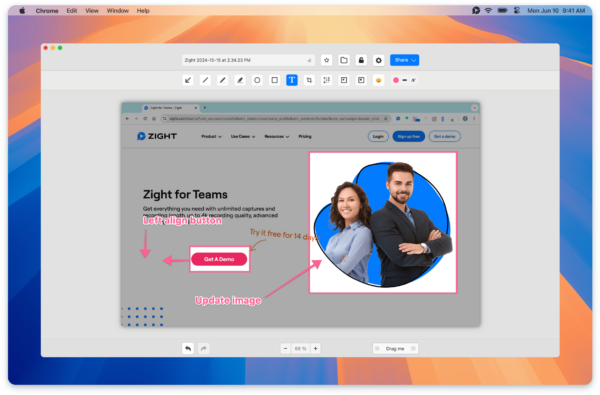
Vidyard only does video. But most communication problems don’t need a video — they need the right format for the message. A bug report might need an annotated screenshot. A quick UI interaction might be best shown as a GIF. A longer walkthrough needs a screen recording. Zight gives you all three in a single app. The GIF maker alone replaces an entire category of tools most teams cobble together with free web apps.
3. Pricing That Makes Sense for Whole Teams
Zight’s individual plan starts at $9/month — roughly a third of Vidyard’s Pro tier. The team plan includes shared collections, centralized billing, team analytics, and collaborative features without requiring you to talk to a sales rep or commit to an annual enterprise contract. You can equip a 15-person team with Zight for less than three Vidyard Pro seats.
4. Zero-Friction Setup
Download the Mac or Windows app (or install the Chrome extension), sign in, and start recording. That’s it. There’s no CRM to configure, no video hub to set up, no onboarding sequence to sit through. Most users are capturing and sharing their first recording within two minutes of signing up.
5. Built for Cross-Functional Teams, Not Just Sales
Zight is used by engineering teams documenting pull requests, product managers recording sprint demos, customer success teams creating personalized help videos, and support agents annotating screenshots for bug escalation. The tool doesn’t assume your workflow — it adapts to it.
Who Should Switch from Vidyard to Zight (And Who Shouldn’t)
Not every Vidyard user should switch. Here’s a straightforward decision framework to help you self-qualify:
✅ Switch to Zight If:
- You don’t use CRM integrations. If Salesforce/HubSpot video tracking isn’t part of your workflow, you’re paying for a feature you’ll never touch.
- You need screenshots and GIFs, not just video. Vidyard is video-only. If your team communicates visually in multiple formats, Zight covers all of them.
- Your team isn’t in sales. Engineering, product, design, customer success, HR, support — if your use case is internal communication, documentation, or client walkthroughs, Zight is purpose-built for you.
- Price matters. If you’re evaluating per-seat costs across a growing team, Zight’s pricing makes it viable to give everyone access instead of rationing licenses.
- You want instant sharing with zero friction. If your current workflow involves waiting for uploads, navigating dashboards, or multiple clicks to get a shareable link, Zight eliminates all of that.
- You’re looking for a Vidyard alternative free option to start. Zight’s free plan is genuinely usable for individuals — no hard recording time limits that make it impractical.
❌ Stay with Vidyard If:
- You run personalized sales video outreach at scale. Vidyard’s one-to-one video prospecting, CRM-embedded analytics, and viewer tracking are best-in-class for sales teams. Zight doesn’t try to compete here.
- You need individual viewer-level engagement data. If knowing exactly which prospect watched which part of your video for how long drives your sales strategy, Vidyard’s analytics are unmatched.
- Your video strategy is tied to Salesforce/HubSpot workflows. If you’ve built automated sequences around Vidyard’s CRM integrations, migrating away would require rebuilding those workflows.
The honest summary: Vidyard is a sales video platform. Zight is a visual communication tool. If your primary job is selling via personalized video, Vidyard is built for you. If your job is anything else that requires fast visual communication, Zight is built for you.
How to Migrate from Vidyard to Zight: Step-by-Step
Switching tools doesn’t have to be painful. Here’s how to move your team from Vidyard to Zight in under 30 minutes:
Step 1: Export Your Existing Vidyard Videos (If Needed)
If you have existing Vidyard recordings you want to keep, download them from your Vidyard library. Go to your Vidyard dashboard → select each video → click “Download.” Save them locally or to your cloud storage. Note: Vidyard may restrict bulk downloads on lower-tier plans, so check your plan’s export capabilities first.
Step 2: Sign Up for Zight
Head to zight.com and create your account. You can start with the free plan to test the workflow, or go directly to the individual or team plan if you’ve already decided. The signup takes under 60 seconds.
Step 3: Install the Zight App
Download the desktop app for Mac or Windows, or install the Chrome extension — whichever matches your workflow. The desktop app gives you system-wide keyboard shortcuts for screen recording, screenshots, and GIFs. The Chrome extension works for browser-based recording without installing anything locally.
Step 4: Set Up Your Team Workspace
If you’re migrating a team, invite your teammates from the Zight dashboard. Create shared collections to organize recordings by project, team, or client. Set up your custom branding if you’re on a plan that supports it. This entire step takes about five minutes.
Step 5: Upload Your Existing Videos (Optional)
If you downloaded videos from Vidyard in Step 1, you can upload them directly to your Zight library using drag-and-drop. Each uploaded file gets its own shareable link, so you can update any old Vidyard links in your documentation, help docs, or wikis with the new Zight URLs.
Step 6: Record Your First Zight Video
Use the keyboard shortcut (or click the Zight icon in your menu bar) to start recording. Choose screen only, webcam only, or both. Stop recording, and your link is copied to your clipboard automatically. Paste it anywhere. That’s the workflow — and it never gets more complicated than that.
Step 7: Cancel Your Vidyard Subscription
Once you’ve confirmed Zight fits your workflow (give it a week), cancel your Vidyard plan. If you’re on an annual contract, note your renewal date and plan the switch accordingly to avoid overlapping payments.
Frequently Asked Questions
Is Zight a good Vidyard alternative for non-sales teams?
Yes. Zight is specifically designed for cross-functional teams — developers, product managers, customer success, support, and remote workers — who need fast screen recording, screenshots, GIFs, and async video without sales-specific features like CRM integrations or viewer-level analytics. It’s simpler, faster, and significantly less expensive than Vidyard for these use cases.
How does Zight’s pricing compare to Vidyard’s pricing in 2026?
Zight’s paid plans start at $9/month per user, while Vidyard’s Pro plan starts at $29/month per user. For a 10-person team, that’s roughly $90/month with Zight versus $290/month with Vidyard — a savings of over 65%. Zight also offers a functional free plan without the aggressive limitations found in Vidyard’s free tier.
Can I use Zight as a free Vidyard alternative?
Yes. Zight offers a free plan that includes screen recording, screenshots, and GIF creation with shareable links. Unlike Vidyard’s free plan, which imposes strict recording limits and heavy branding, Zight’s free tier is practical for individual daily use. You can upgrade to a paid plan when you need team features or additional storage.
What does Zight do that Vidyard doesn’t?
Zight includes native screenshot capture with annotation tools (arrows, text, blur, highlights), a built-in GIF maker, and instant link-to-clipboard sharing — none of which Vidyard offers. Zight is also a native Mac and Windows desktop app with system-wide keyboard shortcuts, while Vidyard’s experience is primarily browser-based.
What does Vidyard do that Zight doesn’t?
Vidyard excels at B2B sales video workflows: deep CRM integrations with Salesforce and HubSpot, individual viewer-level engagement analytics (who watched, how long, which sections), in-video CTAs, and video playlists for sales cadences. If your team’s core workflow depends on these sales-specific features, Vidyard remains the stronger choice in that category.
Ready to Try the Best Vidyard Alternative?
You don’t need to commit to anything to see the difference. Sign up for Zight’s free plan, record your first screen capture, and experience what instant visual communication actually feels like — no sales dashboards, no CRM setup, no waiting for uploads.
If your team has been paying Vidyard prices for a fraction of Vidyard’s features, the math is simple. Zight gives you screen recording, screenshots, GIFs, and async video in one tool — faster, simpler, and at a price that lets you give every teammate access instead of just a lucky few.












