

- Automation: AI handles tasks like data entry, lead scoring, and follow-ups, saving time and reducing errors.
- Personalization: It predicts customer needs, tailors emails, and adjusts campaigns in real-time.
- Efficiency: Teams can focus on meaningful work while AI ensures consistent communication and accurate data updates.
- Cost Savings: Automating workflows reduces the need for additional staff and minimizes training expenses.
- Customer Insights: Tools like predictive analytics and sentiment analysis help businesses identify opportunities and address issues proactively.
AI CRM Workflows: Best way to use AI in your CRM
What is AI-Driven CRM Workflow Automation
AI-driven CRM workflow automation blends artificial intelligence with customer relationship management systems to handle routine tasks and make data-driven decisions. Think of it as a digital assistant that tirelessly manages customer interactions and streamlines processes. Using machine learning and data analysis, AI identifies patterns in customer behavior, predicts outcomes, and takes action automatically. For example, when a customer visits your website, opens an email, or makes a purchase, AI can instantly update their profile, adjust their lead score, and decide the best next step. This ability to process massive amounts of data and uncover insights that might go unnoticed by humans sets the stage for how AI transforms CRM operations.AI Workflow Automation in CRM Explained
AI workflow automation takes the hassle out of repetitive CRM tasks, making teams more efficient by cutting down on manual effort and response times. Imagine a potential customer filling out a contact form, AI can instantly categorize them based on factors like industry, company size, or interests. It then assigns the lead to the right sales rep, sends a personalized welcome email, and schedules follow-ups, ensuring consistent and timely communication. Email automation gets a major upgrade with AI. Instead of generic messages, AI tailors emails to each customer by analyzing their interaction history, preferences, and position in the buying journey. For instance, if a customer abandons their shopping cart, AI can send a personalized email featuring product recommendations and a limited-time offer based on their past behavior. AI also revolutionizes customer segmentation by continuously analyzing data to uncover new patterns and updating segments in real time. It keeps your CRM database accurate by cleaning and enriching data, removing duplicates, standardizing formats, and filling in missing details by cross-referencing various sources. This ensures that your database is always reliable and ready for action.How AI Connects with CRM Platforms
AI integrates with CRM platforms through APIs and native tools, giving it access to customer data, enabling analysis, and executing actions directly within the system. Many modern CRM platforms come with built-in AI features or support third-party tools to enhance their capabilities seamlessly. For example, AI-powered chatbots can handle initial customer inquiries by referencing customer history, answering common questions, and escalating complex issues to human agents, all while keeping CRM records updated. Predictive analytics tools connect to your CRM to analyze historical data and spot trends that guide future strategies. These tools can predict which leads are most likely to convert, identify upselling opportunities, or flag accounts at risk of churn, providing actionable insights that populate customer profiles. AI-powered visual communication tools also play a role in CRM workflows, especially in customer support and training. When a support ticket requires detailed troubleshooting, these tools can automatically create screen recordings, annotated screenshots, or step-by-step guides. For instance, Zight offers AI-driven visual tools that generate and attach these resources directly to customer records, simplifying support interactions.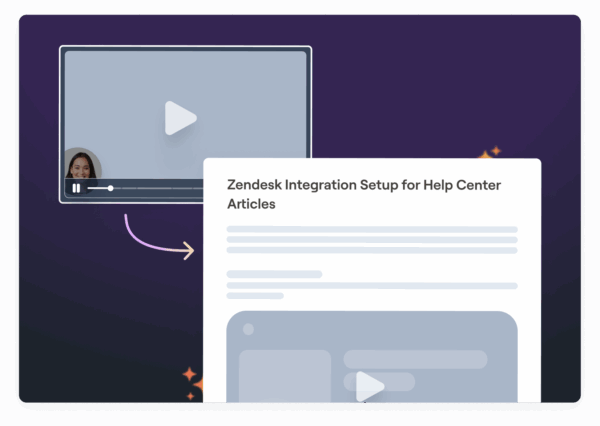 Sentiment analysis tools monitor customer communications across email, chat, and social media, flagging negative sentiment and updating customer profiles with mood indicators. This helps support teams address potential issues before they escalate. The integration process typically involves secure API connections. Once everything is set up, AI can trigger workflows, update records, send communications, and generate reports, all without disrupting your existing processes.
 Key Benefits of AI in CRM Workflow Automation
AI is reshaping CRM workflows by driving improvements in efficiency, customer satisfaction, and cost management. Over time, these advantages grow as AI systems refine their processes, giving businesses a significant competitive edge.Better Efficiency and Productivity
AI takes over repetitive tasks like data entry, lead scoring, and follow-up scheduling, allowing teams to focus on more impactful work. It processes data at incredible speed, updating records and initiating workflows almost instantly, which reduces errors like duplicate entries or outdated information. With AI, human errors like duplicate records, incorrect contact details, or missed follow-ups are virtually eliminated. This leads to cleaner databases, more accurate reporting, and happier customers who no longer deal with outdated or incorrect information. AI also streamlines prioritization. Instead of sales teams manually sifting through leads, AI pinpoints the most promising prospects by analyzing behavior patterns, engagement scores, and historical data. For support teams, tickets are automatically categorized by urgency and complexity, ensuring the most critical issues are addressed promptly. AI’s consistency ensures no task is overlooked. Every customer interaction is handled with the same level of quality, whether it’s the first or the hundredth inquiry of the day. Automated follow-ups are sent on time, nurture campaigns progress seamlessly, and escalation processes are triggered when necessary. This operational reliability directly enhances customer engagement.Better Customer Engagement
Improved efficiency naturally enhances customer engagement. AI enables personalized interactions on a large scale, something that would be impossible to achieve manually. Each email, product recommendation, or support response is tailored to a customer’s history, preferences, and current needs. Response times shrink dramatically with AI. Chatbots handle basic queries instantly, while complex issues are routed to specialists without delay. Customers no longer have to wait hours, or worse, days, for answers to simple questions. AI’s proactive capabilities redefine customer relationships. Instead of reacting to problems, AI detects patterns that indicate potential issues or opportunities. For example, a customer showing signs of disengagement might receive a personalized check-in, while someone exploring related products could get targeted recommendations. Sentiment analysis adds another layer of intelligence by detecting emotions like frustration or satisfaction in real-time. AI flags conversations needing special attention, helping support agents address concerns before they escalate. This emotional insight ensures small problems don’t grow into significant issues. Additionally, AI stores complete customer histories. When a customer reaches out, the system instantly presents their past interactions, preferences, and any unresolved issues. This eliminates the frustration of having to repeat information to multiple representatives.Cost Reduction and Scalability
By automating routine tasks, AI reduces costs while boosting productivity, allowing businesses to scale operations without adding staff. Whether managing 100 or 10,000 customer interactions, AI adapts seamlessly, making it particularly useful for growing companies or those with fluctuating seasonal demand. Training expenses also decrease as AI takes on more customer interactions, providing consistent guidance. New hires can focus on handling complex or high-value tasks rather than spending time learning repetitive procedures, shortening their ramp-up time. Improved service quality reduces customer churn, which has a significant impact on long-term costs. Retaining existing customers is far more cost-effective than acquiring new ones, and AI’s ability to proactively address issues keeps more customers satisfied and loyal. AI also improves resource allocation by delivering detailed insights into which activities yield the best results. Teams can concentrate on the most profitable customers and high-impact tasks, ensuring maximum return on investment across all customer-facing operations.AI Tools and Features for CRM Automation
Today’s AI tools are reshaping customer relationship management by streamlining workflows and delivering real-time insights. Let’s dive into some of the standout AI features driving these advancements.AI Chatbots and Virtual Assistants
AI chatbots are revolutionizing customer interactions by providing 24/7 support without needing human involvement. These bots can interpret customer messages and deliver instant, relevant responses. Unlike older, rule-based systems, modern AI chatbots improve with every interaction, becoming smarter and more accurate over time. Advanced chatbots take things further by integrating directly with CRM databases. This allows them to access customer details, order history, and past support tickets in real time. For example, if a customer asks about their recent order, the chatbot can immediately provide tracking updates, delivery timelines, and other details, no need to involve a human agent. Virtual assistants also play a critical role in CRM workflows. They handle tasks like scheduling, lead qualification, and troubleshooting. When an issue requires human expertise, these assistants seamlessly transfer the conversation, including all relevant context, so customers don’t have to repeat themselves. These tools are designed to meet customers where they already are, integrating with platforms like WhatsApp, Facebook Messenger, and website chat widgets. The result? Faster resolutions and less pressure on support teams, allowing them to focus on more complex issues that require a human touch. Next, let’s explore how AI uses predictive analytics and sentiment analysis to refine CRM processes even further.Predictive Analytics and Sentiment Analysis
Predictive analytics transforms customer data into actionable insights. By analyzing historical trends, customer behavior, and market data, these systems can forecast future outcomes with impressive precision. For instance, AI enhances lead scoring by evaluating multiple data points to identify and prioritize prospects most likely to convert. Sales forecasting becomes more accurate as predictive models assess pipeline data, seasonal trends, and past performance. This allows businesses to allocate resources wisely and set achievable targets for their teams. Sentiment analysis adds an emotional layer to customer interactions. By analyzing tone, word choice, and context in real time, these tools can detect emotions like frustration, satisfaction, or confusion. Conversations flagged for negative sentiment can be escalated automatically to experienced agents or managers, ensuring issues are addressed before they escalate further. AI also helps identify churn risks by spotting patterns in customer behavior that often lead to cancellations. These early warnings enable retention teams to step in with targeted offers or support, increasing the chances of keeping customers on board. Building on these insights, AI-powered visual tools are taking CRM efficiency to the next level, as outlined below.AI-Powered Visual Communication Tools
AI-powered visual tools are transforming customer support by making complex information easier to understand. These platforms simplify the creation and sharing of visual content, which is especially helpful when explaining intricate processes. Take Zight, for example. This platform combines screen recording, screenshot annotation, and AI-driven features into a single tool. One standout feature is its AI transcription capability, which converts video content into searchable text. This makes it simple for teams to locate and reference specific instructions or past interactions.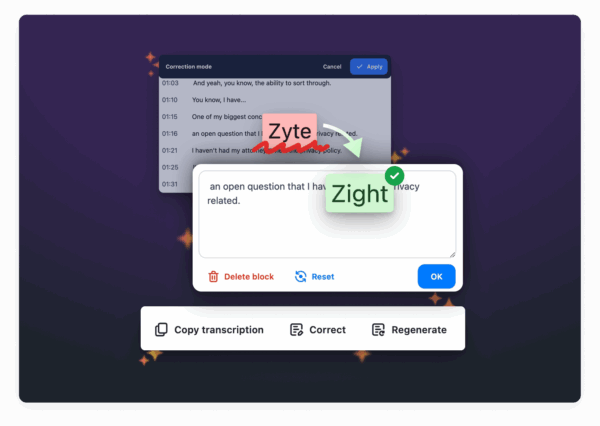 Another powerful feature is AI-generated summaries, which condense lengthy recordings into concise overviews. This is particularly useful for creating training materials or onboarding guides, where quick access to key information is essential. AI also streamlines the creation of step-by-step guides. By analyzing screen recordings, it automatically generates written instructions, allowing support teams to focus on demonstrating processes while the AI handles the documentation. These tools go a step further by supporting multilingual communication. AI-powered translation features make it easy to create content that can be shared across different languages, breaking down barriers in global customer support. Teams can produce materials once and make them accessible to a diverse audience without the need for manual translations.
 Best Practices for Adding AI to CRM Systems
Integrating AI into CRM systems isn’t just about picking the right tools – it’s about thoughtfully addressing process gaps, training teams effectively, and aligning technology with your business goals. By taking a strategic approach, you can maximize the benefits of AI in automating CRM workflows.Finding Workflow Bottlenecks
Before bringing AI into the mix, it’s crucial to identify the points where your CRM workflows slow down or stall. These bottlenecks can disrupt efficiency, limit output, and often signal deeper problems in your processes. Start by mapping out your workflows. Tools like flowcharts, Kanban boards, or value-stream maps provide a clear picture of each step. This visualization helps pinpoint where tasks pile up, for instance, when queues grow faster than tasks are processed, creating delays. Data analysis is another powerful tool. Track key metrics such as lead response times, conversion rates, and average deal durations. Look for sudden spikes or unusual patterns that could signal trouble. Tools like cycle time heatmaps can reveal which stages are dragging down the process. Don’t overlook input from your team. Surveys, interviews, and meetings can uncover inefficiencies that might not be obvious from the data alone. One example of why this matters comes from Tesla‘s Model 3 production in 2017. Severe bottlenecks in battery module assembly and supply chain management meant Tesla produced only 260 cars when their goal was 1,500, just 17% of their target. This highlights why identifying bottlenecks is essential before introducing automation. Once you’ve identified these pain points, you’ll be better positioned to choose AI tools that address them effectively.Choosing the Right AI Tools
The AI tools you select should directly address the bottlenecks you’ve identified and integrate seamlessly into your existing CRM workflows. The goal is to enhance, not disrupt, your current systems. Look for tools with strong integration capabilities. AI solutions with robust APIs and pre-built connectors allow smooth data flow without requiring a complete system overhaul. Scalability is also key, choose tools that meet your current needs but can grow with your business. Ease of use is another critical factor. Tools with intuitive interfaces make adoption quicker and easier for your team. For example, platforms like Zight combine AI features such as converting video into searchable text and generating summaries of long recordings. These features are especially helpful for creating training materials and onboarding resources.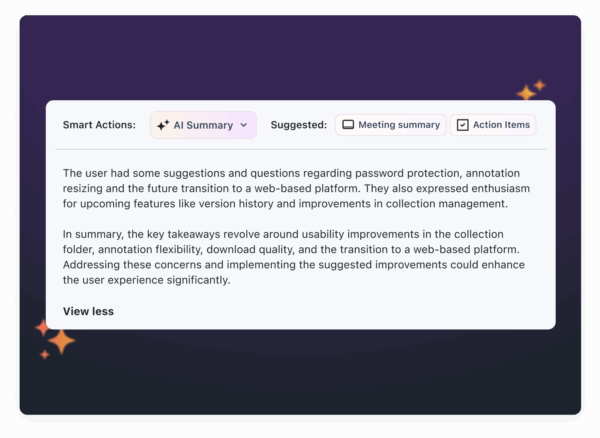 Cost is another consideration. While upfront licensing fees might seem steep, weigh them against long-term savings from reduced manual work. Don’t forget to account for implementation, training, and maintenance costs. Once you’ve chosen the right tools, the next step is preparing your team and monitoring how well the solutions perform.
 Training Teams and Monitoring Performance
For AI tools to succeed, your team needs proper training. Hands-on sessions can help employees see these tools as valuable enhancements rather than replacements. Build a culture of continuous learning by offering ongoing training and support. Address challenges as they arise and reinforce the benefits of AI to ensure team buy-in. After implementation, closely monitor performance. Track metrics like cycle time reductions, productivity gains, and error rates. Some companies report up to a 90% reduction in errors and a 30% boost in productivity after adopting automation. Real-time monitoring tools can help you catch potential issues early. For instance, AI-powered CRM health monitoring can improve system performance by about 40% and cut manual auditing time from 12–16 hours to just 2–3 hours. Establish benchmarks such as maintaining a CRM Health Score above 85, achieving a 95% Data Completeness Rate, and ensuring a 90% Field Standardization Rate. Predictive models can even flag data decay weeks before it impacts campaigns, allowing for proactive fixes. Regular reviews ensure your AI processes stay aligned with evolving business needs. While automation can handle repetitive tasks and improve efficiency, human oversight remains crucial for strategic decisions and maintaining strong customer relationships.Use Cases of AI in CRM Workflow Automation
AI is revolutionizing CRM workflow automation, delivering measurable gains in efficiency, improved customer satisfaction, and revenue growth. From streamlining processes to enhancing customer interactions, here’s how AI is making a difference.Streamlined Customer Support
AI is transforming customer support by automating routine tasks and enabling quicker, more accurate responses. For instance, automated ticket routing uses machine learning to analyze incoming requests and assigns them to the right team members based on factors like issue type, complexity, and agent expertise. AI also prioritizes tickets by evaluating customer tier, problem severity, and overall business impact. This ensures that high-value customers and critical issues are addressed promptly, while routine inquiries are managed efficiently through automated responses. Another game-changer is AI’s ability to track customer interactions and schedule follow-ups based on case status and behavior patterns. By predicting when a customer might need additional help, AI reduces the likelihood of escalations and boosts satisfaction levels. Additionally, AI-driven knowledge base management identifies gaps in documentation by analyzing frequent customer queries. Over time, this creates a self-improving system where customers can resolve issues independently, reducing ticket volume and improving overall support efficiency. AI doesn’t stop at reactive solutions, it also facilitates proactive engagement, helping businesses address potential issues before they escalate.Proactive Customer Engagement
AI takes customer engagement to the next level by anticipating needs and enabling proactive outreach. Through predictive analytics, it examines customer behavior, purchase history, and engagement metrics to spot opportunities for upselling, cross-selling, or retention efforts. For example, if a customer’s engagement drops or their usage patterns change, AI can trigger personalized re-engagement campaigns with offers or content tailored to their needs. This ensures timely, relevant outreach that resonates with the customer. AI also dynamically segments customers based on real-time behavior and preferences. Unlike static demographic-based segments, this approach adapts as customer needs evolve, ensuring campaigns remain effective and personalized. Personalized recommendations further enhance engagement. Using algorithms like collaborative filtering or content-based suggestions, AI delivers tailored product, service, or content recommendations through email, websites, or direct interactions. These touchpoints create meaningful connections throughout the customer journey.Visual Communication for Better Support
AI-powered visual communication tools are changing how businesses deliver support and onboarding, making complex information easier to understand. For example, screen recordings with AI-generated transcriptions allow support teams to create step-by-step walkthroughs that customers can follow at their own pace. Visual guides break down complicated processes into manageable steps, reducing confusion and cutting down on support tickets. Tools like Zight convert video content into searchable text and concise summaries, making it easier for customers and support teams to quickly find the information they need. AI-enhanced screenshots also improve communication by letting agents highlight critical areas and add context. This approach reduces back-and-forth exchanges and provides clearer explanations compared to text-based alternatives. For global audiences, automated translation ensures that visual support materials are accessible across languages. AI translates both text overlays and summaries, helping businesses overcome language barriers and serve diverse markets more effectively.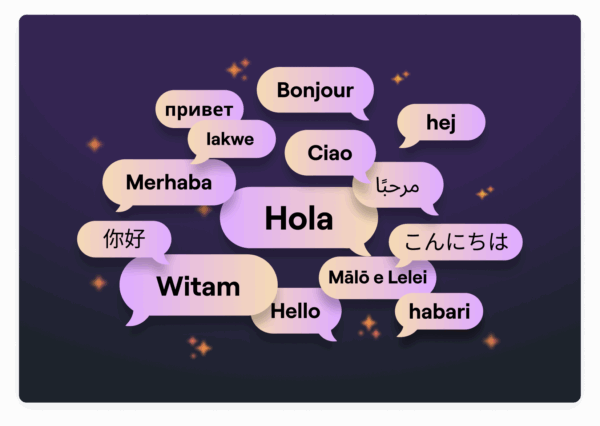 When integrated with CRM platforms, these visual communication tools create seamless workflows. Support interactions are automatically documented and made searchable, building an institutional knowledge base that speeds up resolution times for common issues. This combination of AI and visual tools ensures smoother support experiences for both customers and teams.











