
Free screen recording
- Zight Share
- Screen recordings up to 5 minutes, plus screenshot sharing and Video Requests.
- Loom Starter
- Screen recordings up to 5 minutes, with up to 25 videos per person.
Plan your move from Loom
Give viewers free view-only licences on Scale, plan for regular and occasional creators, and use Request Video to collect customer issues and product feedback.
Want to test the core recording flow first? Sign up free and use non-sensitive sample content.
 Support video workflow
Support sends Customer watches Customer records Support receives
Trusted by 5m+ people who would rather show than tell








Give viewers and occasional creators the access they need, then collect customer context with Request Video. Scale includes free view-only licences; we can help accommodate Creator Lite-style needs in your team’s plan. Request Video lets customers respond without an account or install.
Paste the link in any ticket or chat. It works without an account on their end.
One click starts their recording, presenter bubble and all. Console logs come back with it.
Evaluate your next screen recorder
Start with who needs to view, who needs to create, and how you collect customer feedback. Then compare recording limits and controls. Both products record your screen; Zight’s Request Video workflow also lets people send context back without an account or install.
Plan details checked September 25, 2026 against Zight pricing and Loom pricing. Features and limits vary by plan.
Migration scope
A migration plan starts with an inventory, not a promise that every Loom object transfers automatically. We’ll assess the practical path for your library and identify any manual work before rollout.
Identify the recordings you need to retain, their owners, and the timing for assessing and validating the transfer path.
List the folders, titles, transcripts, comments, and viewer history that matter. We’ll confirm what can transfer and what may need rebuilding or archiving.
Map regular creators, occasional creators, viewers, shared spaces, and admin controls. Validate the intended access model in a pilot.
Inventory Loom links in help content, onboarding, and internal wikis. Keep old URLs live until replacements are verified; automatic redirects are not promised.
Team access that fits the work
Some teammates record every day. Others occasionally need to explain something, while many only need to watch. Build your Zight plan around those different needs.
Moving from a Creator Lite setup? We can accommodate occasional creators. Tell us who needs to create and who only needs to view, and we’ll confirm the access, limits, and pricing for your team.
Scale includes unlimited free view-only licences. Bring viewers into the workspace without treating them as full creators.
Accommodate Creator Lite-style needs through a team plan. View-only access and permission to create are different; confirm the right setup with us.
Give the people making walkthroughs and training the recording and collaboration features they use. Compare current plan limits before choosing.
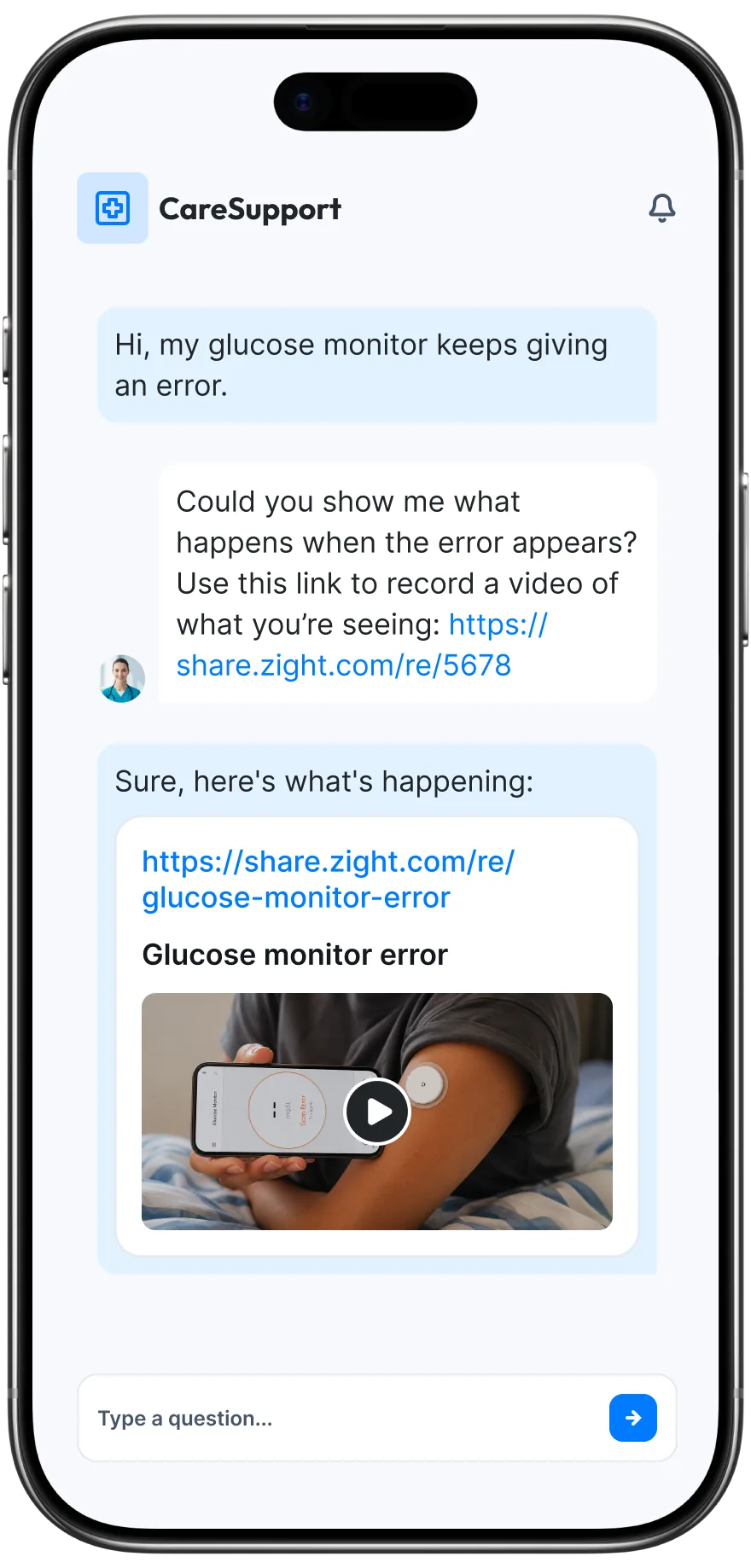
Request Video
Send a request link and ask recipients to send a recording, screenshot, or file. They can respond without an account or install.
For support teams: see the steps behind an issue instead of asking customers to describe it across a long email thread.
For product teams: collect bug reproductions and visual feedback from customers and testers so your team can see the experience they are describing.
Video Request allowances vary by plan. Console-log collection is available on Scale.
Comparing Loom pricing?
Compare the same team size and billing period—not just the headline price. Zight’s self-serve paid plans offer monthly or annual billing. Scale requires an enterprise quote; migration scope should be confirmed separately.
See current Zight prices, billing totals, and plan limits before requesting a migration plan.
Zight plan options
Keep the knowledge, improve the workflow
Move the how-tos and updates your team already made, then keep building a library people can find, share, and reuse. Zight turns recordings into summaries, chapters, and step-by-step guides, so one explanation can keep working after the message is sent.
Record, annotate, and send a clear explanation instead of another long thread.
Organize useful answers into collections your team can return to.
Turn the recording into a summary, chapters, or a step-by-step guide.
“I was searching for an alternative to Loom and found Zight to be the best option.”
Before you switch
Yes. Zight Scale includes unlimited free view-only licences. This is access to view content, not a free full creator seat. Confirm the plan and access your organization needs with us.
Yes. We can accommodate occasional creators in a team plan. Share your mix of regular creators, occasional creators, and viewers so we can confirm permissions, limits, and pricing. Creator Lite describes the setup you are replacing, not a separate Zight self-serve plan.
Yes. Zight records your screen and lets you share the result with a link. It also offers annotated screenshots and Video Requests so customers can send context back. Recording limits and AI features depend on your plan.
Bring an estimate of your library size, the videos and collections you need to keep, the metadata that matters, your access model, and your preferred timing. We’ll assess the transfer path, exclusions, validation steps, and any manual rebuilding before you commit.
Do not assume existing Loom URLs or embeds will redirect to Zight. Include links in help articles, onboarding documents, and internal wikis in your migration review so you can plan any updates.
Review your Loom account’s cancellation terms and confirm access to the content you need before cancelling. Validate your migration and replacement links first; Zight does not manage your Loom subscription.
Ready to make the move?
Migration planning
Tell us what you are moving and how your team works. We’ll help map the right rollout.
We’ll use this to prepare a tailored migration conversation.
* indicates required fields
You’re all set!
Someone from our team will reach out within 2 business hours with next steps for your migration.
Thanks for reaching out. We don’t accept guest posts or paid link placements.
We couldn’t send that through
Something on our side failed, so we would rather tell you than pretend it arrived. Email us at sales@zight.com — the link opens a message with your answers already in it — or .