
How to Convert MP4 to MP3 for Free
Want to extract audio from your videos quickly? This step-by-step guide shows you how to convert MP4 to MP3 for free in just a few clicks using Zight’s free online tool.
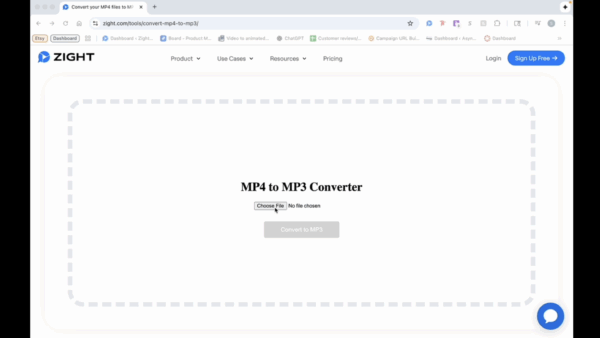
Step 1: Choose Your MP4 File
- Click on the “Choose File” option and locate the MP4 video you wish to convert.
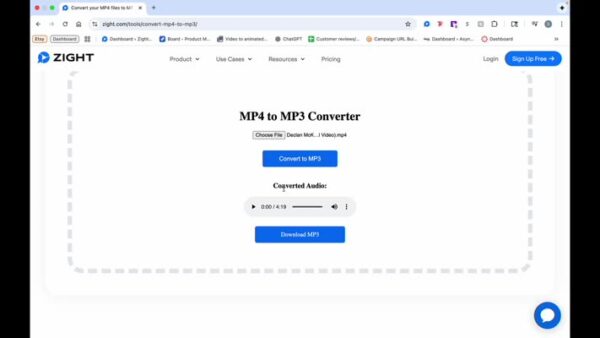
Step 2: Play the Converted Audio
- Once the conversion is complete, you can play the audio file to check the output.
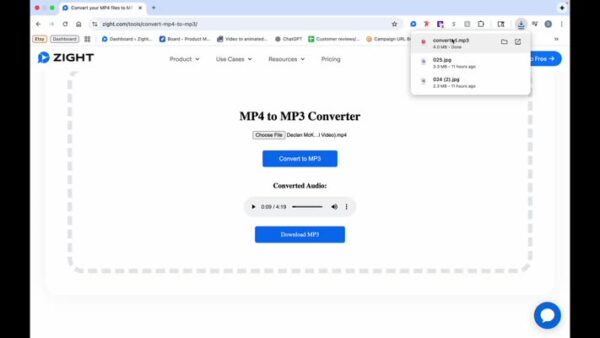
Step 3: Download the Audio
- Click on “Download MP3”.
The Ultimate Guide to Converting MP4 to MP3 for Free
Sometimes you only need the audio from a video, whether it’s a podcast, interview, voiceover, or background track. With Zight’s free online tool, converting an MP4 to an MP3 is fast, simple, and requires no installation or signup. You can extract high-quality sound from any video file in just a few clicks, right from your browser.
This guide explains how the process works, why you might want to convert video to audio, and how Zight’s tool makes it easy to manage your media without extra software.
Why convert MP4 to MP3
An MP4 file contains both video and audio, while an MP3 file contains only audio. Converting MP4 to MP3 is useful when you want to repurpose video content for listening, sharing, or editing.
For example, you might want to:
-
Turn a recorded webinar into a podcast episode
-
Extract background music or narration for another project
-
Save storage space by removing the video portion
-
Listen to educational videos offline as audio files
How Zight’s free converter works
Zight’s MP4 to MP3 converter is designed for convenience. You upload your video, and within moments, it extracts the audio and prepares a downloadable MP3 file. The conversion happens online, so there’s no need to install software or register for an account.
It works directly in your browser, which means you can use it from any device, whether you’re on a computer, tablet, or smartphone. The resulting MP3 file maintains excellent sound quality, making it perfect for both personal and professional use.
Zight’s converter helps you do all this in seconds, keeping the process simple and efficient.
Benefits of converting with Zight
There are plenty of video-to-audio converters available online, but Zight stands out for being fast, free, and secure. Here are some reasons why users prefer it:
-
Free to use: You can convert as many files as you want without paying or creating an account.
-
Instant results: Conversion happens quickly, usually in just a few seconds.
-
No downloads: Everything works directly in your browser.
-
High-quality output: Audio files maintain clarity and consistency.
-
Cross-platform compatibility: Works on Mac, Windows, and mobile devices.
Whether you’re a content creator, student, or professional, Zight’s tool gives you flexibility without the hassle of traditional editing software.
Using audio creatively
Once your MP4 is converted to MP3, there are endless ways to use the audio. You can upload it to a podcasting platform, edit it into a presentation, or add it to your digital content library.
Educators can turn video lessons into audio study materials. Businesses can extract voiceovers for marketing content. Even casual users can convert favorite video clips into portable music or sound bites.
The best part is that your new MP3 file is lightweight and easy to store or share, even through email or messaging apps.
Tips for the best conversion results
While converting is straightforward, keeping these simple tips in mind can help you get the best possible output:
-
Make sure your video file is clear and has good audio quality.
-
Use shorter clips if you only need part of a video.
-
Rename your MP3 files for easy organization.
-
Store your converted files in a dedicated folder or cloud storage.
Following these steps ensures you have a smooth workflow for all your media projects.
Why choose Zight over other tools
Many online converters either limit conversions, add watermarks, or require signups. Zight removes those barriers entirely. It’s a trusted, browser-based tool that values both simplicity and privacy.
Since the tool doesn’t store your files after conversion, you can use it confidently knowing your content remains secure. It’s the ideal option for quick, reliable audio extraction anytime you need it.
Conclusion
Converting MP4 to MP3 is a great way to extract valuable audio from your videos without wasting time or storage. With Zight’s free online converter, you can do it in seconds, no software, no signups, and no complications.
Whether you’re turning video lessons into podcasts, saving favorite music clips, or reusing audio for new projects, Zight makes it effortless. Upload your video, download your MP3, and you’re done.
It’s fast, secure, and accessible from any device. Try it today and simplify how you manage your media.
Frequently Asked Questions
Yes. Zight’s converter is completely free with no signups, downloads, or hidden fees.
No. The conversion happens entirely online through your browser.
No. Zight’s converter keeps the sound quality clear and consistent, even for long videos.
Yes. Zight’s converter works seamlessly on both desktop and mobile devices.
Currently, the converter supports MP4 for input and generates MP3 for output.
Conversion typically takes only a few seconds, depending on your file size and internet speed.
Most standard video files convert without issue, but for very large videos, it’s best to use a stable internet connection.
No. Zight processes files temporarily and does not keep a copy after conversion, ensuring your privacy.












